邀请函 Invitation letter 邀请人出具的邀请函件(原件、传真件、复印件等均可)。该邀请函须包含以下内容: ——被邀请人个人信息:姓名、性别、出生日期等; ——被邀请人访问信息:来华事由、抵离日期、访问地点、与邀请人关系、费用来源等; ——邀请人信息:姓名、联系电话、地址、邀请人签字等。
Invitation Letter issued by the foreigner who stays or resides in China for work or long-term study; (The invitation letter may be in the form of fax, photocopy or computer printout, but the consular officer may require the applicant to submit the original of the invitation letter.) The invitation letter must contain the following information: – Information of the invitee: full name, gender, date of birth, etc.; – Information of the planned visit: purpose of visit, arrival and departure dates, place(s) to visit, relations between the applicant and the inviting entity or individual, financial source for expenditures, etc. – Information of the inviting entity or individual: name, contact telephone number, address, official
For a child who has a sibling studying in the primary school.
Phase 2A
11 Jul - 12 Jul
For a child:
Whose parent or sibling is a former student of the primary school, including those who have joined the alumni association of the primary school as a member.
Whose parent is a member of the School Advisory or Management Committee.
Whose parent is a staff member of the primary school.
From the MOE Kindergarten under the purview of and located within the primary school.
Phase 2B
22 Jul - 23 Jul
For a child:
Whose parent has joined the primary school as a parent volunteer not later than 1 July of the year before P1 registration and has given at least 40 hours of voluntary service to the school by 30 June of the year of P1 registration.
Whose parent is a member endorsed by the church or clan directly connected with the primary school.
Whose parent is endorsed as an active community leader.
Phase 2C
30 Jul - 1 Aug
For a child who is not yet registered in a primary school.
Phase 2C Supplementary
15 Aug - 16 Aug
For a child who is not yet registered in a primary school after Phase 2C.
Phase 3 Registration for International Students
As in previous years, International Students (IS) will register under Phase 3 of the 2024 P1 Registration Exercise, after the allocation of places to all SC and Permanent Residents (PR) under the earlier phases. IS who intend to participate in Phase 3 of the 2024 P1 Registration Exercise must undergo a two-step process:
Step 1: Submit an online ‘indication of interest’ form at https://www.moe.gov.sg/primary/p1-registration/international-students, between Tuesday, 28 May 2024, 9am and Monday, 3 June 2024, 4.30pm. Those who do not do so by 3 June 2024 will not be able to register during Phase 3 of the P1 Registration Exercise.
Step 2: MOE will notify IS applicants who have indicated their interest via email by October 2024, on whether their child can be offered a P1 place in a primary school. If a place is offered, the parent of the child will be informed of how to register with the designated school.
School admission at Phase 3 is not guaranteed, as there may be limited vacancies after allocation of places to SC and PR children.
Nan Hua | 南华小学 Rosyth | 乐赛学校 St. Hilda's | 圣希尔达小学 Tao Nan | 道南学校 Nanyang | 南洋小学 Henry Park | 恒力小学 Catholic High | 公教中学(附小) Anglo-Chinese | 英华学校(小学) Raffles Girls' | 莱佛士女子小学
Nan Hua | 南华小学 Holy Innocents' | 圣婴小学 Poi ching | 培青学校 Tao Nan | 道南学校 Hong Wen | 宏文学校 Red Swastika | 卍慈学校 CHIJ St. Nicholas Girls' | 圣尼各拉女校 Pei Hwa Presbyterian | 培华小学 Ai Tong | 爱同学校 Nanyang | 南洋小学 Pei Chun Public | 公立培群学校 Kong Hwa | 光华学校 Maris Stella High | 海星中学(附小) Maha Bodhi | 菩提学校
Whose parent has joined the primary school as a parent volunteer not later than 1 July of the year before P1 registration and has given at least 40 hours of voluntary service to the school by 30 June of the year of P1 registration.
Whose parent is a member endorsed by the church or clan directly connected with the primary school.
Whose parent is endorsed as an active community leader.
Endorsed active community leaders are eligible to register their child only for schools within 2km of their residential address in Phase 2B.
For a child who gains admission under the “parent is an endorsed active community leader” eligibility to a school within 2km of the address used for registration, they must reside at that address (which shall continue to be your NRIC address) for at least 30 months from the start of the P1 Registration Exercise, which is 2 July 2024 for the 2024 P1 Registration Exercise.
If the 30-month stay requirement is not met, MOE has and will transfer the child to another school with vacancies, as the priority admission to the first school was based on the declared address used for registration.
Eligible GRLs with two years of continuous and active service in GROs can apply for Primary One registration for their children under Phase 2B in schools within 2km of their residence. The rationale for this scheme is to promote greater collaboration between the schools and the community. The experience and expertise of GRLs can be tapped by the schools to start community activities in their areas.
About 1% of GRLs apply per year and the majority of successful applicants continue serving in the GROs for many more years.
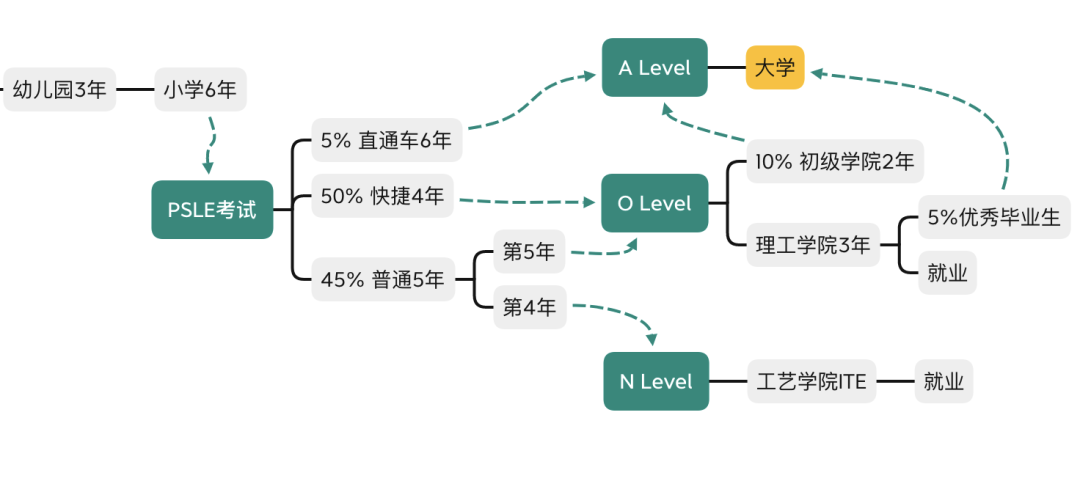
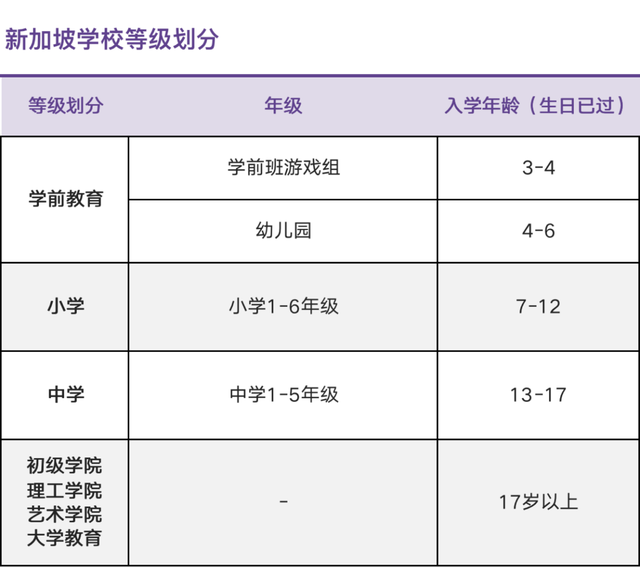
相信很多人已经看到新加坡无数家长为了陪伴小孩参加PSLE小六会考 (Primary School Leaving Examination,简称PSLE)考试尽心尽力,比如冷门歌手孙燕姿。不了解新加坡教育体系为什么从小学就开始卷的朋友也可以通过看《I Not Stupid 小孩不笨》和《Born To Shine 孺子可教也》来感受新加坡的鸡娃方式。
新加坡政府对于教育的定位是“每所学校都是好学校(Every School a Good School)”,比如不再公开讨论小学排名,改变小三GEP天才班(Gifted Education Programme,简称GEP)选拔等多种教育改革方式。作为普通人我觉得最好的方式就是鸡娃不如鸡自己,先从内心接受普娃而非牛娃,用一颗平常心了解每个国家的教育体系,提前规划适合自己家庭的上学路线。
For a child who has a sibling studying in the primary school.
Phase 2A
11 Jul - 12 Jul
For a child:
Whose parent or sibling is a former student of the primary school, including those who have joined the alumni association of the primary school as a member.
Whose parent is a member of the School Advisory or Management Committee.
Whose parent is a staff member of the primary school.
From the MOE Kindergarten under the purview of and located within the primary school.
Phase 2B
22 Jul - 23 Jul
For a child:
Whose parent has joined the primary school as a parent volunteer not later than 1 July of the year before P1 registration and has given at least 40 hours of voluntary service to the school by 30 June of the year of P1 registration.
Whose parent is a member endorsed by the church or clan directly connected with the primary school.
Whose parent is endorsed as an active community leader.
Phase 2C
30 Jul - 1 Aug
For a child who is not yet registered in a primary school.
Phase 2C Supplementary
15 Aug - 16 Aug
For a child who is not yet registered in a primary school after Phase 2C.
Phase 3 Registration for International Students
As in previous years, International Students (IS) will register under Phase 3 of the 2024 P1 Registration Exercise, after the allocation of places to all SC and Permanent Residents (PR) under the earlier phases. IS who intend to participate in Phase 3 of the 2024 P1 Registration Exercise must undergo a two-step process:
Step 1: Submit an online ‘indication of interest’ form at https://www.moe.gov.sg/primary/p1-registration/international-students, between Tuesday, 28 May 2024, 9am and Monday, 3 June 2024, 4.30pm. Those who do not do so by 3 June 2024 will not be able to register during Phase 3 of the P1 Registration Exercise.
Step 2: MOE will notify IS applicants who have indicated their interest via email by October 2024, on whether their child can be offered a P1 place in a primary school. If a place is offered, the parent of the child will be informed of how to register with the designated school.
School admission at Phase 3 is not guaranteed, as there may be limited vacancies after allocation of places to SC and PR children.
Nan Hua | 南华小学 Rosyth | 乐赛学校 St. Hilda's | 圣希尔达小学 Tao Nan | 道南学校 Nanyang | 南洋小学 Henry Park | 恒力小学 Catholic High | 公教中学(附小) Anglo-Chinese | 英华学校(小学) Raffles Girls' | 莱佛士女子小学
Nan Hua | 南华小学 Holy Innocents' | 圣婴小学 Poi ching | 培青学校 Tao Nan | 道南学校 Hong Wen | 宏文学校 Red Swastika | 卍慈学校 CHIJ St. Nicholas Girls' | 圣尼各拉女校 Pei Hwa Presbyterian | 培华小学 Ai Tong | 爱同学校 Nanyang | 南洋小学 Pei Chun Public | 公立培群学校 Kong Hwa | 光华学校 Maris Stella High | 海星中学(附小) Maha Bodhi | 菩提学校
DSA
直接招生计划(DSA,全称Direct School Admission)为具备特长的学生提供了直接进入名校的机会,尤其针对在数学、音乐、体育等领域有突出专长的学生,如果申请成功,学生则无需会考成绩,在会考成绩放榜前接到录取通知。
Tanglin Trust School | 东陵信托国际学校 North London Collegiate School | 北伦敦国际学校 NPS International School | NPS国际学校 Hwa Chong International School(HCIS) | 华中国际学校 Dulwich College singapore | 德威国际学校 UWCSEA Dover campus | 东南亚世界联合书院多佛校区 SJl International School | 圣约瑟国际学校 UWCSEA East Campus | 东南亚世界联合书院淡滨尼校区 Chatsworth International School | 查特沃斯国际学校 Global Indian International School | 新加坡环印国际学校
外国人就读政府学校,现在只有两种途径。要么在小一前一年的6月开始申请,10月能被新加坡教育部幸运地录取(概率非常小,一年级的名额极其有限);要么就是通过每年9月的AEIS (Admissions Exercise for International Students)或次年2月的S-AEIS (Supplementary Admissions Exercise for International Students)考试,但录取率通常也不高,大概5%-10%。考试科目是英文和数学。小二至小五的孩子,需要先通过剑桥的CEQ英文考试后,才有资格报名政府学校的入学考试。中学阶段(中一至中三)的孩子,数学和英文在同一天考试。
Registration: $58.85 (waived for new sign-ups with promo code 'FREEREG' for 24-months 1 Gbps plan)
ONT Activation: $90.00 (waived for Mon to Fri, 9am to 6pm)
Optical Fibre Termination Point Installation: $160.50 (Condo & HDB) or $288.90 (landed)
MyRepublic
1Gbps: $59.99
1Gbps: $50.99
200Mbps: $27.99
1Gbps: $38.99
1Gbps with Router or WiFi Mesh: $41.99
1Gbps (Gamer): $49.99
2 x 1Gbps: $51.99
2 x 1Gbps (Gamer): $56.99
Service installation fee: $53.50 (one-time)
ONT Activation: $56.71
Optical Fibre Termination Point Installation: $160.50 (Condo & HDB) or $288.90 (landed)
Singtel
None
None
1Gbps with Router: $44.90
1Gbps with WiFi Mesh: $49.90
2Gbps with WiFi Mesh: $64.90
1+1 Gbps Gamer Bundle: $64.90
10Gbps with WiFi Mesh: $169
Registration: $53.50 (one time, free for online sign ups)
ONT Activation: $56.71
Optical Fibre Termination Point Installation: $160.50 (Condo & HDB) or $288.90 (landed)
StarHub
None
1Gbps with Router: $49.90
500Mbps: $29.90
1Gbps with Router: $45.90
2Gbps with Router: $54.90
Registration: None
ONT Activation: $56.71
Optical Fibre Termination Point Installation: $160.50 (Condo & HDB) or $288.90 (landed)
ViewQwest
1Gbps: $62.50
None
500Mbps: $29.90
1Gbps with Router: $42.90
1Gbps with WiFi Mesh: $53.90
1Gbps (Gamer): $52.90
2 Gbps: $48.90
2Gbps (Gamer): $64.90
2Gbps with WiFi Mesh: $65.90
Registration: $53.50 (one-time)
ONT Activation: $56.71
Optical Fibre Termination Point Installation: $160.50 (Condo & HDB) or $288.90 (landed)
WhizComms
None
300Mbps: $32
1Gbps: $40
1Gbps with Router: $47
300Mbps: $28.90
1Gbps: $34.90
1Gbps with Router: $39.90
1Gbps with WiFi Mesh: $49.90
Service activation fee: $53.50 (one-time)
ONT Activation: $56.71
Optical Fibre Termination Point Installation: $160.50 (Condo & HDB) or $288.90 (landed)
Note: Prices listed are regular prices correct as at the time of writing; there are usually promos which give free installation, registration fee waivers and etc.
very portable, automagically configured with GNU autoconf.
crash recovery.
up to 8KB block sizes (ZMODEM8K).
internationalized (using GNU gettext). German translation of the programs output exists.
far more secure than the original sources.
high performance. say `make vcheck-z’ and have a look at the BPS rate - i recently saw 1.4 MB per second transfering a large file through pipes (on a I586/133 system. Beat that!).
good blocksize calculation (tries to compute an optimal blocksize based on the number of errors occured).
#!/bin/bash # Author: Matt Mastracci (matthew@mastracci.com) # AppleScript from http://stackoverflow.com/questions/4309087/cancel-button-on-osascript-in-a-bash-script # licensed under cc-wiki with attribution required # Remainder of script public domain
osascript -e 'tell application "iTerm2" to version' > /dev/null 2>&1 && NAME=iTerm2 || NAME=iTerm if [[ $NAME = "iTerm" ]]; then FILE=$(osascript -e 'tell application "iTerm" to activate' -e 'tell application "iTerm" to set thefile to choose file with prompt "Choose a file to send"' -e "do shell script (\"echo \"&(quoted form of POSIX path of thefile as Unicode text)&\"\")") else FILE=$(osascript -e 'tell application "iTerm2" to activate' -e 'tell application "iTerm2" to set thefile to choose file with prompt "Choose a file to send"' -e "do shell script (\"echo \"&(quoted form of POSIX path of thefile as Unicode text)&\"\")") fi if [[ $FILE = "" ]]; then echo Cancelled. # Send ZModem cancel echo -e \\x18\\x18\\x18\\x18\\x18 sleep 1 echo echo \# Cancelled transfer else /usr/local/bin/sz "$FILE" --escape --binary --bufsize 4096 sleep 1 echo echo \# Received "$FILE" fi
#!/bin/bash # Author: Matt Mastracci (matthew@mastracci.com) # AppleScript from http://stackoverflow.com/questions/4309087/cancel-button-on-osascript-in-a-bash-script # licensed under cc-wiki with attribution required # Remainder of script public domain
osascript -e 'tell application "iTerm2" to version' > /dev/null 2>&1 && NAME=iTerm2 || NAME=iTerm if [[ $NAME = "iTerm" ]]; then FILE=$(osascript -e 'tell application "iTerm" to activate' -e 'tell application "iTerm" to set thefile to choose folder with prompt "Choose a folder to place received files in"' -e "do shell script (\"echo \"&(quoted form of POSIX path of thefile as Unicode text)&\"\")") else FILE=$(osascript -e 'tell application "iTerm2" to activate' -e 'tell application "iTerm2" to set thefile to choose folder with prompt "Choose a folder to place received files in"' -e "do shell script (\"echo \"&(quoted form of POSIX path of thefile as Unicode text)&\"\")") fi
if [[ $FILE = "" ]]; then echo Cancelled. # Send ZModem cancel echo -e \\x18\\x18\\x18\\x18\\x18 sleep 1 echo echo \# Cancelled transfer else cd"$FILE" /usr/local/bin/rz --rename --escape --binary --bufsize 4096 sleep 1 echo echo echo \# Sent \-\> $FILE fi
1 2 3 4 5 6 7 8
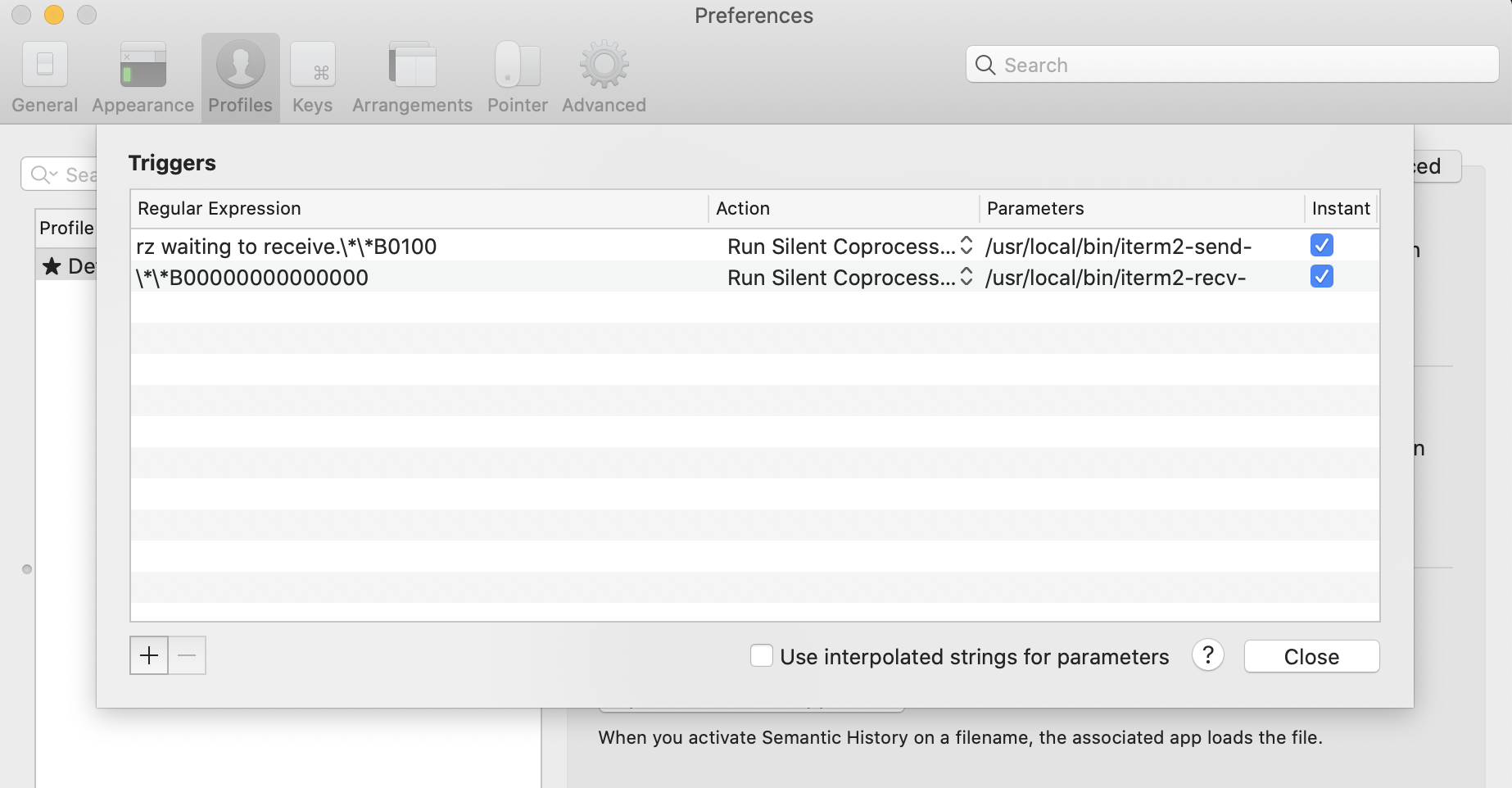
# 在/usr/loal/bin 目录下创建两个文件 cd /usr/local/bin wget https://raw.githubusercontent.com/RobberPhex/iterm2-zmodem/master/iterm2-recv-zmodem.sh wget https://raw.githubusercontent.com/RobberPhex/iterm2-zmodem/master/iterm2-send-zmodem.sh
# 修改环境变量 ==> Next steps: - Run these two commands in your terminal to add Homebrew to your `$PATH`: (echo; echo'eval "$(/opt/homebrew/bin/brew shellenv)"') >> ~/.zprofile eval"$(/opt/homebrew/bin/brew shellenv)"
# run krew command kubectl krew krew is the kubectl plugin manager. You can invoke krew through kubectl: "kubectl krew [command]..."
Usage: kubectl krew [command]
Available Commands: completion generate the autocompletion script for the specified shell help Help about any command index Manage custom plugin indexes info Show information about an available plugin install Install kubectl plugins list List installed kubectl plugins search Discover kubectl plugins uninstall Uninstall plugins update Update the local copy of the plugin index upgrade Upgrade installed plugins to newer versions version Show krew version and diagnostics
Flags: -h, --helphelpfor krew -v, --v Level number for the log level verbosity
Use "kubectl krew [command] --help"for more information about a command.
~ kubectl krew update Adding "default" plugin index from https://github.com/kubernetes-sigs/krew-index.git. Updated the local copy of plugin index.
~ kubectl krew index list INDEX URL default https://github.com/kubernetes-sigs/krew-index.git
kubectl krew install node-shell
WARNING: You have added a new index from "https://github.com/kvaps/krew-index" The plugins in this index are not audited for security by the Krew maintainers. Install them at your own risk. WARNING: To be able to run kubectl plugins, you need to add the following to your ~/.zshrc:
export PATH="${PATH}:${HOME}/.krew/bin"
and restart your shell.
Updated the local copy of plugin index "kvaps". Installing plugin: node-shell Installed plugin: node-shell \ | Use this plugin: | kubectl node-shell | Documentation: | https://github.com/kvaps/kubectl-node-shell | Caveats: | \ | | You need to be allowed to start privileged pods in the cluster | / /