普通视图

发现新文章,点击刷新页面。
昨天以前Yi's blog

Solving Jane Street's 'Dropped a Neural Net' Puzzle

作者 Yi
2026年2月17日 04:00

Jane Street’s January 2026 puzzle1, “Dropped a Neural Net”, presents a deceptively simple premise: a neural network was “dropped” and its 97 pieces scattered. Your job is to put them back together. Behind this simple framing lies a deep combinatorial optimization problem that I solved two different ways — first with gradient-based permutation learning and combined swaps, then again with a simpler approach that revealed a key insight: pairing corrections unlock cascading improvements in ordering.

The Problem

You’re given 97 weight/bias files (piece_0.pth through piece_96.pth) and a dataset (historical_data.csv with 10,000 rows of 48 input features, plus pred and true columns). The neural network architecture is:

  • 48 residual blocks, each consisting of:
    • An “inp” layer: Linear(48 → 96) followed by ReLU
    • An “out” layer: Linear(96 → 48)
    • A residual connection: x = x + out(relu(inp(x)))
  • 1 final layer: Linear(48 → 1) producing the prediction

The 97 pieces split into three groups by weight shape:

  • 48 pieces with shape (96, 48) — the inp layers
  • 48 pieces with shape (48, 96) — the out layers
  • 1 piece with shape (1, 48) — the final layer

The solution is a permutation of indices 0–96 specifying which piece goes where. Positions 0,2,4,…,94 hold inp layers, positions 1,3,5,…,95 hold out layers, and position 96 holds the final layer. The solution is verified by SHA-256 hash — there’s exactly one correct answer, no MSE threshold to meet.

This means you need to solve two sub-problems simultaneously:

  1. Pairing: Which inp layer goes with which out layer in each block?
  2. Ordering: In what sequence do the 48 blocks execute?

The search space is enormous: 48! × 48! ≈ 10121 possible configurations.

Phase 1: First-Order Approximations (MSE ~0.7)

My first instinct was to exploit the linear structure. If all 48 blocks see roughly the same input X (a first-order approximation), then each block’s contribution is independent, and we can use the Hungarian algorithm to find the optimal pairing.

For each candidate pair (i, j), I computed the block’s effect on the prediction:

h = F.relu(F.linear(X, L1_W[i], L1_B[i]))
delta = F.linear(h, L2_W[j], L2_B[j])  # (N, 48)
pred_delta = (delta * l3_dir).sum(dim=1) * l3_w.norm()

Then built a cost matrix and ran linear_sum_assignment. This got MSE down to ~0.7 — a starting point, but far from correct. The first-order approximation breaks down because blocks modify x sequentially, and the cumulative change is large (~6× the input norm).

Phase 2: Gumbel-Sinkhorn — Differentiable Permutation Learning (MSE ~0.03)

The breakthrough came from treating permutations as differentiable objects using the Gumbel-Sinkhorn framework.

The Key Idea

Instead of searching over discrete permutations, parameterize a continuous relaxation. A 48×48 matrix of learnable logits log_alpha is transformed into a doubly-stochastic matrix (a “soft permutation”) via iterated row/column normalization (Sinkhorn’s algorithm):

def sinkhorn(log_alpha, n_iters=25, tau=1.0):
    log_alpha = log_alpha / tau
    for _ in range(n_iters):
        log_alpha = log_alpha - torch.logsumexp(log_alpha, dim=1, keepdim=True)
        log_alpha = log_alpha - torch.logsumexp(log_alpha, dim=0, keepdim=True)
    return log_alpha.exp()

Adding Gumbel noise before normalization enables exploration, and annealing the temperature tau from high to low gradually sharpens the soft permutation toward a hard one. The MSE loss is fully differentiable through this soft permutation, so we can use Adam to optimize the logits.

Alternating Optimization

Jointly optimizing both the ordering permutation and the pairing permutation is expensive — the forward pass with two soft permutations involves O(48³) operations per position. The key insight was to alternate:

  1. Fix pairing, optimize ordering: The soft forward pass weights different block orderings:
    def forward_soft_order(x, pairing, order_weights):
     for pos in range(48):
         # Precompute all block deltas with fixed pairing
         all_deltas = [block_i_j(x) for i,j in pairing]
         # Weighted combination based on soft ordering
         delta = einsum('i,bid->bd', order_weights[pos], all_deltas)
         x = x + delta
    
  2. Fix ordering, optimize pairing: Each block position softly selects among all possible out layers:
    def forward_soft_pair(x, order, pair_weights):
     for inp_idx in order:
         h = relu(linear(x, L1_W[inp_idx], L1_B[inp_idx]))
         # Soft-select out layer
         weighted_w = einsum('j,jdo->do', pair_weights[inp_idx], L2_W)
         delta = linear(h, weighted_w, weighted_b)
         x = x + delta
    

Each sub-problem only involves one 48×48 permutation matrix, making it much faster. After optimization, I extract hard permutations using the Hungarian algorithm on the negative logits.

With 5-6 alternations of 500-800 gradient steps each, MSE dropped from 0.8 to ~0.03 — an order of magnitude better than first-order methods.

Why Alternating Works

Alternating optimization works here because the ordering and pairing sub-problems are partially decoupled. Fixing one makes the other a “standard” assignment problem with a smooth loss landscape. The Gumbel noise acts as a form of stochastic exploration, and the temperature annealing provides a natural curriculum from exploration to exploitation.

Phase 3: Local Search — Getting Stuck (MSE ~0.03)

With a good Gumbel-Sinkhorn solution in hand, I tried various local search strategies:

  • 2-opt: Swap pairs of positions in the ordering, or pairs of pairings
  • 3-opt: Try all triples of positions with all 6 permutations
  • Insertion moves: Remove a block and reinsert at every other position
  • Coordinate descent: For each position, try all 48×48 possible replacements

None of these could escape the MSE ~0.03 basin. The solution was at a strict local minimum for all single-element and pair-element moves. Multiple random restarts with the Gumbel approach also converged to similar MSE values.

Phase 4: Two Paths to the Solution (MSE 0.008 → 0.0)

From MSE ~0.008, I found two different approaches that both reach MSE = 0. Each reveals something different about the problem structure.

Approach A: Combined 2-opt

The first insight was that standard 2-opt treats order swaps and pairing swaps as independent moves. But the correct solution might require simultaneously changing both the order AND the pairing of two positions.

Combined 2-opt tests all three modifications for each pair of positions (p1, p2):

  1. Swap their order positions only
  2. Swap their pairings only
  3. Swap both order AND pairing simultaneously
for p1 in range(48):
    for p2 in range(p1+1, 48):
        i1, i2 = order[p1], order[p2]
        j1, j2 = pairing[i1], pairing[i2]

        for swap_order, swap_pair in [(True,False), (False,True), (True,True)]:
            if swap_order: order[p1], order[p2] = i2, i1
            if swap_pair: pairing[i1], pairing[i2] = j2, j1
            mse = full_eval(order, pairing)
            if mse < best_mse:
                # Accept improvement
                ...

This is O(48² × 3) = 6,912 evaluations per sweep. Starting from MSE 0.0085, it made 86 consecutive improving swaps in a single pass down to MSE = 0.

The intuition: when two blocks have tangled errors, swapping just their order or just their pairing each makes things worse, but swapping both simultaneously moves between consistent configurations. In optimization terms, the individual moves each increase the loss, but their composition decreases it — a “valley” that requires moving diagonally.

Approach B: Alternating Cycles with Insertions (Simpler, Same Result)

The second approach is simpler but equally effective: cycle through three move types and keep going long after apparent convergence.

The three moves:

  1. Pairing swaps: Try all C(48,2) = 1,128 L2 partner exchanges
  2. Order swaps: Try all 1,128 position exchanges
  3. Block insertions: For each of 48 blocks, remove it and try all 48 positions (2,304 evals)
for round in range(many):
    # Pairing swaps
    for i, j in combinations(range(48), 2):
        swap pairing[i], pairing[j]; accept if improved

    # Order swaps
    for i, j in combinations(range(48), 2):
        swap order[i], order[j]; accept if improved

    # Block insertions
    for i in range(48):
        block = order.pop(i)
        try all 48 insert positions; keep best

What makes this work is patience — continuing to cycle when each individual move type appears converged. The key discovery: pairing corrections trigger cascading order improvements.

Starting from MSE 0.0098 (where standard 2-opt appeared stuck), the trajectory looked like this:

Cycle  5: Pairing fix:    0.008274  ← corrected one L1/L2 pair
          ...18 order swaps...
          Order swap:      0.006588  ← cascade!
          ...7 insertions...
          Block insertion:  0.003861

Cycle  6: Pairing fix:    0.002379  ← biggest single improvement
          ...16 order swaps...
          Order swap:      0.000177  ← nearly there
          Block insertion:  0.000064
          Block insertion:  0.000000  ← EXACT!

Each pairing correction fixed a block that had been paired with the wrong L2 layer. With the wrong partner, no ordering could make that block work correctly — so the optimizer was forced into a compromise. Once the pairing was fixed, a flood of previously-blocked order improvements became available.

Why Insertions Matter

Insert moves find improvements that swaps cannot. A swap exchanges two elements; an insert slides one element to a new position, shifting everything in between. The final three moves to MSE = 0 were all insertions — they refined block positions with a precision that pairwise swaps couldn’t match.

Error Analysis: The Tail Tells the Story

At MSE ~0.01, analyzing the per-row error distribution was revealing:

Percentiles of |error|:
  50th: 0.026    (median row is nearly correct)
  95th: 0.210
  99th: 0.415
  100th: 1.496   (worst row is way off)

Top 100 rows: MSE 0.348  (35x more error per row)
Bottom 9900:  MSE 0.006

The error was concentrated in ~45 extreme rows. This pattern — a mostly-correct solution with a few outliers — is the signature of a few specific misconfigurations rather than a globally wrong solution. It motivated continued cycling over restart.

The Full Pipeline

Both paths share the same initialization and diverge at Phase 4:

  1. First-order pairing (200 random restarts + swap optimization) → MSE ~0.7
  2. Gumbel-Sinkhorn alternating optimization → MSE ~0.03
  3. Standard 2-opt + insertion moves → MSE ~0.008
  4. Either:
    • (A) Combined 2-opt → MSE = 0.0 ✓ (single pass, ~7K evals)
    • (B) Alternating pair/order/insert cycles → MSE = 0.0 ✓ (~10 cycles, ~45 min)

Approach A is faster per pass but requires the insight to try simultaneous swaps. Approach B is slower but conceptually simpler — just keep cycling basic moves and let pairing corrections cascade into order improvements.

Total computation: under an hour on a MacBook Pro (M-series, CPU only).

Lessons Learned

Differentiable relaxations are powerful initialization. Gumbel-Sinkhorn took us from a random permutation to within ~1% of the correct answer. Without it, local search would have no hope in a space of 10121 configurations.

Pairing corrections unlock order improvements. A wrong L1/L2 pairing poisons the ordering — no arrangement of blocks can compensate for a block producing the wrong intermediate values. Each pairing fix unblocked 15-20 order improvements that had been invisible before.

Insert moves find what swaps miss. The final three moves to MSE = 0 were all block insertions. Insertions shift an entire segment of the ordering, exploring a richer neighborhood than pairwise swaps.

Cycle, don’t stop. After apparent convergence, continuing to cycle through move types found improvements for 5+ more rounds. Each round took ~90 seconds, so patience was cheap.

The right neighborhood matters more than the right algorithm. Standard 2-opt, 3-opt, simulated annealing, and coordinate descent all failed at MSE ~0.01. Both solutions came from expanding the move set — either by combining swap types (Approach A) or by adding insertions and being patient (Approach B).

Save incrementally. I learned this the hard way — a script that only saves at the end can lose hours of progress if killed. Every improving move should write to disk immediately.

Exact verification changes the game. The SHA-256 hash means only MSE = 0 is correct. This motivated exhaustive local search: even a tiny MSE improvement matters because there’s no “good enough.”

Dead Ends and Abandoned Approaches

Before finding the two approaches that worked, I tried several others that didn’t pan out:

Simulated annealing. The natural response to getting stuck at a local minimum. I implemented SA with multiple move types (order swaps, pairing swaps, block insertions, segment reversals) and ran it for hundreds of thousands of steps. The problem: each evaluation requires a full sequential forward pass through 48 blocks on thousands of samples (~7ms per eval). At 500K steps, that’s nearly an hour per run — and SA needs many restarts to be effective. Worse, the high-dimensional discrete landscape (two interleaved 48-element permutations) makes it hard to set a temperature schedule that explores enough without wasting time in bad regions. The occasional improvements SA found were always things that deterministic local search could have found faster by just cycling more.

Greedy sequential construction. Rather than optimizing the ordering, build it greedily: at each step, try all remaining blocks and pick the one that minimizes the partial prediction error. This was fast (~1 second per full construction) but gave MSE ~1.8 — worse than the starting point. The problem is myopia: the block that looks best at step k might be terrible for what’s needed at steps k+1 through 47. The residual structure means early blocks fundamentally reshape the input for later blocks, so local greedy choices cascade into globally poor orderings.

3-opt (triple rotations). If 2-opt is stuck, try 3-opt — cyclic rotations of three elements. The cost is O(n³) = 17,296 triples, each tested in two rotation directions, times ~7ms per eval = ~4 minutes per sweep. I ran this on both ordering and pairing. It was too slow to iterate and never found improvements that the simpler approach (cycling 2-opt with insertions) couldn’t find faster. The 3-element moves that matter are better discovered by doing 2-opt after an insertion changes the landscape.

SiLU activation. The puzzle description says ReLU, but in first-order (non-residual) models, SiLU gives much lower MSE (~0.9 vs ~11.0). This was a red herring — SiLU only wins when you ignore the residual connections. In the full sequential model, ReLU gives MSE 0.12 while SiLU gives 4.37. The lesson: test with the full architecture, not a simplified proxy.

Group swaps. Instead of swapping individual blocks, try swapping contiguous groups of 2, 3, 4, or 8 blocks. This occasionally found tiny improvements (~0.001) but was never transformative. The blocks that need to move aren’t in contiguous groups — they’re scattered, and the real bottleneck is fixing pairings, not rearranging chunks.

Lasso/sparse selection. Precompute all 48×48 = 2,304 possible block outputs and use Lasso regression to select a sparse subset of 48. Elegant in theory, but Lasso doesn’t enforce the constraint that each L1 and L2 layer is used exactly once. Post-hoc matching from the Lasso solution didn’t produce better pairings than direct swap optimization.

Training a surrogate model, then matching layers. I trained a fresh neural network with the same architecture on the 10K dataset, hoping to match its learned layers against the puzzle pieces. The results were poor — I suspect 10K samples simply aren’t enough to recover a model similar enough to the target for layer-wise matching to work. The trained model converges to a different local minimum with different internal representations, making piece-to-layer correspondence unreliable.

Training a transformer to predict swaps. The most ambitious attempt: train a transformer model to learn which swaps improve the objective, then let it predict a sequence of moves to solve the puzzle. This ran into a bootstrapping problem — generating training data (pairs of configurations and their MSE changes) required the same expensive forward passes we were trying to avoid, and I couldn’t produce enough samples to train on. The model would need to generalize from a tiny fraction of the 10121 search space, with no clear inductive bias for this specific combinatorial structure. In hindsight, domain-specific search (exploiting the residual network structure directly) was always going to beat a general-purpose learned search policy for a one-off puzzle like this.

The common thread: the bottleneck was always pairing, not ordering. Approaches that focused on finding better orderings (SA, greedy construction, 3-opt, group swaps) couldn’t overcome wrong pairings. The approaches that worked were the ones that could fix pairings and then let order improvements cascade.


Good luck if you’re attempting this one — it’s a satisfying puzzle to crack.

  1. Jane Street publishes monthly puzzles at janestreet.com/puzzles

HRM Explained: A 27M Parameter Model That Reasons Without Chain-of-Thought

作者 Yi
2026年2月13日 02:00

What if you could build a model that solves complex Sudoku puzzles, navigates mazes, and tackles abstract reasoning — all with just 27 million parameters and 1,000 training examples? No pre-training on massive datasets, no Chain-of-Thought prompting, no language at all. That’s the claim behind the Hierarchical Reasoning Model (HRM) from Sapient Intelligence.

In this post, I’ll walk through how HRM actually works by tracing the code and architecture step by step. I’ll also cover the important follow-up critiques that question some of these claims.

The Big Idea

Current LLMs reason by writing out their thinking step by step (Chain-of-Thought). This works, but it’s slow, requires huge models, and needs lots of training data. HRM takes a completely different approach: it reasons in latent space — inside the model’s hidden states — through iterative refinement.

The core insight is borrowed from neuroscience: the human brain processes information hierarchically, with slow abstract planning and fast detailed computation happening at different timescales. HRM mimics this with two transformer modules that talk to each other.

The Two-Level Architecture

HRM has two recurrent transformer modules:

H-level (High-level planner) — 4 transformer layers, responsible for slow, abstract reasoning. Think of it as the part that asks: “What strategy should I use?”

L-level (Low-level executor) — 4 transformer layers, responsible for fast, detailed computation. This handles: “What goes in this specific cell?”

They interact in a nested loop:

For each H-cycle (2x):
    For each L-cycle (2x):
        z_L = L_level(z_L, z_H + input_embeddings)
    z_H = H_level(z_H, z_L)

The L-level refines its understanding using the H-level’s guidance plus the raw input. Then the H-level updates its plan based on what L found. Both use non-causal attention — every position can see every other position simultaneously.

One important detail: both modules are ReasoningModule wrappers that add the injection to the hidden state before running through their transformer layers:

def forward(self, hidden_states, input_injection, **kwargs):
    hidden_states = hidden_states + input_injection   # inject
    for layer in self.layers:
        hidden_states = layer(hidden_states=hidden_states, **kwargs)
    return hidden_states

So L doesn’t replace its state — it adds z_H + input to its existing state, then processes. Same for H adding z_L.

Adaptive Computation Time (ACT): The Outer Loop

The H/L cycles above describe what happens within a single step. But HRM can take multiple steps, deciding dynamically how long to think. This is the Adaptive Computation Time (ACT) wrapper.

Each call to model.forward(carry, batch) is one ACT step. The training/evaluation loop calls it repeatedly:

# Evaluation loop
while True:
    carry, _, metrics, preds, all_finish = model(carry, batch)
    if all_finish:
        break

The model can take up to 16 ACT steps (configurable). At each step, it decides: halt or continue?

Here’s how the two levels of looping connect:

ACT Step 1  ──→  H/L cycles (2x2) inside  ──→  logits + Q-values
                                                   │
                                            Q says "continue"
                                                   ↓
ACT Step 2  ──→  H/L cycles (2x2) inside  ──→  logits + Q-values
                 (carry from step 1                │
                  flows in)                  Q says "continue"
                                                   ↓
ACT Step 3  ──→  H/L cycles (2x2) inside  ──→  logits + Q-values
                                                   │
                                            Q says "HALT"
                                                   ↓
                                            Final answer used

With 16 ACT steps, each containing 2 H-cycles x 2 L-cycles, the model can perform up to 64 L-passes + 32 H-passes — massive computational depth from a tiny model, because the same weights are reused every time.

z_H and z_L: The Model’s Working Memory

So what exactly are z_H and z_L? They’re hidden state tensors — the model’s evolving “thoughts” at each level.

Let’s make this concrete with a Sudoku example. A 9x9 puzzle gets flattened into 81 integers:

inputs = [5, 3, 0, 0, 7, 0, 0, 0, 0, 6, 0, 0, ...]
          cell1  cell2  cell3  ...              cell81

Each integer gets embedded into a 512-dimensional vector. Then a puzzle embedding (more on this later) is prepended as position 0. So the final sequence has 82 positions:

position 0:  puzzle embedding    ← 512-dim vector
position 1:  cell 1 embedding   ← 512-dim vector
position 2:  cell 2 embedding   ← 512-dim vector
...
position 81: cell 81 embedding  ← 512-dim vector

Both z_H and z_L have this same shape: (batch_size, 82, 512). Each position holds a 512-dimensional vector representing the model’s current “thoughts” about that cell.

When a sequence starts fresh, both are initialized to learned vectorsH_init and L_init — broadcast across all positions. The model starts with the same state everywhere and must differentiate through the input injection and attention.

After each ACT step, both are detached (gradients cut) and stored in a carry dataclass. The next step picks up where the last left off — but no gradients flow backward between steps. This is what makes the whole thing memory-feasible.

Position 0 is special. Since it holds the puzzle embedding (not a cell value), it acts as a global summary token. Through non-causal attention, it sees all 81 cells. The Q-head reads z_H[:, 0] specifically to make the halt/continue decision:

q_logits = self.q_head(z_H[:, 0])   # position 0 → halt decision

And the final answer is read from the remaining positions:

output = self.lm_head(z_H)[:, puzzle_emb_len:]   # positions 1-81 → predictions

Puzzle Embeddings: Per-Puzzle Identity

Not all puzzle types need this, and the difference is revealing.

Sudoku: every puzzle follows the same rule (fill digits 1-9, no repeats in row/column/box). So puzzle_identifiers = 0 for every example. One universal algorithm.

ARC: every puzzle has a different rule. Puzzle 42 might be “rotate the shape 90°”, puzzle 137 might be “fill enclosed regions with blue”. The model needs to know which puzzle it’s solving.

For ARC, the dataset builder assigns each puzzle a unique integer ID (1 through ~960). The model has a learnable embedding table:

puzzle_emb: shape (961, 512)

Row 0:   [0, 0, ..., 0]            ← blank (unused)
Row 1:   [0.12, -0.34, ..., 0.56]  ← learned embedding for puzzle 1
Row 2:   [-0.78, 0.91, ..., 0.23]  ← learned embedding for puzzle 2
...

Each embedding starts at zero and is trained via SignSGD — a simple optimizer that only uses the sign of the gradient:

w = w * (1 - lr * weight_decay) - lr * sign(gradient)

Every weight goes up by lr or down by lr, regardless of gradient magnitude. Why not Adam? Because puzzle embeddings are extremely sparse — with ~960 puzzles and a batch of 768, most rows get no gradient on any given step. Adam would approximate SignSGD anyway for such sparse updates, but SignSGD is simpler and needs zero optimizer state (no momentum, no second moment to track).

The puzzle embedding is trained with a separate optimizer at 100x the learning rate of the main model (0.01 vs 0.0001) and 10x the weight decay (1.0 vs 0.1). It updates rarely, so it needs to move fast when it does.

The Q-Learning Halting Mechanism

How does the model decide when to stop thinking? Through two Q-values produced by a tiny linear head:

self.q_head = CastedLinear(hidden_size, 2, bias=True)   # 512 → 2 numbers

It reads z_H[:, 0] (the summary token) and outputs:

  • q_halt: “how confident am I that my current answer is correct?”
  • q_continue: “how confident am I that continuing will lead to a correct answer?”

If q_halt > q_continue, the model halts.

Training q_halt: supervised from ground truth

seq_is_correct = (number_of_correct_cells == total_cells)   # True or False
q_halt_loss = binary_cross_entropy(q_halt_logits, seq_is_correct)

Simple. Did you get every cell right? Push q_halt toward 1. Wrong? Push toward 0.

Training q_continue: bootstrapping from the future

This is the trickier part. There’s no ground truth for “will continuing help?” So the model peeks ahead — it runs one more forward pass from the current carry state:

next_q_halt, next_q_continue = self.inner(new_inner_carry, new_current_data)[-1]

The target for q_continue at step t is: the best outcome achievable from step t+1 onward.

target = sigmoid(
    where(is_last_step,
        next_q_halt,                            # forced to halt next step
        max(next_q_halt, next_q_continue)        # best option at next step
    )
)

This is the Bellman equation from reinforcement learning. If at the next step, halting gives 82% confidence and continuing gives 69%, then the value of continuing now is 82% (you’d halt next step). The target follows whichever future path leads to the best outcome.

The bootstrapping cold start

At the beginning of training, both Q-values are meaningless. The Q-head is initialized with bias = -5, so sigmoid(-5) ≈ 0.007 — the model believes there’s a 0.7% chance of being correct for everything. Since q_halt ≈ q_continue, nobody halts early; everything runs to the maximum 16 steps.

The chain reaction goes:

  1. lm_loss gradually teaches the model to produce correct answers
  2. q_halt starts learning which answers are correct (grounded in truth)
  3. Once q_halt is meaningful at step 16, q_continue at step 15 gets a real target
  4. That propagates backward: step 14, 13, 12…
  5. Eventually the model learns to halt early for easy puzzles, run longer for hard ones

Exploration

Without exploration, the Q-head can get stuck — if it always halts at step 3, it never discovers that step 8 would give the right answer. So 10% of the time, each batch item gets a random minimum number of steps it must run before halting is allowed:

min_halt_steps = (rand() < 0.1) * randint(2, max_steps + 1)
halted = halted & (steps >= min_halt_steps)

This ensures the model occasionally sees deeper computation and can update its estimates.

Training: Two Optimizers, One Loss

Each training step:

  1. Forward pass — puzzle embeddings copied to local buffer, flow through L/H cycles, produce logits + Q-values
  2. Single backward pass — gradients flow through everything
  3. Two optimizers step:
    • SignSGD for puzzle embeddings (lr=0.01, weight_decay=1.0)
    • Adam for all transformer weights (lr=0.0001, weight_decay=0.1)

The total loss combines three terms:

total_loss = lm_loss + 0.5 * (q_halt_loss + q_continue_loss)

All three losses backpropagate through the entire model. The Q-losses aren’t just training the Q-head — they shape the representations in z_H and z_L throughout, forcing the model to develop internal representations of “how solved is this puzzle.”

The gradient efficiency trick

Within each ACT step, only the final H/L cycle computes gradients. All earlier cycles run in torch.no_grad():

with torch.no_grad():
    # Run H_cycles * L_cycles - 1 warmup iterations
    for H_step in range(H_cycles):
        for L_step in range(L_cycles):
            if not (last H and last L):
                z_L = L_level(z_L, z_H + input)
        if not last H:
            z_H = H_level(z_H, z_L)

# Only this final step has gradients:
z_L = L_level(z_L, z_H + input)
z_H = H_level(z_H, z_L)

The hidden states carry forward information from the no-grad iterations, but only the final refinement contributes to the loss. This dramatically reduces memory usage.

Limitations: No Branching, No Backtracking

HRM’s computation is a single linear path:

carry → step 1 → step 2 → step 3 → ... → answer

As humans, when we solve puzzles, we do something different:

  • “What if this cell is 5?” → follow implications → contradiction → backtrack
  • “OK, what if it’s 7?” → follow implications → works → keep going

That’s tree search — branching, evaluating, backtracking. HRM can’t do this. If step 2 goes down a wrong path, step 3 builds on that wrong foundation.

The non-causal attention can partially compensate by processing all positions simultaneously (like parallel constraint propagation rather than sequential hypothesis testing). But for tasks that fundamentally require exploring multiple hypotheses — like playing Go, where you need to simulate opponent responses many moves ahead — HRM’s single-path architecture won’t work.

Task type What’s needed HRM works?
Sudoku Constraint propagation Yes
Maze Path finding Yes
ARC Pattern recognition + rule inference Partially
Go / Chess Multi-step adversarial tree search No
Theorem proving Hypothesis testing + backtracking No

The Follow-Up Critiques

Two important independent analyses appeared after HRM’s release, and they paint a different picture than the original paper.

ARC Prize Team Analysis

The ARC Prize team verified HRM’s results and ran ablation studies. Their key findings:

The hierarchy barely matters. A regular transformer with the same parameter count came within ~5 percentage points of HRM without any hyperparameter tuning. The H/L architectural split isn’t the secret sauce.

The refinement loop is the real driver. Performance jumped +13 percentage points from zero to one refinement iteration. This is the ACT outer loop — but any recurrent architecture could benefit from iterative refinement.

Puzzle embeddings limit generalization. Since each puzzle gets a learned embedding by ID, the model can only work on puzzles it has seen during training. This makes HRM closer to “test-time training” (memorizing each puzzle’s pattern) than genuine reasoning that generalizes to novel puzzles.

Ge, Liao & Poggio Analysis (arXiv 2510.00355)

Researchers from MIT published “Hierarchical Reasoning Models: Perspectives and Misconceptions” with further findings:

A flat model works equally well. An 8-layer L-only model (no H module at all) achieved similar performance and trained faster (1h 48m vs 4h 21m).

The one-step gradient trick isn’t novel. The no-grad warmup + 1-step gradient pattern is mathematically equivalent to how diffusion models and Latent Consistency Models train. It’s a known technique.

ACT doesn’t help at inference. Running for the maximum number of steps always gives the best results. The learned halting policy is never actually useful — the code itself always runs to halt_max_steps during evaluation.

Is it even recurrent? Since only the last cycle has gradients and the carry is detached between ACT steps, the paper questions whether HRM is truly recurrent or just a very deep feedforward model.

What’s Genuinely Interesting

Despite the critiques, HRM points toward ideas worth taking seriously:

Latent-space reasoning works. Instead of generating tokens to “think” (Chain-of-Thought), you can reason inside hidden states. This is fundamentally faster — no autoregressive token generation — and the ARC results show it’s viable even at 27M parameters.

Iterative refinement is powerful. Running the same model multiple times with carried state is a simple idea with outsized impact. The +13pp jump from zero to one refinement iteration shows this clearly.

Small models can do complex reasoning. With the right architecture and training setup, you don’t need billions of parameters for tasks like Sudoku and maze solving. The computational depth comes from recurrence, not model size.

The specific hierarchical architecture may not be essential, and the puzzle embeddings are a significant limitation. But the broader research direction — compact models that reason through iterative latent computation — is one worth watching.

BrushNet & BrushEdit Explained: From Inpainting Architecture to Intelligent Editing

作者 Yi
2026年2月8日 02:00

You’ve probably seen AI tools that can erase objects from photos and fill in the gap seamlessly. But how does the model know what to put there — and how does it figure out where to edit when you just say “remove the dog”? In this post, I’ll break down two papers: BrushNet, a clever architecture that adds inpainting ability to any diffusion model, and BrushEdit, an agent pipeline that wraps BrushNet with language understanding to turn natural instructions into image edits.

Part 1: BrushNet — The Inpainting Engine

The Problem: Teaching a Model to Fill Holes

Imagine you have a photo of a dog on a beach. You want to replace the dog with a sandcastle. You need a model that:

  1. Understands what’s around the hole (beach, sky, waves)
  2. Generates something new that matches (a sandcastle)
  3. Blends it seamlessly at the edges

The simplest approach? Fine-tune the entire diffusion model for inpainting. But this has a big downside — you break the original model. It can’t do normal image generation anymore, and you can’t swap in a better base model later.

BrushNet’s solution: keep the original model frozen, and add a separate trainable branch alongside it.

The Two-Branch Architecture

BrushNet runs two U-Nets in parallel:

                 ┌─────────────────────────┐
  Text prompt ──→│  Base U-Net (FROZEN)     │──→ Predicted noise
                 │  Has cross-attention     │
                 │  to understand text      │
                 └────────────▲────────────┘
                              │
                         + (add features)
                              │
                 ┌────────────┴────────────┐
  Masked image ─→│  BrushNet (TRAINABLE)    │
  + mask ────────→│  NO cross-attention      │
  + noisy latent →│  Processes spatial info  │
                 └─────────────────────────┘

The Base U-Net does what it always does — denoise an image guided by a text prompt. BrushNet runs alongside it, processing the mask and surrounding context, then injects hints into the Base U-Net at every layer.

What Goes Into BrushNet?

BrushNet takes 3 things, concatenated into a 9-channel input:

┌──────────────────┐  ┌──────────────────┐  ┌──────────────────┐
│  Noisy latent    │  │  Masked image    │  │  Binary mask     │
│  (4 channels)    │  │  (4 channels)    │  │  (1 channel)     │
│                  │  │                  │  │                  │
│  Current state   │  │  What's around   │  │  Where the       │
│  of denoising    │  │  the hole        │  │  hole is         │
└──────────────────┘  └──────────────────┘  └──────────────────┘
         │                     │                     │
         └─────────────────────┴─────────────────────┘
                               │
                     Concatenate → 9 channels
                               │
                         ┌─────▼─────┐
                         │ BrushNet  │
                         └───────────┘

Why these 3 inputs? What does each one do?

Each input answers a different question:

1. Noisy latent z_t (4 channels) — “What step are we at?”

This is the current state of the image being denoised. At each timestep during the denoising loop, the image goes from pure noise to clean image. BrushNet needs to see this so it knows how much noise is left and can produce appropriate injection features for the current step.

t=T (start):   z_t = pure noise          → BrushNet: "everything is noisy, give strong guidance"
t=T/2 (mid):   z_t = half noise/half image → BrushNet: "refine the details"
t=0 (end):     z_t = nearly clean         → BrushNet: "just fix edges"

2. Masked image latent z_masked (4 channels) — “What’s around the hole?”

This is the original image with the masked region zeroed out, then VAE-encoded. It tells BrushNet what the surrounding context looks like — colors, textures, edges near the mask boundary.

Original:     [beach][dog][beach]
Mask applied: [beach][ 0 ][beach]    ← dog region zeroed out
VAE encode:   [4-channel latent]     ← this goes to BrushNet

Why 4 channels instead of 3 (RGB)? Because the U-Net operates in VAE latent space, not pixel space. Raw pixels would be mismatched — like feeding English text into a Chinese language model. The VAE encoder translates the image into the same “language” the U-Net understands.

Original image (512×512×3)
        │
   Apply mask (zero out hole region)
        │
   VAE Encoder
        │
Masked image latent (64×64×4)   ← This goes to BrushNet

3. Mask (1 channel) — “Where is the hole?”

A simple binary map: 1 = inpaint here, 0 = keep original. You might think BrushNet could figure this out from the masked image alone (just look for the zeros), but zeroed-out pixels are ambiguous:

Without mask channel:
  z_masked has zeros at (2,3) → Is this black pixels or a hole? 🤷

With mask channel:
  z_masked has zeros at (2,3) + mask=1 at (2,3) → Definitely a hole! ✓

Why all 3 are necessary

Without… Problem
Noisy latent BrushNet doesn’t know which denoising step → wrong features
Masked image BrushNet can’t see surrounding context → can’t blend
Mask BrushNet can’t distinguish “black pixel” from “hole”

Each input answers a different question: when (timestep), what’s around (context), and where (hole location).

The Key Innovation: Zero Convolutions

Here’s the clever part. BrushNet’s features are injected into the Base U-Net through zero convolutions — 1×1 convolutions where all weights start at zero.

At training start:

BrushNet feature ──→ ZeroConv ──→ 0.0 ──→ + Base U-Net feature
                     (all zeros)           (unchanged!)

Why? Because the Base U-Net is a carefully trained model. If you inject random noise into it on day one, you’d destroy its ability to generate images. Starting from zero means:

Training step 0:     BrushNet contributes nothing     (U-Net works normally)
Training step 100:   BrushNet whispers tiny hints      (weights: 0.001)
Training step 10K:   BrushNet provides real guidance   (weights: 0.1)

Concrete Example

Say BrushNet produces a feature value of 0.8 at some position. Here’s what the zero convolution does with it over training:

Step 0:     weight = 0.0    →  0.0 × 0.8 = 0.0    (silent)
Step 1000:  weight = 0.02   →  0.02 × 0.8 = 0.016  (whispering)
Step 10000: weight = 0.25   →  0.25 × 0.8 = 0.2    (contributing)

It’s like slowly turning up the volume from mute. The Base U-Net is never shocked by sudden changes.

Where Are Features Injected?

Unlike ControlNet (which only injects into the decoder), BrushNet injects at every single layer — all encoder blocks, the mid block, and all decoder blocks:

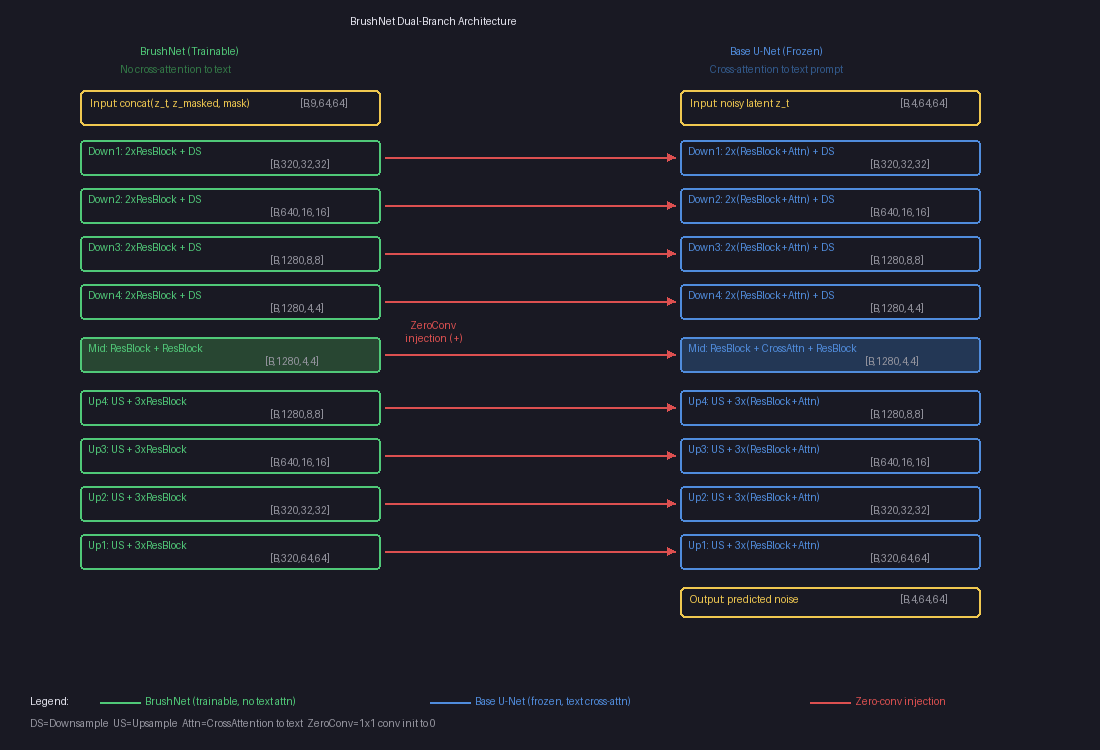
BrushNet Dual-Branch Architecture

The left column (green) is the trainable BrushNet branch — no cross-attention to text. The right column (blue) is the frozen Base U-Net with text cross-attention. The red arrows are zero-conv injection points where BrushNet features are added element-wise to the Base U-Net.

Each arrow is actually multiple injection points (one per sub-layer), totaling about 25 injection points in total. This dense injection gives BrushNet pixel-level control, which is crucial for inpainting — you need precise boundaries where the generated content meets the original image.

Why No Cross-Attention in BrushNet?

The Base U-Net has cross-attention layers that let it understand text prompts:

Base U-Net block:    ResBlock → CrossAttention("a sunflower") → output
BrushNet block:      ResBlock →                                output
                                   ↑
                             (removed!)

This is by design. BrushNet’s job is purely spatial — “here’s a hole, here’s what’s around it.” The text understanding stays in the Base U-Net. This separation means:

  • BrushNet is smaller (~480M vs ~520M params) because it skips attention layers
  • It focuses entirely on where to inpaint, not what to generate
  • What to generate is handled by the Base U-Net via the text prompt

How Training Works

The training loop is surprisingly simple — it uses the standard diffusion denoising loss:

For each training step:

1. Take a clean image                    "cat on a couch"
2. Generate a RANDOM mask                (random shape, random position)
3. Apply mask to image                   (hole in it)
4. VAE-encode both                       z₀ (clean latent), z_masked (masked latent)
5. Add random noise to clean latent      z_t = mix(z₀, noise, t)
6. Run through both branches:
     BrushNet(z_t, z_masked, mask)       → injection features
     Base_UNet(z_t, text) + features     → predicted noise
7. Loss = ‖ predicted_noise - actual_noise ‖²       (MSE)

Wait — the loss compares noise, not images?

Yes! The model predicts what noise was added, not what the clean image looks like. We know the actual noise because we added it ourselves in step 5. If the model can perfectly predict the noise, we can subtract it to recover the clean image.

We added noise ε to get z_t.
Model predicts ε_θ.
If ε_θ ≈ ε, then z₀ ≈ (z_t - ε_θ) / scale   ← clean image recovered!

No special mask-weighted loss?

Nope. The loss is computed over the entire image, not just the masked region. But the model naturally focuses on the mask because:

  • Outside the mask: the frozen Base U-Net already handles this well. BrushNet’s zero-convs learn to stay quiet here (contributing nothing reduces loss just fine).
  • Inside the mask: the Base U-Net struggles without context. BrushNet’s features are the only thing that helps here, so gradients push the zero-convs to output useful values.

The mask guides learning implicitly through gradients, not explicitly through loss weighting.

Training data: just clean images

BrushNet doesn’t need paired before/after examples. It’s self-supervised:

Dataset: clean images + text descriptions (same data as Stable Diffusion)
Masks:   generated randomly during training

The model learns to reconstruct whatever was behind a random mask, using the surrounding context and text prompt. At inference, you provide a real mask of what you want to replace.

BrushNet vs. ControlNet vs. Standard Inpainting

Feature SD Inpainting ControlNet BrushNet
Base model Modified (retrained) Frozen Frozen
Branch coverage N/A (single model) Encoder only Full U-Net
Injection points N/A ~12 (decoder only) ~25 (everywhere)
Swap base models? No Yes Yes
Extra params 0 ~360M ~480M
Text handling Single model Branch has cross-attn Branch has NO cross-attn
Best for General inpainting Structural control Precise inpainting

Why full U-Net matters for inpainting

ControlNet copies only the encoder half — it injects features into the decoder via the skip connections. This works well for structural guidance (edges, poses) but not for inpainting, where you need fine-grained control at every spatial resolution.

The BrushNet paper showed this clearly:

Full U-Net (BrushNet):  PSNR 19.86  ← best quality
Half U-Net:             PSNR 19.01
ControlNet-style:       PSNR 18.28  ← worst quality

Inpainting needs dense per-pixel control, especially at mask boundaries where generated content must blend seamlessly with the original image.

Inference: Putting It All Together

At inference time, the full pipeline looks like this:

1. User provides: image + mask + text prompt ("a sunflower")

2. Encode:
   masked_image = apply_mask(image, mask)
   z_masked = VAE_encode(masked_image)         [4, 64, 64]
   mask_small = downsample(mask)                [1, 64, 64]

3. Start from pure noise:
   z_T ~ N(0, I)                                [4, 64, 64]

4. Denoise loop (T steps, e.g. 25-50):
   for t in T → 0:
       brushnet_feats = BrushNet(z_t, z_masked, mask_small, t)
       noise_pred = BaseUNet(z_t, t, "a sunflower") + brushnet_feats
       z_{t-1} = scheduler_step(z_t, noise_pred)

5. Decode final latent:
   result = VAE_decode(z_0)                     [3, 512, 512]

6. Blend:
   output = blur_blend(result, original_image, mask)

The final blending step uses a Gaussian-blurred mask to smooth the transition between generated and original pixels, avoiding hard edges.

The Plug-and-Play Promise

Because the Base U-Net is never modified, you can:

  • Train one BrushNet and use it with any compatible base model
  • Swap in a photorealistic model, an anime model, or a custom fine-tune
  • The base model keeps all its original capabilities (text-to-image still works)
  • Adjust the conditioning_scale (0.0 to 1.0) to control how much BrushNet influences the output
scale = 0.0  →  Base U-Net only (no inpainting guidance)
scale = 0.5  →  Gentle inpainting hints
scale = 1.0  →  Full BrushNet influence (default)

Model Size

Base U-Net (frozen):     ~520M params
BrushNet (trainable):    ~480M params
  └─ Zero-conv layers:    25 layers, ~20M params
Total at inference:      ~1,000M params (1B)

BrushNet is nearly the same size as the Base U-Net — the only difference is removing cross-attention layers (~40M params saved). The trade-off is clear: 2x memory for plug-and-play flexibility.

BrushNet Summary

BrushNet gives us a powerful inpainting engine. But using it requires you to provide two things manually: a mask (where to edit) and a text prompt (what to generate). For simple cases that’s fine — draw a circle around the dog, type “a sunflower.”

But what if you just want to say “remove the dog” and have the system figure out the rest?

That’s exactly what BrushEdit does. It wraps BrushNet in an intelligent agent pipeline that automates the mask and prompt generation.


Part 2: BrushEdit — From “Remove the Dog” to Edited Image

BrushEdit (arXiv 2412.10316) doesn’t change BrushNet’s architecture at all. Instead, it asks: how do you go from a natural language instruction to a BrushNet-ready mask and prompt?

The answer is an assembly line of 4 AI models:

User: "Remove the dog from the garden"
                │
                ▼
  ┌───────────────────────────┐
  │ 1. MLLM (Qwen2-VL)       │  "What kind of edit? What object?"
  │    Classify + Identify    │  → edit_type = "remove"
  │    + Generate caption     │  → target = "dog"
  └────────────┬──────────────┘  → caption = "garden with flowers"
               ▼
  ┌───────────────────────────┐
  │ 2. GroundingDINO          │  "Where is the dog?"
  │    Text → bounding box    │  → bbox around the dog
  └────────────┬──────────────┘
               ▼
  ┌───────────────────────────┐
  │ 3. SAM                    │  "What's the exact shape?"
  │    Bbox → pixel mask      │  → silhouette of the dog
  └────────────┬──────────────┘
               ▼
  ┌───────────────────────────┐
  │ 4. BrushNet + SD 1.5      │  "Fill the hole"
  │    Mask + caption → image │  → dog replaced with garden
  └───────────────────────────┘

Each model does one thing well. Let’s walk through each step.

Step 1: The MLLM Understands Your Instruction

The MLLM (a vision-language model like Qwen2-VL or GPT-4o) is called three separate times, each with a different question. No fine-tuning — it’s used purely through prompt engineering.

Call 1: “What kind of edit?”

System: "Classify this editing instruction into one of:
         addition, remove, local, global, background.
         Reply with a single word."
User:   "Remove the dog from the garden"

→ "remove"

This classification matters because each edit type needs a different mask strategy:

Edit Type What Happens to the Mask
Remove “Remove the dog” Detect dog → segment it → dilate mask edges
Addition “Add a cat on the sofa” No detection needed — MLLM predicts a bounding box
Local “Make the car blue” Detect car → segment it → use mask as-is
Background “Change to a beach” Detect foreground → segment → invert the mask
Global “Make it nighttime” Mask the entire image

Call 2: “What object?”

System: "Identify the main object being edited.
         Reply with no more than 5 words, a single noun phrase."
User:   "Remove the dog from the garden"

→ "dog"

This short phrase will be fed to GroundingDINO as a search query. It needs to be concise — just enough to find the right thing in the image.

Call 3: “What should the result look like?”

System: "Describe what the image should look like AFTER the edit.
         Do NOT include elements that are removed or changed."
User:   [source image] + "Remove the dog from the garden"

→ "A peaceful garden path with green grass and flowers"

This becomes the text prompt for BrushNet’s inpainting. Notice: it describes the scene without the dog — because we’re removing it. The MLLM has to understand the instruction well enough to describe the result, not just parrot the input.

Why training-free works here

All three calls use the MLLM off-the-shelf. No fine-tuning. This means you can swap backends freely:

GPT-4o  →  Best quality, requires API key, costs money
Qwen2-VL →  Best open-source, runs locally, ~16 GB VRAM
LLaVA   →  Lighter alternative, ~17 GB VRAM

The paper doesn’t fine-tune any of these models. It just writes good prompts. This is a deliberate design choice — it keeps the system modular and easy to upgrade as better VLMs come out.

Step 2: GroundingDINO Finds the Object

Now we know we’re looking for “dog.” But where in the image is it?

GroundingDINO is an open-vocabulary object detector. Unlike traditional detectors that only recognize a fixed set of classes (like COCO’s 80 categories), it takes any text query and finds matching objects:

Input:  image + "dog"
Output: bounding box (128, 128, 384, 384), confidence 0.89
┌────────────────────────┐
│                        │
│    ┌──────────┐        │
│    │          │        │
│    │   dog    │        │
│    │          │        │
│    └──────────┘        │
│         ↑              │
│    bounding box        │
│    from DINO           │
└────────────────────────┘

This works for any object you can describe in words. “Red car,” “wooden table,” “person in blue shirt” — GroundingDINO handles them all.

Exception: addition edits. If the instruction is “add a cat on the sofa,” there’s no cat to detect yet. In this case, GroundingDINO is skipped entirely. Instead, the MLLM predicts where the new object should go by outputting a bounding box: “given this 512×512 image, the cat should go at [256, 170, 128, 170].”

Step 3: SAM Cuts the Exact Shape

A bounding box is too rough. The box around the dog also includes chunks of grass, maybe a bit of fence. We need the exact silhouette.

SAM (Segment Anything Model) takes the bounding box and produces a pixel-precise mask:

Before (bounding box):          After (SAM mask):

┌────────────────────────┐      ┌────────────────────────┐
│                        │      │                        │
│    ┌──────────┐        │      │      ████████          │
│    │ grass    │        │      │    ████████████        │
│    │   dog    │        │      │    ██████████          │
│    │ grass    │        │      │      ██████            │
│    └──────────┘        │      │        ██              │
│                        │      │                        │
└────────────────────────┘      └────────────────────────┘

Box includes background         Mask follows the dog's
around the dog                   exact silhouette

Edit-type-specific mask adjustments

After SAM produces the mask, BrushEdit adjusts it based on the edit type:

  • Remove: Dilate the mask by a few pixels. Fur, hair, and shadows often extend slightly beyond the segmentation boundary. Expanding the mask catches these fuzzy edges.
  • Background: Invert the mask. Instead of masking the dog, mask everything except the dog. Now BrushNet will regenerate the entire background while keeping the dog untouched.
  • Local: Use the mask as-is. The object is being modified, so we need to cover exactly that region.
Remove (dilated):            Background (inverted):

┌────────────────────────┐   ┌────────────────────────┐
│                        │   │████████████████████████│
│     ██████████         │   │████            ████████│
│   ██████████████       │   │██                ██████│
│   ████████████         │   │████            ████████│
│     ████████           │   │██████        ██████████│
│       ████             │   │████████████████████████│
│                        │   │████████████████████████│
└────────────────────────┘   └────────────────────────┘
Expanded to catch fur/shadow  Everything EXCEPT the dog

Step 4: BrushNet Fills the Hole

Now we have everything BrushNet needs:

Input Value
Mask Pixel-precise segmentation from SAM (dilated for removal)
Caption “A peaceful garden path with green grass and flowers”
Original image The source photo

This is the exact same BrushNet pipeline we covered in Part 1:

1. masked_image = original × (1 - mask)          ← zero out the dog region
2. z_masked = VAE.encode(masked_image)            ← encode to latent space
3. conditioning = concat(z_masked, mask)          ← 5-channel conditioning
4. Denoising loop (50 steps):
     BrushNet features = BrushNet(z_t, conditioning)
     noise_pred = Base_UNet(z_t, "garden with flowers") + BrushNet features
     z_{t-1} = scheduler.step(z_t, noise_pred)
5. result = VAE.decode(z_0)                       ← back to pixel space
6. output = blur(mask) × result + (1-blur(mask)) × original  ← blend

The blurred mask blending at the end creates a smooth transition at the boundary. Without it, you’d see a hard edge where the generated content meets the original image. This single step accounts for a +10 PSNR improvement in ablation studies.

The Full Pipeline, End to End

Let’s trace through one more example to make sure it’s clear. Instruction: “Change the background to a tropical beach.”

Step 1: MLLM classifies → "background"
        MLLM identifies  → "person" (the foreground object to keep)
        MLLM captions    → "A person standing on a tropical beach with
                            palm trees and turquoise water"

Step 2: GroundingDINO("person") → bounding box around the person

Step 3: SAM(bbox) → pixel mask of the person
        Mask is INVERTED → now covers everything EXCEPT the person
        Coverage: ~75% of the image

Step 4: BrushNet inpaints the masked region (the background)
        using caption "tropical beach with palm trees"
        Person is preserved in the unmasked region
        Blended at edges for seamless transition

The key insight for background edits: GroundingDINO detects the foreground object (the person), SAM segments it, then the mask is inverted. BrushNet never touches the person — it only regenerates the background.

Why Decompose Instead of End-to-End?

You might wonder: why not train one big model that takes “remove the dog” and directly outputs an edited image? That’s what InstructPix2Pix does. BrushEdit’s decomposed approach has three advantages:

1. Transparency. Every intermediate result is visible. You can see the edit classification (“remove”), the detected object (“dog”), the mask, and the caption. If something goes wrong, you know exactly where.

2. User control. You can override any step. Don’t like the auto-generated mask? Draw your own. Want a different caption? Type one. The pipeline doesn’t force you into a black box.

3. No paired training data. InstructPix2Pix needs millions of (instruction, before, after) triples — expensive to create. BrushEdit needs none. The MLLM is used off-the-shelf, GroundingDINO and SAM are pre-trained, and BrushNet trains on standard images with random masks.

The trade-off is complexity. BrushEdit orchestrates 4 separate models totaling ~66 GB of weights. But each model is best-in-class at its job, and you can upgrade any component independently.

How Does It Compare?

vs. Inversion-based methods (DDIM+P2P, Null-Text)

These methods invert the image to noise, then re-denoise with edits. BrushEdit skips inversion entirely — it generates directly in the masked region.

Method PSNR (quality) Time
DDIM + P2P 22.67 11s
Null-Text + P2P 26.52 148s
BrushEdit 32.16 3.6s

5 PSNR better and 3-40x faster.

vs. Original BrushNet

BrushEdit uses BrushNet internally, but improves on it:

  BrushNet BrushEdit
Mask generation Manual Automatic (MLLM + DINO + SAM)
Caption Manual Automatic (MLLM)
Model checkpoints 2 separate (seg masks, random masks) 1 unified model
Object removal Limited Trained explicitly with removal data
Multi-round editing No Yes (output becomes next input)

The unified model comes from training on BrushData-v2 — a merged dataset that combines segmentation masks and random masks, plus new removal training pairs where clean-background images are paired with random masks.

BrushEdit’s Limitations

No system is perfect. BrushEdit struggles with:

Irregular masks. Very thin, fragmented, or oddly shaped masks can produce artifacts. The model was trained mostly on blob-like masks and object silhouettes.

Text-mask misalignment. If the caption says “a large elephant” but the mask is tiny, the model can’t fit an elephant in there. The MLLM doesn’t always reason well about spatial constraints.

Base model ceiling. BrushEdit uses Stable Diffusion 1.5 as its backbone. Output quality is bounded by what SD 1.5 can generate. It can’t produce FLUX-quality images because the underlying diffusion model isn’t that capable.

VLM errors cascade. If the MLLM misclassifies the edit type (calling a “remove” a “local edit”), the entire downstream pipeline produces wrong results. There’s no error recovery between steps.

Key Takeaways

BrushNet (Part 1):

  1. Dual-branch design: Frozen base model + trainable BrushNet branch. Plug-and-play.
  2. 9-channel input: Noisy latent (4) + masked image latent (4) + mask (1).
  3. Zero convolutions: Start silent, gradually learn. Stable training.
  4. Full U-Net coverage: Encoder + mid + decoder injection. Not just the encoder (ControlNet-style).
  5. No cross-attention in BrushNet: Text stays in the Base U-Net. BrushNet handles spatial information only.

BrushEdit (Part 2):

  1. 4-model assembly line: MLLM → GroundingDINO → SAM → BrushNet. Each model does one job well.
  2. Training-free VLM: The MLLM is used off-the-shelf through prompt engineering. No fine-tuning. Swap backends freely.
  3. Edit-type-aware masks: Different edit types get different mask treatments (dilated for removal, inverted for background, bbox for addition).
  4. Transparent pipeline: Every intermediate result is visible and overridable by the user.
  5. Unified inpainting model: One BrushNet checkpoint handles all mask types, trained on BrushData-v2.

The two papers together tell a clean story: BrushNet solves how to inpaint (the architecture), and BrushEdit solves what to inpaint (the intelligence layer that turns natural language into masks and captions).


This post covers BrushNet (ECCV 2024) and BrushEdit (arXiv 2412.10316). The architecture diagrams come from hands-on experimentation and code analysis of the TencentARC/BrushEdit repository.

U-Net Explained: A Visual Guide for Beginners

作者 Yi
2026年2月4日 02:00

If you’ve explored image generation, segmentation, or diffusion models, you’ve probably heard of U-Net. But what exactly is it, and why is it so widely used? In this post, I’ll break down U-Net step by step with concrete examples and visual diagrams.

What is U-Net?

U-Net is a neural network architecture designed for tasks where you need an image in and an image out of the same size. It was originally created for medical image segmentation in 2015, but has since become the backbone of many modern AI systems, including Stable Diffusion.

The name comes from its shape—when you draw the architecture, it looks like the letter “U”:

Input Image
    │
    ▼
┌─────────────────────────────────────────┐
│  ENCODER (Downsampling)                 │
│  ┌─────┐    ┌─────┐    ┌─────┐         │
│  │64ch │ →  │128ch│ →  │256ch│ → ...   │
│  │128² │    │64²  │    │32²  │         │
│  └──┬──┘    └──┬──┘    └──┬──┘         │
│     │ skip     │ skip     │ skip       │
│     ▼          ▼          ▼            │
│  ┌──┴──┐    ┌──┴──┐    ┌──┴──┐         │
│  │64ch │ ←  │128ch│ ←  │256ch│ ← ...   │
│  │128² │    │64²  │    │32²  │         │
│  └─────┘    └─────┘    └─────┘         │
│  DECODER (Upsampling)                   │
└─────────────────────────────────────────┘
    │
    ▼
Output Image

The Three Key Parts

1. Encoder (The Down Path)

The encoder compresses the image, making it spatially smaller but with more channels:

128×128×3  →  64×64×64  →  32×32×128  →  16×16×256  →  8×8×512
   │              │             │             │            │
   └──────────────┴─────────────┴─────────────┴────────────┘
                    Shrinking spatially
                    Growing in channels

At each step:

  • Spatial size halves (128 → 64 → 32 → 16 → 8)
  • Channels increase (3 → 64 → 128 → 256 → 512)

This is like summarizing a book—you lose details but capture the main ideas.

2. Bottleneck

The bottleneck is the smallest point in the network:

┌─────────────────────────────────┐
│          8×8×512                │
│                                 │
│  Only 64 spatial positions      │
│  but 512 features each          │
│                                 │
│  "Compressed understanding"     │
└─────────────────────────────────┘

At this point, the network has maximum semantic understanding but minimum spatial detail. It knows “what” is in the image but has lost “where” things are precisely.

3. Decoder (The Up Path)

The decoder expands the image back to full resolution:

8×8×512  →  16×16×256  →  32×32×128  →  64×64×64  →  128×128×3

But here’s the problem: how do you recover the spatial details that were lost?

The Secret Sauce: Skip Connections

This is what makes U-Net special. Skip connections pass information directly from the encoder to the decoder, bypassing the bottleneck:

ENCODER                              DECODER
───────                              ───────
128×128 ─────── skip1 ─────────────→ 128×128
   │                                    ▲
64×64 ───────── skip2 ───────────→ 64×64
   │                                    ▲
32×32 ───────── skip3 ─────────→ 32×32
   │                                    ▲
16×16 ───────── skip4 ───────→ 16×16
   │                                    ▲
   └──→ 8×8 BOTTLENECK ──────────────────┘

Why Are Skip Connections Needed?

Think of it this way:

Source Knows Problem
Bottleneck “What” is in image Lost “where” exactly
Skip “Where” things are Doesn’t know context
Combined Both! Sharp + accurate output

Visual Example

WITHOUT skip connections:        WITH skip connections:
┌────────────────────┐          ┌────────────────────┐
│                    │          │  ●                 │
│      ◯             │          │   ╲                │
│   (blurry,         │          │    ╲               │
│    wrong spot)     │          │     ●  (sharp,     │
│                    │          │      ╲  correct!)  │
│                    │          │       ●            │
└────────────────────┘          └────────────────────┘

The bottleneck knows “there’s a line somewhere” but lost the exact position. The skip connection says “the line edge is at these exact pixels.” Combined, you get a sharp, accurate output.

The Building Blocks

ConvBlock: The Basic Unit

Every level of the U-Net uses convolutional blocks:

Input
  ↓
Conv 3×3 → BatchNorm → ReLU
  ↓
Conv 3×3 → BatchNorm → ReLU
  ↓
Output

A 3×3 convolution looks at a pixel and its 8 neighbors to compute each output pixel.

Understanding Conv2d

Let’s make this concrete with Conv2d(2, 3, 3) — 2 input channels, 3 output channels, 3×3 kernel.

Key insight: Each output channel has its own filter, and each filter looks at ALL input channels.

INPUT (2 channels)              OUTPUT (3 channels)

┌─────────┐                    ┌─────────┐
│ Ch 0    │──┬─ Filter 0 ─────→│ Ch 0    │
│         │  │                 └─────────┘
└─────────┘  │
             ├─ Filter 1 ─────→┌─────────┐
┌─────────┐  │                 │ Ch 1    │
│ Ch 1    │──┤                 └─────────┘
│         │  │
└─────────┘  └─ Filter 2 ─────→┌─────────┐
                               │ Ch 2    │
                               └─────────┘

Each filter reads ALL input channels to produce ONE output channel.

Concrete Conv2d Example

Input (2 channels, 4×4 each):

Channel 0:              Channel 1:
┌────┬────┬────┬────┐   ┌────┬────┬────┬────┐
│ 10 │ 10 │  0 │  0 │   │  5 │  5 │  5 │  5 │
├────┼────┼────┼────┤   ├────┼────┼────┼────┤
│ 10 │ 10 │  0 │  0 │   │  5 │  5 │  5 │  5 │
├────┼────┼────┼────┤   ├────┼────┼────┼────┤
│ 10 │ 10 │  0 │  0 │   │  5 │  5 │  5 │  5 │
├────┼────┼────┼────┤   ├────┼────┼────┼────┤
│ 10 │ 10 │  0 │  0 │   │  5 │  5 │  5 │  5 │
└────┴────┴────┴────┘   └────┴────┴────┴────┘

Filter 0 (one 3×3 kernel per input channel):

For input ch0:          For input ch1:
┌────┬────┬────┐        ┌────┬────┬────┐
│  1 │  0 │ -1 │        │  0 │  0 │  0 │
├────┼────┼────┤        ├────┼────┼────┤
│  1 │  0 │ -1 │        │  0 │  1 │  0 │
├────┼────┼────┤        ├────┼────┼────┤
│  1 │  0 │ -1 │        │  0 │  0 │  0 │
└────┴────┴────┘        └────┴────┴────┘

To compute output pixel at (row=1, col=1):

From ch0: 10×1 + 10×0 + 0×(-1) + 10×1 + 10×0 + 0×(-1) + 10×1 + 10×0 + 0×(-1) = 30
From ch1: 5×0 + 5×0 + 5×0 + 5×0 + 5×1 + 5×0 + 5×0 + 5×0 + 5×0 = 5
Total: 30 + 5 + bias = 35

DownBlock (Encoder Step)

def forward(self, x):
    features = self.conv(x)     # Process with ConvBlock
    pooled = self.pool(features) # Shrink by half
    return pooled, features      # Return BOTH!
Input: (1, 64, 64, 64)
         │
    ConvBlock
         │
     (1, 128, 64, 64) ──→ SAVED as skip connection
         │
    MaxPool2d (shrink)
         │
Output: (1, 128, 32, 32)

The key: it returns TWO things — the pooled result for the next layer AND the features for the skip connection.

UpBlock (Decoder Step)

def forward(self, x, skip):
    x = self.up(x)              # Grow spatially (ConvTranspose2d)
    x = torch.cat([x, skip], dim=1)  # Concatenate with skip
    x = self.conv(x)            # Process combined features
    return x
Input: (1, 512, 8, 8)    Skip: (1, 512, 16, 16)
         │
  ConvTranspose2d (grow 2×)
         │
     (1, 512, 16, 16)
         │
  Concat with skip (channels add)
         │
     (1, 1024, 16, 16)
         │
  ConvBlock (reduce channels)
         │
Output: (1, 256, 16, 16)

ConvTranspose2d: Growing Images

ConvTranspose2d is the opposite of Conv2d — it makes images bigger:

Conv2d (stride=2):          ConvTranspose2d (stride=2):
  4×4  →  2×2                 2×2  →  4×4
  (shrink)                    (grow)

Each input pixel becomes a 2×2 region:

Input (2×2):          Output (4×4):
┌───┬───┐             ┌───┬───┬───┬───┐
│ 1 │ 2 │             │ 1 │ 1 │ 2 │ 2 │
├───┼───┤      →      ├───┼───┼───┼───┤
│ 3 │ 4 │             │ 1 │ 1 │ 2 │ 2 │
└───┴───┘             ├───┼───┼───┼───┤
                      │ 3 │ 3 │ 4 │ 4 │
                      ├───┼───┼───┼───┤
                      │ 3 │ 3 │ 4 │ 4 │
                      └───┴───┴───┴───┘

Complete Data Flow

Let’s trace through an entire U-Net forward pass:

INPUT:    (1,   3, 128, 128)   "RGB image"

ENCODER:
  enc1:   (1,  64,  64,  64)   → skip1 saved
  enc2:   (1, 128,  32,  32)   → skip2 saved
  enc3:   (1, 256,  16,  16)   → skip3 saved
  enc4:   (1, 512,   8,   8)   → skip4 saved

BOTTLENECK:
          (1, 512,   8,   8)   "Compressed understanding"

DECODER:
  dec4:   (1, 256,  16,  16)   ← uses skip4
  dec3:   (1, 128,  32,  32)   ← uses skip3
  dec2:   (1,  64,  64,  64)   ← uses skip2
  dec1:   (1,  64, 128, 128)   ← uses skip1

OUTPUT:   (1,   3, 128, 128)   "Processed image"

What Can U-Net Do?

U-Net is used for any task requiring pixel-level output:

Task Input Output
Medical segmentation CT scan Tumor mask
Semantic segmentation Photo Labels per pixel
Image denoising Noisy image Clean image
Inpainting Image with hole Filled image
Super resolution Low-res High-res
Style transfer Photo Stylized image
Diffusion models Noisy latent Denoised latent

When NOT to Use Decoder

Not all tasks need a decoder:

Classification (no decoder):
  Image → [shrink, shrink, shrink] → "This is a cat"

U-Net (full decoder):
  Image → [shrink] → [expand] → Processed image

If you only need a label, not a pixel-by-pixel output, skip the decoder.

Summary

U-Net’s power comes from three key ideas:

  1. Encoder: Compress spatially, extract “what” is in the image
  2. Decoder: Expand back to full resolution
  3. Skip connections: Pass “where” information directly from encoder to decoder

This combination allows U-Net to understand both the big picture (global context from bottleneck) and fine details (local information from skips), producing sharp, accurate outputs.

Whether you’re segmenting medical images, generating art with Stable Diffusion, or building your own image editing model, U-Net’s elegant architecture is likely at the core.


This post was created while building a text-conditioned image editing model. The examples and diagrams come from hands-on experimentation with PyTorch.

Building an Image Captioning Transformer from Scratch

作者 Yi
2026年1月31日 02:00

After building a text-only transformer for name generation, I wanted to tackle something more ambitious: teaching a model to describe images. This post documents my journey building a minimal image captioning transformer that learns to generate captions like “a dog runs through the snow” from raw pixels.

Try the live demo! - The model runs entirely in your browser using ONNX Runtime Web.

The Architecture: Encoder-Decoder with Cross-Attention

Unlike the decoder-only transformer from my previous experiment, image captioning requires an encoder-decoder architecture. The key insight is that we need to process two different modalities (images and text) and connect them through cross-attention.

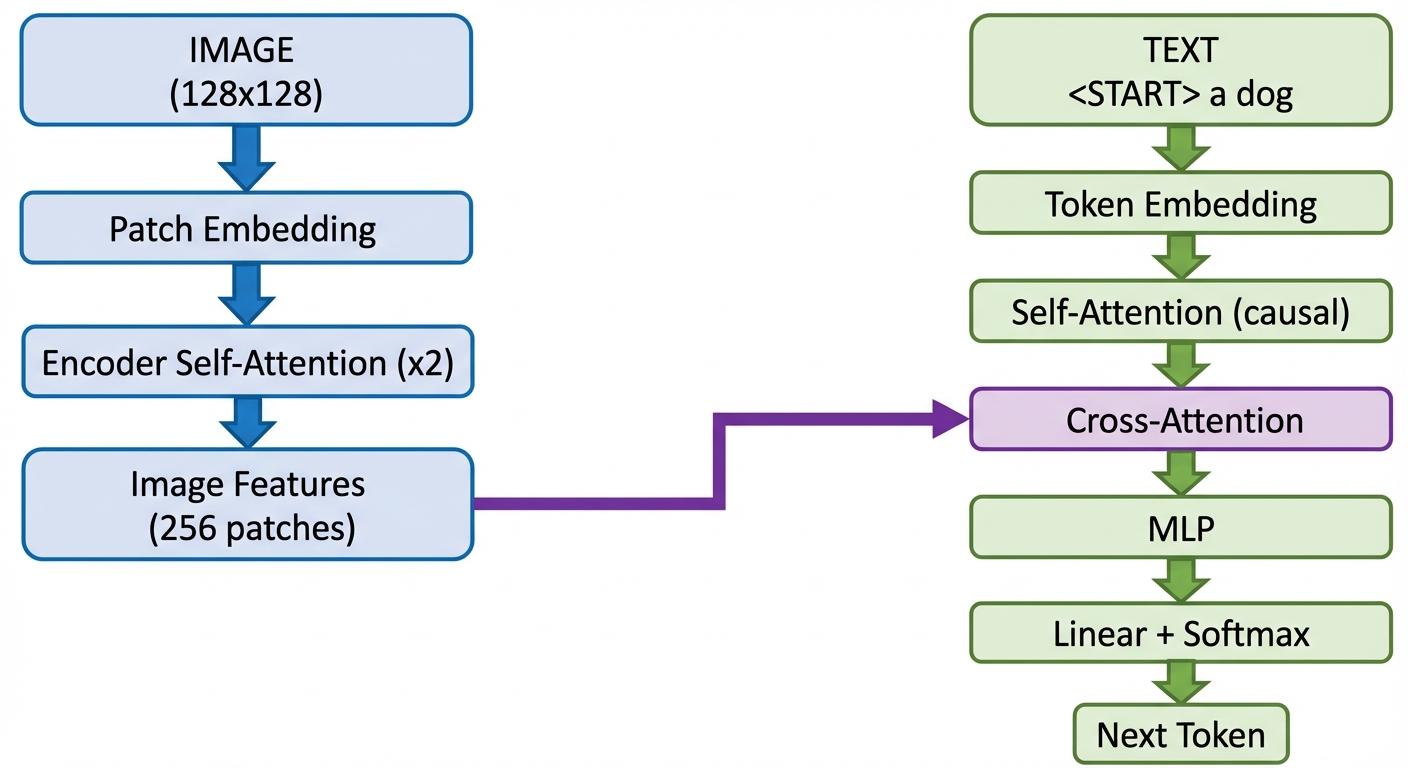
Image Captioning Architecture

The architecture has two parallel paths:

Image Path (Blue): The image goes through patch embedding, then encoder self-attention layers. This produces “image features” — a sequence of patch embeddings that understand spatial relationships.

Text Path (Green): The caption tokens go through token embedding, then decoder layers with both self-attention (causal) and cross-attention to the image features.

The Bridge (Purple): Cross-attention is where the magic happens. It allows each text token to “look at” all image patches and gather relevant visual information.

From Pixels to Patches: The Vision Encoder

The first challenge is converting an image into something a transformer can process. Transformers work on sequences, but images are 2D grids. The solution: split the image into patches.

128x128 image → 16x16 grid of 8x8 patches → 256 patch embeddings

Each 8x8 patch contains 64 pixels × 3 colors = 192 values. A linear layer projects this to 128 dimensions:

class PatchEmbedding(nn.Module):
    def __init__(self, image_size, patch_size, n_embd):
        patch_dim = 3 * patch_size * patch_size  # 192
        self.proj = nn.Linear(patch_dim, n_embd)  # 192 → 128
        self.pos_embd = nn.Parameter(torch.randn(1, n_patches, n_embd))

    def forward(self, x):
        # Split image into patches, flatten, project
        patches = extract_patches(x)  # (B, 256, 192)
        return self.proj(patches) + self.pos_embd  # (B, 256, 128)

Now we have 256 “patch tokens” that can go through self-attention, just like text tokens. The encoder self-attention lets patches learn about each other — a patch showing a dog’s head can attend to patches showing its body and legs, building a coherent understanding of “dog”.

Cross-Attention: The Bridge Between Vision and Language

This is the key difference from text-only transformers. In self-attention, Q, K, and V all come from the same source. In cross-attention:

  • Q (Query) comes from the text decoder: “What visual information do I need?”
  • K, V (Key, Value) come from the image encoder: “Here’s what each patch contains”
class CrossAttention:
    def forward(self, text_embeddings, image_features):
        Q = text_embeddings @ W_q   # What am I looking for?
        K = image_features @ W_k    # What does each patch contain?
        V = image_features @ W_v    # What info to retrieve?

        scores = Q @ K.T  # (text_len, num_patches)
        weights = softmax(scores)
        return weights @ V  # Weighted sum of patch info

When generating the word “running”, the model learns to attend heavily to patches showing legs in motion. When generating “snow”, it attends to the white ground patches.

Training on Flickr8k

I used the Flickr8k dataset: 8,000 images with 5 human-written captions each. A key insight was using random caption sampling — each epoch, randomly select one of the 5 captions per image. This acts as data augmentation and dramatically reduces overfitting.

Configuration Train Loss Val Loss Notes
64x64, fixed caption 0.78 1.10 Baseline
128x128, fixed caption 0.58 1.38 More detail, more overfitting
128x128, random caption 0.90 0.99 Much better generalization!

The random caption sampling closed the train-val gap from 0.80 to just 0.09.

Results: What the Model Learned

After 30 epochs of training (~17 minutes on M4 Mac), the model generates reasonable captions:

Success case:

Dog running on grass

Generated: "a black dog is running through the grass ."
Actual:    "A black dog running across green grass ."

Failure case:

Ski lodge scene

Generated: "a man in a blue shirt is standing in the stree"
Actual:    "A crowd of people are enjoying a meal with a view of a mountaintop ."

The model handles simple scenes well (dogs, people, basic actions) but struggles with complex scenes (crowds, multiple objects, subtle context).

Model Statistics

Total parameters: ~980,000 (about 1M)

Breakdown:
- Patch embedding:     32,896 (3%)
- Encoder blocks (2):  395,776 (40%)
- Token embedding:     8,960 (1%)
- Position embedding:  6,144 (1%)
- Decoder blocks (2):  527,616 (54%)
- Output layer:        9,286 (1%)

The decoder is larger than the encoder because each decoder block has both self-attention AND cross-attention.

Key Learnings

1. Patches are the “tokenizer” for images

Just as we split text into tokens, we split images into patches. This converts the 2D spatial structure into a sequence that transformers can process. The same weight matrix processes every patch, learning a universal “patch reader”.

2. Cross-attention is the bridge

The key architectural difference from text-only transformers. It lets the text generation process “see” the image at every step, attending to relevant patches for each word being generated.

3. Data augmentation matters enormously

Using all 5 captions with random sampling was more impactful than doubling the image resolution. The model learns semantic concepts rather than memorizing specific strings.

4. Resolution limits understanding

At 128x128, a tricycle looks like a blob. The model can distinguish dogs from people, but struggles with fine details. Real vision models use 224x224 or higher.

5. This is still a toy model

Production image captioning models use:

  • Pretrained vision encoders (CLIP, ViT trained on millions of images)
  • Word-level tokenization (shorter sequences)
  • Much larger datasets (COCO has 330k images)
  • Billions of parameters

Improvement: Using Pretrained CLIP Encoder

After training the from-scratch model, I wanted to see how much a pretrained vision encoder could help. I created a second version that uses CLIP ViT-B/32 as a frozen image encoder, training only the decoder and a projection layer.

Architecture Changes

Instead of learning patch embeddings from scratch:

  • CLIP’s pretrained ViT processes the image (224x224 input)
  • 50 patch embeddings (768-dim) are projected to the decoder dimension
  • Only the decoder (~3.8M params) is trained; CLIP (~87M params) is frozen
class CLIPCaptioningModel(nn.Module):
    def encode_image(self, img):
        # Use CLIP's visual transformer (frozen)
        with torch.no_grad():
            x = clip_model.visual(img)  # (B, 50, 768)
        return self.visual_proj(x)  # Project to decoder dim

Results Comparison

Metric From-Scratch CLIP-based
Val Loss 1.29 0.86
Train Loss 1.23 0.75
Epochs 30 20
Training Time ~17 min ~17 min
Model Size 4 MB 363 MB

The CLIP-based model achieves 33% lower validation loss with fewer epochs!

Sample Captions

For the same test image (two dogs in snow):

Model Caption
From-scratch “a black dog and a white dog are in the snow .”
CLIP-based “two dogs playing in the snow .”
Ground truth “a black dog is running after a white dog in the snow .”

The CLIP-based model produces more natural, concise captions. It benefits from CLIP having been trained on 400 million image-text pairs — it already understands visual concepts like “dogs” and “playing” without needing to learn them from our small 8k image dataset.

Testing on Complex Scenes

I tested both models on the validation set, focusing on complex scenes that the from-scratch model struggled with:

Scene From-Scratch CLIP-based Ground Truth
Ice skating rink “a man in a blue shirt…” “a group of people standing in the snow .” “A group of people are ice skating in a big city .”
Rock climbing “a woman is standing…” “a woman in a red shirt is climbing a rock .” “A kid rock climbing against the backdrop of a green valley”
People at boats “a man is…” “a group of people standing in a rowd of a boat” “A group of people waiting to ride boats .”
Mountain hikers “a man in…” “two people stand on the side of a mountain .” “Three people facing the mountains .”

Key observations:

  1. Better at groups/crowds — CLIP recognizes “group of people” much better than the from-scratch model which defaults to “a man”
  2. Better semantic understanding — Recognizes concepts like “rock climbing”, “mountain”, “boat” that the small model misses entirely
  3. Still struggles with fine details — Exact counts (two vs three people), specific activities (ice skating vs standing)
  4. More robust to complex scenes — Doesn’t collapse to generic “man in blue shirt” for difficult images

The pretrained visual features give CLIP a huge advantage on scenes requiring real-world knowledge.

Tradeoff: Accuracy vs Size

The improved model is 363MB (vs 4MB), making it impractical for browser deployment. This is the classic accuracy-size tradeoff:

  • From-scratch model: Smaller, deployable, but less accurate
  • CLIP-based model: More accurate, but requires a large pretrained encoder

For production, you’d typically use the large model on a server, or apply techniques like knowledge distillation to compress it.

Improvement: Word-Level Tokenization

The character-level model processes “a black dog” as 11 tokens (including spaces). Word-level tokenization reduces this to just 3 tokens, making sequences shorter and potentially easier to learn.

Parameter Count Changes

Switching from character-level to word-level tokenization dramatically changes where the parameters live:

Component Character-Level Word-Level Change
Token embedding 8,960 (70 × 128) 570,240 (4453 × 128) +561K
Position embedding 6,144 (48 × 128) 2,560 (20 × 128) -3.5K
Output layer 8,960 570,240 +561K
Total model ~980K ~2.1M +1.1M (2.2×)

The vocabulary explodes from ~70 characters to ~4500 words, but sequences shrink from 48 characters to 20 words. The net effect: 2.2× more parameters, almost entirely in the embedding layers.

Results Comparison

Metric Character-Level Word-Level
Val Loss 0.99 2.98
Train Loss 0.90 2.42
Vocab Size 70 4,453
Max Seq Length 48 20
Model Size 4 MB 8.2 MB

Wait — the word-level loss is higher? This is actually expected:

  1. Loss is per-token: Character-level predicts from 70 options; word-level predicts from 4,453 options
  2. Different scales: A word-level loss of 2.98 means perplexity ~20 (choosing from 4453 words), while character loss 0.99 means perplexity ~2.7 (choosing from 70 chars)
  3. The captions are similar quality despite the different loss values

Sample Caption

For the same test image (two dogs in snow):

Model Caption
Character-level “a black dog and a white dog are in the snow .”
Word-level “a dog is running through the snow .”
Ground truth “a black dog is running after a white dog in the snow .”

The word-level model produces fluent captions but with a smaller effective vocabulary (it saw each word fewer times during training than character-level saw each character).

Key Insight: Vocabulary Size vs Training Data

Word-level tokenization works better when you have lots of training data. With only 8k images:

  • Character-level sees each character thousands of times → learns robust patterns
  • Word-level sees many words only a few times → harder to learn good embeddings

This is why production models use:

  • Subword tokenization (BPE, WordPiece): Best of both worlds
  • Much larger datasets: COCO (330k), Conceptual Captions (3M+)
  • Pretrained word embeddings: GloVe, Word2Vec, etc.

Improvement: CLIP + GloVe Pretrained Embeddings

Since the word-level model struggled with limited training data, I tried combining the best of both worlds: CLIP’s pretrained vision encoder with GloVe pretrained word embeddings.

The Idea

Instead of learning word embeddings from scratch with only 8k images, why not use GloVe embeddings trained on 6 billion words? This gives the model a head start on understanding word relationships.

class CLIPGloVeCaptioningModel(nn.Module):
    def __init__(self, vocab_size, clip_model, glove_embeddings, ...):
        # Use CLIP for vision (frozen)
        self.clip_model = clip_model

        # Use GloVe for word embeddings (fine-tuned)
        self.token_embed = nn.Embedding(vocab_size, glove_dim)
        self.token_embed.weight.data.copy_(glove_embeddings)

        # Project GloVe dim (100) to decoder dim (256)
        self.glove_proj = nn.Linear(glove_dim, n_embd)

GloVe Coverage

Using GloVe 6B 100d (100-dimensional embeddings trained on 6 billion tokens):

  • 4441 out of 4517 words (98.3%) found in GloVe
  • Only 76 words missing (mostly rare or domain-specific terms)
  • Missing words initialized with small random values

Results

Metric Word-Level (random) CLIP + GloVe
Val Loss 2.98 2.55
Train Loss 2.42 1.78
Epochs 30 30
GloVe Coverage N/A 98.3%

The GloVe embeddings give a 14% improvement in validation loss!

Sample Caption

For the same test image (two dogs in snow):

Model Caption
Word-level (random init) “a dog is running through the snow .”
CLIP + GloVe “two dogs are playing in the snow .”
Ground truth “a black dog is running after a white dog in the snow .”

The GloVe model correctly identifies “two dogs” rather than “a dog”, suggesting the pretrained embeddings help with understanding quantities and relationships.

Key Insight: Transfer Learning Stacks

This experiment shows that transfer learning compounds:

  1. CLIP brings pretrained visual understanding (400M image-text pairs)
  2. GloVe brings pretrained word relationships (6B tokens)
  3. Only the decoder and projection layers need to learn task-specific mappings

Even with just 8k training images, combining two pretrained components achieves significantly better results than training from scratch.

What’s Next

Remaining improvements to explore:

  1. Pretrained vision encoder: Use CLIP or ViT instead of learning from scratch ✅ Done!
  2. Word-level tokenization: “a black dog” as 3 tokens instead of 11 characters ✅ Done!
  3. Pretrained word embeddings: Use GloVe for better word representations ✅ Done!
  4. Subword tokenization: Use BPE for better vocab coverage
  5. More data: COCO dataset (330k images) instead of Flickr8k (8k)
  6. Knowledge distillation: Train a small model to mimic the CLIP-based one

But even the minimal from-scratch implementation demonstrates the core concepts: patch embeddings, encoder-decoder architecture, and cross-attention as the bridge between vision and language.

Code

The complete training script is available in my learn-llm repository as train-image-caption.py.

Building a Language Transformer Step by Step

作者 Yi
2026年1月29日 02:00

After months of reading about transformers and LLMs, I finally decided to build one from scratch. Not by copy-pasting code, but by incrementally adding each architectural component and measuring its impact. The result was a character-level name generator trained on 32,033 names, and the journey taught me more than any paper or tutorial could.

Preparation: Standing on the Shoulders of Giants

Before diving into code, I spent time building intuition through two excellent resources:

“Build a Large Language Model (From Scratch)” by Sebastian Raschka was my theoretical foundation. The book walks through every component of a transformer with clear explanations and diagrams. Reading it gave me a mental model of how attention, embeddings, and layer normalization fit together — knowledge that proved essential when debugging my own implementation.

Andrej Karpathy’s YouTube series (Neural Networks: Zero to Hero) was equally valuable. His “Let’s build GPT” video demystified the architecture by building it live on screen. Watching someone think through the design decisions — why we use residual connections, how attention matrices work, what LayerNorm actually does — made the concepts stick in a way that reading alone couldn’t. His makemore repository became the dataset and benchmark for my experiments.

With this foundation, I was ready to build.

The Experiment

I incrementally built a character-level transformer for name generation. Each step adds one architectural improvement. All models were trained with batch size 32, AdamW optimizer, and per-name padding with masked loss.

Results - Architecture Comparison (5,000 steps)

Config N_EMBD Heads Layers Params Train Test
baseline 32 1 1 2,908 2.35 2.35
double embd 64 1 1 8,860 2.34 2.34
2 heads 32 2 1 5,948 2.25 2.23
4 layers 32 2 4 18,332 2.00 2.04
+ MLP 32 2 4 51,740 1.97 2.02
+ LayerNorm 32 2 4 52,252 1.96 1.99
+ RoPE 32 2 4 52,252 1.94 1.98
+ GELU 32 2 4 52,252 1.94 1.94

Results - Scaling Up

Config Steps Train Test Notes
N_EMBD=32, 2 heads 5,000 1.94 1.94 Baseline final model
N_EMBD=64, 4 heads 5,000 1.84 1.92 Matches makemore architecture
N_EMBD=64, 4 heads + dropout 5,000 1.95 2.00 Dropout slows convergence
N_EMBD=64, 4 heads + dropout 20,000 1.75 1.85 Longer training helps
+ LR schedule, weight decay, grad clip 20,000 1.72 1.86 Training improvements

Makemore’s default transformer achieves ~1.92 test loss with N_EMBD=64, 4 heads, 4 layers.

Generated Names

Sample outputs from the final model (N_EMBD=64, 4 heads, 20k steps with all training improvements):

kaelynn, aileigh, elyce, yadi, ovani, derella, nyailee, ranyah, niaa, sett

Key Findings

Depth beats width

Doubling embedding size from 32 to 64 (3x params) gave almost no improvement (2.35 -> 2.34). Adding a second attention head with fewer total params (5,948 vs 8,860) dropped loss by 0.12. Stacking 4 layers was the single biggest improvement, dropping test loss from 2.23 to 2.04. The model benefits far more from multiple layers of processing than from wider representations at a single layer.

Data handling matters most

Before adding per-name padding, our best model achieved 2.36 test loss. After switching to per-name padding with masked loss (same architecture), it dropped to 1.94. This was a larger improvement than all architectural changes combined. The reason: without padding, the model wasted capacity trying to predict across name boundaries — an impossible task that added noise to every gradient update.

MLP adds capacity but needs regularization

Adding the feed-forward network (MLP) to each layer tripled the parameter count (18k -> 52k) but only modestly improved results. It also widened the train-test gap (2.00/2.04 -> 1.97/2.02), suggesting mild overfitting. The MLP lets the model transform representations nonlinearly after attention gathers information, but at this small scale the effect is limited.

LayerNorm and RoPE help incrementally

LayerNorm stabilized training and closed the train-test gap slightly. RoPE (Rotary Position Embeddings) gave the model awareness of character positions without adding any parameters. Neither was dramatic at this scale, but both are essential for larger models — LayerNorm enables training deep networks, and RoPE enables generalization to longer sequences.

GELU vs ReLU is negligible at small scale

Switching from ReLU to GELU activation in the MLP had no measurable effect. The smoother gradient flow matters more when networks are deeper and wider.

Scaling up helps significantly

Doubling N_EMBD to 64 and using 4 heads (matching makemore’s architecture) dropped test loss from 1.94 to 1.92 at 5k steps. With longer training (20k steps), the model reached 1.85 test loss — surpassing makemore’s default.

Dropout trades speed for generalization

Adding 20% dropout increased the train-test gap initially and slowed convergence. At 5k steps, it actually hurt test loss (1.92 -> 2.00). But it prevents overfitting during longer training runs, allowing the model to keep improving past where it would otherwise plateau.

Training improvements compound

Learning rate scheduling (warmup + cosine decay), weight decay (0.01), and gradient clipping (max_norm=1.0) together produced smoother training curves. The cosine decay prevents the learning rate from being too high in later steps when fine-tuning. Weight decay acts as regularization. Gradient clipping prevents instability from occasional large gradients.

Architecture Summary

The final model is a proper transformer decoder:

Input tokens
    -> Token Embedding (28 vocab -> 64 dim)
    -> 4x Transformer Blocks:
        -> LayerNorm -> Multi-Head Attention (4 heads, RoPE, dropout) -> Residual
        -> LayerNorm -> MLP (64 -> 256 -> 64, GELU, dropout) -> Residual
    -> Linear (64 -> 28 vocab)
    -> Cross-entropy loss (masked on PAD tokens)

Training config:

  • 20,000 steps
  • Batch size 32
  • AdamW optimizer with weight decay 0.01
  • Learning rate: warmup to 1e-3 over 200 steps, cosine decay to 1e-4
  • Gradient clipping: max_norm=1.0
  • Dropout: 0.2

What the Loss Means

Cross Entropy Loss

A loss of 1.86 means the model assigns ~15.6% probability on average to the correct next character (e^(-1.86)). Random guessing over 27 characters would give ~3.7% (loss = 3.30). Perfect prediction is impossible because many positions are genuinely ambiguous — after “ma”, the next character could be r, d, k, x, t, and many others.

Progress through this project:

  • Start: 2.35 test loss (~9.5% confidence)
  • Final: 1.86 test loss (~15.6% confidence)
  • Improvement: ~1.6x more confident on the correct character

Conclusion

Building a transformer incrementally taught me that the magic isn’t in any single component — it’s in how they work together. Data preprocessing had the biggest impact. Depth mattered more than width. And the “modern” improvements (LayerNorm, RoPE, GELU) are less about dramatic gains and more about enabling scale.

Reverse Engineering Guitar Pro 8's Locked Files

作者 Yi
2026年1月17日 08:58

Have you ever worked on a Guitar Pro tab, saved it, and then realized you couldn’t edit it anymore because it was “locked”? Or perhaps you downloaded a tab that was perfect but needed just one small tweak, and the author had locked it?

I recently went down a rabbit hole reverse-engineering this “protection” mechanism in Guitar Pro 8. What I found was a classic case of “security through obscurity” — and not very deep obscurity at that.

The Problem

Guitar Pro has a feature to “lock” a file. When locked, the file can be opened and played, but the editing features are disabled. If you peek inside the .gp file (which is just a ZIP archive), you’ll see a few interesting things:

  1. A file named editLocked.
  2. The main content Content/score.gpif is encrypted (it doesn’t have the standard XML header).

Removing editLocked isn’t enough. The app sees it’s missing, but the content remains encrypted and unreadable.

The Breakthrough

As Guitar Pro can open and play the file without ever prompting for a password, it was clear that the key to decrypt the content must be available to the application without user input. This realization led me to investigate how the application handles these files internally.

I analyzed the GuitarPro binary and its libraries, specifically libGPIO.dylib.

1. The Salt

Deep in the binary, I found a reference to a static salt used in the encryption routine. da40cc64900b617a0f72ad4e6ef42f9c

2. The Password

Tracing the assembly code for Score::setLockPwd, I found something surprising. The application reads the entire content of the editLocked file (which contains a salt and a hash of the user’s original password) and sets that string as the internal password for decryption.

So, the “password” to decrypt audio and score data isn’t what you typed. It’s the metadata file itself.

The Solution

Putting it all together, the encryption scheme is:

  • Algorithm: AES-256-CBC
  • Key Derivation: PBKDF2-HMAC-SHA1 (4096 iterations)
  • Password: The content of editLocked (e.g., salt$hash)
  • Salt: The static binary salt (da40cc...)

With this information, I wrote a Python script unlock_score.py that fully unlocks these files.

The Script

Here is the core logic of the unlocker:

STATIC_SALT_HEX = "da40cc64900b617a0f72ad4e6ef42f9c"

def decrypt_gpif(encrypted_data, password):
    salt = binascii.unhexlify(STATIC_SALT_HEX)
    # PBKDF2 with 4096 iterations
    key = hashlib.pbkdf2_hmac("sha1", password.encode(), salt, 4096, 32)
    
    iv = encrypted_data[:16]
    ciphertext = encrypted_data[16:]
    
    cipher = Cipher(algorithms.AES(key), modes.CBC(iv), backend=default_backend())
    decryptor = cipher.decryptor()
    decrypted = decryptor.update(ciphertext) + decryptor.finalize()
    
    # Decompress zlib payload
    return zlib.decompress(decrypted)

You can find the full tool on GitHub Gist.

The Role of LLMs in Reverse Engineering

A fascinating part of this project was using an LLM to accelerate the reverse engineering process. While tools like otool and grep provided the raw data, the AI acted as a “force multiplier”:

  • Reading Code at Scale: The most daunting part of reverse engineering is the sheer volume of information. A binary dump can contain millions of lines of assembly instructions. For a human, “reading” this to build a mental model of the software’s behavior is a task that takes days or weeks. The LLM, however, could digest these massive text dumps instantly.
  • Semantic Understanding: It didn’t just match patterns; it understood the intent of the low-level code. By analyzing the context around function calls (like AES_encrypt or setLockPwd), the AI could infer high-level logic—such as identifying that the password was being sourced from file metadata—without us having to manually trace every register.
  • Time Compression: This ability to essentially “read” the binary allowed us to bypass the tedious manual tracing phase entirely. We could ask high-level questions about the software’s behavior and get answers derived from the raw assembly, compressing what would be an “forever” task for a human into a quick conversation.

This collaboration turned what could have been a multi-day debugging session into a targeted, systematic investigation.

Conclusion

This exercise showed that the “lock” feature in Guitar Pro is effectively just a UI flag backed by a fixed-key obfuscation. It prevents casual editing but offers no real security against someone determined to access the data.

Disclaimer: This information is for educational purposes only. Always respect copyright and the wishes of content creators.

Vibe Coding - Extracting Pet Sprites from Cross Gate

作者 Yi
2026年1月17日 06:35

Cross Gate Pet Viewer

Cross Gate (魔力宝贝) was one of the most influential MMORPGs in Taiwan and China during the early 2000s. As someone who spent countless hours collecting pets in this game during my childhood, I recently embarked on a nostalgia-driven project: extracting all the pet sprites from the game files and building a modern web viewer to browse them.

The Challenge

Game resources from the early 2000s are notoriously difficult to work with. Cross Gate uses proprietary binary formats for its graphics and animation data:

  • GraphicInfo_*.bin (40 bytes per entry) - Metadata for each graphic including dimensions, offsets, and addresses
  • Graphic_*.bin - RLE-compressed 8-bit indexed images with transparency
  • AnimeInfo_*.bin (12 bytes per entry) - Animation metadata linking pet IDs to frame sequences
  • Anime_*.bin - Animation frame data with actions and directions
  • Palette files (.cgp) - 224-color palettes mapping indices 16-239

The compression format is a custom RLE implementation with multiple encoding modes (literal, repeat, transparent) and variable-length counters.

The Solution

Using AI-assisted development (Claude Code and Antigravity), I built a Python extraction pipeline:

  1. Parse the binary formats - Read the structured binary files, extracting metadata and addresses
  2. Decompress RLE graphics - Implement the full RLE decompression algorithm with all encoding modes
  3. Apply palettes - Map 8-bit indexed pixels to RGB colors using the game’s palette files
  4. Generate animated GIFs - Combine frames into animated GIFs for each pet’s actions and directions

Each pet has up to 10 actions (Idle, Walk, Attack, Defend, Cast, etc.) and 8 directions, resulting in potentially 80 GIF animations per pet.

The Frontend

I built a Next.js web application to browse the extracted pets:

  • Grid view displaying all available pets
  • Detail view with interactive controls for actions and directions
  • Drag-to-rotate functionality for intuitive direction changes
  • Pixel-perfect rendering with image-rendering: pixelated to preserve the retro aesthetic

Lessons Learned

  1. Binary format reverse engineering is time-consuming - Even with AI assistance, understanding undocumented binary formats requires careful experimentation and validation
  2. Progress persistence is essential - With 1000+ pets to process, the batch generator needed to skip already-processed pets and handle timeouts gracefully
  3. Test with edge cases early - Some pets had unusual frame counts or missing animations that caused the initial implementation to fail

References

This project was made possible by the cgg-viewer project, which provided the foundational understanding of Cross Gate’s binary file formats and RLE decompression algorithm. The original Python implementation by the cgg-viewer author was invaluable for understanding how to correctly parse GraphicInfo, AnimeInfo, and palette files.

What’s Next

You can try it out at https://1203906e.cross-gate-pets.pages.dev/.

Breaking Up with Evernote: Building a Custom Migration Tool for Apple Notes

作者 Yi
2026年1月17日 06:00

After 15+ years of note-taking, I finally said goodbye to Evernote. Here’s the technical journey of migrating 4,330 notes—with all their attachments, tables, and formatting—to Apple Notes.

The Problem

Evernote had been my digital brain since the late 2000s. But with each passing version, the app became slower, more bloated, and increasingly expensive. Apple Notes, meanwhile, has quietly evolved into a capable, fast, and free alternative that syncs seamlessly across my devices.

The catch? There’s no official migration path. Evernote’s export format (ENEX) doesn’t preserve everything, and Apple Notes doesn’t have any bulk import feature. Manual copy-paste wasn’t an option.

So I built my own migration tool.

What Made This Hard

This wasn’t a simple file conversion:

  • Rich text formatting including tables, checklists, and styled text
  • Embedded attachments (images, PDFs, documents) referenced by MD5 hashes in Evernote’s proprietary ENML format
  • Creation and modification dates that needed to be preserved
  • Duplicate detection to allow resumable, interruptible migrations
  • Apple Notes’ limitations—no public API, only AppleScript access

Evernote v10 made things even more complicated. Unlike older versions that stored everything in a straightforward SQLite database, v10 uses a hybrid system with:

  • A SQLite database for metadata
  • Separate .dat files containing rich text content (tables/formatting)
  • Protobuf-encoded binary structures
  • Server-side attachment storage requiring authenticated downloads

The Solution: A Two-Phase Migration System

I built a Python-based migration pipeline that handles all of this complexity.

Phase 1: Parallel Preparation

The first phase downloads attachments and generates PDFs in parallel using 10 worker threads. For notes with embedded images or files, I render the complete content (HTML + attachments) into a PDF using headless Chrome. This preserves formatting perfectly.

Phase 2: Sequential Import

The second phase imports to Apple Notes via AppleScript—sequentially, because Apple Notes doesn’t handle concurrent modifications well.

Solving the Attachment Problem

Evernote embeds attachments using <en-media> tags with MD5 hashes. To resolve these to actual files, I:

  1. Query Evernote’s local database for attachment metadata
  2. Download from Evernote’s servers using captured auth tokens
  3. Embed them as base64 in generated PDFs
  4. Attach the PDF to the Apple Notes entry

Deduplication Done Right

My initial attempt at duplicate detection was fragile—comparing dates via AppleScript often failed. The fix was simple: track Evernote note IDs in a log file. This makes the migration fully resumable.

Bonus: AI-Powered Organization

Once notes were in Apple Notes, I used Gemini AI to automatically categorize them into folders based on content.

Lessons Learned

  1. AppleScript is slow but reliable — Building a cache at startup dropped duplicate checks from 0.5s to 0.001s per note.

  2. Parallelism for I/O, sequential for mutations — Downloading attachments scales linearly with workers. Writing to Apple Notes must be sequential.

  3. Auth tokens expire — Evernote’s tokens last about an hour. I kept Proxyman ready to capture fresh tokens.

  4. PDF is a universal container — When your target doesn’t support rich formatting or attachments, bundle everything into a PDF.

The Code

The entire migration toolkit is available on GitHub: apple-notes-toolkit

⚠️ Note: This repo is fully vibe coded. Use with caution.

Final Thoughts

What started as a weekend project turned into a deep dive into Evernote’s internals, Apple’s Scripting Bridge, and the art of data migration. But the result is worth it: my 15 years of notes are now in Apple Notes, fully searchable, syncing across devices, and—most importantly—mine to keep.

If you’re considering leaving Evernote, know that it’s possible. It just takes a bit of engineering.

《世上为什么要有图书馆》读书笔记

作者 Yi
2025年9月29日 01:00

最近读到的一本文字流畅,内容清爽的小书。书里描述了大学教授杨素秋,在西安市碑林区文化旅游局挂职一年,筹办区图书馆的经历。这是个繁杂、具体,有时甚至需要挑战权威的工作:

  • 区里提供的馆址是个地下空间,需要在有限的预算内,找到合适的装修公司,把这个地下空间改造成舒适的阅读空间。
  • 在图书采购过程中,供应商惯于提供劣质的,滥竽充数的图书,为采购者支付回扣。作者不屑于收受回扣,一心为公,希望图书馆里都是经历了时间检验的好书。
  • 为一个图书馆选书,工程浩大,无法仅凭一己之力完成。作者发动自己的人脉,联系了诸多好友帮忙选书。选书缘由,荐者心路,作者缓缓道来,推卷而述,好不痛快。

尽管困难重重,作者心有所往,逆流而上,不畏险阻,最终得偿所愿。主线之余,作者夹叙一年挂职生活所遇的形色人等,有的让人牙关紧咬,有的让人唏嘘感慨,说尽人情冷暖。西安的美食,官场中的本色不改,选书朋友们的人生故事,对弱势群体的关照,五味杂陈,乒乓作响,读者吃到的是酸辣爽口的一餐。

附录里的书单

童书(含漫画)

书名 作者 出版年份 豆瓣评分 豆瓣链接
《安徒生童话》 [丹麦] 汉斯·克里斯蒂安·安徒生 1835年 9.2 链接
《镖人》 许先哲 2015年 9.0 链接
《冰菓》 [日] 米澤穂信 2001年 8.6 链接
《查理和巧克力工厂》 [英] 罗尔德·达尔 1964年 8.9 链接
《虫师》 [日] 漆原友纪 1999年 9.4 链接
《宝可梦(宠物小精灵)》 [日] 日下秀宪 / 真斗 1997年 9.0 链接
《窗边的小豆豆》 [日] 黑柳彻子 1981年 8.8 链接
《吹小号的天鹅》 [美] E.B. 怀特 1970年 8.9 链接
《丁丁历险记》 [比利时] 埃尔热 1929年 9.4 链接
《机动战士高达》 [日] 富野由悠季 / 矢立肇 1979年 9.2 链接
《给孩子的故事》 黄永玉 2015年 8.2 链接
《灌篮高手》 [日] 井上雄彦 1990年 9.7 链接
《哈利·波特》 [英] J.K. 罗琳 1997年 9.2 链接
《海贼王》 [日] 尾田荣一郎 1997年 9.6 链接
《汉声中国童话》 汉声杂志社 1982年 9.5 链接
《荷花镇的早市》 周翔 2014年 8.8 链接
《黑子的篮球》 [日] 藤卷忠俊 2008年 8.1 链接
《护生画集》 丰子恺 / 弘一法师 1929年 9.4 链接
《火影忍者》 [日] 岸本齐史 1999年 9.3 链接
《精灵鼠小弟》 [美] E.B. 怀特 1945年 8.6 链接
《可怕的科学》 [英] 尼克·阿诺德 1996年 9.3 链接
《拉比的猫》 [法] 尤安·斯法 2002年 8.8 链接
《了不起的狐狸爸爸》 [英] 罗尔德·达尔 1970年 8.8 链接
《龙珠Z》 (漫画原作) [日] 鸟山明 1984年 9.7 链接
《玛蒂尔达》 [英] 罗尔德·达尔 1988年 9.1 链接
《玛法达》 [阿根廷] 季诺 1964年 9.4 链接
《名侦探柯南》 [日] 青山刚昌 1994年 9.3 链接
《排球少年》 [日] 古馆春一 2012年 9.7 链接
《七龙珠》 [日] 鸟山明 1984年 9.7 链接
《棋魂》 [日] 堀田由美 / 小畑健 1999年 9.5 链接
《犬夜叉》 [日] 高桥留美子 1996年 9.1 链接
《三毛流浪记》 张乐平 1947年 9.1 链接
《圣斗士星矢》 [日] 车田正美 1986年 9.2 链接
《死神》 (BLEACH) [日] 久保带人 2001年 9.0 链接
《死亡笔记》 [日] 大场鸫 / 小畑健 2003年 9.2 链接
《四月是你的谎言》 [日] 新川直司 2011年 8.7 链接
《太空》 [美] H.A. 雷 1957年 9.1 链接
《网球王子》 [日] 许斐刚 1999年 8.8 链接
《文豪野犬》 [日] 朝雾卡夫卡 / 春河35 2012年 8.4 链接
《希利尔讲艺术史》 [美] V.M. 希利尔 1924年 8.8 链接
《夏洛的网》 [美] E.B. 怀特 1952年 8.6 链接
《夏目友人帐》 [日] 绿川幸 2005年 9.4 链接
《写给孩子的哲学启蒙书》 [法] 布里吉特·拉贝 等 2001年 8.8 链接
《银魂》 [日] 空知英秋 2003年 9.5 链接
《幽游白书》 [日] 冨㭴义博 1990年 9.5 链接
《月刊少女野崎君》 [日] 椿泉 2011年 9.2 链接

文学类

书名 作者 出版年份 豆瓣评分 豆瓣链接
《奥德赛》 [古希腊] 荷马 公元前8世纪 8.7 链接
《白鹿原》 陈忠实 1993年 9.3 链接
《冰与火之歌》 [美] 乔治·R.R. 马丁 1996年 9.4 链接
《查令十字街84号》 [美] 海莲·汉芙 1970年 8.5 链接
《传习录》 王阳明 约1518年 9.1 链接
《东周列国志》 [明] 冯梦龙 约1620年代 9.3 链接
《读库》 张立宪 (主编) 2006年 9.3 链接
《儿女英雄传》 [清] 文康 约1878年 7.6 链接
《反骨仔》 王朔 2007年 7.0 链接
《废都》 贾平凹 1993年 8.2 链接
《古文观止》 [清] 吴楚材 / 吴调侯 1695年 9.4 链接
《哈克贝利·费恩历险记》 [美] 马克·吐温 1884年 8.7 链接
《海边的卡夫卡》 [日] 村上春树 2002年 8.2 链接
《海底两万里》 [法] 儒勒·凡尔纳 1870年 8.6 链接
《汉字王国》 [瑞典] 林西莉 1989年 9.0 链接
《红楼梦》 [清] 曹雪芹 约1791年 9.6 链接
《活着》 余华 1993年 9.4 链接
《基督山伯爵》 [法] 大仲马 1844年 9.2 链接
《卡拉马佐夫兄弟》 [俄] 陀思妥耶夫斯基 1880年 9.7 链接
《克林索尔的最后夏天》 [德] 赫尔曼·黑塞 1920年 8.8 链接
《老人与海》 [美] 欧内斯特·海明威 1952年 8.5 链接
《礼物》 [美] 弗拉基米尔·纳博科夫 1938年 8.8 链接
《裂缝》 [英] 多丽丝·莱辛 2007年 7.9 链接
《流言》 张爱玲 1944年 8.8 链接
《鲁滨孙漂流记》 [英] 丹尼尔·笛福 1719年 8.4 链接
《鲁迅全集》 鲁迅 1938年 9.7 链接
《论语》 孔子弟子及再传弟子 战国时期 9.4 链接
《罗生门》 [日] 芥川龙之介 1915年 8.7 链接
《麦田里的守望者》 [美] J.D. 塞林格 1951年 8.2 链接
《魔戒》 [英] J.R.R. 托尔金 1954年 9.4 链接
《墓法墓天》 不带剑 2017年 7.9 链接
《那不勒斯四部曲》 [意] 埃莱娜·费兰特 2011年 8.8 链接
《挪威的森林》 [日] 村上春树 1987年 8.1 链接
《胚胎奇谭》 [英] 朱利安·巴恩斯 1984年 8.5 链接
《契诃夫文集》 [俄] 安东·巴甫洛维奇·契诃夫 19世纪末 9.6 链接
《人间词话》 王国维 1910年 9.0 链接
《人间喜剧》 [法] 奥诺雷·德·巴尔扎克 1829-1848年 9.2 链接
《三国演义》 [明] 罗贯中 14世纪 9.2 链接
《三体》 刘慈欣 2006年 8.9 链接
《诗的八堂课》 张晓风 2011年 8.3 链接
《诗歌手册》 [法] 保尔·瓦雷里 1942年 8.7 链接
《诗经》 佚名 公元前11-7世纪 9.0 链接
《史记》 [汉] 司马迁 约公元前94年 9.6 链接
《世说新语》 [南朝宋] 刘义庆 约430年 9.1 链接
《鼠疫》 [法] 阿尔贝·加缪 1947年 9.1 链接
《太平广记》 [宋] 李昉 等 978年 9.5 链接
《汤姆·索亚历险记》 [美] 马克·吐温 1876年 8.5 链接
《唐诗别裁集》 [清] 沈德潜 1717年 9.0 链接
《唐诗三百首》 [清] 蘅塘退士 约1763年 9.2 链接
《天龙八部》 金庸 1963年 9.2 链接
《推拿》 毕飞宇 2008年 8.7 链接
《文苑英华》 [宋] 李昉 等 987年 9.7 链接
《我弥留之际》 [美] 威廉·福克纳 1930年 8.8 链接
《西南联大国文课》 闻一多 / 朱自清 等 - 8.4 链接
《献给阿尔吉侬的花束》 [美] 丹尼尔·凯斯 1966年 9.1 链接
《小城之恋》 [英] L.P. 哈特利 1953年 8.1 链接
《小说课》 毕飞宇 2017年 8.6 链接
《写作法宝》 [美] 斯蒂芬·金 2000年 8.9 链接
《伊利亚特》 [古希腊] 荷马 公元前8世纪 8.8 链接
《阴阳师》 [日] 梦枕貘 1986年 8.6 链接
《银河帝国》 [美] 艾萨克·阿西莫夫 1951年 9.4 链接
《酉阳杂俎》 [唐] 段成式 9世纪 9.2 链接
《战国争鸣记》 [日] 宫崎市定 1947年 8.5 链接
《朝花夕拾》 鲁迅 1928年 8.8 链接
《正常人》 [爱尔兰] 萨莉·鲁尼 2018年 8.0 链接
《纸牌屋》 [英] 迈克尔·多布斯 1989年 8.6 链接
《最后一个匈奴》 高建群 1993年 8.1 链接
《左传》 [春秋] 左丘明 (传) 战国时期 9.4 链接
《作文七巧》 夏丏尊 / 叶圣陶 1980年 8.0 链接

人文社科

书名 作者 出版年份 豆瓣评分 豆瓣链接
《1844年经济学哲学手稿》 [德] 卡尔·马克思 1932年 9.2 链接
《奥斯威辛:一部历史》 [英] 劳伦斯·里斯 2005年 9.3 链接
《奥义书》 佚名 公元前800-500年 9.1 链接
《巴尔扎克传》 [奥] 斯蒂芬·茨威格 1946年 9.1 链接
《保卫马克思》 [法] 路易·阿尔都塞 1965年 8.8 链接
《藏在碑林里的国宝》 郭志呈 / 郭强 2019年 8.5 链接
《册府元龟》 [宋] 王钦若 / 杨亿 1013年 9.8 链接
《纯粹理性批判》 [德] 伊曼努尔·康德 1781年 9.2 链接
《丛书集成》 王云五 (主编) 1935年 9.7 链接
《大藏经》 历代高僧 历代 9.8 链接
《抵抗的群体》 [美] 王人英 2011年 8.8 链接
《第二性》 [法] 西蒙·娜·德·波伏娃 1949年 8.8 链接
《洞穴奇案》 [美] 彼得·萨伯 1998年 9.4 链接
《对影胡说》 胡兰成 1980年 7.2 链接
《二十四史》 历代史学家 历代 9.7 链接
《二手时间》 [白俄] S.A.阿列克谢耶维奇 2013年 9.2 链接
《佛家名相通释》 熊十力 1937年 9.1 链接
《傅山的世界》 [美] 白谦慎 2006年 9.1 链接
《伽利略传》 [德] 贝托尔特·布莱希特 1943年 8.9 链接
《关于他人的痛苦》 [美] 苏珊·桑塔格 2003年 8.5 链接
《观看之道》 [英] 约翰·伯格 1972年 8.5 链接
《汉字书法之美》 蒋勋 2009年 8.5 链接
《汉字与文物的故事》 孙机 2021年 9.2 链接
《黑镜头》 [美] 罗伯特·普雷基 2002年 8.8 链接
《黄泉下的美术》 巫鸿 2005年 8.6 链接
《火车上的中国人》 王福春 2001年 8.8 链接
《基督教神学原理》 [美] 奥尔森 1992年 8.9 链接
《基督教要义》 [法] 约翰·加尔文 1536年 9.5 链接
《加德纳艺术通史》 [美] 弗雷德·S. 克莱纳 1926年 9.4 链接
《剑桥中国史》 [英] 费正清 等 1978年 9.4 链接
《咖啡厅、餐馆内景实例》 - - 6.7 链接
《康德传》 [德] 曼弗雷德·库恩 2001年 9.1 链接
《旷野呼告》 [美] 杰克·伦敦 1903年 8.8 链接
《拉丁美洲被切开的血管》 [乌拉圭] 爱德华多·加莱亚诺 1971年 9.3 链接
《蓝色血脉》 朱大可 1991年 8.1 链接
《劳特利奇哲学史》 G.H.R.帕金森 (主编) 1993年 9.3 链接
《理解一张照片》 [英] 约翰·伯格 2013年 8.3 链接
《理想城市》 [美] 简·雅各布斯 1961年 9.4 链接
《另一种讲述的方式》 [英] 约翰·伯格 1982年 8.8 链接
《伦理学》 [荷] 巴鲁赫·斯宾诺莎 1677年 9.2 链接
《论摄影》 [美] 苏珊·桑塔格 1977年 8.7 链接
《毛以后的中国》 [美] 罗德里克·麦克法夸尔 2008年 9.3 链接
《美术、神话与祭祀》 张光直 1988年 9.0 链接
《明朝那些事儿》 当年明月 2006年 9.2 链接
《墨庄漫录》 [宋] 张邦基 南宋 8.6 链接
《纽约摄影学院摄影教材》 [美] Don Sheff 1970年 8.7 链接
《欧洲大学史》 [法] 克里斯托夫·夏尔勒 2002年 8.3 链接
《破〈破新唯识论〉》 熊十力 1923年 8.6 链接
《囚徒的困境》 [美] 威廉·庞德斯通 1992年 8.4 链接
《让房子与你的灵魂契合》 [美] 克莱尔·库珀·马库斯 1995年 8.0 链接
《人类简史》 [以色列] 尤瓦尔·赫拉利 2011年 9.1 链接
《如何建造美好家园》 [英] 约翰·布鲁克斯 1984年 8.6 链接
《撒马尔罕的金桃》 [美] 薛爱华 1963年 9.2 链接
《僧侣与哲学家》 [法] 让-弗朗索瓦·勒维尔 1997年 8.5 链接
《送法下乡》 苏力 2000年 8.7 链接
《山川悠远》 方闻 2004年 8.5 链接
《设计中的设计》 [日] 原研哉 2003年 8.5 链接
《摄影哲学的思考》 [捷] 维兰·傅拉瑟 1983年 8.5 链接
《身体·性别·摄影》 [日] 笠原美智子 2003年 8.0 链接
《神话学》 [法] 罗兰·巴特 1957年 8.4 链接
《生活与命运》 [苏] 瓦西里·格罗斯曼 1980年 9.6 链接
《圣经·旧约》 摩西 等 公元前13世纪-前2世纪 9.2 链接
《圣经·新约》 马太 / 马可 / 路加 等 公元1世纪 9.2 链接
《世界摄影史》 [美] 内奥米·罗森布拉姆 1984年 8.8 链接
《世界摄影艺术史》 [法] 安德烈·胡耶 2005年 8.3 链接
《世界通史》 [美] 斯塔夫里阿诺斯 1970年 9.1 链接
《市井西仓》 胡武功 2006年 8.1 链接
《私人生活史》 [法] 菲利普·阿里埃斯 等 1985年 8.7 链接
《斯宾诺莎导读》 [美] 史蒂文·纳德勒 2006年 8.7 链接
《四库全书》 [清] 纪昀 等 1782年 9.9 链接
《俗世威尔》 [英] 特里·伊格尔顿 2008年 8.5 链接
《涑水记闻》 [宋] 司马光 北宋 8.7 链接
《太平御览》 [宋] 李昉 等 983年 9.8 链接
《天真的人类学家》 [英] 奈吉尔·巴利 1983年 8.4 链接
《同性恋亚文化》 李银河 / 王小波 1998年 8.5 链接
《图书馆入门》 [日] 若松英辅 2013年 8.1 链接
《完美店铺设计指南》 - - 7.0 链接
《唯识二十论》 [古印度] 世亲 约4世纪 9.2 链接
《为什么我不是基督教徒》 [英] 伯特兰·罗素 1927年 8.7 链接
《未来简史》 [以色列] 尤瓦尔·赫拉利 2015年 8.4 链接
《文字的力与美》 [日] 杉浦康平 2002年 8.7 链接
《无知的教师》 [法] 雅克·朗西埃 1987年 8.5 链接
《乡土中国》 费孝通 1947年 9.3 链接
《湘山野录》 [宋] 释文莹 北宋 8.2 链接
《新教伦理与资本主义精神》 [德] 马克斯·韦伯 1905年 8.9 链接
《新唯识论》 熊十力 1932年 9.1 链接
《新游牧民》 [日] 四方田犬彦 2002年 7.9 链接
《幸运者》 [英] 约翰·伯格 1967年 8.8 链接
《修剪菩提树》 [美] 唐纳德·S.洛佩兹 1995年 8.7 链接
《雅典与耶路撒冷》 [俄] 列夫·舍斯托夫 1938年 9.1 链接
《艺术哲学》 [法] 丹纳 1865年 9.1 链接
《隐士建筑》 [日] 中村好文 2011年 8.6 链接
《永字八法》 佚名 唐代 8.3 链接
《犹太教》 [英] 诺曼·所罗门 1996年 8.3 链接
《与古为徒和娟娟发屋》 巫鸿 2005年 9.0 链接
《与小泽征尔共度的午后音乐时光》 [日] 村上春树 / 小泽征尔 2011年 8.7 链接
《造型的诞生》 [日] 杉浦康平 1999年 9.1 链接
《怎样阅读照片》 [英] 伊安·杰夫里 1981年 8.4 链接
《詹森艺术史》 [美] H.W. 詹森 1962年 9.4 链接
《正面管教》 [美] 简·尼尔森 1981年 8.4 链接
《知日》 苏静 (主编) 2011年 7.5 链接
《直角之诗》 [法] 勒·柯布西耶 1955年 8.9 链接
《纸上纪录片》 崔永元 (主编) 2002年 8.7 链接
《中国碑帖名品》 - - 9.2 链接
《中国摄影史》 陈申 / 徐希景 1987年 8.4 链接
《中国照相馆史》 [美] 泰瑞·贝内特 2013年 8.9 链接
《宗教生活的基本形式》 [法] 埃米尔·涂尔干 1912年 9.0 链接
《走向新建筑》 [法] 勒·柯布西耶 1923年 8.6 链接

自然科学

书名 作者 出版年份 豆瓣评分 豆瓣链接
《别闹了,费曼先生》 [美] 理查德·费曼 1985年 9.3 链接
《城市自然故事》 张瑜 2021年 8.9 链接
《从一到无穷大》 [美] G. 伽莫夫 1947年 9.2 链接
《地球编年史》 [美] 撒迦利亚·西琴 1976年 8.1 链接
《第三种黑猩猩》 [美] 贾雷德·戴蒙德 1991年 8.5 链接
《哥德尔、艾舍尔、巴赫》 [美] 侯世达 1979年 9.4 链接
《给忙碌者的天体物理学》 [美] 奈尔·德葛拉司·泰森 2017年 8.6 链接
《给青年科学家的信》 [美] 爱德华·威尔逊 2013年 8.4 链接
《果壳中的宇宙》 [英] 斯蒂芬·霍金 2001年 9.0 链接
《剑桥科学史》 [英] 科林·A.罗南 1983年 8.9 链接
《科学的历程》 吴国盛 1995年 9.1 链接
《盲眼钟表匠》 [英] 理查德·道金斯 1986年 9.0 链接
《上帝掷骰子吗?》 曹天元 2006年 9.3 链接
《什么是科学》 吴国盛 2016年 8.6 链接
《实验室女孩》 [美] 霍普·洁伦 2016年 8.6 链接
《贪婪的多巴胺》 [美] 丹尼尔·利伯曼 等 2018年 7.9 链接
《物理世界奇遇记》 [美] G. 伽莫夫 1940年 9.1 链接
《现实不似你所见》 [意] 卡洛·罗韦利 2014年 8.9 链接
《园丁的一年》 [捷克] 卡雷尔·恰佩克 1929年 8.7 链接
《云彩收集者手册》 [英] 加文·弗雷特-平尼 2006年 8.0 链接
《杂草的故事》 [英] 理查德·梅比 2012年 8.8 链接
《怎样观察一棵树》 [美] 南希·罗斯·哈格 2005年 8.5 链接
《这里是中国》 星球研究所 / 中国青藏高原研究会 2018年 9.3 链接
《自私的基因》 [英] 理查德·道金斯 1976年 8.9 链接

其他系列书

书名 作者 出版年份 豆瓣评分 豆瓣链接
《中国在梁庄》(“梁庄”系列) 梁鸿 2010年 8.9 链接
《玛格南世纪》(“玛格南”系列) 玛格南图片社 1999年 9.4 链接
“牛津树”系列 [英] Roderick Hunt 等 1986年 9.7 链接
“培生”系列 培生教育集团 - 9.1 链接
《失落的一代》(“中国纪实三部曲”) [法] 潘鸣啸 1994年 9.2 链接

《纳瓦尔宝典》推荐阅读

作者 Yi
2025年7月5日 06:00

纳瓦尔·拉维坎特(Naval Ravikant)在《纳瓦尔宝典》中不仅分享了他关于财富和幸福的智慧,还推荐了大量影响他思维的优质书籍和博客。这些推荐读物构成了一个完整的知识体系,涵盖科学、哲学、商业、灵修等多个领域。

《纳瓦尔宝典》提及书籍与博客索引(含博客链接)

以下列表依照在《The Almanack of Naval Ravikant》中首次出现顺序整理,并补充中文译名及 Naval 的一句话点评。博客及博文已附可点击链接。

英文原名(含链接) 中文译名 类 型  Naval 一句点评
1 The Beginning of Infinity 无穷的开始:世界进步的本源 书籍 不算易读,却真正把我读聪明了。
2 Sapiens: A Brief History of Humankind 人类简史:从动物到上帝 书籍 近十年读过的最佳著作,洞见满页。
3 The Rational Optimist 理性乐观派:人类经济进步史 书籍 多年里最睿智、最启发我的一本书。
4 Genome 基因组:人类自传23章 书籍 Ridley 的其他作品,我全读且反复读。
5 The Red Queen 红皇后:性与人类进化 书籍 Ridley 必读之作之一。
6 The Origins of Virtue 美德的起源 书籍 Ridley 探讨合作本能的佳作。
7 The Evolution of Everything 万物演化 书籍 解释新思想如何诞生的前瞻之书。
8 Skin in the Game 非对称风险 书籍 2018 年最佳读物之一,商业模型极佳。
9 The Bed of Procrustes 暂无中文版 书籍 Taleb 的古典智慧箴言集。
10 The Black Swan 黑天鹅 书籍 Taleb 另一部必读之作。
11 Antifragile 反脆弱 书籍 Taleb 另一部必读之作。
12 Fooled by Randomness 随机漫步的傻瓜 书籍 Taleb 另一部必读之作。
13 Six Easy Pieces 费曼物理学讲义·六篇轻松小品 书籍 我会送给孩子的物理入门书。
14 Six Not-So-Easy Pieces 费曼物理学讲义·六篇不太轻松小品 书籍 与上册并读收获更大。
15 Perfectly Reasonable Deviations… 合理的偏差:费曼书信集 书籍 展示费曼思考魅力的书信精选。
16 Genius: The Life and Science of Richard Feynman 天才:理查德·费曼的一生 书籍 费曼传记,值得再三回味。
17 Thing Explainer 万物解释者 书籍 用千常用词解释复杂世界,妙不可言。
18 Thinking Physics 思考物理 书籍 小学到研究生都能悟到物理真义。
19 The Lessons of History 历史的教训 书籍 短小却犀利,概括宏大历史主题。
20 The Sovereign Individual 主权个人 书籍 自《人类简史》以来最打动我的书。
21 Poor Charlie’s Almanack 穷查理宝典 书籍 芒格之道的最全面记录。
22 Reality Is Not What It Seems 现实并非如你所见 书籍 现代物理的诗意科普。
23 Seven Brief Lessons on Physics 七堂极简物理课 书籍 物理学的极简浪漫入门。
24 The Compleat Strategyst 策略家的博弈 书籍 博弈论的轻松读物,受益匪浅。
25 The Evolution of Cooperation 合作的进化 书籍 合作的博弈论经典。
26 Theory of Everything (Dreamstate Trilogy) 暂无中文版 书籍 探索意识与现实边界的小说。
27 Jed McKenna’s Notebook 暂无中文版 书籍 对自我探寻的极端反思。
28 A Master’s Secret Whispers 暂无中文版 书籍 灵性启蒙手册。
29 Direct Truth 暂无中文版 书籍 直指真理的心灵炸弹。
30 Atmamun 暂无中文版 书籍 意识自由的个人记录。
31 The Book of Life 生命之书 书籍 克里希那穆提思想精粹。
32 Total Freedom 彻底的自由 书籍 通往绝对自由的途径。
33 Siddhartha 悉达多 书籍 每个人的精神旅程寓言。
34 The Book of Secrets 秘密之书 书籍 奥修对人生的114条开示。
35 The Great Challenge 暂无中文版 书籍 奥修晚期谈话录。
36 The Way to Love 爱的方式 书籍 孟德信简练的灵修指引。
37 The Untethered Soul 觉醒的你 书籍 如何超越自我束缚。
38 Meditations 沉思录 书籍 斯多葛智慧的原典读法。
39 Love Yourself Like Your Life Depends on It 像生命一样爱自己 书籍 简单却有效的自爱练习。
40 The Tao of Seneca 暂无中文版 书籍 与纳瓦尔同频的斯多葛精选。
41 How to Change Your Mind 如何改变你的想法 书籍 揭开迷幻药疗愈潜力。
42 Striking Thoughts 搏击思想 书籍 李小龙哲学火花。
43 The Prophet 先知 书籍 简洁而永恒的人生诗篇。
44 Ficciones 虚构集 书籍 每一页都折射无限宇宙。
45 Stories of Your Life and Others 你一生的故事 书籍 科幻与哲思的完美融合。
46 Exhalation 呼吸 书籍 最富想象力的当代科幻集。
47 The Lifecycle of Software Objects 软件体的生命周期 书籍 AI 伦理预演,深刻摄人。
48 Snow Crash 雪崩 书籍 网络与文化的先知小说。
49 The Diamond Age 钻石年代 书籍 纳瓦尔常提的教育乌托邦。
50 The Last Question 最后的问题 书籍 短篇里藏着宇宙终极命题。
51 Tools of Titans 巨人的工具 书籍 实践者的心法大全。
52 Thermoinfocomplexity 暂无中文版 书籍 信息热力学的深度论文。
53 Pre-Suasion 瞬时说服 书籍 说服术的时机艺术。
54 The Story of Philosophy 哲学的故事 书籍 通俗入门哲学名著。
55 God’s Debris 神的碎片 书籍 思辨小说的奇葩精品。
56 Tao Te Ching 道德经 书籍 智慧源头,日日可读。
57 The Undercover Economist 卧底经济学 书籍 经济学视角的日常透镜。
58 Illusions: The Adventures of a Reluctant Messiah 幻灭 书籍 寓言式的自由宣言。
59 The Three-Body Problem 三体 书籍 科幻史诗,引人沉思。
60 Man’s Search for Meaning 活出生命的意义 书籍 逆境中的意义之书。
61 Sex at Dawn 黎明前的性 书籍 重新审视人类亲密关系。
62 Melting Asphalt (Kevin Simler) 暂无中文版 博客 洞悉人性与社会的深度博文。
63 Farnam Street (Shane Parrish) 范南街 博客 思维模型的宝库。
64 Stratechery (Ben Thompson) 战略学 博客 商业与科技的清晰分析。
65 Idle Words (Maciej Cegłowski) 闲言碎语 博客 写作优雅,观点锐利。
66 The Munger Operating System: How to Live a Life That Really Works 芒格操作系统:如何过一种真正有效的生活 博文 芒格智慧的浓缩指南。
67 The Day You Became a Better Writer 你成为更好作家的那一天 博文 写作质量跃迁之道。
68 Crony Beliefs 裙带信念 博文 自我欺骗的深刻剖析。
69 Career Decisions 职业决策 博文 择业思考框架。
70 Think Like Reality 像现实一样思考 博文 量子并不怪——怪的是你。
71 Lazy Leadership 懒惰的领导力 博文 以无为治有为。
72 EdLatimore.com Ed Latimore 个人网站 博客 拳击与人生哲理的结合。
73 You and Your Research 你和你的研究 博文 做重要工作的心法。

与冰山交谈

作者 Yi
2025年7月5日 03:38

每个人都是一座冰山。当你与人交谈,想象你是在和冰山交谈,目之所及的只是水面之上的部分。如果你希望达成交流,你必须具备耐心,从身体和情绪感受出发,逐层递进,弄清原委。

冰山模式

Claude Code Complexity: Safety, Safety, Safety

作者 Yi
2025年6月27日 02:24

I tried Claude Code this week, and instantly felt the empowerment from the tool, and was stunned by how naturally it blends into developer workflows.

It demonstrated how easy the LLM model makers can disrupt the application makers (Cursor in this case). This reminds me of the analogy Andrej Karpathy made in Software Is Changing (Again) presentation that LLM has strong analogies to operating systems. The LLM model makers can easily disrupt app makers like Apple can sherlock other softwares running on top of macOS.

With a similar tool from Google called Gemini CLI released, I begin to question about what is the main complexity Claude Code has, and whether that complexity is challenging enough to support companies relying on building agentic tools.

I found the following video where Boris Cherny (who is the creator of Claude Code) answered my first question:

Audience: I was wondering what was the hardest implementation, like part of the implementation for you of building it?

Boris: I think there’s a lot of tricky parts. I think one part that is tricky is the things that we do to make bash commands safe. Bash is inherently pretty dangerous and it can change system state in unexpected ways. But at the same time, if you have to manually approve every single bash command, it’s super annoying as an engineer.

Boris: … the thing we landed on is there’s commands that are read-only, there’s static analysis that we do in order to figure out which commands can be combined in safe ways, and then we have this pretty complex tiered permission system so that you can allow list and block list commands at different levels.

This highlights a key insight: In agentic systems, safety isn’t an afterthought—it’s the core challenge.

How do we know if a command is safe to run? How can these tools predict the consequences of an action? Currently, the burden is shifted to the developer via permission dialogs. But eventually, developers will expect these tools to act more autonomously—without compromising safety.

For commands that only affect local environments, Docker might offer a partial solution. But many real-world use cases involve remote effects—like modifying a task in Linear or changing a GitHub label. These remote side effects raise thorny questions about trust, auditability, and failure handling.

After exploring Claude Code and Gemini CLI, I’m excited about where this space is headed. The next breakthroughs may come not just from smarter agents—but from safer ones.

– EOF –

微信读书:LLM 自动化问答 PK

作者 Yi
2025年6月22日 11:42

为了增加用户活跃度,微信读书团队开发了一个微信小游戏——问答 PK。这是一个双人对决形式的知识问答天梯,题目内容主要基于常识,比如成语填字,古诗词接上下句。

玩了几天后发现,光靠我的知识储备和记忆力,很难持续提升段位。答案在网上一搜就能找到,但是 10 秒钟的答题时间来不及搜索,于是我想到借助 DeepSeek 来自动答题。说干就干,Vide-Coding 了一个 Python 脚本,自动化了整个答题过程,并最终达到了最高等级。本文记录在开发过程中,遇到的问题与一些观察。

技术难点与观察

OCR 错误率导致的复杂度

我首先想到的是将窗口截图转为文字,这一步涉及图片到文字的模态转换:

  • macOS 自带的 OCR 中文识别准确率并不完美。有些中文字符在不同帧中会被错误识别为相似字形。
    • 为了判断题目是否更新,程序需要实现较复杂的题目刷新检测逻辑。
    • 在存储与提取已答题目上,也因此增加了额外复杂度。
  • 后来想到可以利用 macOS 的 Accessibility API 来获取小程序窗口的文字信息,实现起来就简单多了。
  • 结论:
    • 如果可以获取文本内容,应当优先使用文本内容,尽量避免不必要的复杂度。
    • 第一个想到的方法不一定是最好的方法,实现之前可以再多花一点时间比较一下其他方法。

反馈机制的设计

LLM 并不能保证每道题都能准确回答,因此,需要设计一种反馈机制,用于处理错误回答,并逐步提高系统表现:

  • 每次答题后,程序会记录实际答案与 LLM 输出是否一致。
  • 若识别为错误,会将题目及正确答案保存进本地题库,供后续匹配使用。
  • 随着题库积累,LLM 的回答可以逐步退居辅助角色,以“已知题目匹配”为主、生成式回答为辅。
  • 在实践中,这种混合策略显著提高了答题准确率,也使系统更加可控。

工具效率与资源消耗

这类依赖模态转换和实时反馈的程序在效率上也面临挑战,尤其当一方发生变化、但未提供明确的推送机制时,工具只能通过“轮询”方式不断查询变化状态:

  • 本例中,为了判断题目是否已经刷新,程序只能定期抓取小程序里的文字内容,并比对,轮询带来了显著的资源消耗。这种“拉取式”的检测逻辑效率低下,不适合长期运行。
  • 本质上,这类问题的根源在于缺乏变化触发的事件通知机制。如果 macOS 或目标应用能提供“题目变动事件”的观察接口,将显著提高系统效率。期待苹果在接下来的几年持续进化 macOS 来帮助第三方软件加入更多 AI 驱动的功能。
  • 实现的过程中用到了 MacPaw 开源的 macapptree 来抓取应用的 Accessibility Tree。估计 MacPaw 团队在开发 Envy 的 actions 也依赖 Accessibility API 来实现各种软件的自动化。
  • 结论:在系统设计中,应尽量选择或构建具备事件驱动机制的组件,避免盲目轮询所带来的能耗与复杂度。

Vibe-Coding

作为一个 Weekend Fun Project,没有 Vibe-Coding,我无论如何也无法在两三天里快速迭代实现各种预想中的功能,修复各种 bug,并最终把程序跑起来,自动化整个答题过程的。不得不说,有了 Cursor 以后,没有办法回到一行一行写代码的日子了。Vibe-Coding is fun and the future for everyone。

– EOF –

Why working on moonshot projects?

作者 Yi
2025年6月11日 01:55

Sundar Pichai: CEO of Google and Alphabet | Lex Fridman Podcast:

Sundar Pichai views “moonshot” projects as crucial for several reasons:

  • Driving Innovation: He believes that aiming for audacious, seemingly impossible goals, like the original moon landing, forces radical rethinking and leads to breakthroughs that wouldn’t happen with incremental improvements. It’s about finding “10X” improvements rather than “10 percent” improvements.
  • Inspiring Talent and Passion: Big, challenging problems ignite both the hearts and minds of people. It’s easier to attract passionate and talented individuals to work on projects that could redefine humanity.
  • Societal Impact: Moonshots, even if their initial goal is not fully realized, can lead to numerous technological advancements with real-world applications and inspire future generations. For example, Google considers fighting climate change as a “moonshot” due to its profound societal importance.
  • Leveraging Constraints: Pichai has also highlighted that constraints can act as catalysts for innovation. Working within defined limits encourages teams to be more creative and focused, leading to groundbreaking ideas.

Vibe Coding - Baby Sleep Tracker

作者 Yi
2025年6月4日 00:07

To monitor our baby from other rooms, we purchased a Nanit Baby Monitor. Using image recognition, Nanit provides insights into our baby’s nighttime sleep patterns through its app. Each state transition point includes a video for review.

However, the display isn’t very intuitive — the chart doesn’t show the exact timestamps for each transition. For example, the start and end times of the two longer sleep sessions are not clearly marked.

To more intuitively view this information and more flexibly display the baby’s sleep duration and time periods throughout the night, I used Cursor and video-coding to build a Web App:

  • Fetch data from Nanit API for any given date
  • Render sleep sessions throughout the day
  • Plot sleeping trend of most recent dates

Lessons learnt:

  • Think through the main features and their designs you want before code generation with Cursor.
    • Although LLM can generate code for you. You would still need to think through what are the features you have in mind, and what things would look like (the design).
    • This reminds me how Firebase Studio is trying to help build a PRD (Product Requirements Document) before beginning to generate code.
    • Remind me apps like https://stitch.withgoogle.com/
  • Think about testing if you would like to have some code maintainability.
    • Fully AI generated code without any review and test is not maintainable.
    • As a weekend project to meet myself’s requirements, I didn’t put much effort into how to make it maintainable.
    • I feel the joy of vibe coding goes down slowly when I put more features to it as new changes could break existing features.
      • I probably should add some end-to-end tests to make sure that new changes won’t break existing features. However, I didn’t figure out how to put tests in the iteration loop in Cursor yet.
  • Tighter development loop and more agentic behaviors are needed.
    • Cursor stops itself frequently even with agent mode to ask for all kinds of inputs:
      • human input (confirmation, or opinion on design choices)
      • app console output
    • For the human input, I found myself becoming the bottleneck for it to do more useful things. When it’s waiting for some input, I wish it would begin working on other parts which don’t require human input.
    • For the app console output, I wish it has a tighter loop so that I don’t need to copy console output from Chrome DevTools back to Cursor. (Maybe Chrome could provide something to close the loop here?)
  • Analyzing images through AI generated code doesn’t work.
    • As Nanit doesn’t provide a way to export data, I was trying to use app screenshots to parse the sleep information (which is challenging for me to code manually), and it turns out that the current AI models cannot do that as well even with dozens of prompts back and forth.
    • I ended up using Proxyman to capture HTTPs requests and responses from the Nanit app to understand the API, and calling that directly from Python.

独立思考的人

作者 Yi
2025年4月25日 07:43

独立思考的人,
笃定真理一定存在,
但可能不是他心中的模样。

世界上大部分的问题悬而未决,
小部分我们以为的答案,
也随着时间的推移不断演变。

观点就像流过身体的水,
并不属于某一个人。

保持质疑一切的态度,
保持开放,
倾听不同的观点。

听到一个观点之后,
不急着相信或者否定,
而是尝试理解观点背后的事实与逻辑,
然后再做出独立的判断。

做好随时修正持有观点的准备,
因为对事实的认知会改变,
行动之后也会得到了更多的事实。

论辩不是为了输赢,
而是共同探索不同观点的根源,
是价值排序的不同,
还是你我看见了不同局部的世界。

放下偏见和自傲,
做一个理智,独立思考的人。

Magic Moment

作者 Yi
2025年4月22日 11:23

使用了一整天 MacWhisper 之后的感受:

语音输入文字本身并不是什么新鲜的功能,但就像 iPhone 键盘 的诞生一样,它背后仿佛存在着一道无形的界限——在跨越这道界限之前,一切都显得繁琐笨重;而一旦突破,用户才能真正感受到那种 Magic Moment,仿佛一切变得自然、顺畅,甚至有些神奇。

Magic Moment

作者 Yi
2025年4月22日 11:23

使用了一整天 MacWhisper 之后的感受:

语音输入文字本身并不是什么新鲜的功能,但就像 iPhone 键盘 的诞生一样,它背后仿佛存在着一道无形的界限——在跨越这道界限之前,一切都显得繁琐笨重;而一旦突破,用户才能真正感受到那种 Magic Moment,仿佛一切变得自然、顺畅,甚至有些神奇。

❌
❌