普通视图

发现新文章,点击刷新页面。
昨天以前Eric's Blog

Nova - chat.nvim 的 Android 客户端

2026年4月22日 08:00
如果你已经在电脑上使用了 chat.nvim 这个 Neovim AI 对话插件,那么你一定会想知道:能否在手机上继续这些对话? 答案是可以的,chat.nvim 支持链接多种 IM 工具,包括微信、飞书、Telegram、Discord 等等。 和 IM 不同的是,Nova 是通过 chat.nvim 的 REST API 来链接各个会话,是一个专门为 chat.nvim 设计的 Android 客户端。

Nova 是什么?

Nova 是一个 Android 原生应用,它通过连接 chat.nvim 的 HTTP Server,让你可以在手机上继续你的 AI 对话。 简单来说:
  • chat.nvim 运行在你的电脑上(Neovim 插件)
  • HTTP Server 由 chat.nvim 提供(中间层)
  • Nova 运行在你的手机上(Android 客户端)

核心特性

📱 移动端访问

在手机上继续你的 Neovim AI 对话,无需重新开始,历史记录完整同步。

💬 会话管理

  • 查看所有会话列表
  • 切换不同会话
  • 创建新会话
  • 删除不需要的会话

🎨 美观的界面

  • Material Design 设计风格
  • 区分用户和 AI 消息
  • Markdown 渲染(支持代码高亮、表格、任务列表等)

🔒 本地存储

设置信息和会话列表保存在本地,保护你的隐私。

快速开始

前置条件

在手机上使用 Nova 之前,你需要:
  1. 安装 chat.nvim - 在你的电脑上安装 chat.nvim Neovim 插件
  2. 启动 HTTP Server - 在 Neovim 中启动 HTTP Server

安装 Nova

  1. 访问 Nova Releases 页面
  2. 下载最新的 ChatApp.apk
  3. 在 Android 设备上安装(需要允许安装未知来源应用)

配置连接

首次使用需要配置服务器信息:
  1. 打开 Nova 应用
  2. 点击右上角「Settings」图标
  3. 填写服务器配置:
    • 服务器地址: 运行 chat.nvim HTTP Server 的电脑 IP 地址
    • 端口: HTTP Server 端口(默认 8000)
    • API Key: 如果 chat.nvim 配置了验证,填写你的 API Key
  4. 点击保存

开始使用

配置完成后:
  1. 查看会话列表 - 打开应用显示所有会话
  2. 进入对话 - 点击会话进入聊天界面
  3. 新建会话 - 点击右下角按钮创建新会话
  4. 删除会话 - 长按会话项,选择删除

技术架构

技术栈

Nova 是一个原生 Android 应用,使用以下技术:
技术 说明
语言 Java
最低 SDK Android 7.0 (API 24)
目标 SDK Android 14 (API 34)
UI 框架 AppCompat + Material Design
网络请求 OkHttp 4.12.0
Markdown Markwon 4.6.2
JSON 解析 org.json

工作原理

                           ┌────────────────────┐
                           │     Tools / MCP    │
                           │      (Editor)      │
                           └────────────────────┘
                                     ▲
                                     │ Async Job
                                     ▼
┌──────────────┐   HTTP API   ┌──────────────┐   AI API   ┌────────────┐
│     Nova     │ ◄──────────► │  chat.nvim   │ ◄────────► │  AI Model  │
│   (Android)  │              │ HTTP Server  │            │            │
└──────────────┘              └──────────────┘            └────────────┘
                                     ▲
                                     │
                                     │ user input / result
                                     ▼
                              ┌──────────────┐
                              │    Neovim    │
                              │ Floating UI  │
                              └──────────────┘
数据流
  1. Neovim 启动 chat.nvim HTTP Server(本地端口 8000)
  2. Nova(Android)配置服务器地址,连接到 HTTP Server
  3. 用户在 Nova 发送消息 → HTTP Server → AI Model
  4. AI 响应 → HTTP Server → Nova 显示
  5. 同时 Neovim 也能访问相同会话
重要: Nova 不直接连接大模型 API,而是通过 chat.nvim HTTP Server 作为中间层。 在家里、办公室、咖啡馆,无论在哪,只要你的电脑开启了 chat.nvim HTTP Server,就能通过手机随时访问。

与其他方案的对比

相比 Termux + Neovim

  • 更轻量: 不需要在手机上安装完整的 Neovim 环境
  • 更简单: 只需一个 APK,无需复杂配置
  • 性能更好: 原生 Android 应用,启动快
  • 依赖电脑: 需要电脑端运行 HTTP Server

相比直接调用 AI API

  • 工具支持: 继承 chat.nvim 的工具调用能力
  • 历史同步: 会话历史与电脑端同步
  • 配置复用: 使用相同的配置和提示词
  • 网络要求: 需要能访问到电脑端 HTTP Server

应用截图

会话列表 聊天界面 设置界面
会话列表 聊天界面 设置界面

后续计划

Nova 还在不断进化中,后续计划支持:
  • 支持流式响应(SSE)
  • 支持图片发送
  • 支持语音输入

开发者信息

如果你是开发者,想要参与贡献:

总结

Nova 是 chat.nvim 生态的重要补充,它打破了桌面环境的限制,让你可以在移动设备上继续使用 AI 辅助开发。无论你是在通勤路上、咖啡馆里,还是任何远离电脑的地方,只要有网络连接,就能随时访问你的 AI 助手。 相关项目picker.nvim - Neovim fuzzy finder
如果你在使用过程中遇到问题,欢迎在 GitHub Issues 提交反馈!

阿里云 Coding Plan Bug:流式输出内容截断

2026年4月20日 08:00

问题背景

本文记录在使用 阿里云百炼平台 Coding Plan(GLM-5 模型) 时遇到的另一个严重 bug:流式输出内容截断。 上一篇博文记录了 Tool Call arguments 输出协议异常的问题,这一次遇到了更基础的问题:普通文本回复的内容被截断,直接丢失了最后的几个字符。 阿里云售后人员的回复是:”这是工具问题”。好吧,那就用这篇博文来证明,这根本不是工具问题。

问题现象

请求场景

在 chat.nvim 中使用 GLM-5 模型,发送最简单的问候消息 “你好”。这次请求完全没有触发 Tool Call,就是一次最普通的聊天对话。

完整原始日志(铁证)

以下是 curl stdout 的完整原始日志,逐行打印,未做任何删减:
data: {"choices":[{"delta":{"content":null,"reasoning_content":"用户","role":"assistant"},"finish_reason":null,"index":0,"logprobs":null}],"object":"chat.completion.chunk","usage":null,"created":1776597535,"system_fingerprint":null,"model":"glm-5","id":"chatcmpl-f87aa751-9260-9884-8cb6-f33c540cab94"}

data: {"choices":[{"delta":{"content":null,"reasoning_content":"说"},"finish_reason":null,"index":0,"logprobs":null}],"object":"chat.completion.chunk","usage":null,"created":1776597535,"system_fingerprint":null,"model":"glm-5","id":"chatcmpl-f87aa751-9260-9884-8cb6-f33c540cab94"}

data: {"choices":[{"delta":{"content":null,"reasoning_content":"\"你好"},"finish_reason":null,"index":0,"logprobs":null}],"object":"chat.completion.chunk","usage":null,"created":1776597535,"system_fingerprint":null,"model":"glm-5","id":"chatcmpl-f87aa751-9260-9884-8cb6-f33c540cab94"}

data: {"choices":[{"delta":{"content":null,"reasoning_content":"\","},"finish_reason":null,"index":0,"logprobs":null}],"object":"chat.completion.chunk","usage":null,"created":1776597535,"system_fingerprint":null,"model":"glm-5","id":"chatcmpl-f87aa751-9260-9884-8cb6-f33c540cab94"}

data: {"choices":[{"delta":{"content":null,"reasoning_content":"这是一个简单的"},"finish_reason":null,"index":0,"logprobs":null}],"object":"chat.completion.chunk","usage":null,"created":1776597535,"system_fingerprint":null,"model":"glm-5","id":"chatcmpl-f87aa751-9260-9884-8cb6-f33c540cab94"}

data: {"choices":[{"delta":{"content":null,"reasoning_content":"问候。"},"finish_reason":null,"index":0,"logprobs":null}],"object":"chat.completion.chunk","usage":null,"created":1776597535,"system_fingerprint":null,"model":"glm-5","id":"chatcmpl-f87aa751-9260-9884-8cb6-f33c540cab94"}

data: {"choices":[{"delta":{"content":null,"reasoning_content":"根据我的"},"finish_reason":null,"index":0,"logprobs":null}],"object":"chat.completion.chunk","usage":null,"created":1776597535,"system_fingerprint":null,"model":"glm-5","id":"chatcmpl-f87aa751-9260-9884-8cb6-f33c540cab94"}

data: {"choices":[{"delta":{"content":null,"reasoning_content":"性格设定"},"finish_reason":null,"index":0,"logprobs":null}],"object":"chat.completion.chunk","usage":null,"created":1776597535,"system_fingerprint":null,"model":"glm-5","id":"chatcmpl-f87aa751-9260-9884-8cb6-f33c540cab94"}

data: {"choices":[{"delta":{"content":null,"reasoning_content":",我应该"},"finish_reason":null,"index":0,"logprobs":null}],"object":"chat.completion.chunk","usage":null,"created":1776597535,"system_fingerprint":null,"model":"glm-5","id":"chatcmpl-f87aa751-9260-9884-8cb6-f33c540cab94"}

data: {"choices":[{"delta":{"content":null,"reasoning_content":":\n1"},"finish_reason":null,"index":0,"logprobs":null}],"object":"chat.completion.chunk","usage":null,"created":1776597535,"system_fingerprint":null,"model":"glm-5","id":"chatcmpl-f87aa751-9260-9884-8cb6-f33c540cab94"}

data: {"choices":[{"delta":{"content":null,"reasoning_content":"."},"finish_reason":null,"index":0,"logprobs":null}],"object":"chat.completion.chunk","usage":null,"created":1776597535,"system_fingerprint":null,"model":"glm-5","id":"chatcmpl-f87aa751-9260-9884-8cb6-f33c540cab94"}

data: {"choices":[{"delta":{"content":null,"reasoning_content":" 热"},"finish_reason":null,"index":0,"logprobs":null}],"object":"chat.completion.chunk","usage":null,"created":1776597535,"system_fingerprint":null,"model":"glm-5","id":"chatcmpl-f87aa751-9260-9884-8cb6-f33c540cab94"}

data: {"choices":[{"delta":{"content":null,"reasoning_content":"情"},"finish_reason":null,"index":0,"logprobs":null}],"object":"chat.completion.chunk","usage":null,"created":1776597535,"system_fingerprint":null,"model":"glm-5","id":"chatcmpl-f87aa751-9260-9884-8cb6-f33c540cab94"}

data: {"choices":[{"delta":{"content":null,"reasoning_content":"友好\n"},"finish_reason":null,"index":0,"logprobs":null}],"object":"chat.completion.chunk","usage":null,"created":1776597535,"system_fingerprint":null,"model":"glm-5","id":"chatcmpl-f87aa751-9260-9884-8cb6-f33c540cab94"}

data: {"choices":[{"delta":{"content":null,"reasoning_content":"2."},"finish_reason":null,"index":0,"logprobs":null}],"object":"chat.completion.chunk","usage":null,"created":1776597535,"system_fingerprint":null,"model":"glm-5","id":"chatcmpl-f87aa751-9260-9884-8cb6-f33c540cab94"}

data: {"choices":[{"delta":{"content":null,"reasoning_content":" 简"},"finish_reason":null,"index":0,"logprobs":null}],"object":"chat.completion.chunk","usage":null,"created":1776597535,"system_fingerprint":null,"model":"glm-5","id":"chatcmpl-f87aa751-9260-9884-8cb6-f33c540cab94"}

data: {"choices":[{"delta":{"content":null,"reasoning_content":"洁直接"},"finish_reason":null,"index":0,"logprobs":null}],"object":"chat.completion.chunk","usage":null,"created":1776597535,"system_fingerprint":null,"model":"glm-5","id":"chatcmpl-f87aa751-9260-9884-8cb6-f33c540cab94"}

data: {"choices":[{"delta":{"content":null,"reasoning_content":"\n3"},"finish_reason":null,"index":0,"logprobs":null}],"object":"chat.completion.chunk","usage":null,"created":1776597535,"system_fingerprint":null,"model":"glm-5","id":"chatcmpl-f87aa751-9260-9884-8cb6-f33c540cab94"}

data: {"choices":[{"delta":{"content":null,"reasoning_content":"."},"finish_reason":null,"index":0,"logprobs":null}],"object":"chat.completion.chunk","usage":null,"created":1776597535,"system_fingerprint":null,"model":"glm-5","id":"chatcmpl-f87aa751-9260-9884-8cb6-f33c540cab94"}

data: {"choices":[{"delta":{"content":null,"reasoning_content":" 可能使用"},"finish_reason":null,"index":0,"logprobs":null}],"object":"chat.completion.chunk","usage":null,"created":1776597535,"system_fingerprint":null,"model":"glm-5","id":"chatcmpl-f87aa751-9260-9884-8cb6-f33c540cab94"}

data: {"choices":[{"delta":{"content":null,"reasoning_content":"一些表情"},"finish_reason":null,"index":0,"logprobs":null}],"object":"chat.completion.chunk","usage":null,"created":1776597535,"system_fingerprint":null,"model":"glm-5","id":"chatcmpl-f87aa751-9260-9884-8cb6-f33c540cab94"}

data: {"choices":[{"delta":{"content":null,"reasoning_content":"符号\n\n"},"finish_reason":null,"index":0,"logprobs":null}],"object":"chat.completion.chunk","usage":null,"created":1776597535,"system_fingerprint":null,"model":"glm-5","id":"chatcmpl-f87aa751-9260-9884-8cb6-f33c540cab94"}

data: {"choices":[{"delta":{"content":null,"reasoning_content":"我应该回忆"},"finish_reason":null,"index":0,"logprobs":null}],"object":"chat.completion.chunk","usage":null,"created":1776597535,"system_fingerprint":null,"model":"glm-5","id":"chatcmpl-f87aa751-9260-9884-8cb6-f33c540cab94"}

data: {"choices":[{"delta":{"content":null,"reasoning_content":"一下是否"},"finish_reason":null,"index":0,"logprobs":null}],"object":"chat.completion.chunk","usage":null,"created":1776597535,"system_fingerprint":null,"model":"glm-5","id":"chatcmpl-f87aa751-9260-9884-8cb6-f33c540cab94"}

data: {"choices":[{"delta":{"content":null,"reasoning_content":"有什么相关的"},"finish_reason":null,"index":0,"logprobs":null}],"object":"chat.completion.chunk","usage":null,"created":1776597535,"system_fingerprint":null,"model":"glm-5","id":"chatcmpl-f87aa751-9260-9884-8cb6-f33c540cab94"}

data: {"choices":[{"delta":{"content":null,"reasoning_content":"记忆,"},"finish_reason":null,"index":0,"logprobs":null}],"object":"chat.completion.chunk","usage":null,"created":1776597535,"system_fingerprint":null,"model":"glm-5","id":"chatcmpl-f87aa751-9260-9884-8cb6-f33c540cab94"}

data: {"choices":[{"delta":{"content":null,"reasoning_content":"比如用户的"},"finish_reason":null,"index":0,"logprobs":null}],"object":"chat.completion.chunk","usage":null,"created":1776597535,"system_fingerprint":null,"model":"glm-5","id":"chatcmpl-f87aa751-9260-9884-8cb6-f33c540cab94"}

data: {"choices":[{"delta":{"content":null,"reasoning_content":"偏好等"},"finish_reason":null,"index":0,"logprobs":null}],"object":"chat.completion.chunk","usage":null,"created":1776597535,"system_fingerprint":null,"model":"glm-5","id":"chatcmpl-f87aa751-9260-9884-8cb6-f33c540cab94"}

data: {"choices":[{"delta":{"content":null,"reasoning_content":"。不过"},"finish_reason":null,"index":0,"logprobs":null}],"object":"chat.completion.chunk","usage":null,"created":1776597535,"system_fingerprint":null,"model":"glm-5","id":"chatcmpl-f87aa751-9260-9884-8cb6-f33c540cab94"}

data: {"choices":[{"delta":{"content":null,"reasoning_content":"这是一个新的"},"finish_reason":null,"index":0,"logprobs":null}],"object":"chat.completion.chunk","usage":null,"created":1776597535,"system_fingerprint":null,"model":"glm-5","id":"chatcmpl-f87aa751-9260-9884-8cb6-f33c540cab94"}

data: {"choices":[{"delta":{"content":null,"reasoning_content":"对话开始"},"finish_reason":null,"index":0,"logprobs":null}],"object":"chat.completion.chunk","usage":null,"created":1776597535,"system_fingerprint":null,"model":"glm-5","id":"chatcmpl-f87aa751-9260-9884-8cb6-f33c540cab94"}

data: {"choices":[{"delta":{"content":null,"reasoning_content":",我先"},"finish_reason":null,"index":0,"logprobs":null}],"object":"chat.completion.chunk","usage":null,"created":1776597535,"system_fingerprint":null,"model":"glm-5","id":"chatcmpl-f87aa751-9260-9884-8cb6-f33c540cab94"}

data: {"choices":[{"delta":{"content":null,"reasoning_content":"友好地"},"finish_reason":null,"index":0,"logprobs":null}],"object":"chat.completion.chunk","usage":null,"created":1776597535,"system_fingerprint":null,"model":"glm-5","id":"chatcmpl-f87aa751-9260-9884-8cb6-f33c540cab94"}

data: {"choices":[{"delta":{"content":null,"reasoning_content":"回应,"},"finish_reason":null,"index":0,"logprobs":null}],"object":"chat.completion.chunk","usage":null,"created":1776597535,"system_fingerprint":null,"model":"glm-5","id":"chatcmpl-f87aa751-9260-9884-8cb6-f33c540cab94"}

data: {"choices":[{"delta":{"content":null,"reasoning_content":"看看用户"},"finish_reason":null,"index":0,"logprobs":null}],"object":"chat.completion.chunk","usage":null,"created":1776597535,"system_fingerprint":null,"model":"glm-5","id":"chatcmpl-f87aa751-9260-9884-8cb6-f33c540cab94"}

data: {"choices":[{"delta":{"content":null,"reasoning_content":"需要什么"},"finish_reason":null,"index":0,"logprobs":null}],"object":"chat.completion.chunk","usage":null,"created":1776597535,"system_fingerprint":null,"model":"glm-5","id":"chatcmpl-f87aa751-9260-9884-8cb6-f33c540cab94"}

data: {"choices":[{"delta":{"content":null,"reasoning_content":"帮助。\n\n"},"finish_reason":null,"index":0,"logprobs":null}],"object":"chat.completion.chunk","usage":null,"created":1776597535,"system_fingerprint":null,"model":"glm-5","id":"chatcmpl-f87aa751-9260-9884-8cb6-f33c540cab94"}

data: {"choices":[{"delta":{"content":null,"reasoning_content":"我应该:\n"},"finish_reason":null,"index":0,"logprobs":null}],"object":"chat.completion.chunk","usage":null,"created":1776597535,"system_fingerprint":null,"model":"glm-5","id":"chatcmpl-f87aa751-9260-9884-8cb6-f33c540cab94"}

data: {"choices":[{"delta":{"content":null,"reasoning_content":"-"},"finish_reason":null,"index":0,"logprobs":null}],"object":"chat.completion.chunk","usage":null,"created":1776597535,"system_fingerprint":null,"model":"glm-5","id":"chatcmpl-f87aa751-9260-9884-8cb6-f33c540cab94"}

data: {"choices":[{"delta":{"content":null,"reasoning_content":" 友好"},"finish_reason":null,"index":0,"logprobs":null}],"object":"chat.completion.chunk","usage":null,"created":1776597535,"system_fingerprint":null,"model":"glm-5","id":"chatcmpl-f87aa751-9260-9884-8cb6-f33c540cab94"}

data: {"choices":[{"delta":{"content":null,"reasoning_content":"地问候"},"finish_reason":null,"index":0,"logprobs":null}],"object":"chat.completion.chunk","usage":null,"created":1776597535,"system_fingerprint":null,"model":"glm-5","id":"chatcmpl-f87aa751-9260-9884-8cb6-f33c540cab94"}

data: {"choices":[{"delta":{"content":null,"reasoning_content":"\n-"},"finish_reason":null,"index":0,"logprobs":null}],"object":"chat.completion.chunk","usage":null,"created":1776597535,"system_fingerprint":null,"model":"glm-5","id":"chatcmpl-f87aa751-9260-9884-8cb6-f33c540cab94"}

data: {"choices":[{"delta":{"content":null,"reasoning_content":" 简单"},"finish_reason":null,"index":0,"logprobs":null}],"object":"chat.completion.chunk","usage":null,"created":1776597535,"system_fingerprint":null,"model":"glm-5","id":"chatcmpl-f87aa751-9260-9884-8cb6-f33c540cab94"}

data: {"choices":[{"delta":{"content":null,"reasoning_content":"介绍自己"},"finish_reason":null,"index":0,"logprobs":null}],"object":"chat.completion.chunk","usage":null,"created":1776597535,"system_fingerprint":null,"model":"glm-5","id":"chatcmpl-f87aa751-9260-9884-8cb6-f33c540cab94"}

data: {"choices":[{"delta":{"content":null,"reasoning_content":"可以"},"finish_reason":null,"index":0,"logprobs":null}],"object":"chat.completion.chunk","usage":null,"created":1776597535,"system_fingerprint":null,"model":"glm-5","id":"chatcmpl-f87aa751-9260-9884-8cb6-f33c540cab94"}

data: {"choices":[{"delta":{"content":null,"reasoning_content":"做什么\n"},"finish_reason":null,"index":0,"logprobs":null}],"object":"chat.completion.chunk","usage":null,"created":1776597535,"system_fingerprint":null,"model":"glm-5","id":"chatcmpl-f87aa751-9260-9884-8cb6-f33c540cab94"}

data: {"choices":[{"delta":{"content":null,"reasoning_content":"- "},"finish_reason":null,"index":0,"logprobs":null}],"object":"chat.completion.chunk","usage":null,"created":1776597535,"system_fingerprint":null,"model":"glm-5","id":"chatcmpl-f87aa751-9260-9884-8cb6-f33c540cab94"}

data: {"choices":[{"delta":{"content":null,"reasoning_content":"询问需要"},"finish_reason":null,"index":0,"logprobs":null}],"object":"chat.completion.chunk","usage":null,"created":1776597535,"system_fingerprint":null,"model":"glm-5","id":"chatcmpl-f87aa751-9260-9884-8cb6-f33c540cab94"}

data: {"choices":[{"delta":{"content":null,"reasoning_content":"什么帮助"},"finish_reason":null,"index":0,"logprobs":null}],"object":"chat.completion.chunk","usage":null,"created":1776597535,"system_fingerprint":null,"model":"glm-5","id":"chatcmpl-f87aa751-9260-9884-8cb6-f33c540cab94"}

data: {"choices":[{"delta":{"content":null,"reasoning_content":"\n\n"},"finish_reason":null,"index":0,"logprobs":null}],"object":"chat.completion.chunk","usage":null,"created":1776597535,"system_fingerprint":null,"model":"glm-5","id":"chatcmpl-f87aa751-9260-9884-8cb6-f33c540cab94"}

data: {"choices":[{"delta":{"content":null,"reasoning_content":"不需要调用"},"finish_reason":null,"index":0,"logprobs":null}],"object":"chat.completion.chunk","usage":null,"created":1776597535,"system_fingerprint":null,"model":"glm-5","id":"chatcmpl-f87aa751-9260-9884-8cb6-f33c540cab94"}

data: {"choices":[{"delta":{"content":null,"reasoning_content":"任何工具"},"finish_reason":null,"index":0,"logprobs":null}],"object":"chat.completion.chunk","usage":null,"created":1776597535,"system_fingerprint":null,"model":"glm-5","id":"chatcmpl-f87aa751-9260-9884-8cb6-f33c540cab94"}

data: {"choices":[{"delta":{"content":null,"reasoning_content":",只是"},"finish_reason":null,"index":0,"logprobs":null}],"object":"chat.completion.chunk","usage":null,"created":1776597535,"system_fingerprint":null,"model":"glm-5","id":"chatcmpl-f87aa751-9260-9884-8cb6-f33c540cab94"}

data: {"choices":[{"delta":{"content":null,"reasoning_content":"简单的对话"},"finish_reason":null,"index":0,"logprobs":null}],"object":"chat.completion.chunk","usage":null,"created":1776597535,"system_fingerprint":null,"model":"glm-5","id":"chatcmpl-f87aa751-9260-9884-8cb6-f33c540cab94"}

data: {"choices":[{"delta":{"content":null,"reasoning_content":"问候。"},"finish_reason":null,"index":0,"logprobs":null}],"object":"chat.completion.chunk","usage":null,"created":1776597535,"system_fingerprint":null,"model":"glm-5","id":"chatcmpl-f87aa751-9260-9884-8cb6-f33c540cab94"}

data: {"choices":[{"delta":{"content":"你好!","reasoning_content":null},"finish_reason":null,"index":0,"logprobs":null}],"object":"chat.completion.chunk","usage":null,"created":1776597535,"system_fingerprint":null,"model":"glm-5","id":"chatcmpl-f87aa751-9260-9884-8cb6-f33c540cab94"}

data: {"choices":[{"delta":{"content":"我是 No","reasoning_content":null},"finish_reason":null,"index":0,"logprobs":null}],"object":"chat.completion.chunk","usage":null,"created":1776597535,"system_fingerprint":null,"model":"glm-5","id":"chatcmpl-f87aa751-9260-9884-8cb6-f33c540cab94"}

data: {"choices":[{"delta":{"content":"va,","reasoning_content":null},"finish_reason":null,"index":0,"logprobs":null}],"object":"chat.completion.chunk","usage":null,"created":1776597535,"system_fingerprint":null,"model":"glm-5","id":"chatcmpl-f87aa751-9260-9884-8cb6-f33c540cab94"}

data: {"choices":[{"delta":{"content":"来自 N","reasoning_content":null},"finish_reason":null,"index":0,"logprobs":null}],"object":"chat.completion.chunk","usage":null,"created":1776597535,"system_fingerprint":null,"model":"glm-5","id":"chatcmpl-f87aa751-9260-9884-8cb6-f33c540cab94"}

data: {"choices":[{"delta":{"content":"eovim 的小","reasoning_content":null},"finish_reason":null,"index":0,"logprobs":null}],"object":"chat.completion.chunk","usage":null,"created":1776597535,"system_fingerprint":null,"model":"glm-5","id":"chatcmpl-f87aa751-9260-9884-8cb6-f33c540cab94"}

data: {"choices":[{"delta":{"content":"星星 :","reasoning_content":null},"finish_reason":null,"index":0,"logprobs":null}],"object":"chat.completion.chunk","usage":null,"created":1776597535,"system_fingerprint":null,"model":"glm-5","id":"chatcmpl-f87aa751-9260-9884-8cb6-f33c540cab94"}

data: {"choices":[{"delta":{"content":")","reasoning_content":null},"finish_reason":null,"index":0,"logprobs":null}],"object":"chat.completion.chunk","usage":null,"created":1776597535,"system_fingerprint":null,"model":"glm-5","id":"chatcmpl-f87aa751-9260-9884-8cb6-f33c540cab94"}

data: {"choices":[{"delta":{"content":"\n\n","reasoning_content":null},"finish_reason":null,"index":0,"logprobs":null}],"object":"chat.completion.chunk","usage":null,"created":1776597535,"system_fingerprint":null,"model":"glm-5","id":"chatcmpl-f87aa751-9260-9884-8cb6-f33c540cab94"}

data: {"choices":[{"delta":{"content":"我可以","reasoning_content":null},"finish_reason":null,"index":0,"logprobs":null}],"object":"chat.completion.chunk","usage":null,"created":1776597535,"system_fingerprint":null,"model":"glm-5","id":"chatcmpl-f87aa751-9260-9884-8cb6-f33c540cab94"}

data: {"choices":[{"delta":{"content":"帮","reasoning_content":null},"finish_reason":null,"index":0,"logprobs":null}],"object":"chat.completion.chunk","usage":null,"created":1776597535,"system_fingerprint":null,"model":"glm-5","id":"chatcmpl-f87aa751-9260-9884-8cb6-f33c540cab94"}

data: {"choices":[{"delta":{"content":"你:\n- 📝","reasoning_content":null},"finish_reason":null,"index":0,"logprobs":null}],"object":"chat.completion.chunk","usage":null,"created":1776597535,"system_fingerprint":null,"model":"glm-5","id":"chatcmpl-f87aa751-9260-9884-8cb6-f33c540cab94"}

data: {"choices":[{"delta":{"content":" 编","reasoning_content":null},"finish_reason":null,"index":0,"logprobs":null}],"object":"chat.completion.chunk","usage":null,"created":1776597535,"system_fingerprint":null,"model":"glm-5","id":"chatcmpl-f87aa751-9260-9884-8cb6-f33c540cab94"}

data: {"choices":[{"delta":{"content":"写和修","reasoning_content":null},"finish_reason":null,"index":0,"logprobs":null}],"object":"chat.completion.chunk","usage":null,"created":1776597535,"system_fingerprint":null,"model":"glm-5","id":"chatcmpl-f87aa751-9260-9884-8cb6-f33c540cab94"}

data: {"choices":[{"delta":{"content":"改 ","reasoning_content":null},"finish_reason":null,"index":0,"logprobs":null}],"object":"chat.completion.chunk","usage":null,"created":1776597535,"system_fingerprint":null,"model":"glm-5","id":"chatcmpl-f87aa751-9260-9884-8cb6-f33c540cab94"}

data: {"choices":[{"delta":{"content":"Lu","reasoning_content":null},"finish_reason":null,"index":0,"logprobs":null}],"object":"chat.completion.chunk","usage":null,"created":1776597535,"system_fingerprint":null,"model":"glm-5","id":"chatcmpl-f87aa751-9260-9884-8cb6-f33c540cab94"}

data: {"choices":[{"delta":{"content":"a 插","reasoning_content":null},"finish_reason":null,"index":0,"logprobs":null}],"object":"chat.completion.chunk","usage":null,"created":1776597535,"system_fingerprint":null,"model":"glm-5","id":"chatcmpl-f87aa751-9260-9884-8cb6-f33c540cab94"}

data: {"choices":[{"delta":{"content":"件代码","reasoning_content":null},"finish_reason":null,"index":0,"logprobs":null}],"object":"chat.completion.chunk","usage":null,"created":1776597535,"system_fingerprint":null,"model":"glm-5","id":"chatcmpl-f87aa751-9260-9884-8cb6-f33c540cab94"}

data: {"choices":[{"delta":{"content":"\n- 🔍","reasoning_content":null},"finish_reason":null,"index":0,"logprobs":null}],"object":"chat.completion.chunk","usage":null,"created":1776597535,"system_fingerprint":null,"model":"glm-5","id":"chatcmpl-f87aa751-9260-9884-8cb6-f33c540cab94"}

data: {"choices":[{"delta":{"content":" 搜","reasoning_content":null},"finish_reason":null,"index":0,"logprobs":null}],"object":"chat.completion.chunk","usage":null,"created":1776597535,"system_fingerprint":null,"model":"glm-5","id":"chatcmpl-f87aa751-9260-9884-8cb6-f33c540cab94"}

data: {"choices":[{"delta":{"content":"索、","reasoning_content":null},"finish_reason":null,"index":0,"logprobs":null}],"object":"chat.completion.chunk","usage":null,"created":1776597535,"system_fingerprint":null,"model":"glm-5","id":"chatcmpl-f87aa751-9260-9884-8cb6-f33c540cab94"}

data: {"choices":[{"delta":{"content":"阅读项目文件\n","reasoning_content":null},"finish_reason":null,"index":0,"logprobs":null}],"object":"chat.completion.chunk","usage":null,"created":1776597535,"system_fingerprint":null,"model":"glm-5","id":"chatcmpl-f87aa751-9260-9884-8cb6-f33c540cab94"}

data: {"choices":[{"delta":{"content":"- 📦","reasoning_content":null},"finish_reason":null,"index":0,"logprobs":null}],"object":"chat.completion.chunk","usage":null,"created":1776597535,"system_fingerprint":null,"model":"glm-5","id":"chatcmpl-f87aa751-9260-9884-8cb6-f33c540cab94"}

data: {"choices":[{"delta":{"content":" Gi","reasoning_content":null},"finish_reason":null,"index":0,"logprobs":null}],"object":"chat.completion.chunk","usage":null,"created":1776597535,"system_fingerprint":null,"model":"glm-5","id":"chatcmpl-f87aa751-9260-9884-8cb6-f33c540cab94"}

data: {"choices":[{"delta":{"content":"t 操","reasoning_content":null},"finish_reason":null,"index":0,"logprobs":null}],"object":"chat.completion.chunk","usage":null,"created":1776597535,"system_fingerprint":null,"model":"glm-5","id":"chatcmpl-f87aa751-9260-9884-8cb6-f33c540cab94"}

data: {"choices":[{"delta":{"content":"作(提","reasoning_content":null},"finish_reason":null,"index":0,"logprobs":null}],"object":"chat.completion.chunk","usage":null,"created":1776597535,"system_fingerprint":null,"model":"glm-5","id":"chatcmpl-f87aa751-9260-9884-8cb6-f33c540cab94"}

data: {"choices":[{"delta":{"content":"交、","reasoning_content":null},"finish_reason":null,"index":0,"logprobs":null}],"object":"chat.completion.chunk","usage":null,"created":1776597535,"system_fingerprint":null,"model":"glm-5","id":"chatcmpl-f87aa751-9260-9884-8cb6-f33c540cab94"}

data: {"choices":[{"delta":{"content":"分支","reasoning_content":null},"finish_reason":null,"index":0,"logprobs":null}],"object":"chat.completion.chunk","usage":null,"created":1776597535,"system_fingerprint":null,"model":"glm-5","id":"chatcmpl-f87aa751-9260-9884-8cb6-f33c540cab94"}

data: {"choices":[{"delta":{"content":"管","reasoning_content":null},"finish_reason":null,"index":0,"logprobs":null}],"object":"chat.completion.chunk","usage":null,"created":1776597535,"system_fingerprint":null,"model":"glm-5","id":"chatcmpl-f87aa751-9260-9884-8cb6-f33c540cab94"}

data: {"choices":[{"delta":{"content":"理等)\n","reasoning_content":null},"finish_reason":null,"index":0,"logprobs":null}],"object":"chat.completion.chunk","usage":null,"created":1776597535,"system_fingerprint":null,"model":"glm-5","id":"chatcmpl-f87aa751-9260-9884-8cb6-f33c540cab94"}

data: {"choices":[{"delta":{"content":"- 💾","reasoning_content":null},"finish_reason":null,"index":0,"logprobs":null}],"object":"chat.completion.chunk","usage":null,"created":1776597535,"system_fingerprint":null,"model":"glm-5","id":"chatcmpl-f87aa751-9260-9884-8cb6-f33c540cab94"}

data: {"choices":[{"delta":{"content":" 记","reasoning_content":null},"finish_reason":null,"index":0,"logprobs":null}],"object":"chat.completion.chunk","usage":null,"created":1776597535,"system_fingerprint":null,"model":"glm-5","id":"chatcmpl-f87aa751-9260-9884-8cb6-f33c540cab94"}

data: {"choices":[{"delta":{"content":"住你","reasoning_content":null},"finish_reason":null,"index":0,"logprobs":null}],"object":"chat.completion.chunk","usage":null,"created":1776597535,"system_fingerprint":null,"model":"glm-5","id":"chatcmpl-f87aa751-9260-9884-8cb6-f33c540cab94"}

data: {"choices":[{"delta":{"content":"的偏好和习","reasoning_content":null},"finish_reason":null,"index":0,"logprobs":null}],"object":"chat.completion.chunk","usage":null,"created":1776597535,"system_fingerprint":null,"model":"glm-5","id":"chatcmpl-f87aa751-9260-9884-8cb6-f33c540cab94"}

data: {"choices":[{"delta":{"content":"惯","reasoning_content":null},"finish_reason":null,"index":0,"logprobs":null}],"object":"chat.completion.chunk","usage":null,"created":1776597535,"system_fingerprint":null,"model":"glm-5","id":"chatcmpl-f87aa751-9260-9884-8cb6-f33c540cab94"}

data: {"choices":[{"delta":{"content":"\n- 🌐","reasoning_content":null},"finish_reason":null,"index":0,"logprobs":null}],"object":"chat.completion.chunk","usage":null,"created":1776597535,"system_fingerprint":null,"model":"glm-5","id":"chatcmpl-f87aa751-9260-9884-8cb6-f33c540cab94"}

data: {"choices":[{"delta":{"content":" 搜索网","reasoning_content":null},"finish_reason":null,"index":0,"logprobs":null}],"object":"chat.completion.chunk","usage":null,"created":1776597535,"system_fingerprint":null,"model":"glm-5","id":"chatcmpl-f87aa751-9260-9884-8cb6-f33c540cab94"}

data: {"choices":[{"delta":{"content":"络、获","reasoning_content":null},"finish_reason":null,"index":0,"logprobs":null}],"object":"chat.completion.chunk","usage":null,"created":1776597535,"system_fingerprint":null,"model":"glm-5","id":"chatcmpl-f87aa751-9260-9884-8cb6-f33c540cab94"}

data: {"choices":[{"delta":{"content":"取网页内","reasoning_content":null},"finish_reason":null,"index":0,"logprobs":null}],"object":"chat.completion.chunk","usage":null,"created":1776597535,"system_fingerprint":null,"model":"glm-5","id":"chatcmpl-f87aa751-9260-9884-8cb6-f33c540cab94"}

data: {"choices":[{"delta":{"content":"容\n\n","reasoning_content":null},"finish_reason":null,"index":0,"logprobs":null}],"object":"chat.completion.chunk","usage":null,"created":1776597535,"system_fingerprint":null,"model":"glm-5","id":"chatcmpl-f87aa751-9260-9884-8cb6-f33c540cab94"}

data: {"choices":[{"delta":{"content":"有什么","reasoning_content":null},"finish_reason":null,"index":0,"logprobs":null}],"object":"chat.completion.chunk","usage":null,"created":1776597535,"system_fingerprint":null,"model":"glm-5","id":"chatcmpl-f87aa751-9260-9884-8cb6-f33c540cab94"}

data: {"choices":[{"delta":{"content":"我","reasoning_content":null},"finish_reason":null,"index":0,"logprobs":null}],"object":"chat.completion.chunk","usage":null,"created":1776597535,"system_fingerprint":null,"model":"glm-5","id":"chatcmpl-f87aa751-9260-9884-8cb6-f33c540cab94"}

data: {"choices":[{"finish_reason":"stop","delta":{"content":"","reasoning_content":null},"index":0,"logprobs":null}],"object":"chat.completion.chunk","usage":null,"created":1776597535,"system_fingerprint":null,"model":"glm-5","id":"chatcmpl-f87aa751-9260-9884-8cb6-f33c540cab94"}

data: {"choices":[],"object":"chat.completion.chunk","usage":{"prompt_tokens":16418,"completion_tokens":191,"total_tokens":16609,"completion_tokens_details":{"reasoning_tokens":106},"prompt_tokens_details":{"cached_tokens":16414}},"created":1776597535,"system_fingerprint":null,"model":"glm-5","id":"chatcmpl-f87aa751-9260-9884-8cb6-f33c540cab94"}

data: [DONE]

问题定位

从完整日志中可以清楚看到:
  1. 前面的 reasoning_content(思考过程)输出正常,从 “用户” 到 “问候。” 共 55 行
  2. 后面的 content(正式回复)开始输出,从 “你好!” 到功能介绍
  3. 关键截断点:最后一个有 content 的 chunk 是 {"content":"我"}
  4. 紧接着就是一个 finish_reason: "stop" 的 chunk,content 是空字符串
  5. 然后是 usage 统计和 [DONE]
按照正常的回复逻辑,AI 应该说 “有什么我可以帮你的吗?”,但实际只输出了 “有什么我”,后面的 7 个字符”可以帮你的吗?”直接丢失了

这不是工具问题

请求原理

chat.nvim 的请求逻辑非常简单:
function M.request(opt)
  local cmd = {
    'curl',
    '-s',
    'https://coding.dashscope.aliyuncs.com/v1/chat/completions',
    '-H', 'Content-Type: application/json',
    '-H', 'Authorization: Bearer ' .. api_key,
    '-X', 'POST',
    '-d', '@-',  -- 从 stdin 读取请求体
  }
  
  -- 启动 job,通过 stdin 发送请求体
  local jobid = job.start(cmd, {
    on_stdout = opt.on_stdout,  -- 处理 stdout 输出
    on_stderr = opt.on_stderr,
    on_exit = opt.on_exit,
  })
  job.send(jobid, body)
end

解析逻辑

SSE 解析逻辑也只是简单地:
  1. 检测 data: 前缀
  2. 解析 JSON
  3. 提取 content 字段
if choice.delta.content and #choice.delta.content > 0 then
  sessions.on_progress(id, choice.delta.content)
end

为什么这不是工具问题

论点 证据
curl 只是传输层 curl 不做任何内容处理,只是把 stdout 原样输出
日志是完整原始输出 日志是逐行打印的,不存在截断或遗漏
SSE 格式正常 每个 chunk 都是合法的 data: {...} 格式
finish_reason 正确返回 服务端明确返回了 finish_reason: "stop"
usage 统计显示完成 completion_tokens: 191 表明模型认为已完成
结论:服务端已经认为回复完成了(finish_reason: "stop"),但实际输出不完整。这是服务端生成逻辑的 bug,客户端无法检测或修复。

可能的根因分析

推测的原因

根据输出特征,推测可能的原因:
  1. 提前终止生成:模型在生成过程中被服务端提前终止,但没有返回错误信息
  2. 缓冲区问题:最后几个 token 在缓冲区中被丢弃,未发送到客户端
  3. token 计数错误:服务端在某个阈值(如 completion_tokens 达到某个值)时错误地终止生成
  4. 流式输出同步问题:模型生成结束和服务端发送 finish_reason: stop 的时机不同步

为什么 usage 显示 191 tokens

有趣的是,usage 显示 completion_tokens: 191,其中 reasoning_tokens: 106。这意味着:
  • reasoning_content(思考):约 106 tokens
  • content(回复):约 85 tokens(191 - 106)
但实际输出的 content 远少于 85 tokens(只有几个短句),说明:
  • 要么:token 计数有误
  • 要么:有大量 content 在服务端被丢弃

与 Tool Call Bug 的关联

上一篇博文记录的 Tool Call bug 是 arguments 输出协议异常。这次遇到的是更基础的 content 截断问题。 两个问题的共同特征:
特征 Tool Call Bug Content 截断 Bug
问题层级 协议层 内容生成层
表现形式 数据格式异常 数据丢失
影响范围 Tool Call 功能 所有回复
客户端可检测 ✅ 可以检测并容错 ❌ 无法检测
Content 截断 bug 更加隐蔽,因为:
  1. 格式合法:每个 SSE chunk 都是合法的 JSON,不会触发解析错误
  2. finish_reason 正常:服务端明确返回了 stop,客户端会认为正常完成
  3. 无错误信息:没有任何错误提示,客户端无法知道内容不完整

对用户的影响

实际影响

影响项 严重程度
回复不完整
功能介绍缺失
用户体验下降
无法自动检测

用户感知

用户发送消息后,收到的是不完整的回复。例如:
  • 期望:”有什么我可以帮你的吗?”
  • 实际:”有什么我”
用户可能会:
  1. 认为模型回答奇怪
  2. 再次发送消息询问
  3. 怀疑客户端有问题

无法修复

客户端无法修复这个问题,因为:
  1. 没有任何错误信息
  2. finish_reason: "stop" 表示正常结束
  3. 客户端无法知道应该还有后续内容
唯一的”修复”方式是:用户自己发现回复不完整,手动再次询问。

给阿里云的建议

问题定性

这是一个 服务端内容生成层 bug,具体表现为:
  1. 流式输出在模型生成过程中提前终止
  2. 最后的 token 被丢弃,未发送到客户端
  3. 服务端错误地认为生成已完成,返回 finish_reason: "stop"

希望的修复

  1. 确保模型生成的所有 token 都正确发送到客户端
  2. finish_reason: "stop" 之前,确保所有 content 已完整输出
  3. 检查 token 计数逻辑,确保与实际输出一致

测试建议

建议阿里云增加以下测试:
# 简单测试:检查输出是否完整
curl -N https://coding.dashscope.aliyuncs.com/v1/chat/completions \
  -H "Content-Type: application/json" \
  -H "Authorization: Bearer YOUR_KEY" \
  -d '{"model":"glm-5","messages":[{"role":"user","content":"你好"}],"stream":true}' \
  > output.txt

# 分析:最后一个 content chunk 后是否直接出现 finish_reason: stop
grep "content" output.txt | tail -5
grep "finish_reason" output.txt

结论

又一次踩坑阿里云 Coding Plan。上一篇是 Tool Call 协议异常,这次是 Content 截断。 阿里云售后说”这是工具问题”,但本文已经清楚证明:
  1. curl 只是传输层,不做内容处理
  2. 日志是完整原始输出
  3. 服务端明确返回了 finish_reason: "stop"
  4. 客户端无法检测或修复
这是服务端 bug,不是工具问题。 建议使用阿里云 Coding Plan 的开发者:
  1. 注意检查回复内容是否完整
  2. 发现截断时手动再次询问
  3. 向阿里云提交工单,附上原始日志

参考资料

curl 请求体长度限制问题及解决方案

2026年4月20日 08:00

起因

在开发 chat.nvim 插件时, 遇到了一个奇怪的错误:当使用 curl 发送较大的 JSON 请求体时, 会报错 ENAMETOOLONG: name too long。这个错误提示虽然明确,但背后的原因和解决方案却值得记录一下。

问题背景

chat.nvim 是一个 Neovim 插件,用于在 Neovim 内集成 AI 助手功能。 在调用 AI API 时,需要使用 job.nvim 异步调用 curl 发送 POST 请求, 请求体是一个 JSON 对象,包含了模型名称、对话历史、工具定义等信息。 原始的实现方式是这样的:
local cmd = {
  'curl',
  '-s',
  url,
  '-H',
  'Content-Type: application/json',
  '-H',
  'Authorization: Bearer ' .. api_key,
  '-X',
  'POST',
  '-d',
  vim.json.encode({
    model = requestObj.model,
    messages = requestObj.messages,
    stream = true,
    stream_options = { include_usage = true },
    tools = require('chat.tools').available_tools(),
  }),
}

local jobid = job.start(cmd, {
  on_stdout = requestObj.on_stdout,
  on_stderr = requestObj.on_stderr,
  on_exit = requestObj.on_exit,
})
这种方式将 JSON 数据直接作为 curl 的 -d 参数传递,看似没问题,但当对话历史较长或者工具定义较多时,JSON 数据会变得很大,导致命令行参数过长。

问题分析

ENAMETOOLONG 错误表明命令行参数超过了系统限制。不同操作系统对命令行参数长度有不同的限制:
  • Linux: 通常为 128KB 到 2MB(取决于 MAX_ARG_STRLEN
  • macOS: 约 256KB
  • Windows: 约 8KB 到 32KB(更严格的限制)
当 JSON 数据包含大量对话历史或工具定义时,很容易超过这些限制。比如,一个包含 50 条对话记录的请求,JSON 可能就有几十 KB,再加上 URL、Header 等参数,总长度很容易超标。

解决方案

curl 提供了一个非常实用的特性:使用 -d @- 从 stdin 读取数据。这样就可以避免命令行参数长度限制,将请求体通过 stdin 传递给 curl。 修改后的代码:
local cmd = {
  'curl',
  '-s',
  url,
  '-H',
  'Content-Type: application/json',
  '-H',
  'Authorization: Bearer ' .. api_key,
  '-X',
  'POST',
  '-d',
  '@-',  -- 从 stdin 读取数据
}

local body = vim.json.encode({
  model = requestObj.model,
  messages = requestObj.messages,
  thinking = {
    type = 'enabled',
  },
  stream = true,
  stream_options = { include_usage = true },
  tools = require('chat.tools').available_tools(),
})

local jobid = job.start(cmd, {
  on_stdout = requestObj.on_stdout,
  on_stderr = requestObj.on_stderr,
  on_exit = requestObj.on_exit,
})

-- 通过 stdin 发送请求体
job.send(jobid, body)
job.send(jobid, nil)  -- 关闭 stdin,表示数据发送完毕
关键变化:
  1. -d 参数从 JSON 字符串改为 @-,表示从 stdin 读取
  2. 将 JSON 数据单独编码为 body 变量
  3. 启动 job 后,使用 job.send() 通过 stdin 发送数据
  4. 最后发送 nil 关闭 stdin,告诉 curl 数据已发送完毕

相关 commit

这个问题的修复记录在 commit @3f4277
commit 3f427762779ff9ffe645fd6683195da0b234731d
Author: Eric Wong <wsdjeg@outlook.com>
Date:   Sun Feb 8 21:41:47 2026 +0800

    fix: use stdin to send body
    
    use body as curl command argument cause error:
    
    `ENAMETOOLONG: name too long`
修复涉及了三个 provider 文件:deepseek.luagithub.luamoonshot.lua,统一采用了 stdin 方式发送请求体。

其他注意事项

在使用 stdin 发送数据时,有几个细节需要注意:
  1. 及时关闭 stdin:发送完数据后必须关闭 stdin,否则 curl 会一直等待更多数据,导致请求无法完成。使用 job.send(jobid, nil)job.chanclose(jobid, 'stdin') 都可以实现。
  2. 数据完整性:确保发送的 JSON 数据是完整的,不要分多次发送部分数据,除非你知道如何处理分块传输。
  3. 编码问题:确保发送的数据是正确的 UTF-8 编码,curl 默认期望 UTF-8。

总结

当使用 curl 发送大量数据时,不要将数据直接作为命令行参数传递,而应该使用 stdin(-d @-)方式。这样可以:
  • 避免命令行参数长度限制
  • 支持更大数据量的传输
  • 更加稳定可靠
这个坑虽然看似简单,但在实际开发中却容易被忽视。记录下来,希望能帮助到遇到类似问题的开发者。 如果你也在开发类似的 HTTP 客户端功能,建议一开始就采用 stdin 方式,避免后续遇到这个问题。

阿里云 Coding Plan GLM-5 流式 Tool Call 异常输出

2026年3月21日 08:00
  • content

问题背景

本文记录在使用 阿里云百炼平台 Coding Plan(GLM-5 模型) 时遇到的一个流式输出协议异常问题。请求客户端为 Neovim 插件 chat.nvim,通过 curl 命令异步调用阿里云的流式聊天补全接口。 在正常开发过程中,chat.nvim 需要调用大模型完成代码生成、问题解答等任务,并支持 Tool Call 功能以扩展模型能力。然而在实际使用中,发现当模型返回 Tool Call 响应时,SSE(Server-Sent Events)流中会夹杂未经封装的原始文本数据,导致客户端解析失败。

调用架构与实现

客户端请求实现

chat.nvim 底层使用 Neovim 的 job 系统异步执行 curl 命令,通过标准输入输出与服务端通信。核心请求函数如下:
function M.request(opt)
  local cmd = {
    'curl',
    '-s',
    'https://coding.dashscope.aliyuncs.com/v1/chat/completions',
    '-H',
    'Content-Type: application/json',
    '-H',
    'Authorization: Bearer ' .. config.config.api_key.aliyuncs_pc,
    '-X',
    'POST',
    '-d',
    '@-',
  }

  local body = vim.json.encode({
    model = sessions.get_session_model(opt.session),
    messages = opt.messages,
    enable_thinking = true,
    stream = true,
    stream_options = { include_usage = true },
    tools = require('chat.tools').available_tools(),
  })

  local jobid = job.start(cmd, {
    on_stdout = opt.on_stdout,
    on_stderr = opt.on_stderr,
    on_exit = opt.on_exit,
  })
  job.send(jobid, body)
  job.send(jobid, nil)
  sessions.set_session_jobid(opt.session, jobid)

  return jobid
end

关键请求参数

参数 配置值 说明
服务端点 https://coding.dashscope.aliyuncs.com/v1/chat/completions 阿里云百炼平台 API
模型 glm-5 GLM-5 模型(Coding Plan)
流式输出 stream = true 启用 SSE 流式响应
Tool Call tools = available_tools() 注册可用工具函数
思考模式 enable_thinking = true 启用模型思考过程
使用量统计 stream_options.include_usage = true 返回 token 使用统计
请求体通过 curl -d @- 从标准输入读取,job 系统通过 job.send() 将 JSON 编码的请求体发送给 curl 进程。响应数据通过 on_stdout 回调逐行接收,客户端需要实时解析 SSE 格式的数据流。

异常现象详述

正常的 SSE 流格式

符合 OpenAI 规范的 SSE 流式响应应当严格遵循以下格式,每一行都以 data: 前缀开头,后面跟随完整的 JSON 对象或 [DONE] 标记:
data: {"id":"chat-123","choices":[{"delta":{"content":"Hello"},"index":0}]}
data: {"id":"chat-123","choices":[{"delta":{"content":" world"},"index":0}]}
data: {"id":"chat-123","choices":[{"delta":{"content":"!"},"index":0}]}
data: {"id":"chat-123","choices":[{"finish_reason":"stop","index":0}]}
data: [DONE]
客户端解析器通过检测 data: 前缀识别有效数据行,使用 vim.json.decode() 解析 JSON 内容,遇到 [DONE] 标记时结束流式处理。

实际收到的异常数据

在实际调用 GLM-5 模型时,收到的响应流中出现了不符合 SSE 规范的裸文本数据:
data: {"id":"chat-456","choices":[{"delta":{"content":"请查看"},"index":0}]}
data: {"id":"chat-456","choices":[{"delta":{"tool_calls":[{"id":"call_1","function":{"name":"read_file","arguments":""},"index":0}]}]}
ts from you under
this License for any purpose whatsoever, with or without
data: {"id":"chat-456","choices":[{"delta":{"tool_calls":[{"function":{"arguments":"\"--filepath\""},"index":0}]}]}
data: {"id":"chat-456","choices":[{"finish_reason":"tool_calls","index":0}]}
data: [DONE]
可以看到在第 2 行和第 3 行之间,插入了两行没有 data: 前缀的纯文本内容。这些文本实际上是 Tool Call 的 arguments 参数值的一部分,应该是 GPL 许可证文本的片段。 以上是使用 openai 协议进行请求,切换到 anthropic 协议进行请求,比如发送一句写一篇1200个单词的文章到 hello.txt
data:{"type":"content_block_start","content_block":{"name":"write_file","input":{},"id":"toolu_tool-5f54e710c4364f5b9a5d0cafb65f246d","type":"tool_use"},"index":2}

data:{"delta":{"partial_json":"","type":"input_json_delta"},"type":"content_block_delta","index":2}

tracking every change. Integrated development environments provide sophisticated features like syntax highlighting, code completion, and debugging tools that enhance productivity. Testing frameworks help ensure code correctness, while continuous integration systems automate the process of building and deploying software.\\n\\nThe methodology of software development has also evolved significantly. The waterfall model, with its sequential phases of requirements, design, implementation, testing, and deployment, gave way to more flexible approaches like Agile and DevOps. These methodologies recognize that software development is inherently iterative, that requirements change, and that the ability to adapt quickly is more valuable than rigid adherence to an initial plan. The rise of microservices architecture, containerization, and cloud computing has further transformed how we build and deploy applications, emphasizing modularity, scalability, and resilience.\\n\\nBut programming is not just about tools and techniques; it is fundamentally about problem-solving. Every program begins with a problem, a gap between what is and what should be. The programmer's task is to bridge this gap, to transform a vague desire into a concrete solution. This transformation requires analytical thinking, the ability to break complex problems into smaller, manageable pieces, and creative synthesis, the skill of assembling these pieces into a coherent whole that addresses the original problem.\\n\\nThe cognitive processes involved in programming are fascinating and still not fully understood. Studies have shown that expert programmers use mental models to understand code, building representations of program state and simulating execution in their minds. They recognize patterns, draw on past experiences, and employ heuristics to navigate the vast space of possible solutions. This expertise develops over time, through thousands of hours of practice, and involves not just technical knowledge but also domain understanding, communication skills, and the ability to work effectively in teams.\\n\\nDebugging exemplifies the problem-solving nature of programming. When a program does not behave as expected, the programmer must become a detective, gathering evidence, forming hypotheses, and testing them systematically. This process requires both deductive reasoning—working from general principles to specific conclusions—and inductive reasoning—inferring general patterns from specific observations. It demands patience, attention to detail, and the humility to recognize that our initial assumptions are often wrong.\\n\\nThe social dimension of programming has grown increasingly important. Open-source software development demonstrates how communities can collaborate on a global scale, contributing code, documentation, and support to projects that benefit millions. Platforms like GitHub and GitLab have made it easier than ever to share code, review contributions, and coordinate efforts across time zones and languages. The open-source movement has not only produced valuable software but has also established new norms of transparency, collaboration, and shared ownership.\\n\\nProgramming also raises profound philosophical questions about the nature of intelligence, creativity, and agency. As we develop more sophisticated artificial intelligence systems, we must grapple with questions about whether machines can truly think, create, or understand. The code we write increasingly influences critical decisions in healthcare, finance, criminal justice, and other domains, raising ethical questions about bias, accountability, and transparency. The responsibility that comes with this power requires programmers to consider not just what they can do, but what they should do.\\n\\nLearning to program is a journey that never truly ends. The field evolves rapidly, with new languages, frameworks, and tools emerging constantly. Staying current requires continuous learning, a willingness to embrace new paradigms, and the humility to recognize that there is always more to learn. Yet the fundamentals—algorithmic thinking, abstraction, modularity, testing—remain remarkably stable. Mastering these fundamentals provides a foundation that enables adaptation to whatever new technologies emerge.\\n\\nFor those beginning this journey, the path may seem daunting. The syntax alone can be overwhelming, and error messages are often cryptic. But with persistence and practice, the fog begins to lift. Lines of code that once seemed impenetrable become readable, even elegant. Problems that seemed impossible become manageable challenges. The joy of solving a difficult problem, of seeing a program run correctly after hours of debugging, of building something that helps others—these are the rewards that keep programmers engaged.\\n\\nIn conclusion, programming is a multifaceted discipline that combines technical skill with creative thinking, individual effort with collaborative practice, and practical problem-solving with philosophical reflection. It is a craft that rewards patience, curiosity, and persistence. Whether you are writing a simple script to automate a tedious task or building a complex distributed system that serves millions of users, the fundamental challenges and joys of programming remain the same. It is about translating human intentions into machine actions, about building tools that extend our capabilities, and about participating in the ongoing project of shaping the digital world we all inhabit.\"}","type":"input_json_delta"},"type":"content_block_delta","index":2}

data:{"type":"content_block_stop","index":2}
上述是 anthropic 协议请求时的返回内容,第三行文字是无效数据。

异常数据特征分析

通过对多次请求的原始响应进行比对,总结出以下异常特征:
特征 表现 出现频率
裸文本行 data: 前缀的纯文本 每次 Tool Call 必现
内容来源 Tool Call arguments 字符串片段 100%
出现位置 tool_calls delta 输出过程中 100%
content 输出 正常 SSE 格式 不受影响
finish_reason 正确返回 tool_calls 不受影响
JSON 完整性 tool_call JSON 被截断 100%
这些特征表明问题具有高度一致性,并非网络传输错误或偶发异常,而是服务端实现层面的系统性问题。

根因分析

问题本质:协议层混流

该问题的本质是服务端在流式输出过程中,存在两条独立的输出通道被错误地混合写入同一个 HTTP 响应流:
输出类型 预期通道 实际通道 状态
普通内容 (content) SSE JSON 封装 SSE JSON 封装 ✅ 正常
Tool Call 参数 (arguments) SSE JSON 封装 原始 stdout 直写 ❌ 异常
正常情况下,所有输出内容都应当经过 SSE 协议封装层,统一格式化为 data: {...} 后写入 HTTP 响应体。但实际实现中,Tool Call 的 arguments 生成逻辑绕过了封装层,直接将 token 写入输出流。

推测的错误实现

根据输出特征,推测服务端可能存在类似以下的错误实现:
// ❌ 错误实现示意
func streamToolCallArguments(tokens []string, writer http.ResponseWriter) {
    for _, token := range tokens {
        // 错误:直接写入原始 token,未经过 SSE 封装
        writer.Write([]byte(token))
        writer.(http.Flusher).Flush()
    }
}

// ✅ 正确实现应当是
func streamToolCallArguments(tokens []string, writer http.ResponseWriter) {
    for _, token := range tokens {
        // 正确:构造完整的 SSE 消息
        message := SSEMessage{
            Choices: []Choice{
                {
                    Delta: Delta{
                        ToolCalls: []ToolCall{
                            {
                                Function: Function{
                                    Arguments: token,
                                },
                            },
                        },
                    },
                },
            },
        }
        fmt.Fprintf(writer, "data: %s\n\n", json.Marshal(message))
        writer.(http.Flusher).Flush()
    }
}

为什么会出现”半截字符串”

观察到的裸文本如 ts from you under 实际上是 arguments 字符串的中间片段。这是因为:
  1. Token 级流式输出:模型生成 arguments 时按 token 逐个输出,而非等待完整字符串生成后一次性输出
  2. 写入时机错误:每个 token 生成后立即被写入输出流,但未经过 JSON 转义和 SSE 封装
  3. 边界不匹配:token 切分点与 JSON 字符串边界不一致,导致输出的是字符串中间片段
例如,当 arguments 应该是 "GPL License text from you under this License" 时,实际输出可能是:
data: {"arguments":"GPL Licen"}   // 正常 SSE
se text from you under            // 裸文本(错误)
this License"                     // 裸文本(错误)
data: {"arguments":""}            // 正常 SSE

通道混用的可能原因

从软件工程角度分析,这种问题通常由以下原因导致:
  1. 代码路径分支:content 输出和 tool_call 输出走了不同的代码路径,其中一条路径遗漏了封装逻辑
  2. 历史遗留代码:可能在迭代过程中,tool_call 功能是后期添加的,复用了旧的输出接口
  3. 测试覆盖不足:缺少对原始 HTTP 响应流的协议一致性测试,仅测试了最终解析结果
  4. 多团队协作:流式输出模块和 Tool Call 模块可能由不同团队开发,接口约定不清晰

对客户端的影响

chat.nvim 解析器行为

chat.nvim 的 SSE 解析器期望每一行输入都是合法的 data: {...} 格式,当遇到裸文本时会出现以下问题:
-- 简化的解析逻辑
local function parse_sse_line(line)
  local data = line:sub(7)  -- 去掉 "data: " 前缀
  return vim.json.decode(data)  -- 裸文本会导致这里报错
end
当输入行为 ts from you under 时:
  1. line:sub(7) 返回 ` from you under`(或原样返回,如果行长度不足 7)
  2. vim.json.decode() 尝试解析非 JSON 字符串,抛出异常
  3. 异常可能导致整个流式处理中断,Tool Call 无法完成

实际影响范围

影响项 严重程度 说明
JSON 解析失败 vim.json.decode() 抛出异常
Tool Call 识别失败 arguments 内容不完整,无法调用工具
流式输出中断 可能触发错误处理逻辑,提前终止
用户体验下降 功能不可用或响应异常
错误日志污染 产生大量解析错误日志

临时容错方案

在无法修改服务端的情况下,客户端可以增加容错逻辑,过滤非法数据行:
local function safe_parse_sse(line)
  -- 严格过滤:只处理以 "data: " 开头的行
  if not line:match("^data: ") then
    vim.log.warn("跳过非法 SSE 行:" .. line)
    return nil
  end

  local ok, result = pcall(function()
    local content = line:sub(7)
    if content == "[DONE]" then
      return "DONE"
    end
    return vim.json.decode(content)
  end)

  if not ok then
    vim.log.warn("JSON 解析失败:" .. result)
    return nil
  end

  return result
end

-- 在 on_stdout 回调中使用
on_stdout = function(_, data)
  for line in data:gmatch("[^\n]+") do
    local parsed = safe_parse_sse(line)
    if parsed then
      handle_chunk(parsed)
    end
  end
end
该方案的核心思想是严格过滤 + 静默丢弃,遇到非法数据行时记录警告日志但不中断处理流程。这样可以保证在服务端修复问题之前,客户端仍能正常工作。

调试与验证方法

保存原始响应

使用 curl 直接请求并保存完整响应,便于离线分析:
curl -N \
  https://coding.dashscope.aliyuncs.com/v1/chat/completions \
  -H "Content-Type: application/json" \
  -H "Authorization: Bearer YOUR_API_KEY" \
  -d '{
    "model": "glm-5",
    "messages": [
      {"role": "user", "content": "请读取当前目录下的 LICENSE 文件"}
    ],
    "stream": true,
    "tools": [
      {
        "type": "function",
        "function": {
          "name": "read_file",
          "parameters": {
            "type": "object",
            "properties": {
              "filepath": {"type": "string"}
            }
          }
        }
      }
    ]
  }' \
  > raw_response.txt
参数说明:
  • -N:禁用缓冲,实时输出
  • raw_response.txt:保存完整原始响应

分析响应内容

# 统计总行数
wc -l raw_response.txt

# 查看非 data: 开头的行(非法行)
grep -v "^data: " raw_response.txt

# 统计非法行数量
grep -cv "^data: " raw_response.txt

# 查看非法行的上下文(前后各 2 行)
grep -v "^data: " -B 2 -A 2 raw_response.txt

# 提取所有 data: 行并验证 JSON 格式
grep "^data: " raw_response.txt | \
  sed 's/^data: //' | \
  while read line; do
    echo "$line" | jq . 2>/dev/null || echo "INVALID: $line"
  done

验证 Tool Call 完整性

# 提取所有 tool_calls 相关的行
grep "tool_calls" raw_response.txt

# 检查 arguments 字段是否完整
grep "arguments" raw_response.txt | \
  sed 's/^data: //' | \
  jq '.choices[0].delta.tool_calls[0].function.arguments'
如果 arguments 字段显示不完整或解析失败,说明存在数据污染。

结论与建议

问题定性

该问题属于服务端协议层实现缺陷,具体表现为:
  1. 非客户端问题:chat.nvim 的 SSE 解析逻辑符合 OpenAI 规范
  2. 非网络问题:裸文本稳定出现,非传输错误
  3. 非偶发问题:每次 Tool Call 必现,具有可复现性
  4. 协议级错误:违反 SSE 协议规范,混合输出不同格式数据

根本原因

Tool Call 的 arguments 在流式生成过程中未被正确封装进 SSE 消息格式,导致原始 token 直接泄漏到 HTTP 响应流中。这反映了服务端在流式输出模块和 Tool Call 模块的集成测试不足。

解决建议

对服务端(阿里云)
  1. 修复 arguments 输出路径,确保所有输出经过 SSE 封装层
  2. 增加协议一致性测试,验证响应流符合 SSE 规范
  3. 提供问题追踪和修复时间表
对客户端(chat.nvim)
  1. 增加 SSE 行过滤逻辑,容忍非法数据
  2. 记录详细的解析错误日志,便于问题诊断
  3. 考虑增加协议一致性检查,主动检测服务端问题

后续跟进

建议将原始响应日志提交给阿里云技术支持,附上:
  • 完整的 raw_response.txt 文件
  • 请求参数和调用时间
  • 问题复现步骤
  • 期望的正确输出格式

参考资料

job.nvim raw 参数导致 JSON 解析失败

2026年3月10日 08:00

起因

最近在使用 job.nvim 执行一些命令时,遇到了一个奇怪的问题。当我执行一个返回 JSON 数据的命令时,发现 JSON 数据无法被正确解析,总是报错 unexpected end of JSON。经过调试后发现,问题出在 job.nvim 的 raw 参数默认值上。

问题复现

假设我们有一个命令,它会输出一个较大的 JSON 数据:
local job = require('job')
local result = {}

local jobid = job.start({ 'some-command-that-outputs-json' }, {
  on_stdout = function(id, data)
    for _, line in ipairs(data) do
      table.insert(result, line)
    end
  end,
  on_exit = function(id, code, signal)
    local json_str = table.concat(result, '')
    local ok, decoded = pcall(vim.json.decode, json_str)
    if not ok then
      print('JSON decode failed: ' .. decoded)
    else
      print('JSON decoded successfully')
      vim.print(decoded)
    end
  end,
})
执行上述代码后,可能会看到类似以下的错误:
JSON decode failed: Expected object key string but found null at character 1024
或者在解析时直接报错:
JSON decode failed: Expected value but found T_END at character 1

问题分析

要理解这个问题,需要先了解 job.nvim 的 raw 参数的作用。查看 job.nvim 的源码,可以看到:
--- @class JobOpts
--- @field on_stderr? function
--- @field on_exit? fun(id: integer, code: integer, signin: integer)
--- @field on_stdout? function
--- @field cwd? string
--- @field detached? boolean
--- @field clear_env? boolean
--- @field env? table<string, string|number>
--- @field encoding? string
--- @field raw? boolean
raw 参数默认是 nil(即 false),这意味着使用行缓冲模式。在这种模式下,数据会通过 buffered_data 函数处理:
---@param eof string
---@param data string
local function buffered_data(eof, data)
  data = data:gsub('\r\n', '\n')
  local std_data = vim.split(data, '\n')
  if #std_data > 1 then
    std_data[1] = eof .. std_data[1]
    eof = std_data[#std_data] == '' and '' or std_data[#std_data]
    table.remove(std_data, #std_data)
  elseif #std_data == 1 then
    if std_data[1] == '' and eof ~= '' then
      std_data = { eof }
      eof = ''
    elseif std_data[1] == '' and eof == '' then
      std_data = {}
    elseif std_data[#std_data] ~= '' then
      eof = std_data[#std_data]
      std_data = {}
    end
  end
  return eof, std_data
end
这个函数的逻辑是:
  1. \r\n 替换为 \n
  2. 按换行符 \n 分割数据
  3. 处理不完整的行,保存到 eof 变量中等待下一次数据
问题在于:大多数 JSON 输出是不包含换行符的单行数据,或者是一个格式化的多行 JSON。当 JSON 数据较大时,可能会被系统分成多个数据块(chunk),但每个数据块内部可能没有换行符。 在这种情况下,buffered_data 函数会:
  1. 如果数据块中没有换行符,会将整个数据块视为一个”不完整的行”,保存到 eof
  2. 此时 std_data 是空的,不会触发 on_stdout 回调
  3. 只有当下一个数据块到来或者 EOF 时,才会将之前保存的数据输出
这样就导致了数据在缓冲区中累积,但 on_stdout 回调可能不会及时接收到数据。更糟糕的是,如果 JSON 数据本身就包含换行符(格式化的 JSON),会被错误地分割成多行。

对比两种模式

默认模式(raw = false)

-- Default: line-buffered mode
uv.read_start(stdout, function(_, data)
  if data then
    local stdout_data
    _jobs['jobid_' .. current_id].state.stdout_eof, stdout_data =
      buffered_data(
        _jobs['jobid_' .. current_id].state.stdout_eof,
        data
      )
    if #stdout_data > 0 then
      vim.schedule(function()
        if opts.encoding then
          stdout_data = vim.tbl_map(function(t)
            return vim.fn.iconv(t, opts.encoding, 'utf-8')
          end, stdout_data)
        end
        opts.on_stdout(current_id, stdout_data)
      end)
    end
    return
  end
  -- ... EOF handling
end)

Raw 模式(raw = true)

-- Raw mode: no buffering, pass raw data chunks directly
if opts.raw then
  uv.read_start(stdout, function(_, data)
    if data then
      vim.schedule(function()
        if opts.encoding then
          data = vim.fn.iconv(data, opts.encoding, 'utf-8')
        end
        if nparams == 2 then
          opts.on_stdout(current_id, { data })
        else
          opts.on_stdout(current_id, { data }, 'stdout')
        end
      end)
    else
      -- EOF
      if stdout and not stdout:is_closing() then
        stdout:close()
      end
    end
  end)
end
可以看到,raw = true 模式下:
  1. 不进行行缓冲处理
  2. 直接将原始数据块传递给回调函数
  3. 数据可能会被分成多个块,每个块都是不完整的

解决方案

针对 JSON 数据解析的场景,有以下几种解决方案:

方案一:使用 raw 模式并手动拼接数据

local job = require('job')
local result = {}

local jobid = job.start({ 'some-command-that-outputs-json' }, {
  raw = true,  -- 使用原始模式
  on_stdout = function(id, data)
    -- data 是一个包含原始数据块的列表
    for _, chunk in ipairs(data) do
      table.insert(result, chunk)
    end
  end,
  on_exit = function(id, code, signal)
    local json_str = table.concat(result, '')
    local ok, decoded = pcall(vim.json.decode, json_str)
    if not ok then
      print('JSON decode failed: ' .. decoded)
    else
      print('JSON decoded successfully')
      vim.print(decoded)
    end
  end,
})

方案二:在默认模式下正确处理数据

如果 JSON 数据是单行输出(minified JSON),需要在 on_exit 回调中处理缓冲区中剩余的数据:
local job = require('job')
local result = {}

local jobid = job.start({ 'some-command-that-outputs-json' }, {
  on_stdout = function(id, data)
    for _, line in ipairs(data) do
      -- 如果 JSON 是格式化的多行,需要保留换行符
      table.insert(result, line)
    end
  end,
  on_exit = function(id, code, signal)
    -- 拼接所有行,如果是 minified JSON,不需要换行符
    -- 如果是格式化 JSON,需要添加换行符
    local json_str = table.concat(result, '\n')
    local ok, decoded = pcall(vim.json.decode, json_str)
    if not ok then
      print('JSON decode failed: ' .. decoded)
    else
      print('JSON decoded successfully')
      vim.print(decoded)
    end
  end,
})

方案三:使用 luv 的 stream API

如果需要更精细的控制,可以直接使用 vim.loop (或 vim.uv) 的 stream API:
local uv = vim.uv or vim.loop

local stdout = uv.new_pipe()
local result = {}

local handle, pid = uv.spawn('some-command', {
  stdio = { nil, stdout, nil },
}, function(code, signal)
  stdout:close()
  handle:close()

  local json_str = table.concat(result, '')
  local ok, decoded = pcall(vim.json.decode, json_str)
  if not ok then
    print('JSON decode failed: ' .. decoded)
  else
    print('JSON decoded successfully')
    vim.print(decoded)
  end
end)

uv.read_start(stdout, function(err, data)
  if data then
    table.insert(result, data)
  end
end)

实际案例

在我开发的 chat.nvim 插件中,调用 AI API 时返回的就是 JSON 数据。最初使用默认模式时,遇到了数据解析失败的问题。 查看调试日志:
[ 14:23:42:123 ] [ Info  ] Received chunk 1: {"id":"chatcmpl-123","object":"chat.completion","created":1234567890
[ 14:23:42:125 ] [ Info  ] Received chunk 2: ,"model":"gpt-4","choices":[{"index":0,"message":{"role":"assistant"
[ 14:23:42:127 ] [ Info  ] Received chunk 3: ,"content":"Hello"},"finish_reason":"stop"}]}
可以看到,JSON 数据被分成了 3 个数据块,每个块都不完整。在默认模式下,这些数据会被缓冲,等待换行符,但 JSON 数据中没有换行符,导致数据一直在缓冲区中。 使用 raw = true 后,可以正确地接收并拼接这些数据块:
local job = require('job')
local chunks = {}

job.start(cmd, {
  raw = true,
  on_stdout = function(id, data)
    for _, chunk in ipairs(data) do
      table.insert(chunks, chunk)
    end
  end,
  on_exit = function(id, code, signal)
    local json_str = table.concat(chunks, '')
    -- 现在可以正确解析 JSON
    local response = vim.json.decode(json_str)
    -- 处理响应数据
  end,
})

总结

job.nvim 的 raw 参数默认为 false,使用行缓冲模式,适合处理以行为单位的文本输出(如日志、命令输出等)。但如果要处理二进制数据或单行的大型 JSON 数据,应该设置 raw = true,然后在回调函数中手动拼接数据块。 理解 raw 参数的作用对于正确处理外部命令的输出非常重要:
  • raw = false(默认):行缓冲模式,按换行符分割数据,确保每次回调传递完整的行
  • raw = true:原始模式,直接传递数据块,适合处理二进制数据或需要手动拼接的场景
在使用 job.nvim 处理 JSON 数据时,建议使用 raw = true 并在 on_exit 回调中拼接所有数据块后再进行解析。

Neovim 智能对话伙伴 chat.nvim

2026年2月3日 08:00
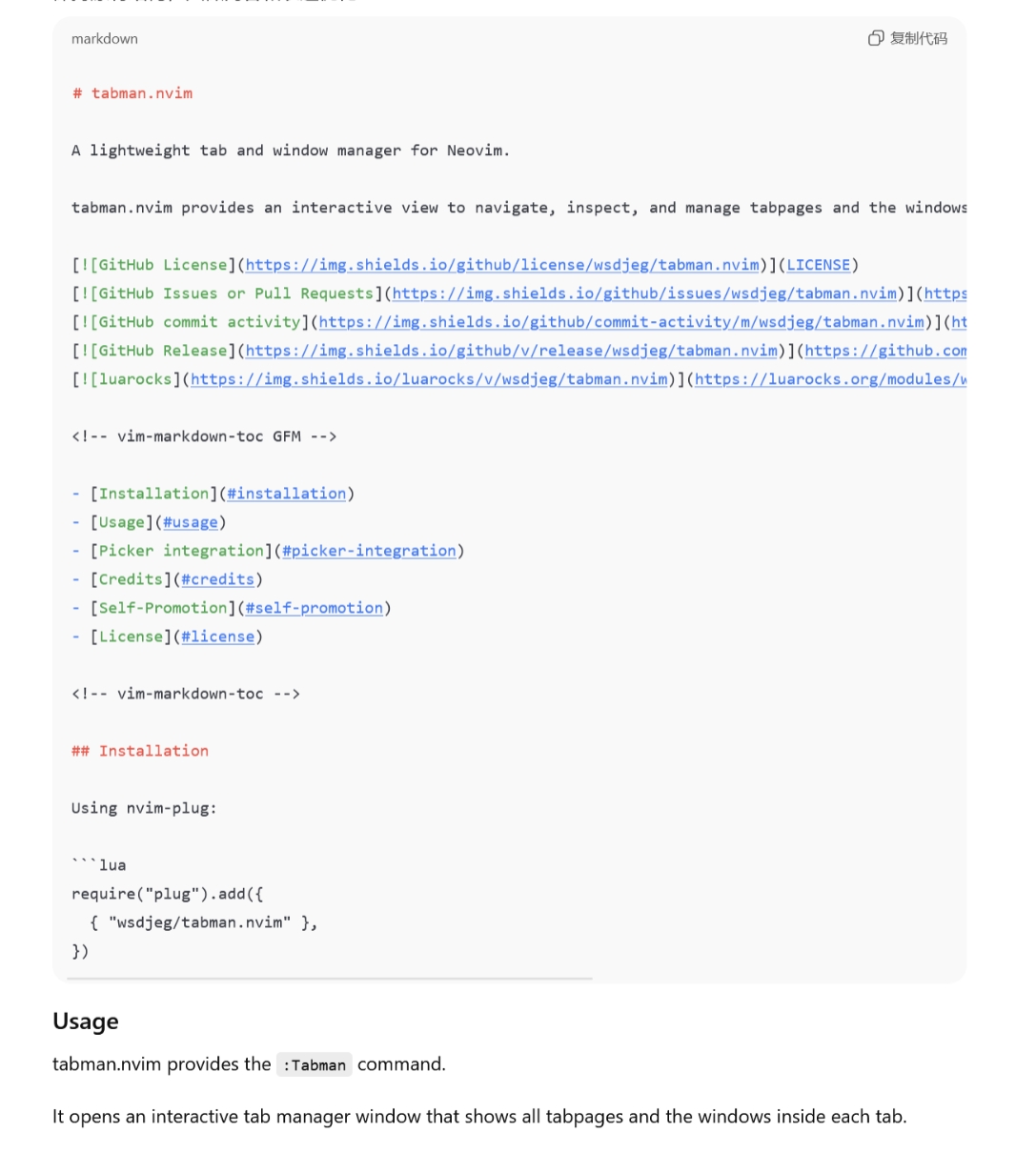
很长一段时间,AI 一直是一个非常热门的话题。衍生出来的工具也非常的多,从我接触的顺序来看, 从最早的 tabline 补全到后来的 GitHub Copilot 补全。再到后来的 ChatGPT 以及之后来的各自类似的 Chat 工具。 前面我使用最多的还是网页版的 ChatGPT,使用过程中最大的一个问题就是请求结果渲染展示一直是有问题的。 尤其是让他展示 markdown 源码时。比如: markdown display error 上述图片 Usage 实际上也在代码块里面是,但是由于 markdown 内还有代码块,导致解析展示出问题。 正是由于这个原因,我制作了 Neovim AI 聊天插件 chat.nvim, 我需要以纯文本展示请求结果的完整内容。

安装及配置 chat.nvim

使用任意插件管理器,比如 nvim-plug:
local deepseek_api_key = 'xxxxxxxxxxx'
local free_chatgpt_api_key = 'xxxxxxxxxxxxxxx'
require('plug').add({
  {
    'wsdjeg/chat.nvim',
    depends = {
      {
        'wsdjeg/job.nvim', -- Required
        'wsdjeg/picker.nvim', -- Optional but recommended
      },
    },
  },
})

使用操作界面

chat.nvim 默认是上下分屏两个浮窗,分别为输入窗口和结果展示窗口。如图: chat.nvim

多 AI 提供商支持

chat.nvim 内置支持多种 AI 服务提供商: 同时还支持自定义提供商,你可以创建 ~/.config/nvim/lua/chat/providers/<provider_name>.lua 来添加新的 AI 服务。

picker.nvim 集成

chat.nvim 自带了一些 picker.nvim 插件的拓展,目前支持的拓展有:
  1. :Picker chat - 搜索历史对话 picker-chat
  2. :Picker chat_provider - 搜索并切换 provider picker-chat
  3. :Picker chat_model - 搜索并切换当前 provider 提供的模型 picker-chat

内置工具支持

chat.nvim 支持丰富的内置工具,让 AI 可以直接与编辑器交互:

文件操作工具

  • @read_file - 读取文件内容(支持指定行范围)
  • @find_files - 搜索文件
  • @search_text - 搜索文件内容(支持正则表达式、文件类型过滤等)
  • @git_diff - 查看 git diff 信息

网页工具

  • @web_search - 网络搜索(支持 Firecrawl、Google、SerpAPI)
  • @fetch_web - 获取网页内容

记忆系统

chat.nvim 实现了三层记忆系统,灵感来自认知心理学:
  • 工作记忆 (Working Memory) ⚡ - 当前会话的任务和决策(最高优先级)
  • 日常记忆 (Daily Memory) 📅 - 临时任务和短期目标(7-30天后自动过期)
  • 长期记忆 (Long-term Memory) 💾 - 永久知识存储(事实、偏好、技能)
相关工具:
  • @extract_memory - 提取并存储记忆
  • @recall_memory - 回忆相关信息

其他工具

  • @set_prompt - 设置系统提示词
  • @plan - 任务计划管理
  • @zettelkasten_create - 创建笔记(需要 zettelkasten.nvim)
  • @zettelkasten_get - 获取笔记(需要 zettelkasten.nvim)

会话管理

chat.nvim 提供了完整的会话管理功能:
  • :Chat - 打开当前会话
  • :Chat new - 创建新会话
  • :Chat prev / :Chat next - 切换会话
  • :Chat clear - 清空当前会话
  • :Chat delete - 删除当前会话
  • :Chat save <path> - 保存会话到文件
  • :Chat load <path> - 从文件或 URL 加载会话
  • :Chat share - 分享会话到 pastebin
  • :Chat preview - 在浏览器中预览会话
chat preview

并行会话

chat.nvim 支持同时运行多个独立的聊天会话:
  • 每个会话可以使用不同的 AI 模型
  • 会话之间保持独立的对话历史和设置
  • 使用 :Chat prev:Chat next 快速切换

IM 集成

chat.nvim 支持多种第三方聊天平台集成,可以将 Neovim 的 AI 对话能力扩展到各个平台:
平台 图标 双向通信 特点
Discord 💬 ✅ 是 完整的机器人功能,会话绑定
飞书 🐦 ✅ 是 飞书机器人,消息轮询
钉钉 📱 ✅ 是* Webhook(单向)或 API(双向)
企业微信 💼 ✅ 是* 企业微信 Webhook 或 API
Telegram ✈️ ✅ 是 Bot API,支持群组和私聊

Discord 集成

chat-nvim-discord 通过 Discord 集成,你可以:
  • 在 Discord 频道中与 AI 助手交互
  • 使用 :Chat bridge discord 绑定当前会话
  • 使用 /session 命令确认绑定
  • 通过提及机器人或回复消息来触发对话

飞书集成

chat-nvim-lark 飞书集成支持:
  • 双向消息通信
  • 自动轮询新消息
  • 长消息支持(最多 30,720 字符)

消息同步

通过这些集成,可以实现 Neovim 与各平台的消息同步: chat-nvim-integration-sync 这些集成功能让 chat.nvim 成为一个多平台的 AI 对话中心,不仅可以在 Neovim 内使用,还可以作为各种聊天平台的智能助手。

HTTP API

chat.nvim 内置了 HTTP 服务器功能,提供 RESTful API 接口:
http = {
  host = '127.0.0.1',
  port = 7777,
  api_key = 'your-secret-key',
}

API 端点

  • POST / - 发送消息到指定会话
  • GET /sessions - 获取所有活跃会话列表
  • GET /session - 获取会话的 HTML 预览(需要 id 参数)

使用示例

# 发送消息
curl -X POST http://127.0.0.1:7777/ \
  -H "X-API-Key: your-secret-key" \
  -H "Content-Type: application/json" \
  -d '{"session": "my-session", "content": "Hello from curl!"}'

# 获取会话列表
curl -H "X-API-Key: your-secret-key" http://127.0.0.1:7777/sessions
这使得外部应用可以轻松集成 chat.nvim 的对话能力,比如 CI/CD 流水线、监控系统等。

快捷键

在输入窗口中:
  • <Enter> - 发送消息
  • q - 关闭聊天窗口
  • <Tab> - 切换输入和结果窗口
  • Ctrl-C - 取消当前请求
  • Ctrl-N - 新建会话
  • r - 重试上次取消的请求
  • alt-h / alt-l - 上一个/下一个会话
在结果窗口中:
  • q - 关闭聊天窗口
  • <Tab> - 切换输入和结果窗口

总结

从最初为了解决 markdown 渲染问题而开发的聊天插件,到现在支持多种 AI 提供商、内置工具系统、三层记忆架构、多平台集成、HTTP API 等功能,chat.nvim 已经发展成为一个功能强大的 Neovim AI 助手。它不仅能帮助你在编辑器内高效地与 AI 对话,还能通过各种工具直接操作文件、搜索网络、管理记忆,真正成为了开发者的智能伙伴。 更多详细信息,请访问 chat.nvim GitHub 仓库

Neovim buffer 删除插件 bufdel.nvim

2026年1月28日 08:00
在使用 Neovim 的过程中,「删除 buffer 但不破坏窗口布局」一直是一个高频需求。 社区里已经有不少相关插件,比如 bufdelete.nvimnvim-bufdelmini.bufremove,以及 snacks.bufdelete。 但是在我自己长期使用过程中,总觉得缺少了我需要的功能。 于是,我写了一个新的插件:bufdel.nvim。 这篇文章简单聊聊它解决了什么问题、有哪些设计取舍,以及它和现有方案的区别。

为什么再写一个 bufdel 插件

先说结论:bufdel.nvim 设计初衷是为了删除 buffer 这个操作的每一步更加可控。 我写这个插件,主要有几个原因:
  1. bufdelete.nvim 已经 archived bufdelete.nvim 是一个非常优秀的插件,我也之前也使用过一段时间。但它目前已经被标记为 archived,不再维护。 我希望有一个持续维护、可扩展的替代方案,同时保留它最核心、最优雅的设计。
  2. 我需要更灵活的 buffer 选择方式 很多插件只支持按照 buffer number 删除,但是再实际使用中,我经常需要:
    • 按照 buffer name 删除
    • 按照正则表达式匹配到的 buffer 名称删除
    • 按照特定的条件函数删除(比如:未修改、已列出、非当前 buffer)
  3. 删除之后,切换到哪个 buffer,应该是可控的 前面提到的几个插件大多数在删除 buffer 后,选择切换到 bufnr('#')。但我更希望能明确指定下一个 buffer 是哪个或者通过函数,完全自定义切换逻辑。

bufdel.nvim 的核心设计

  1. 一个核心 API:delete(buffers, opt) bufdel.nvim 只暴露一个核心函数,但是它支持的参数非常灵活。不少其他的插件会设计两个 API 函数 deletewipeout,其实完全可以合并,通过 opt 内一个选项区分。
    require('bufdel').delete(buffers, opt)
    
  2. buffers 参数:你想怎么选 buffer 都行 buffers 支持多种形式:
    • 单个 buffer number
    • buffer 名称(字符串)
    • Vim 正则(匹配 buffer name)
    • table(混合 bufnr / bufname / regex)
    • 函数过滤器
    比如,删除所有已列出、已保存的非当前 buffer:
    require('bufdel').delete(function(buf)
      return not vim.bo[buf].modified
        and vim.bo[buf].buflisted
        and buf ~= vim.api.nvim_get_current_buf()
    end, { wipe = true })
    
    这类逻辑,在很多其他插件里是做不到的。
  3. 正则匹配 buffer 名称 如果你想清理一类文件,比如所有 .txt buffer:
    require('bufdel').delete('.txt$', { wipe = true })
    
    这在日常清理临时文件、日志文件时非常方便。

删除之后,切到哪个 buffer

这是 bufdel.nvim 的一个重点特性。
  1. 使用函数自定义切换逻辑(推荐)
    require('bufdel').delete(filter, {
      wipe = true,
      switch = function(deleted_buf)
        return vim.fn.bufnr('#') -- 切换到 alternate buffer
      end,
    })
    
    你可以在这里实现任何策略,只要返回一个有效的 buffer number。
  2. 内置几种常用策略 如果不想写函数,也可以直接用字符串:
    switch = 'alt'
    
    当前支持:
    • alt:alternate buffer(#)
    • current:保持当前 buffer
    • lastused:最近使用的 buffer
    • next / prev:下一个 / 上一个 buffer
  3. 直接指定 buffer number
    switch = 3
    

用户命令Bdelete/Bwipeout

bufdel.nvim 提供了两个命令:
:Bdelete
:Bwipeout
行为和 :bdelete / :bwipeout 一致,但不会改变窗口布局。 示例:
:Bdelete
:Bdelete 3
:Bdelete 2 5 7
:3,6Bdelete

一个 Vim 本身的限制说明

和原生 :bdelete 一样: 纯数字的 buffer 名称不能作为用户命令参数使用。 比如:
:e 123
:Bdelete 123
这时必须使用 bufnr,而不是 bufname。

自定义用户事件

bufdel.nvim 会在删除 buffer 前后触发两个事件:
User BufDelPre
User BufDelPost
示例:
vim.api.nvim_create_autocmd('User', {
  pattern = 'BufDelPost',
  callback = function(ev)
    -- 被删除的 bufnr 在 ev.data.buf 中
  end,
})
如果删除失败,BufDelPost 不会触发。

和其他插件的简单对比

下面是基于我个人使用需求的一个对比表:
Feature / Plugin bufdel.nvim bufdelete.nvim nvim-bufdel snacks.bufdelete mini.bufremove
Preserve window layout
Delete by bufnr
Delete by bufname
User Command
Lua filter function
Regex buffer matching
Post-delete buffer switch
User autocmd hooks
如果你发现表格里有不准确的地方,欢迎直接提 issue。

写在最后

bufdel.nvim 并不是一个“什么都做”的插件,相反,我刻意让它保持:
  • 功能边界清晰
  • API 简单
  • 逻辑可控
如果你:
  • 经常清理 buffer
  • 在意窗口布局
  • 希望对 buffer 删除过程有更多掌控
那它可能正好适合你。 👉 GitHub:wsdjeg/budel.nvim 如果你觉得有用,欢迎 star ⭐

Neovim 日历插件 calendar.nvim

2026年1月4日 08:00
早在写 zettelkasten.nvim 插件的时候,我就想做一个日历试图,用来查看笔记的日期。可能是因为需求不是那么的迫切, 所以一直拖着没有写这样功能。 趁着这次假日,抽空写了这样一个日历插件 calendar.nvim,功能目前还是非常简单的,只是一个简单的日历月视图。 这算是 2026 年我的第一个 Neovim 插件,这篇文字主要介绍 calendar.nvim 插件的安装使用以及制作这一插件遇到的一些问题。

插件安装

calendar.nvim 是使用 Lua 实现的 Neovim 插件,零依赖,可以使用任意插件管理器直接安装,比如:nvim-plug
require('plug').add({
  {
    'wsdjeg/calendar.nvim',
  },
})

基本使用

插件的默认配置如下:
require('calendar').setup({
  mark_icon = '•',
  keymap = {
    next_month = 'L',      -- 下个月
    previous_month = 'H',  -- 上个月
    next_day = 'l',        -- 后一天
    previous_day = 'h',    -- 前一天
    next_week = 'j',       -- 下一周
    previous_week = 'k',   -- 前一周
    today = 't',           -- 跳到今天
  },
  highlights = {
    current = 'Visual',
    today = 'Todo',
    mark = 'Todo',
  },
})

记录一些坑

  1. nvim_buf_set_extmark 函数中 col 等参数指的并不是屏幕 column 列表,而是字符串的字节,
  2. overlay virt_text 的高亮会清除掉当前位置的 extmark hl_group 高亮
最终解决逻辑是给每一个需要标记的位置按照如下逻辑添加 virt_text,其高亮参数传输一个高亮列表.
local hls = { highlights.mark }

if is_totay() then
  table.insert(hls, highlights.today)
end

if is_current() then
  table.insert(hls, highlights.current)
end

vim.api.nvim_buf_set_extmark(buf, ns, col, {
  virt_text = { { mark_icon, hls } },
})

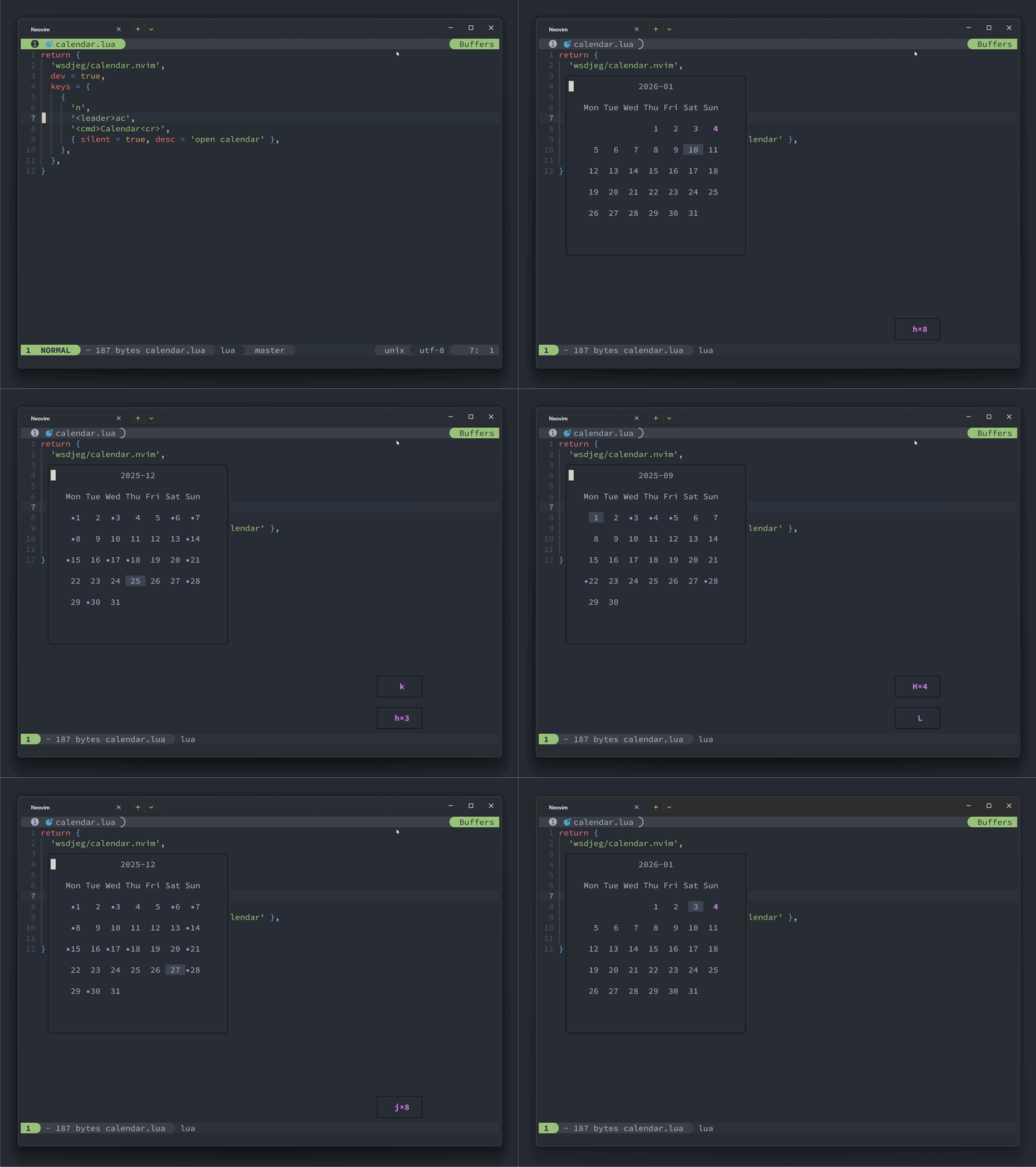
最终效果图

这里展示了一个添加了 zettelkasten 拓展的日历:
local zk_ext = {}

function zk_ext.get(year, month)
  local notes = require('zettelkasten.browser').get_notes()
  local marks = {}
  for _, note in ipairs(notes) do
    local t = vim.split(note.id, '-')
    if tonumber(t[1]) == year and tonumber(t[2]) == month then
      table.insert(
        marks,
        {
          year = tonumber(t[1]),
          month = tonumber(t[2]),
          day = tonumber(t[3]),
        }
      )
    end
  end

  return marks
end

require('calendar.extensions').register(zk_ext)
最终的效果图如下: calendar-demo

文件路径大小写敏感导致 Lua 模块重载

2025年12月28日 08:00

事情起因

时隔十年,再次被 Windows 系统的路劲大小写问题坑了一把。记得上一次被坑是因为写 Vim Script 的 autoload 脚本时出现的问题。 最近使用 Lua 重新写了 ChineseLinter.vim 这个插件,最开始的文件结构: 文件:plugins/chineselinter.lua
return {
  'wsdjeg/ChineseLinter.nvim',
  dev = true,
  opts = {
    ignored_errors = { 'E015', 'E013', 'E020', 'E021' },
  },
  cmds = { 'CheckChinese' },
  desc = 'Chinese Document Language Standards Checking Tool',
}
按照以上配置,无论如何 ignored_errors 配置都无法起效。

寻找原因

上述插件在载入时没有报错,说明被成功载入并且执行了 setup 函数。我试着用单独的脚本来测试,并且打入一些日志:
vim.opt.runtimepath:append("D:/wsdjeg/job.nvim")
vim.opt.runtimepath:append("D:/wsdjeg/logger.nvim")
vim.opt.runtimepath:append("D:/wsdjeg/nvim-plug")

require('plug').setup({

    bundle_dir = 'D:/bundle_dir',
    raw_plugin_dir = 'D:/bundle_dir/raw_plugin',
    -- ui = 'notify',
    http_proxy = 'http://127.0.0.1:7890',
    https_proxy = 'http://127.0.0.1:7890',
    enable_priority = false,
    enable_luarocks = true,
    max_processes = 16,
    dev_path = 'D:/wsdjeg',
})

require("plug").add({
	{
		"wsdjeg/ChineseLinter.nvim",
		dev = true,
		opts = {
			ignored_errors = { "E015", "E013", "E020", "E021" },
		},
		cmds = { "CheckChinese" },
		desc = "Chinese Document Language Standards Checking Tool",
	},
})
日志结果如下:
[ 23:35:32:449 ] [ Info  ] [ cnlint ] module is loaded
[ 23:35:32:450 ] [ Info  ] [ cnlint ] setup function is called
[ 23:35:32:450 ] [ Info  ] [   plug ] load plug: ChineseLinter.nvim in 4.3624ms
[ 23:35:32:451 ] [ Info  ] [ cnlint ] module is loaded
[ 23:35:32:451 ] [ Info  ] [ cnlint ] check function is called
不难看出 ChineseLinter 模块被载入了两次,第一次载入及setup函数是 nvim-plug 在执行,执行后计算的载入时间,第二次是执行 CheckChinese 命令时, 而这一命令是在 plugin/ChineseLinter.lua 内定义的:
vim.api.nvim_create_user_command("CheckChinese", function(opt)
	require("ChineseLinter").check()
end, { nargs = "*" })
问题就在这里,这个命令内 require('ChineseLinter') 不应该再次载入模块文件,因为前面 nvim-plug 已经执行过一次了,正常情况下 package.loaded 内会缓存模块。 看一下 nvim-plug 载入 Lua 插件的逻辑,它会给 plugSpec 自动设置一个模块名称, 以便于自动执行 require(plugSpec.module).setup(plugSpec.opts)。 问题就在于这个 module 名称生成函数原先是:
local function get_default_module(name)
  return name
    :lower()
    :gsub('[%.%-]lua$', '')
    :gsub('^n?vim-', '')
    :gsub('[%.%-]n?vim', '')
end
也就是说,按照上述载入插件方式,nvim-plug 执行的是 require('chineselinter'),这在 Windows 系统下, 因为文件 lua/ChineseLinter/init.lua 已存在,那么上述 require 函数就会读取这个模块。 而 :CheckChinese 命令实际上调用的模块是 require('ChineseLinter')。 因为 Lua 的模块名称实际上是大小写敏感的,就会再次去寻找模块文件以载入。

如何修复?

我查阅了几个插件管理器,他们的获取模块名称的函数基本上逻辑类似,都使用了 lower() 函数:
---@param name string
---@return string
function M.normname(name)
  local ret = name:lower():gsub("^n?vim%-", ""):gsub("%.n?vim$", ""):gsub("[%.%-]lua", ""):gsub("[^a-z]+", "")
  return ret
end
实际上,最好是不要自动去将模块的名字全部小写,按照仓库的名称来最合适,去除掉前后缀,修改 nvim-plug 如下:
diff --git a/lua/plug/loader.lua b/lua/plug/loader.lua
index d0fc7b6..957fcb7 100644
--- a/lua/plug/loader.lua
+++ b/lua/plug/loader.lua
@@ -68,8 +68,7 @@ end
 --- @param name string
 --- @return string
 local function get_default_module(name)
-    return name:lower()
-        :gsub('[%.%-]lua$', '')
+    return name:gsub('[%.%-]lua$', '')
         :gsub('^n?vim-', '')
         :gsub('[%.%-]n?vim', '')
 end
@@ -94,6 +93,13 @@ function M.parser(plugSpec)
     plugSpec.name = check_name(plugSpec)
     if not plugSpec.module then
         plugSpec.module = get_default_module(plugSpec.name)
+        log.info(
+            string.format(
+                'set %s default module name to %s',
+                plugSpec.name,
+                plugSpec.module
+            )
+        )
     end
     if #plugSpec.name == 0 then
         plugSpec.enabled = false
考虑到 Windows 系统的大小写敏感,以及 Shift 键这么难按,我将插件的名称以及其内模块的名称都改成了小写,修改后插件的安装方式:
return {
  'wsdjeg/chineselinter.nvim',
  dev = true,
  opts = {
    ignored_errors = { 'E015', 'E013', 'E020', 'E021' },
  },
  cmds = { 'CheckChinese' },
  desc = 'Chinese Document Language Standards Checking Tool',
}

总结

上述核心问题在于 Lua 的 require() 函数读取模块缓存时判断的是 package.load[key],这里的 key 是大小写敏感的。 而发现缓存不存在时,依照 key 去载入文件时,在 Windows 系统下路劲又是不敏感的, 会导致同一个模块被不同的大小写模块名称多次载入。

Neovim 悬浮滚动条 scrollbar.nvim

2025年12月25日 08:00

scrollbar.nvim 简介

好几年前,我使用 Vim Script 实现过一个悬浮侧栏插件 scrollbar.vim, 前段时间该插件使用 Lua 进行了重写并改名称为 scrollbar.nvim, 重写后的插件只支持 Neovim。 scrollbar.nvim 会在当前窗口的右侧使用浮窗绘制一个滚动条,其位置依据当前窗口显示的内容在整个文件中所在的行数, 并且随着鼠标移动、滚屏等操作上下移动。

安装 scrollbar.nvim

使用 nvim-plug 进行安装:
require('plug').add({
    {
        'wsdjeg/scrollbar.nvim'
    }
})
或者使用 luarocks 进行安装:
luarocks install scrollbar.nvim

插件的配置

require('scrollbar').setup({
  max_size = 10,
  min_size = 5,
  width = 1,
  right_offset = 1,
  excluded_filetypes = {
    'startify',
    'git-commit',
    'leaderf',
    'NvimTree',
    'tagbar',
    'defx',
    'neo-tree',
    'qf',
  },
  shape = {
    head = '▲',
    body = '█',
    tail = '▼',
  },
  highlight = {
    head = 'Normal',
    body = 'Normal',
    tail = 'Normal',
  },
  debug = false,
})

如何正确地使用 ftplugin 目录

2025年12月23日 08:00
前面再阅读一些插件源码时,发现一个问题,很多插件的使用了 ftplugin 这个目录,其内的脚本文件中直接使用了 setlocal xx=xx 这样的语法。 在早期的 Neovim 或者 Vim 版本中这样确实没有问题,但是随着 Neovim 功能特性增加。这样写就会容易出错。 实际上,直到目前为止 Neovim 和 Vim 的官方文档 :h ftplugin 内的示例还是:
" Only do this when not done yet for this buffer
if exists("b:did_ftplugin")
  finish
endif
let b:did_ftplugin = 1
setlocal textwidth=70
Neovim 插件的 ftplugin 目录是一个特殊的文件夹,其内的文件会在 FileType 事件触发是被载入。 看一下 Neovim 的源码,ftplugin 目录下的文件是如何被载入的。
augroup filetypeplugin
  au FileType * call s:LoadFTPlugin()

  func! s:LoadFTPlugin()
    if exists("b:undo_ftplugin")
      exe b:undo_ftplugin
      unlet! b:undo_ftplugin b:did_ftplugin
    endif

    let s = expand("<amatch>")
    if s != ""
      if &cpo =~# "S" && exists("b:did_ftplugin")
	" In compatible mode options are reset to the global values, need to
	" set the local values also when a plugin was already used.
	unlet b:did_ftplugin
      endif

      " When there is a dot it is used to separate filetype names.  Thus for
      " "aaa.bbb" load "aaa" and then "bbb".
      for name in split(s, '\.')
        " Load Lua ftplugins after Vim ftplugins _per directory_
        " TODO(clason): use nvim__get_runtime when supports globs and modeline
        " XXX: "[.]" in the first pattern makes it a wildcard on Windows
        exe $'runtime! ftplugin/{name}[.] ftplugin/{name}_*. ftplugin/{name}/*.'
      endfor
    endif
  endfunc
augroup END
以上内容不难看出,Neovim 实际上是监听了 FileType 这个事件,然后根据 expand('<amatch>') 的值来执行 :runtime 命令。 但是,随着 Neovim 和 Vim 增加了设置非当前 buffer 的 option 这一功能后。就会出现这样问题,当 FileType 事件触发时,触发的 buffer 并非是当前 buffer。 那么在 ftplugin 内如果使用了 setlocal 这样的命令,有可能会设置错了缓冲区。 test_ft.lua
local log = require("logger").derive("ft")
log.info("nvim_get_current_buf() is " .. vim.api.nvim_get_current_buf())
log.info("nvim_get_current_win() is " .. vim.api.nvim_get_current_win())
log.info("-----------------------------------------------------")
local real_current_win = vim.api.nvim_get_current_win()
local newbuf = vim.api.nvim_create_buf(true, false)

local events = {}

for _, v in ipairs(vim.fn.getcompletion("", "event")) do
	if not vim.endswith(v, "Cmd") then
		table.insert(events, v)
	end
end

local id = vim.api.nvim_create_autocmd(events, {
	group = vim.api.nvim_create_augroup("test_ft", { clear = true }),
	pattern = { "*" },
	callback = function(ev)
		log.info("-----------------------------------------------------")
		log.info("event is " .. ev.event)
		log.info("ev.buf is " .. ev.buf)
		log.info("nvim_get_current_buf() is " .. vim.api.nvim_get_current_buf())
		log.info("nvim_get_current_win() is " .. vim.api.nvim_get_current_win())
		log.info("real_current_win's buf is" .. vim.api.nvim_win_get_buf(real_current_win))
	end,
})

vim.api.nvim_open_win(newbuf, false, { split = "above" })
vim.api.nvim_set_option_value("filetype", "test123", { buf = newbuf })
vim.api.nvim_del_autocmd(id)
log.info("-----------------------------------------------------")
log.info("nvim_get_current_buf() is " .. vim.api.nvim_get_current_buf())
log.info("nvim_get_current_win() is " .. vim.api.nvim_get_current_win())
[ 23:50:19:932 ] [ Info  ] [     ft ] nvim_get_current_buf() is 7
[ 23:50:19:932 ] [ Info  ] [     ft ] nvim_get_current_win() is 1000
[ 23:50:19:932 ] [ Info  ] [     ft ] -----------------------------------------------------
[ 23:50:19:933 ] [ Info  ] [     ft ] -----------------------------------------------------
[ 23:50:19:933 ] [ Info  ] [     ft ] event is WinNew
[ 23:50:19:933 ] [ Info  ] [     ft ] ev.buf is 7
[ 23:50:19:933 ] [ Info  ] [     ft ] nvim_get_current_buf() is 7
[ 23:50:19:933 ] [ Info  ] [     ft ] nvim_get_current_win() is 1008
[ 23:50:19:933 ] [ Info  ] [     ft ] real_current_win's buf is7
[ 23:50:19:934 ] [ Info  ] [     ft ] -----------------------------------------------------
[ 23:50:19:934 ] [ Info  ] [     ft ] event is BufWinEnter
[ 23:50:19:934 ] [ Info  ] [     ft ] ev.buf is 9
[ 23:50:19:934 ] [ Info  ] [     ft ] nvim_get_current_buf() is 9
[ 23:50:19:934 ] [ Info  ] [     ft ] nvim_get_current_win() is 1008
[ 23:50:19:934 ] [ Info  ] [     ft ] real_current_win's buf is7
[ 23:50:19:953 ] [ Info  ] [     ft ] -----------------------------------------------------
[ 23:50:19:953 ] [ Info  ] [     ft ] event is Syntax
[ 23:50:19:953 ] [ Info  ] [     ft ] ev.buf is 9
[ 23:50:19:953 ] [ Info  ] [     ft ] nvim_get_current_buf() is 9
[ 23:50:19:953 ] [ Info  ] [     ft ] nvim_get_current_win() is 1008
[ 23:50:19:953 ] [ Info  ] [     ft ] real_current_win's buf is7
[ 23:50:19:954 ] [ Info  ] [     ft ] -----------------------------------------------------
[ 23:50:19:954 ] [ Info  ] [     ft ] event is FileType
[ 23:50:19:954 ] [ Info  ] [     ft ] ev.buf is 9
[ 23:50:19:954 ] [ Info  ] [     ft ] nvim_get_current_buf() is 9
[ 23:50:19:954 ] [ Info  ] [     ft ] nvim_get_current_win() is 1008
[ 23:50:19:954 ] [ Info  ] [     ft ] real_current_win's buf is7
[ 23:50:19:954 ] [ Info  ] [     ft ] -----------------------------------------------------
[ 23:50:19:954 ] [ Info  ] [     ft ] event is OptionSet
[ 23:50:19:954 ] [ Info  ] [     ft ] ev.buf is 0
[ 23:50:19:954 ] [ Info  ] [     ft ] nvim_get_current_buf() is 9
[ 23:50:19:954 ] [ Info  ] [     ft ] nvim_get_current_win() is 1008
[ 23:50:19:954 ] [ Info  ] [     ft ] real_current_win's buf is7
[ 23:50:19:954 ] [ Info  ] [     ft ] -----------------------------------------------------
[ 23:50:19:954 ] [ Info  ] [     ft ] nvim_get_current_buf() is 7
[ 23:50:19:954 ] [ Info  ] [     ft ] nvim_get_current_win() is 1000
可以看到,在 event 触发 callback 函数内 nvim_get_current_win 和 nvim_get_current_buf 都临时被修改了。 测试一下,不开窗口效果呢?
local log = require("logger").derive("ft")
log.info("nvim_get_current_buf() is " .. vim.api.nvim_get_current_buf())
log.info("nvim_get_current_win() is " .. vim.api.nvim_get_current_win())
log.info("-----------------------------------------------------")
local real_current_win = vim.api.nvim_get_current_win()
local newbuf = vim.api.nvim_create_buf(true, false)

local events = {}

for _, v in ipairs(vim.fn.getcompletion("", "event")) do
	if not vim.endswith(v, "Cmd") then
		table.insert(events, v)
	end
end

local id = vim.api.nvim_create_autocmd(events, {
	group = vim.api.nvim_create_augroup("test_ft", { clear = true }),
	pattern = { "*" },
	callback = function(ev)
		log.info("-----------------------------------------------------")
		log.info("event is " .. ev.event)
		log.info("ev.buf is " .. ev.buf)
		log.info("nvim_get_current_buf() is " .. vim.api.nvim_get_current_buf())
		log.info("nvim_get_current_win() is " .. vim.api.nvim_get_current_win())
		log.info("real_current_win's buf is" .. vim.api.nvim_win_get_buf(real_current_win))
	end,
})

-- vim.api.nvim_open_win(newbuf, false, { split = "above" })
vim.api.nvim_set_option_value("filetype", "test123", { buf = newbuf })
vim.api.nvim_del_autocmd(id)
log.info("-----------------------------------------------------")
log.info("nvim_get_current_buf() is " .. vim.api.nvim_get_current_buf())
log.info("nvim_get_current_win() is " .. vim.api.nvim_get_current_win())
[ 23:53:49:058 ] [ Info  ] [     ft ] nvim_get_current_buf() is 10
[ 23:53:49:058 ] [ Info  ] [     ft ] nvim_get_current_win() is 1000
[ 23:53:49:058 ] [ Info  ] [     ft ] -----------------------------------------------------
[ 23:53:49:078 ] [ Info  ] [     ft ] -----------------------------------------------------
[ 23:53:49:078 ] [ Info  ] [     ft ] event is Syntax
[ 23:53:49:078 ] [ Info  ] [     ft ] ev.buf is 12
[ 23:53:49:078 ] [ Info  ] [     ft ] nvim_get_current_buf() is 12
[ 23:53:49:078 ] [ Info  ] [     ft ] nvim_get_current_win() is 1001
[ 23:53:49:078 ] [ Info  ] [     ft ] real_current_win's buf is10
[ 23:53:49:079 ] [ Info  ] [     ft ] -----------------------------------------------------
[ 23:53:49:079 ] [ Info  ] [     ft ] event is FileType
[ 23:53:49:079 ] [ Info  ] [     ft ] ev.buf is 12
[ 23:53:49:079 ] [ Info  ] [     ft ] nvim_get_current_buf() is 12
[ 23:53:49:079 ] [ Info  ] [     ft ] nvim_get_current_win() is 1001
[ 23:53:49:079 ] [ Info  ] [     ft ] real_current_win's buf is10
[ 23:53:49:079 ] [ Info  ] [     ft ] -----------------------------------------------------
[ 23:53:49:079 ] [ Info  ] [     ft ] event is OptionSet
[ 23:53:49:079 ] [ Info  ] [     ft ] ev.buf is 0
[ 23:53:49:079 ] [ Info  ] [     ft ] nvim_get_current_buf() is 12
[ 23:53:49:079 ] [ Info  ] [     ft ] nvim_get_current_win() is 1001
[ 23:53:49:079 ] [ Info  ] [     ft ] real_current_win's buf is10
[ 23:53:49:079 ] [ Info  ] [     ft ] -----------------------------------------------------
[ 23:53:49:079 ] [ Info  ] [     ft ] nvim_get_current_buf() is 10
[ 23:53:49:079 ] [ Info  ] [     ft ] nvim_get_current_win() is 1000
这窗口 1001 是什么鬼?临时隐藏窗口?
local log = require("logger").derive("ft")
log.info("nvim_get_current_buf() is " .. vim.api.nvim_get_current_buf())
log.info("nvim_get_current_win() is " .. vim.api.nvim_get_current_win())
log.info("-----------------------------------------------------")
local real_current_win = vim.api.nvim_get_current_win()
local newbuf = vim.api.nvim_create_buf(true, false)

local events = {}

for _, v in ipairs(vim.fn.getcompletion("", "event")) do
	if not vim.endswith(v, "Cmd") then
		table.insert(events, v)
	end
end

local id = vim.api.nvim_create_autocmd(events, {
	group = vim.api.nvim_create_augroup("test_ft", { clear = true }),
	pattern = { "*" },
	callback = function(ev)
		log.info("-----------------------------------------------------")
		log.info("event is " .. ev.event)
		log.info("ev.buf is " .. ev.buf)
		log.info("nvim_get_current_buf() is " .. vim.api.nvim_get_current_buf())
		log.info("nvim_get_current_win() is " .. vim.api.nvim_get_current_win())
        log.info('win count is ' .. vim.fn.winnr('$'))
        log.info('winconfig is ' .. vim.inspect(vim.api.nvim_win_get_config(vim.api.nvim_get_current_win())))
		log.info("real_current_win's buf is" .. vim.api.nvim_win_get_buf(real_current_win))
	end,
})

-- vim.api.nvim_open_win(newbuf, false, { split = "above" })
vim.api.nvim_set_option_value("filetype", "test123", { buf = newbuf })
vim.api.nvim_del_autocmd(id)
log.info("-----------------------------------------------------")
log.info("nvim_get_current_buf() is " .. vim.api.nvim_get_current_buf())
log.info("nvim_get_current_win() is " .. vim.api.nvim_get_current_win())
[ 23:57:49:249 ] [ Info  ] [     ft ] nvim_get_current_buf() is 9
[ 23:57:49:249 ] [ Info  ] [     ft ] nvim_get_current_win() is 1000
[ 23:57:49:249 ] [ Info  ] [     ft ] -----------------------------------------------------
[ 23:57:49:268 ] [ Info  ] [     ft ] -----------------------------------------------------
[ 23:57:49:268 ] [ Info  ] [     ft ] event is Syntax
[ 23:57:49:268 ] [ Info  ] [     ft ] ev.buf is 13
[ 23:57:49:268 ] [ Info  ] [     ft ] nvim_get_current_buf() is 13
[ 23:57:49:268 ] [ Info  ] [     ft ] nvim_get_current_win() is 1001
[ 23:57:49:268 ] [ Info  ] [     ft ] win count is 2
[ 23:57:49:268 ] [ Info  ] [     ft ] winconfig is {
  anchor = "NW",
  col = 0,
  external = false,
  focusable = false,
  height = 5,
  hide = false,
  mouse = false,
  relative = "editor",
  row = 0,
  width = 168,
  zindex = 50
}
[ 23:57:49:268 ] [ Info  ] [     ft ] real_current_win's buf is9
[ 23:57:49:269 ] [ Info  ] [     ft ] -----------------------------------------------------
[ 23:57:49:269 ] [ Info  ] [     ft ] event is FileType
[ 23:57:49:269 ] [ Info  ] [     ft ] ev.buf is 13
[ 23:57:49:269 ] [ Info  ] [     ft ] nvim_get_current_buf() is 13
[ 23:57:49:269 ] [ Info  ] [     ft ] nvim_get_current_win() is 1001
[ 23:57:49:269 ] [ Info  ] [     ft ] win count is 2
[ 23:57:49:270 ] [ Info  ] [     ft ] winconfig is {
  anchor = "NW",
  col = 0,
  external = false,
  focusable = false,
  height = 5,
  hide = false,
  mouse = false,
  relative = "editor",
  row = 0,
  width = 168,
  zindex = 50
}
[ 23:57:49:270 ] [ Info  ] [     ft ] real_current_win's buf is9
[ 23:57:49:270 ] [ Info  ] [     ft ] -----------------------------------------------------
[ 23:57:49:270 ] [ Info  ] [     ft ] event is OptionSet
[ 23:57:49:270 ] [ Info  ] [     ft ] ev.buf is 0
[ 23:57:49:270 ] [ Info  ] [     ft ] nvim_get_current_buf() is 13
[ 23:57:49:270 ] [ Info  ] [     ft ] nvim_get_current_win() is 1001
[ 23:57:49:270 ] [ Info  ] [     ft ] win count is 2
[ 23:57:49:270 ] [ Info  ] [     ft ] winconfig is {
  anchor = "NW",
  col = 0,
  external = false,
  focusable = false,
  height = 5,
  hide = false,
  mouse = false,
  relative = "editor",
  row = 0,
  width = 168,
  zindex = 50
}
[ 23:57:49:270 ] [ Info  ] [     ft ] real_current_win's buf is9
[ 23:57:49:270 ] [ Info  ] [     ft ] -----------------------------------------------------
[ 23:57:49:270 ] [ Info  ] [     ft ] nvim_get_current_buf() is 9
[ 23:57:49:270 ] [ Info  ] [     ft ] nvim_get_current_win() is 1000

这里说明一下,即便是 nvim_open_win 没有执行,Neovim 也会新建一个 autocmd windows,使用 win_gettype() 函数可以获取值为 “autocmd”。

本地化管理 Github secrets

2025年12月4日 08:00
有这样一个需求,要给自己多个 Github 仓库增加多个仓库 secrets,以便于 Action 中使用。 起初我是手动在每个仓库的设置页面逐一复制粘贴来添加的。但是这样效率明显太低,而且容易出错,此外后期若需要修改, 还得要重新操作。 于是我就想着是否可以使用脚本访问 Github API 来更改,查阅了 GitHub secrets API 文档,也找到了相关信息。 这篇文章就是我使用 Neovim 编辑并批量更新 Github 仓库 secrets 的完整方案。

安装 github.nvim

github.nvim 是一个 GitHub REST API 的 Lua 实现,用于在 Neovim 中访问 Github API。 早些年,我使用 Vim Script 写过类似的 Vim 插件 GitHub.vim, 而 github.nvim 算是 github.vim 的 Lua 重新实现版本,目前也仅仅实现了部分 API,会更具个人使用需要,陆续再实现其他的 API。 可以使用任意 Neovim 插件管理器安装,比如 nvim-plug,
require('plug').add({
  'wsdjeg/github.nvim',
})
当然了,你也可以使用 luarocks 安装:
luarocks install github.nvim

使用 github.nvim 访问仓库 secrts

由于 Github 的 secrts API 访问时,传输的数据都是要使用 libsodium 加密,因此需要安装 libsodium,以及对应的 Lua 模块。 这里记录一下 Windows 下安装这两个工具遇到的坑: 从官网下载 libsodium-1.0.20-stable-msvc.zip,解压后, 需要将 libsodium\x64\Release\v143\dynamic 目录加入到环境变量 PATH 内。
vim.env.PATH = vim.env.PATH
  .. ';'
  .. [[D:\Downloads\libsodium-1.0.20-stable-msvc\libsodium\x64\Release\v143\dynamic]]
此时再使用 luarocks 安装 luasodium,需要指定 libsodium 的安装目录:
luarocks install luasodium SODIUM_INCDIR=D:\Downloads\libsodium-1.0.20-stable-msvc\libsodium\include SODIUM_DIR=D:\Downloads\libsodium-1.0.20-stable-msvc\libsodium\x64\Release\v143\dynamic
如果提示安装成功后,在 Neovim 内如果使用以下 Lua 脚本,只有最后一个会报错。
local luasodium_ffi = require'luasodium' -- ok
local luasodium_ffi = require'luasodium.ffi' -- uses the FFI API (in a C module) ok
local luasodium_c = require'luasodium.core' -- uses the C API ok
local luasodium_pureffi = require'luasodium.pureffi' -- 失败,因为他使用 `require('ffi').load('sodium')`, 应该是 libsodium
最后一个失败的原因时因为 luasodium 源码文件 lib_loader.lua 中使用了 require(‘ffi’).load(‘sodium’) – 在luasodium 修复之前,可以临时如下操作 – 将 dynamic 目录里面的 libsodium.dll 改名为 sodium.dll 我也给 luasodium 提交了一个 PR 来解决这个问题。 确保上述 libsodium、luasodium、github.nvim 都安装好了之后,就可以使用以下脚本了:
local secrts = {
  {
    name = 'DOCKER_API_KEY',
    value = '12jdksjdiiwkdjsskkdj',
  },
  {
    name = 'LUAROCKS_API_KEY',
    value = 'ijnuhbygvtfcrdxesz',
  },
}
local repos = {
  'picker.nvim',
  'format.nvim',
  'tasks.nvim',
}
for _, repo in ipairs(repos) do
  for _, secrt in ipairs(secrts) do
    require('github.secrets').update_repository_secret('wsdjeg', repo, secrt)
  end
end
通过上述脚本,就给批量给自己的 Github 仓库设定 secrets,后期如果 API_KEY 修改了, 只需要修改脚本后再执行一次即可。

发现 Git 仓库中幽灵文件

2025年11月29日 08:00
在使用 Git 过程中,有时候会遇到这样的情况:某个以前删除的文件,不记得当时删除的 commit message 内容了, 也不记得完整的文件路径,只记得文件部分名称,想要找到是哪一个 commit 删除的,发现比较难。 实际上可以通过下方的命令来时间这一功能,首先使用下面的命令搜索删掉的文件路径包含 src 的文件列表:
git log --diff-filter=D --summary | rg delete | rg src
如果要使用 code-runner.nvim,执行并输出,需要设定 ps 的 runner:
require('code-runner').setup({
    runners = {
        lua = { exe = 'nvim', opt = { '-l', '-' }, usestdin = true },
        ps = { exe = 'powershell.exe', opt = { '-Command', '-' }, usestdin = true },
    },
})
快捷键调用 code-runner 输出:
[Running] powershell.exe -Command - STDIN

--------------------
 delete mode 100644 src/test/hello.c
 delete mode 100644 src/example/delete.c

[Done] exited with code=0, single=0 in 0.916431 seconds
获取到上述文件列表后,通过 git.nvim 执行以下命令,就可以打开 log 列表,列表内回车会分屏展示 commit diff。
:Git log -1 -- src/test/hello.c

使用 git-ghosts 拓展

最近,给 git.nvim 增加了一个 git-ghosts 的 picker.nvim 拓展。其实现的原理就是参考上述的命令执行顺序。 先获取已删除文件的列表,回车获取改文件的最后一次 commit 的哈希值,然后执行:
:Git show <commit_hash>

参考链接

  • https://www.linux88.com/restore-a-deleted-document-in-git/

Neovim 中使用 luarocks

2025年11月27日 08:00
luarocks 是 lua 常用的包管理器,类似于 python 的 pip。前面使用 Lua 实现了一个 Neovim 的插件管理器,而目前我自己正在维护的插件也都是使用 Lua 来实现的。 因此使用 luarocks 来管理插件,同时又让插件管理器 nvim-plug 支持 luarocks 就显得很有必要了。看了下目前主流的插件管理器 lazy.nvim、rocks.nvim 也是支持 luarcoks 的。

安装 luarocks

在 Windows 下可以使用 scoop 命令进行安装:
scoop install luarocks
这里需要注意一下,上述命令会自动安装 lua 5.4,但是 Neovim 内默认使用的是 luajit 兼容的 lua 5.1。因此为了避免下载的 rocks 不兼容。可以再执行以下命令:
scoop uninstall lua
scoop install lua51
安装完成后检查一下:
luarocks config | rg deploy
输出内容:
deploy_bin_dir = "D:\\Scoop\\apps\\luarocks\\current\\rocks\\bin"
deploy_lib_dir = "D:\\Scoop\\apps\\luarocks\\current\\rocks\\lib\\lua\\5.1"
deploy_lua_dir = "D:\\Scoop\\apps\\luarocks\\current\\rocks\\share\\lua\\5.1"

在 Neovim 内使用 luarocks

在 Neovim 内使用 :lua 命令或者使用 lua 开发 Neovim 插件时, 若想要使用 luarocks 安装的包,其原理就是将 luarocks 所安装的包位置加入到 package.pathpackage.cpath: nvim-plug 中实现这一步骤的逻辑如下: lua/plug/rocks/init.lua
function M.enable()
    if enabled then
        return
    end
    local ok, _ = pcall(function()
        local luarocks_config = vim.json.decode(
            vim.system({ 'luarocks', 'config', '--json' }):wait().stdout
        )
        package.path = package.path
            .. ';'
            .. luarocks_config.deploy_lua_dir
            .. [[\?.lua]]
            .. ';'
            .. luarocks_config.deploy_lua_dir
            .. [[\?\init.lua]]
            .. ';'
        package.cpath = package.cpath
            .. ';'
            .. luarocks_config.deploy_lib_dir
            .. '\\?.'
            .. luarocks_config.external_lib_extension
        -- 此处,还可以将 luarcoks bin 目录加入到 PATH
        vim.env.PATH = vim.env.PATH .. ';' .. luarocks_config.deploy_bin_dir
    end)
    if ok then
        enabled = true
    end
end

使用 nvim-plug 下载 rocks

可以在添加插件时,指定 type = 'rocks',比如: plugins/mru.lua
return {
    'wsdjeg/mru.nvim',
    events = { 'UIEnter' },
    opts = {
        enable_cache = true,
        ignore_path_regexs = {
            '/.git/',
            '/nvim/runtime/doc/',
            '.mp3$',
            '.mp4$',
            '.png$',
            '.jpg$',
            '.exe$',
            'nvim-mru.json$',
            'tags$',
        },
        enable_logger = true,
        sort_by = 'lastenter',
    },
    type = 'rocks',
    desc = 'mru(most recently used) files',
}
参考以上方式添加插件后,nvim-plug 在安装插件时会自动调用 luarocks install plugin_name 这一命令。

luarocks 的限制

在实现完上述功能后,才发现 luarocks 这个包管理器似乎还有一些限制。比如:
  1. 不支持同时安装多个插件。 因为 nvim-plug 是使用异步 job 调用外部命令的,因此支持多线程。 但是起初实现后发现,当同时执行多个 luarocks install 命令时, 只有第一个是成功的,后续的命令都有会报这一错误:Error: command ‘install’ requires exclusive write access。 解决的办法是为 luarocks 实现单独的 tasks 序列,逐一执行,这样的话插件的安装会非常慢。一个是单线程,一个是 16 线程 (max_processes = 16)
  2. 无法根据 plugSpec 获取的 rtp 目录位置 一个最简单 plugSpec 比如 { 'wsdjeg/mru.nvim' }, 默认 type 是 git,我是可以获取到该插件默认的 runtimepath 值为 plug.config.bundle_dir .. '/' .. 'wsdjeg/mru.nvim', 此时就可以根据这个目录是否存在来判断插件是否已安装。 但是,这样一个 plugSpec:
    return {
      'wsdjeg/mru.nvim',
      type = 'rocks',
    }
    
    将无法获取到默认的 runtimepath 目录位置,因为他的格式是
    D:/Scoop/apps/luarocks/current/rocks/lib/luarocks/rocks-5.1/mru.nvim/1.4.0-1
    
    最后面这个版本号,除非是 plugSpec 内指定,否则是无法判断到默认的值的。 最终的解决方案是分析 luarocks list 命令的输出内容,返回一个类似与这样的 lua table:
    return {
      ['mru.nvim'] = {
        rtp = 'D:/Scoop/apps/luarocks/current/rocks/lib/luarocks/rocks-5.1/mru.nvim/1.4.0-1',
      },
      ['rooter.nvim'] = {
        rtp = 'D:/Scoop/apps/luarocks/current/rocks/lib/luarocks/rocks-5.1/rooter.nvim/1.3.0-1',
      },
    }
    

将插件发布到 LuaRocks

这里主要使用到两个 Github actions:
  • googleapis/release-please-action
  • nvim-neorocks/luarocks-tag-release
使用 googleapis/release-please-action 来自动打 tag 并且新建 GitHub release,可以参考之前的文章《Github 仓库自动 release》。 使用 nvim-neorocks/luarocks-tag-release GitHub action 自动将 tag 上传到 luarocks.org。 在仓库根目录新建文件 .github/workflows/luarocks.yml:
name: Push to Luarocks

on:
  push:
    tags: # Will upload to luarocks.org when a tag is pushed
      - "*"
  pull_request: # Will test a local install without uploading to luarocks.org
  workflow_dispatch:

jobs:
  luarocks-upload:
    runs-on: ubuntu-22.04
    steps:
      - uses: actions/checkout@v4
      - name: LuaRocks Upload
        uses: nvim-neorocks/luarocks-tag-release@v7
        env:
          LUAROCKS_API_KEY: $
存在一个问题,luarocks-tag-release 使用 copy_directories 来复制打包插件的其他文件, 但是 luarocks 一旦使用了 copy_directories 这一设置,就不会复制默认的 doc 文件了。 相关 issue : luarocks/issues/1266 代码逻辑 src/luarocks/build.lua#L344-L363

模块载入问题

neovim 中直接使用 rocks 似乎还有问题,dll 文件载入时会报错,估计跟 luarocks 的包编译方式有关
D:\wsdjeg\my-blog>luarocks list | rg file -A 2
luafilesystem
   1.8.0-1 (installed) - D:\Scoop\apps\luarocks\current\rocks\lib\luarocks\rocks-5.1
然后在 Neovim 内执行 :lua require('lfs') 时,报错:
E5108: Error executing lua error loading module 'lfs' from file 'D:\Scoop\apps\luarocks\current\rocks\lib\lua\5.1\lfs.dll':
        找不到指定的模块。

stack traceback:
        [C]: at 0x7ff83ac1bdb0
        [C]: in function 'require'
        [string ":lua"]:1: in main chunk
实际上这个 dll 文件是存在的:

D:\Scoop\apps\luarocks\current\rocks\lib\lua\5.1>ls
lfs.dll

排除问题

使用 scoop 安装 dependencies,
scoop install dependencies
打开 lfs.dll 文件,发现确实是依赖问题: lfs.dll 在 lua51 的安装目录里:
D:\Scoop\apps\lua51\current>ls
Microsoft.VC80.CRT  install.json  lua5.1.dll.manifest  lua51.dll           manifest.json
bin2c5.1.exe        liblua5.1.a   lua5.1.exe           lua51.dll.manifest  wlua5.1.exe
include             lua5.1.dll    lua5.1.exe.manifest  luac5.1.exe         wlua5.1.exe.manifest
而 Neovim 中 :lua 调用的是:
D:\Scoop\apps\neovim\current\bin>ls
dbghelp.dll  lua51.dll  nvim.exe  platforms  win32yank.exe  xxd.exe
使用 scoop 安装 luajit:
scoop install luajit
看下 luajit 的目录结构
D:\Scoop\apps\luajit/..
  2.1.1762795099-1
  current ➛ 2.1.1762795099-1
    bin
       lua51.dll
       luajit
       luajit-2.1.1762795099.exe
       luajit.exe
    include/luajit-2.1
       lauxlib.h
       lua.h
       lua.hpp
       luaconf.h
       luajit.h
       lualib.h
    lib
    share
     install.json
     manifest.json
修改 D:\Scoop\apps\luarocks\current\config.lua 为:
lua_interpreter = "D:/Scoop/apps/luajit/current/bin/luajit.exe"
lua_version = "5.1"
rocks_trees = {
   "D:/Scoop/apps/luarocks/current/rocks"
}
variables = {
   LUA = "D:/Scoop/apps/luajit/current/bin/luajit.exe",
   LUA_BINDIR = "D:/Scoop/apps/luajit/current/bin",
   LUA_INCDIR = "D:/Scoop/apps/luajit/current/include/luajit-2.1",
   LUA_DIR = "D:/Scoop/apps/luajit/current/bin"
}
重新安装 luafilesystem:
luarocks install luafilesystem --force
此时再使用 Dependencies 查看 lfs.dll: lfs-ok 此时在 Neovim 中执行 :=require('lfs') 就会看到:
{
  _COPYRIGHT = "Copyright (C) 2003-2017 Kepler Project",
  _DESCRIPTION = "LuaFileSystem is a Lua library developed to complement the set of functions related to file systems offered by the standard Lua distribution",
  _VERSION = "LuaFileSystem 1.8.0",
  attributes = <function 1>,
  chdir = <function 2>,
  currentdir = <function 3>,
  dir = <function 4>,
  link = <function 5>,
  lock = <function 6>,
  lock_dir = <function 7>,
  mkdir = <function 8>,
  rmdir = <function 9>,
  setmode = <function 10>,
  symlinkattributes = <function 11>,
  touch = <function 12>,
  unlock = <function 13>
}

Neovim 终端中使用

为了能在 Neovim 内置终端中使用 lua,luajit,luarocks 等,给 nvim-plug 增加这样一个 patch:
diff --git a/lua/plug/rocks/init.lua b/lua/plug/rocks/init.lua
index e336791..58f391d 100644
--- a/lua/plug/rocks/init.lua
+++ b/lua/plug/rocks/init.lua
@@ -71,6 +71,8 @@ function M.enable()
             .. luarocks_config.deploy_lib_dir
             .. '\\?.'
             .. luarocks_config.external_lib_extension
+        vim.env.LUA_PATH = package.path
+        vim.env.LUA_CPATH = package.cpath
     end)
     if ok then
         enabled = true
这样在 Neovim 内置终端内使用 lua 命令,或者 luajit 命令,就会自动读取这两个变量值。
D:\wsdjeg\my-blog>lua
Lua 5.1.5  Copyright (C) 1994-2012 Lua.org, PUC-Rio
> print(require('lfs'))
table: 00000000004DCAC0
> 

D:\wsdjeg\my-blog>luajit
LuaJIT 2.1.1762795099 -- Copyright (C) 2005-2025 Mike Pall. https://luajit.org/
JIT: ON SSE3 SSE4.1 BMI2 fold cse dce fwd dse narrow loop abc sink fuse
> print(require('lfs'))
table: 0x01f72937bc70
> 
D:\wsdjeg\my-blog>echo print(require("lfs")) | nvim -l -  
table: 0x01dcba84a148

Neovim 窗口 API 参数 noautocmd 测试

2025年11月12日 08:00
最近在修改 notify.nvim 插件源码的时候有这么一段:
local win_config = {
  -- .....
}
if not vim.api.nvim_buf_is_valid(buf) then
  buf = vim.api.nvim_create_buf(false, true)
end
if not vim.api.nvim_win_is_valid(win) then
  win_config.noautocmd = true
  win = vim.api.nvim_open_win(buf, false, win_config)
else
  vim.api.nvim_win_set_config(win, win_config)
end
我把 win_config 内容省略了,主要想表达的意思是, 本来我想通过一个固定的窗口配置来打开或者设置窗口的参数。 但是 Neovim 的 nvim_open_winnvim_win_set_config 两个函数所接受的 win_opt 选项是有区别的,已存在的窗口使用后者设置时不能够传入 noautocmd 选项(neovim#36409)。
'noautocmd' cannot be used with existing windows
于是只能分开写,在调用 nvim_open_win 时传入 noautocmd 参数。 那么这个 noautocmd 到底禁用了哪些事件,以及禁用的时机时什么呢? 以下为测试脚本:
local buf = vim.api.nvim_create_buf(true, false)

local log = require('logger').derive('t_no')

local aug = vim.api.nvim_create_augroup('test_noautocmd', { clear = true })

vim.api.nvim_create_autocmd(
  { 'WinEnter', 'BufWinEnter', 'BufEnter', 'WinLeave', 'TextChangedI' },
  {
    pattern = { '*' },
    group = aug,
    callback = function(ev)
      log.info(ev.event)
    end,
  }
)

vim.api.nvim_open_win(buf, true, { split = 'above', noautocmd = true })

-- [ 20:43:20:664 ] [ Info  ] [   t_no ] TextChangedI
-- [ 20:43:23:092 ] [ Info  ] [   t_no ] WinLeave
-- [ 20:43:23:093 ] [ Info  ] [   t_no ] WinEnter
-- [ 20:43:23:094 ] [ Info  ] [   t_no ] BufEnter
local buf = vim.api.nvim_create_buf(true, false)

local log = require('logger').derive('t_no')

local aug = vim.api.nvim_create_augroup('test_noautocmd', { clear = true })

vim.api.nvim_create_autocmd(
  { 'WinEnter', 'BufWinEnter', 'BufEnter', 'WinLeave', 'TextChangedI' },
  {
    pattern = { '*' },
    group = aug,
    callback = function(ev)
      log.info(ev.event)
    end,
  }
)

vim.api.nvim_open_win(buf, true, { split = 'above', noautocmd = false })

-- [ 20:44:50:454 ] [ Info  ] [   t_no ] WinLeave
-- [ 20:44:50:455 ] [ Info  ] [   t_no ] WinEnter
-- [ 20:44:50:456 ] [ Info  ] [   t_no ] BufEnter
-- [ 20:44:50:456 ] [ Info  ] [   t_no ] BufWinEnter
-- [ 20:44:51:279 ] [ Info  ] [   t_no ] TextChangedI
-- [ 20:44:52:045 ] [ Info  ] [   t_no ] WinLeave
-- [ 20:44:52:046 ] [ Info  ] [   t_no ] WinEnter
-- [ 20:44:52:048 ] [ Info  ] [   t_no ] BufEnter
如果去看 API 的源码,neovim 这段 nvim_open_win api 的源码。
Window nvim_open_win(Buffer buffer, Boolean enter, Dict(win_config) *config, Error *err)
  FUNC_API_SINCE(6) FUNC_API_TEXTLOCK_ALLOW_CMDWIN
{
#define HAS_KEY_X(d, key) HAS_KEY(d, win_config, key)
  buf_T *buf = find_buffer_by_handle(buffer, err);
  if (!buf) {
    return 0;
  }
  if ((cmdwin_type != 0 && enter) || buf == cmdwin_buf) {
    api_set_error(err, kErrorTypeException, "%s", e_cmdwin);
    return 0;
  }

  WinConfig fconfig = WIN_CONFIG_INIT;
  if (!parse_win_config(NULL, config, &fconfig, false, err)) {
    return 0;
  }

  bool is_split = HAS_KEY_X(config, split) || HAS_KEY_X(config, vertical);
  Window rv = 0;
  if (fconfig.noautocmd) {
    block_autocmds();
  }

  win_T *wp = NULL;
  tabpage_T *tp = curtab;
  assert(curwin != NULL);
  win_T *parent = config->win == 0 ? curwin : NULL;
  if (config->win > 0) {
    parent = find_window_by_handle(fconfig.window, err);
    if (!parent) {
      // find_window_by_handle has already set the error
      goto cleanup;
    } else if (is_split && parent->w_floating) {
      api_set_error(err, kErrorTypeException, "Cannot split a floating window");
      goto cleanup;
    }
    tp = win_find_tabpage(parent);
  }
  if (is_split) {
    if (!check_split_disallowed_err(parent ? parent : curwin, err)) {
      goto cleanup;  // error already set
    }

    if (HAS_KEY_X(config, vertical) && !HAS_KEY_X(config, split)) {
      if (config->vertical) {
        fconfig.split = p_spr ? kWinSplitRight : kWinSplitLeft;
      } else {
        fconfig.split = p_sb ? kWinSplitBelow : kWinSplitAbove;
      }
    }
    int flags = win_split_flags(fconfig.split, parent == NULL) | WSP_NOENTER;
    int size = (flags & WSP_VERT) ? fconfig.width : fconfig.height;

    TRY_WRAP(err, {
      if (parent == NULL || parent == curwin) {
        wp = win_split_ins(size, flags, NULL, 0, NULL);
      } else {
        switchwin_T switchwin;
        // `parent` is valid in `tp`, so switch_win should not fail.
        const int result = switch_win(&switchwin, parent, tp, true);
        assert(result == OK);
        (void)result;
        wp = win_split_ins(size, flags, NULL, 0, NULL);
        restore_win(&switchwin, true);
      }
    });
    if (wp) {
      wp->w_config = fconfig;
      if (size > 0) {
        // Without room for the requested size, window sizes may have been equalized instead.
        // If the size differs from what was requested, try to set it again now.
        if ((flags & WSP_VERT) && wp->w_width != size) {
          win_setwidth_win(size, wp);
        } else if (!(flags & WSP_VERT) && wp->w_height != size) {
          win_setheight_win(size, wp);
        }
      }
    }
  } else {
    if (!check_split_disallowed_err(curwin, err)) {
      goto cleanup;  // error already set
    }
    wp = win_new_float(NULL, false, fconfig, err);
  }
  if (!wp) {
    if (!ERROR_SET(err)) {
      api_set_error(err, kErrorTypeException, "Failed to create window");
    }
    goto cleanup;
  }

  if (fconfig._cmdline_offset < INT_MAX) {
    cmdline_win = wp;
  }

  // Autocommands may close `wp` or move it to another tabpage, so update and check `tp` after each
  // event. In each case, `wp` should already be valid in `tp`, so switch_win should not fail.
  // Also, autocommands may free the `buf` to switch to, so store a bufref to check.
  bufref_T bufref;
  set_bufref(&bufref, buf);
  if (!fconfig.noautocmd) {
    switchwin_T switchwin;
    const int result = switch_win_noblock(&switchwin, wp, tp, true);
    assert(result == OK);
    (void)result;
    if (apply_autocmds(EVENT_WINNEW, NULL, NULL, false, curbuf)) {
      tp = win_find_tabpage(wp);
    }
    restore_win_noblock(&switchwin, true);
  }
  if (tp && enter) {
    goto_tabpage_win(tp, wp);
    tp = win_find_tabpage(wp);
  }
  if (tp && bufref_valid(&bufref) && buf != wp->w_buffer) {
    // win_set_buf temporarily makes `wp` the curwin to set the buffer.
    // If not entering `wp`, block Enter and Leave events. (cringe)
    const bool au_no_enter_leave = curwin != wp && !fconfig.noautocmd;
    if (au_no_enter_leave) {
      autocmd_no_enter++;
      autocmd_no_leave++;
    }
    win_set_buf(wp, buf, err);
    if (!fconfig.noautocmd) {
      tp = win_find_tabpage(wp);
    }
    if (au_no_enter_leave) {
      autocmd_no_enter--;
      autocmd_no_leave--;
    }
  }
  if (!tp) {
    api_set_error(err, kErrorTypeException, "Window was closed immediately");
    goto cleanup;
  }

  if (fconfig.style == kWinStyleMinimal) {
    win_set_minimal_style(wp);
    didset_window_options(wp, true);
  }
  rv = wp->handle;

cleanup:
  if (fconfig.noautocmd) {
    unblock_autocmds();
  }
  return rv;
#undef HAS_KEY_X
}
从源码中不难看出,这个 noautocmd 选项只是在 nvim_open_win 这个函数调用内起作用,在最后的时候使用 unblock_autocmds 又恢复的事件的响应。

Neovim 模糊搜索插件 picker.nvim

2025年10月31日 08:00
模糊搜索插件(fuzzy finder)算是日常使用 Neovim 必不可少的插件之一。早期我在使用 Vim 时,最开始使用过 ctrlp.vim、unite.vim、leaderf、以及后来切换到的 denite.vim。 因为一直是在 Windows 系统下居多,因此没使用 fzf 系列的插件,最开始的时候 Windows 默认终端支持这些命令可不是那么的友好。因此我更倾向于使用 Vim 内置窗口实现的这类插件。 随着 Neovim 的浮窗功能完善,使用浮窗实现的 telescope.nvim 是我日常主要使用的工具了,我自己也实现了好一些 telescope extensions。 但是 telescope 似乎太复杂了,而且个人感觉维护也变得不是那么的活跃了,因此就自己写了一个 picker.nvim

安装和配置

picker.nvim 的安装很简单,默认是没有任何仓库依赖,可以使用任意插件管理器进行安装,比如 nvim-plug
require('plug').add({
  {
    'wsdjeg/picker.nvim',
    config = function()
      require('picker').setup({
        filter = {
          ignorecase = false, -- ignorecase (boolean): defaults to false
        },
        window = {
          width = 0.8, -- set picker screen width, default is 0.8 * vim.o.columns
          height = 0.8,
          col = 0.1,
          row = 0.1,
          current_icon = '>',
          current_icon_hl = 'CursorLine',
          enable_preview = false,
          preview_timeout = 500,
        },
        highlight = {
          matched = 'Tag',
        },
        prompt = {
          position = 'bottom', -- set prompt position, bottom or top
          icon = '>',
          icon_hl = 'Error',
          insert_timeout = 100,
          title = true, -- display/hide source name
        },
        mappings = {
          close = '<Esc>',
          next_item = '<Tab>',
          previous_item = '<S-Tab>',
          open_item = '<Enter>',
          toggle_preview = '<C-p>',
        },
      })
    end,
  },
})
以上是插件初始化时,默认的配置,也可以参考我的配置文件:nvim-config/plugins/picker.lua, 在我的配置里,我使用 picker.nvim 接管了 Neovim 默认的 vim.ui.select 函数。

基本使用

  1. :Picker 命令看看目前支持的源(sources)
  2. :Picker source_name 指定打开某个源进行匹配搜索。
  3. --input 指定默认初始化输入的内容
  4. --input=<cword> 指定以光标下的词作为默认输入内容。
默认只有四个快捷键,可以在 setup 时指定,默认是以下四个按键:
key binding description
Tab next item
S-Tab previous item
Enter default action
Esc close picker
其他的快捷键通过 source 的 action() 函数返回定义。

内置 source

source description
buffers listed buffers
buftags ctags outline for current buffer
cmd_history results from :history :
colorscheme all colorschemes
files files in current dir
help_tags neovim help tags source
highlights highlight group source
jumps jump list
lines lines in current buffer
loclist location list source
lsp_document_symbols document symbols result from lsp client
lsp_references lsp references
lsp_workspace_symbols workspace symbols
marks marks list
picker_config picker config source
qflist quickfix source
registers registers context

其他插件 source

source description
mru most recent used files, need mru.nvim
project project history, need rooter.nvim
bookmarks all bookmarks, need bookmarks.nvim
zettelkasten zettelkasten notes source from zettelkasten.nvim
zettelkasten_tags zettelkasten tags source from zettelkasten.nvim
git-branch git branch source from git.nvim
music-player music-player source form music-player.nvim
plug plugins source for nvim-plug
async_files async files source, require job.nvim

如何自定义拓展

picker.nvim 的拓展实际上就是一个 Lua table:
local source = {}

---@return PickerItem[]
function source.get() end
---@param entry PickerItem
function source.default_action(entry) end

--- 只有需要使用到预览窗口,才需要定义 preview 函数。
source.preview_win = true
function source.preview(entry, win, buf) end

Lua 可变参数

2025年8月24日 08:00
在 Lua 中遇到需要使用可变参数时,通常这样处理:
local function add(...)
    local l = 0
    for k, v in ipairs({...}) do
        l = l + v
    end
    return l
end

print(add(1, 2, 3, 4))

-- 输出:
-- 10
但是,如果传入的参数中间有 nil 那么,结果就不是预期的了:
local function add(...)
    local l = 0
    for k, v in ipairs({...}) do
        l = l + v
    end
    return l
end

print(add(1, 2, nil, 4))
-- 输出:
-- 3
因此,在遍历参数时,推荐使用 select 函数:
local function add(...)
    local l = 0
    for i = 1, select('#', ...), 1 do
        l = l + (select(i, ...) or 0)
    end
    return l
end

print(add(1, 2, nil, 4))
-- 输出:
-- 7

参考文章

高效处理 Markdown 中的代码块

2025年8月24日 08:00
在使用 Markdown 写作时,通常会在文章中需要插入代码块。为了更高效的编辑和执行代码块,引入以下几个插件及配置。

执行代码

新建 ~/.confg/nvim/ftplugin/markdown.lua
vim.keymap.set('n', '<leader>lr', function()
    local cf = vim.fn['context_filetype#get']()

    if cf.filetype ~= 'markdown' then
        local runner = require('code-runner').get(cf.filetype)
        runner['usestdin'] = true
        runner['range'] = { cf['range'][1][1], cf['range'][2][1] }
        require('code-runner').open(runner)
    end
end, { silent = true, buffer = true })

格式化代码

vim.keymap.set('n', '<leader>bf', function()
    local cf = vim.fn['context_filetype#get']()

    if cf.filetype ~= 'markdown' then
        local command = vim.fn.printf(
            '%s,%sFormat! %s',
            cf.range[1][1],
            cf.range[2][1],
            cf.filetype
        )
        vim.cmd(command)
    end
end, { silent = true, buffer = true })
❌
❌