普通视图

发现新文章,点击刷新页面。
昨天以前Save The Web Project

LTO 磁带存储初探

作者 saveweb
2026年4月7日 11:28

HC550: 02023 年时,我只需 800 块,那时你对我爱答不理,今天我让你高攀不起。

如今的存储市场,连二手 HC550 都得两千 CNY 起步,机械硬盘再也不是我等穷鬼能用得起的存储设备了。让我们把目光转向 LTO 磁带吧!

我于 02025-08-30 以 2299 CNY 的价格购入了台 HP MSL4048 的带库(含一个 LTO6 的 SAS driver)。

磁带库和磁带机相比服务器要金贵,最重要的就是做好无尘,磁带库手册上明确说需要基本的 ISO 8 级无尘(大部分无尘机房的环境)。有幸见识过在普通室内环境 7×24 工作多年的库、机、平均全量读写400次的带子,袋子里面都进了肉眼可见的一层灰,它们最终都提前退休报废了。

正经的无尘机房当然是封闭室内空间+FFU。但是我们没钱,又想给我们的设备(即使是二手的设备)无尘的环境,可是咱们没钱,咋办呢?

淘宝花 200 CNY 买个二手小米空气净化器2,倒着放,让它把干净空气从上至下灌进机柜里,机柜中成正压。空气净化器的长宽正好是 24×24,刚好匹配我机柜的 27×27 的上通风口。多出来的几厘米边边角角用静电棉给堵上就成。以后只需要每 5 个月换 20~30 CNY 的滤芯。

这个磁带机运行起来比服务器还吵,主要是驱动器的外置暴力风扇,上电就疯狂吹。翻了下库的带外管理,发现可以单独开关机驱动器电源,单独关机后就不算吵了。

然后,这个库的带外管理模块需要库本身开机才能工作。😅我没找到来电开机的设置,所以不能简单用智能插座解决远程开机问题。于是我淘宝了个支持米家的蓝牙断路器,烙在库的开机键上。

原本打算在开关旁边打孔,从开关电位引出线来,接我的蓝牙断路器。结果打出下面两个孔,被屏幕挡着,用不了。再打出上面两个孔,被开关的传动机构挡着,还是用不了。只好把开关拆了。

怎么知道这样的逆天 DIY 方案到底能不能行呢?

ISO 规定的洁净等级是按照每立方各直径的颗粒数量来区分的。而我们从一般的空气质量传感器和气象站看到的 PM2.5 和 PM10 用的单位是 ug/m3。

PM10,颗粒直径按平均 5um 算。
单位体积 V = 4/3 * π * (5/2)^3 = 65.45 um3

颗粒数量 PCS = X / (V * D)

X = 气象站出的数据 (ug/m3)
V = 65.45 μm3
D = 1.7 g/cm3 = 1.7*10^9 μg/m3 (用 https://pubs.acs.org/doi/abs/10.1021/es204073t 推算)

V = 65.45 * 1e-18 # m3
D = 1.7e9 # ug/m3
def pcs(x): # x in ug/m3
return x / (V * D)

ISO 8 级洁净要求

>= 0.5um 3520,000
>= 1um 832,000
>= 5um 29,300

就按 5um 来算,29300 pcs/ m3

pcs_limit = 29300 # pcs/m3
def quota(x): # x in ug/m3
return pcs(x) / pcs_limit

>>> quota(1)
306.7423972746551
>>> quota(22)
6748.332740042413

这样粗略算下来,我家附近的环境空气洁净度超标 6.7k 倍。就算 PM10 是 1ug/m3,也超标了 300 倍。而多数成品空气质量检测器(包块空气净化器自带的)的输出分辨率也才 1ug/m3,所以它们都不能用来测机柜内到底是不是 ISO 8 洁净。

网上卖的正经尘埃颗粒计数器成品卖几百几千,但是家用空气净化器同款的检测模块只要52包邮,TTL 读数据就行。

模块能输出 0.3~10um 等各个直径的颗粒物的单位空间的质量和数量。

这种模块被多款空气净化器使用,厂商故意在低端机上面只读取PM2.5的质量数据,而在“高端机”上则再多读取PM10质量数据,美其名曰:“具有PM10粉尘传感器”。

另外,磁带库运行的允许湿度范围是 20-80,建议范围是 20-50。这个要求简单,放个小米蓝牙温湿度计,然后要用磁带库的时候如果超范围提前开空调除湿或者制冷就行。

半年过去了,本文发布时(02026-04-07)机柜内仍一尘不染。大成功!


接下来原本想谈谈怎么在 Linux 上用命令管理磁带库、驱动器、磁带的,但是网上这样的教程已经很多了,就不多赘述了:

一些提示:

以及我们并不使用 tar 来在磁带上存档数据,我们用 LTFS。LTFS 开发者的两篇博文值得一看:https://web.archive.org/web/20230211161809/https://www.smallersystems.com/blog/2011/06/how-does-ltfs-work/https://web.archive.org/web/20230213170705/https://www.smallersystems.com/blog/2011/07/ltfs-consistency-and-index-snapshots/

致谢

感谢 @yangyunfei
感谢 @madaoya

The Chaotic Web, Headless Archiving — GSoC 2025 Final Report

作者 yzqzss
2025年9月1日 21:43

Summer is quietly coming to an end. As Google Summer of Code (GSoC) 2025 wraps up, it’s time to hand in my summer homework — this GSoC final report.

My GSoC project: Zeno v2 Enhancement Proposal: Headless Mode, CSS Parser, and More – Google Summer of Code

A quick intro to Zeno: Zeno is the Internet Archive’s self-described state-of-the-art WARC web archiver, and as far as I know, the only Golang WARC archiver to date.

Starting with the least meaningful metric: from June 2 (GSoC Coding officially begins) to August 31 (near the end), roughly 90 days, I opened 25 PRs to Zeno: 23 merged, 2 open. I also sent PRs to gowarc (Zeno’s WARC read/write/recording library) and gocrawlhq (Zeno’s tracker client), plus a few PRs to external dependencies.

Here are some of the more interesting bits along the way.

CSS, the myth

I am the world's best css dev

Regex master

As we all know, CSS can reference external URLs. For example, adding a background image via CSS:

body {
  background: url(http://example.com/background.jpg);
}

Zeno parses inline CSS inside HTML and tries to extract values from URL tokens and string tokens using regex. The two simple regexes looked like this:

urlRegex = regexp.MustCompile(`(?m)url\((.*?)\)`)
backgroundImageRegex = regexp.MustCompile(`(?:\(['"]?)(.*?)(?:['"]?\))`)

The biggest issue was that the second one, backgroundImageRegex, was far too permissive — it matched anything inside parentheses.

generated by regexper.com

This meant Zeno often parsed a lot of nonexistent relative paths from inline CSS. For example, in color: rgb(12, 34, 56), the 12, 34, 56 inside the parentheses got matched, causing Zeno to crawl a bunch of annoying 404 asset URLs.

How do we fix this? Write an even cleverer regex? I’d rather not become a regex grandmaster. Let’s use a real CSS parser.

A proper CSS parser should correctly handle token escaping and other housekeeping.

What in CSS actually makes network requests?

Before picking a CSS parser, I first asked: “For an archival crawler, which CSS constructs can contain useful external resources?”

Looking at CSS Values and Units Module Level 4, the Security Considerations section states:

This specification defines the url() and src() functions (<url>), which allow CSS to make network requests.

However, for security reasons, src() is not implemented by any browser yet, so we can ignore it for now.

Note a special case for @import: the string token after @import should be treated as if it were url(""). For example, these two rules are equivalent:

@import "mystyle.css";
@import url("mystyle.css");

So the only CSS tokens that can initiate network requests (without JS) are url() and the string token following @import.

There are two flavors of url():

  • The older unquoted form: url(http://example.com) – a URL token
  • The quoted form (single or double quotes): url("http://example.com") – a function token plus a string token

Their parsing/escaping differs. In this report, “URL token” refers to both.

CSS parser

With the spec in mind, I surveyed Go CSS parser libraries. The only one that seemed somewhat viable was https://github.com/tdewolff/parse — widely used, looks decent. But hands-on testing was a wake-up call.

It doesn’t decode token values; it’s more of a lexer/tokenizer. Not quite enough.

For instance, it can only give you the whole token like url( "http://a\"b.c" ) — you get out what you put in — but it can’t decode the value to http://a"b.c.

Other Golang CSS parsers were even less helpful.

So I wrote a small parser dedicated to extracting URL-token values, focusing on escapes, newlines, and whitespace. Then I wired it up with tdewolff/parse.

PR: #324 Replacing the regex-based CSS extractor with a standard CSS parser

I also added a simple state machine to extract URLs from @import.

Note: `@import` is only valid in the stylesheet header; occurrences elsewhere should be ignored. Not critical, but easy enough, so I implemented it.

PR: #339 Extracting URLs from CSS @import rule

Living on a tree

In Zeno, each URL crawl task is called an item. Every item has its own type and state.

type Item struct {
    id         string       // ID is the unique identifier of the item
    url        *url.URL {
            mimetype  *mimetype.MIME
        Hops      int           // This determines the number of hops this item is the result of, a hop is a "jump" from 1 page to another page
        Redirects int
        }
    status     ItemState    // Status is the state of the item in the pipeline
    children   []*Item      // Children is a slice of Item created from this item
    parent     *Item        // Parent is the parent of the item (will be nil if the item is a seed)
}

Briefly, Hops is the page depth, and Redirects is the number of redirects followed.

Items form a tree. A root item with no parent is a seed item (a page/outlink), while all descendants are asset items (resources).

For example, if we archive archive.org, that item is the seed. On the page we discover archive.org/a.jpg as an asset; we add it to item.children. We also find archive.org/about as an outlink, so we create a separate seed item; that new seed’s hops += 1.

We know HTML has inline CSS, but it also references standalone CSS via <link rel="stylesheet" href="a.css">.

Previously, Zeno struggled on pages with separate CSS files (i.e., most pages), not only due to the lack of a proper CSS parser, but also because resources referenced inside CSS are assets of an asset — the seed item (HTML) → asset item (CSS file) → asset (e.g., images). Zeno generally doesn’t extract assets-of-assets.

My change was to integrate the parser above and then open a “backdoor” for CSS that is an asset of HTML: when item.mimetype == CSS && item.parent.mimetype == HTML, allow that asset item to extract its own assets. (We also need a backdoor for HTML → CSS → CSS via @import; see below.)

Was that enough? Not quite.

CSS Nesting

While developing, I found tdewolff/parse doesn’t support CSS Nesting, a “new” feature introduced in 2013.

To handle CSS that uses the nesting sugar as best as possible, I donned the regex robe again and added a smarter regex fallback parser to kick in when tdewolff/parse fails.

cGroup            = `(.*?)`
cssURLRegex       = regexp.MustCompile(`(?i:url\(\s*['"]?)` + cGroup + `(?:['"]?\s*\))`)
cssAtImportRegex  = regexp.MustCompile(`(?i:@import\s+)` + // start with @import
	`(?i:` +
	`url\(\s*['"]?` + cGroup + `["']?\s*\)` + // url token
	`|` + // OR
	`\s*['"]` + cGroup + `["']` + `)`, // string token
)

Done now? Still not.

Endless @import

From https://www.w3.org/TR/css-cascade-5/#at-ruledef-import:

The @import rule allows users to import style rules from other style sheets. If an @import rule refers to a valid stylesheet, user agents must treat the contents of the stylesheet as if they were written in place of the @import rule

“In place” is interesting. It made me wonder: if a page recursively @imports forever, what do browsers do? The spec doesn’t mention a depth limit. Do real browsers cap @import depth like they cap redirect chains?

I tested it: browsers don’t enforce a recursion limit for @import.

So you can even make a page that never finishes loading, lol.

To prevent a CSS @import DoS on Zeno (unlikely, but let’s be safe), I added a --max-css-jump option to limit recursion depth.

PR: #345 Cascadingly capture css @import urls and extracting urls from separate css item

Also, the CSS spec says: when resolving ref URLs inside a separate CSS file, the base URL should be the CSS file’s URL, not the HTML document’s base. Thanks to Zeno’s item tree design, this came for free — no special handling needed in the PR.

Firefox is wrong

This section isn’t about Zeno — it’s just a quirky inconsistency I noticed while reading the CSS spec. Fun trivia.

First, look at the escape handling for string tokens.

U+005C REVERSE SOLIDUS (\)
    1. If the next input code point is EOF, do nothing.
    2. Otherwise, if the next input code point is a newline, consume it.
    3. Otherwise, (the stream starts with a valid escape) consume an escaped code point and append the returned code point to the <string-token>’s value.

If a backslash in a string token is followed by EOF, do nothing (i.e., ignore the escape and return the token as-is).

But if a backslash is followed by a valid escape, proceed with escape handling.

Checking whether an escape is valid looks at the backslash and the next code point: https://www.w3.org/TR/css-syntax-3/#check-if-two-code-points-are-a-valid-escape

If the first code point is not U+005C REVERSE SOLIDUS (\), return false.
Otherwise, if the second code point is a newline, return false.
Otherwise, return true.

So for string tokens, as long as the next code point is not EOF and not a newline, it’s considered a valid escape.

Escape consumption: https://www.w3.org/TR/css-syntax-3/#consume-an-escaped-code-point

This section describes how to consume an escaped code point. It assumes that the U+005C REVERSE SOLIDUS (\) has already been consumed and that the next input code point has already been verified to be part of a valid escape. It will return a code point.

Consume the next input code point.

1. hex digit
    Consume as many hex digits as possible, but no more than 5. Note that this means 1-6 hex digits have been consumed in total. If the next input code point is whitespace, consume it as well. Interpret the hex digits as a hexadecimal number. If this number is zero, or is for a surrogate, or is greater than the maximum allowed code point, return U+FFFD REPLACEMENT CHARACTER (�). Otherwise, return the code point with that value. 
2. EOF
    This is a parse error. Return U+FFFD REPLACEMENT CHARACTER (�). 
3. anything else
    Return the current input code point.

It consumes up to 6 hex digits. If 1–6 hex digits were consumed and the next code point is whitespace, it swallows that whitespace as part of the escape (see https://www.w3.org/International/questions/qa-escapes#cssescapes).

If no hex digits are consumed, it returns the current code point unchanged. If it encounters EOF, it returns U+FFFD.

Here’s the issue: in the branch with zero hex digits, this algorithm can’t encounter EOF — because the prior “valid escape” check needs a next code point, which excludes EOF.

So which rule wins in the overall tokenization? Do we follow the higher-level “Consume a token” rule (backslash + EOF in a string does nothing), or the escape rule (backslash + EOF returns U+FFFD)?

Turns out people noticed this in 2013: https://github.com/w3c/csswg-drafts/issues/3182

Browsers disagree too.

  • Chrome and Safari return .
  • Firefox returns \�.

W3C’s resolution: “\[EOF] turns into U+FFFD except when inside a string, in which case it just gets dropped.”

Even today, browsers aren’t fully aligned here. See WPT: https://wpt.live/css/css-syntax/escaped-eof.html

VS Code

See @overflowcat’s post: A CSS variable, a hidden change in spec, and a VS Code fix

A CSS lexer from Blink

On August 5, @renbaoshuo said he had ported Blink’s CSS lexer to Go, named go-css-lexer.

See @renbaoshuo’s post: https://blog.baoshuo.ren/post/css-lexer/

As you’ve gathered above, usable CSS lexers/parsers for Go are scarce. This was promising — and it is. I made a small performance optimization, replaced tdewolff/parse and the regex fallback with it, and it’s been working great. CSS Nesting and custom CSS variables are fine.

PR: renbaoshuo/go-css-lexer#1 Performance optimization

PR: #415 New CSS parser with go-css-lexer

Headless

Two years ago, in Zeno#55, we tried to implement headless browsing using Rod.

Rod is a high-level driver for the DevTools Protocol. It’s widely used for web automation and scraping. Rod can automate most things in the browser that can be done manually.

But there was concern that the Chrome DevTools Protocol (CDP) might manipulate network data (e.g., tweak HTTP headers, transparently decompress payloads), so #55 was put on hold.

After skimming Rod’s request hijacking code, I saw it operates outside CDP. I confirmed with the Rod maintainer that an external http.Client (our gowarc client) can have full control over Chromium’s network requests.

Hijacking Requests | Respond with ctx.LoadResponse():
   * As documented here: <https://go-rod.github.io/#/network/README?id=hijack-requests>
   * The http.Client passed to ctx.LoadResponse() operates outside of the CDP.
   * This means the http.Client has complete control over the network req/resp, allowing access to the original, unprocessed data.
   * The flow is like this: browser --request-> rod ---> server ---> rod --response-> browser

Using CDP as a MITM beats general HTTP/socket-based mitmproxy approaches in one dimension: you can control requests per tab with finer granularity.

So, let’s build it.

I thought it would take a week. It took over two months, mostly ironing out details.

PR: https://github.com/internetarchive/Zeno/pull/356

Scrolling

Lazy loading has been common since the pre-modern web, and modern sites increasingly load content dynamically.

So once a page “finishes” loading, the first thing is to scroll to trigger additional resource loads. Scrolling well is an art:

  • Each scroll step shouldn’t exceed the tab’s viewport height, or you’ll skip elements.
  • Scroll too fast and some fixed-rate animations won’t fully display, losing chances to load resources.
  • Scroll too slow and you waste time; headless is heavy — keeping tabs alive is costly.
  • It should be silky smooth.

Rather than reinventing this, I recalled webrecorder’s archiver auto-scrolls. Indeed, webrecorder/browsertrix-behaviors provides a simple heuristic scroller and many other useful behaviors (auto-play media, auto-click, etc.), all bundled as a single JS payload. Perfect — drop it in.

DOM

Traditional crawlers work with raw HTML per request.

In a browser, everything is the DOM. A tab’s DOM tree results from the server’s HTML response, the browser’s HTML normalization, JS DOM manipulation, and even your extensions.

Open a direct .mp4 URL and the browser actually creates an HTML container to play it, e.g.:

<html>
<head><meta name="viewport" content="width=device-width"></head>
<body><video controls="" autoplay="" name="media"><source src="{URL}" type="video/mp4"></video></body>
</html>

To keep Zeno’s existing outlink post-processing compatible (so we can extract outlinks from headless runs), I export the tab’s DOM as HTML and stash it in item.body, letting our current outlink extractors run with minimal changes.

nf_conntrack bites back

After finishing headless outlink crawling, I noticed that under high concurrency, new connections started failing with mysterious Connection EOFs, spiraling into death-retries. It looked like a race, and I chased it on and off for a couple of weeks. dmesg was clean; fs.file-max was fine.

By chance I discovered my upstream device’s occasional outages aligned with my headless tests…

Thanks to @olver for setting up monitoring.

  • gowarc doesn’t implement HTTP/1.1 keep-alive (and no HTTP/2 yet).
  • Zeno opens a new connection for each request.
  • Conntrack keeps entries around for a while after connections close.
  • The egress router only has 512MB RAM; Linux auto-set nf_conntrack_max to 4096.
  • Headless Zeno generates a lot of requests.
  • When the conntrack table fills up, new connections are dropped; existing ones keep working. My chat apps stayed online, so I didn’t notice.

Raising nf_conntrack_max on the router fixed it.

Future work:

I worry Zeno might also exhaust target servers’ TCP connection pools under high concurrency. The real fix is connection reuse:

  • Support HTTP/1.1 keep-alive.
  • Support HTTP/2.

HTTP caching

  • Chromium’s HTTP caching (RFC 9111) lives in the net stack.
  • We bypass Chromium’s net stack via CDP to use our own gowarc HTTP client.

As a result, every tab re-downloads cacheable resources (JS, CSS, images…). Implementing a full HTTP cache in Zeno would be a lot of work just to save bandwidth.

Fortunately, CDP exposes the resource type in request metadata. If we’ve seen an URL before and it’s an image, CSS, font, etc., we can block it. For cacheable static HTML/JS, we have to let them through for the page to load correctly.

isSeen := seencheck(item, seed, hijack.Request.URL().String())
if isSeen {
    resType := hijack.Request.Type()
    switch resType {
    case proto.NetworkResourceTypeImage, proto.NetworkResourceTypeMedia, proto.NetworkResourceTypeFont, proto.NetworkResourceTypeStylesheet:
        logger.Debug("request has been seen before and is a discardable resource. Skipping it", "type", resType)
        hijack.Response.Fail(proto.NetworkErrorReasonBlockedByClient)
        return
    default:
        logger.Debug("request has been seen before, but is not a discardable resource. Continuing with the request", "type", resType)
    }
}

This isn’t “standard” like a real HTTP cache, and headful previews will look incomplete, but it’s simple, effective, and doesn’t hurt replay quality. Based on HTTP Archive’s Page Weight stats, a back-of-the-envelope estimate suggests it saves about 44% of traffic.

Future work:

Compared to other asset types, JavaScript payloads have been trending upward.

We could implement an HTTP cache for headless in Zeno to save JS bandwidth.

Chromium revision

Rod’s default Chromium revision is too old. I switched to fetching the latest snapshot revision from chromiumdash.appspot.com and downloading the matching binary.

Sometimes Google publishes a version number on chromiumdash but doesn’t build a binary for it. So, like Rod, we pinned a default revision in Zeno.

I also found some WAFs block snapshot Chromium builds but ignore distro-packaged release builds. For production, it’s best to use the distro’s Chromium.

Q: Why not use Google Chrome binaries?
A: Zeno is open source, and Google Chrome is not. It’s a mismatch.

Q: Doesn’t Google ship release builds of Chromium?
A: Only automated snapshot builds.

Content-Length and HTTP connections

When Zeno starts a crawl and free disk space drops too low, the diskWatcher signals workers to pause new items, but in-flight downloads continue until they finish.

If, at the moment of the pause, the total size of in-flight downloads exceeds --min-space-required, we’ll still run out of space — kaboom.

So I added --max-content-length. Before downloading, we check the Content-Length header; if it exceeds the cap, we skip. For streaming responses with unknown length, if the downloaded size crosses the cap, we abort.

PR: https://github.com/internetarchive/Zeno/pull/369

While working on this, I found three connection-related bugs in gowarc:

  • A critical one: when the HTTP TCP connection closes abnormally (early EOF, I/O timeout, conn closed/reset), gowarc called .Close() instead of .CloseWithError(). The downstream mirrored MITM TCP connection mistook it for a normal EOF. For streaming responses without Content-Length, these early-EOF responses were treated as valid and written into WARC, compromising data integrity for all streaming responses. (For non-streaming responses with Content-Length, Go’s http.ReadResponse() uses io.LimitReader and checks that EOF aligns with Content-Length; if mismatched, it returns an early EOF. In other words, the stdlib masked this in most cases.)
  • --http-read-deadline had no effect.
  • On errors, temp files were sometimes not deleted.

Since Zeno defaults to Accept-Encoding: gzip, many servers return gzipped HTML/CSS/JS, often as streaming payloads. The impact was broad.

Bugfixes PR: https://github.com/internetarchive/gowarc/pull/115

Future work:

I also planned a --min-space-urgent option to abort all in-flight downloads when disk space is critically low. I got too excited fixing the bugs and forgot. Next time.

E2E tests

Web crawlers face the real internet. Zeno used to have only unit tests, with no integration or E2E tests exercising end-to-end behavior.

I’d heard Kubernetes’ E2E tests are the gold standard in Go land, but staring at https://github.com/kubernetes-sigs/e2e-framework didn’t help — I still didn’t know how to wire E2E for Zeno. How to instrument it? How to assert components behave as expected?

I came up with a log-based E2E approach. I couldn’t think of a more non-intrusive way.

During go test, spin up Zeno’s main in-process, redirect logs to a socket, and let Zeno run the test workload we feed it. The test suite connects to the socket, streams logs, and asserts lines we expect (or don’t expect).

This requires no instrumentation or mocking — logs are the probe.

To get coverage and race detector benefits over the code under test, we don’t exec a separate binary; we invoke the main entry point from a Test* function. Since go test builds all tests in the same package into one binary and runs them in one process, each E2E test must live in a different package.

PR: https://github.com/internetarchive/Zeno/pull/403

Later I realized we were in one process, so we didn’t need sockets for “cross-process” comms; I switched to a simpler io.Pipe.

Future work:

Increase coverage. Since adding E2E tests, Zeno’s coverage slowly climbed from 51% to 56%. While 100% isn’t realistic for a crawler, getting to ~70% would significantly boost confidence when making changes.

Pulling your head out of the UTF‑8 sand

It does not make sense to have a string without knowing what encoding it uses. You can no longer stick your head in the sand and pretend that “plain” text is ASCII.

There Ain’t No Such Thing As Plain Text.

The Absolute Minimum Every Software Developer Absolutely, Positively Must Know About Unicode and Character Sets (No Excuses!) – Joel on Software

As of 2025‑08‑30, 98.8% of websites use UTF‑8. Zeno previously didn’t treat non‑UTF‑8 HTML specially.

If Zeno were a general-purpose crawler, we could ignore the remaining 1.2%. But as a web archiver, those legacy-encoded sites that survived into the present are valuable and charmingly retro.

Implementation was straightforward: follow WHATWG specs step by step and add tests.

The specs smell like legacy, too:

https://html.spec.whatwg.org/multipage/urls-and-fetching.html#resolving-urls

Let encoding be UTF-8.
If environment is a Document object, then set [encoding] (document charset) to environment's character encoding.

https://url.spec.whatwg.org/#query-state

1. ....
2. Percent-encode after encoding, with [encoding], buffer, and queryPercentEncodeSet, and append the result to url’s query.

https://url.spec.whatwg.org/#path-state

1. If ...special cases...
2. Otherwise, run these steps:
   .... special cases ...
   3. UTF-8 percent-encode c using the path percent-encode set and append the result to buffer.

If the document charset is non‑UTF‑8, then when encoding a URL: the path is UTF‑8 percent-encoded, but the query is percent-encoded using the document’s charset. Quirky? Yep.

PR: https://github.com/internetarchive/Zeno/pull/370

Goada

ada is a C++ URL parser compatible with WHATWG standards. It has Go bindings: goada. Zeno uses it to normalize URLs (Go’s stdlib net/url isn’t WHATWG-compatible). But since goada is C++, building Zeno requires CGO, which complicates cross-compilation.

@otkd tried replacing goada with pure Go nlnwa/whatwg-url (Zeno#374), but I found that on non‑UTF‑8 input it bluntly replaces bytes with U+FFFD before percent-encoding, instead of percent-encoding the raw bytes.

Before normalization we can’t assume input URLs are valid UTF‑8, and for non‑UTF‑8 HTML/URLs we need the parser to percent-encode bytes as-is (as WHATWG requires), so #374 was closed.

fun fact: goada package c bindings were updated to the latest ada package as part of our exploration into using a different URL parser.

Future work:

goada is excellent quality. If only it didn’t require CGO. We could try packaging ada as WASM (e.g., like ncruces/go-sqlite3) using wazero to avoid CGO.

Misc

Lots of small PRs not worth detailing: terminal colors 🌈, sending SIGNALs to Zeno from HQ (tracker) over WebSocket, improving archiving of GitHub Issues and PR pages, etc.

What I didn’t ship (per the original proposal)

  • Dummy test site. When I wrote the proposal, I hadn’t figured out a good E2E approach, so I planned a small httpbin-like site to help future E2E tests. After inventing the log-based method, this became unnecessary — the test code can spin up whatever web server it needs.
  • Route items between a headless project HQ and a general project HQ conditionally.

Acknowledgments

  • Google: for GSoC — it’s a great program.
  • Internet Archive: thanks in many senses — Universal Access to All Knowledge!
  • Dr. Sawood Alam, Will Howes, Jake LaFountain: my GSoC mentors — for reviewing my PRs and sharing many useful ideas. I learned lots of nifty web tricks.
  • Corentin: the author of Zeno — no Zeno without him.
  • Members of STWP:
    • @OverflowCat: pointed me to other potential Go CSS parsers and fixed VS Code’s CSS variable highlighting; their blog “A New World’s Door” is full of high-tech CSS and became my testbed for Zeno’s CSS features.
    • @renbaoshuo: the CSS lexer port is great.
    • @NyaMisty: encouraged me a year ago to learn Go — opened a new world.
    • @Ovler: revised my GSoC proposal PDF; helped uncover the conntrack issue.
  • rod, goada, browsertrix-behaviors, and other libraries we depend on.
  • Ladybird: not yet a usable browser, but the repo is small and easy to clone. Its code serves as a reference implementation for web standards. When the spec text is confusing, reading Ladybird helps — even though I barely know C++.

混乱Web,无头存档,开源拖拉机——2025 GSoC 最终报告

作者 yzqzss
2025年8月31日 02:30

夏天夏天悄悄过去,今年的 Google 编程之夏(Google Summer of Code, GSoC)即将结束,是时候赶在DDL(9月2日)前写份最终报告了。


先简单介绍一下 Zeno,Zeno 是 Internet Archive 的一个以 State-of-the-art 自称的 WARC web archiver,目前为止应该是唯一的 Golang WARC Archiver。不过与其称之为 SOTA,我更愿称之为开源拖拉机。

从哪儿开始说呢?先说最无意义的数据:从6月2日 GSoC 正式开始,到8月31日大约90天,我向 Zeno 发了25个PR:23 Merged,2 Open。外加 gowarc (Zeno 自己的 WARC 读写及录制 lib) 和 gocrawlhq (Zeno 的 tracker 的 client) 的两个 PR,以及对外部依赖的一些PR。

选取一些遇到的有意思的事情说道说道吧!


CSS,神话

正则仙人

总所周知,CSS 里可以引用外部的 URL 资源,比如这样给 body 加上背景图片:

body {
background: url(http://example.com/background.jpg);
}

Zeno 会解析 html 里面的 inline CSS,并且用正则尝试提取 CSS 中的 url-token 和 string-token 中的值。这两个简单的正则长这样

urlRegex = regexp.MustCompile(`(?m)url((.*?))`)
backgroundImageRegex = regexp.MustCompile(`(?:(['"]?)(.*?)(?:['"]?))`)

最大的问题就在于第二个 backgroundImageRegex 写得太宽松,只要是括号就匹配。

导致 Zeno 经常会从 HTML inline CSS 中解析出大量不存在的相对路径,例如 CSS color: rgb(12, 34, 56) 括号中的 12, 34, 56 会被 backgroundImageRegex 匹配,从而导致 Zeno 爬取一堆烦人的 404 的 url assests。

那这个问题怎么解决呢?写一个更完善的 regex ?我可不想当正则仙人,用个正经的 CSS Parser 来解析我们的各种 CSS 吧。

正经的 CSS Parser 应该能帮我们正确处理 CSS Token 转义等杂务。

有标准,没实现

在找 CSS Parser 之前,先要搞清楚一个问题——“对于存档爬虫来说,CSS 中哪些元素可能会包含有用的外部资源?”

翻阅目前的 CSS Values and Units Module Level 4 标准,其 Security Considerations 一节明确地说:

This specification defines the url() and src() functions (<url>), which allow CSS to make network requests.

不过呢,src() 由于安全考虑,现在还没有被任何浏览器实现,现阶段可以忽略不实现。

注意对于 @import 有个特殊情况,@import 后面的 string-token 应被视为 url(“”) 来解析,比如如下两条规则是等价的:

@import "mystyle.css";
@import url("mystyle.css");

因此 CSS 能自行产生网络请求(不借助 JS)的 token 只有 url() 和 @import 后面跟的 string-token。

url() 其实有两种:

  • 一种是老的不带引号的: url(http://exampl.com) 这样的 url-token
  • 一种是带引号的(双引号单引号都可以): url("http://exampl.com") 这样的 function-token + string-token

两者的解析方式和转义方式有差异。本文后续提及的 url-token 泛指两者。

Parser 拼好饭

搞清楚 CSS 标准后,找了一圈,Go 的各种 CSS Parser 库似乎也就 https://github.com/tdewolff/parse 这个库貌似有模有样的,用的人也多。但是上手实验了一下,现实给了我一耳巴子。

它没做 Token Value 的细提取,只是 lexer/tokenizer 粗切片,不太能用。

比如它只能提取出来 url( "http://a\"b.c" ) 这样的整个 Token,你输入啥它就输出啥,无法提取其中的 http://a"b.c 这样的转义后的值。

至于其它的 Golang CSS Parser,还不如它呢。

那我就写了个专用于处理 url-token 的值的小 parser,主要是处理转义、换行和空格。接着和 tdewolff/parse 拼一起就行了。

PR: #324 Replacing the regex-based CSS extractor with a standard CSS parser

再加上个状态机,提取 @import 引用的 URL。

需要注意 @import 只能出现在 css 的 header 里,其它地方出现的 @import 需要无效化。这个不实现都无所谓,但反正也不算复杂,就顺带做了。

PR: #339 Extracting URLs from CSS @import rule

生活在树上

在 Zeno 中,每个 URL 爬取任务被称为 item,每个 item 都有自己的类型和状态。

type Item struct {
	id         string       // ID is the unique identifier of the item
	url        *url.URL {
            mimetype  *mimetype.MIME
	    Hops      int           // This determines the number of hops this item is the result of, a hop is a "jump" from 1 page to another page
	    Redirects int
        }
	status     ItemState    // Status is the state of the item in the pipeline
	children   []*Item      // Children is a slice of Item created from this item
	parent     *Item        // Parent is the parent of the item (will be nil if the item is a seed)
}

简单说下,Hops 是页面深度,Redirects 是跳转次数。

而 item 之间则是树状关系,莫得妈老汉的根 item 被称为 seed item,对应“网页/外链”,而其它所有的子节点被称为 asset item,对应“资源”。

比如我们想存 archive.org,那么 archive.org 这个 item 就是 seed item。在这个页面上发现了 archive.org/a.jpg 这个 asset,把它添加到 item.children 中。还发现了 archive.org/about 这个 outlink,则新建一个树外的 seed item,这个新的树外 seed item 的 hops+=1。

而我们知道,HTML 不仅有 inline CSS,还有 <link rel="stylesheet" href="a.css"> 这样的单独 CSS 文件。

而 Zeno 之前遇到这种独立 CSS 的网页(大部分网页),就容易抓瞎,不仅因为缺 css parser,还因为 css 文件中的资源是作为 seed item (html) 的 asset item (css 文件) 的 asset——Zeno 一般情况下不会提取 asset 的 asset。

所以,我做的就是引入前面拼好的 Parser,再给 item.mimetype == CSS && item.parent.mimtype == HTML 的 asset item 开后门,允许其提取 item 中的 assets。(还需要给 HTML->CSS->CSS 这样的多个 CSS @import 链开后门,见后文)

这样就大功告成了吗?并不。

CSS Nesting

开发中发现 tdewolff/parse 不支持 CSS Nesting,这是一个 2013 年引入 CSS 的“新”语法特性。

为了能尽力解析加了 CSS Nesting 语法糖的 CSS,我只得继承正则仙人的衣冠,重新加上一个“更高明”的 regex fallback parser 在 tdewolff/parse 错误时兜底。

cGroup            = `(.*?)`
cssURLRegex       = regexp.MustCompile(`(?i:url(s*['"]?)` + cGroup + `(?:['"]?s*))`)
cssAtImportRegex  = regexp.MustCompile(`(?i:@imports+)` + // start with @import
	`(?i:` +
	`url(s*['"]?` + cGroup + `["']?s*)` + // url token
	`|` + // OR
	`s*['"]` + cGroup + `["']` + `)`, // string token
)

这样真的结束了吗?并不。

无止境地 @import

https://www.w3.org/TR/css-cascade-5/#at-ruledef-import 中如此写道:

The @import rule allows users to import style rules from other style sheets. If an @import rule refers to a valid stylesheet, user agents must treat the contents of the stylesheet as if they were written in place of the @import rule

这个 “in place” 就很有趣啊,这里很自然地让我想:“如果弄个会在 CSS 里无限递归 @import 的网页,浏览器会咋样?”,在 CSS 标准里也没看到有深度限制。那么现实的浏览器会像类似多重重定向那样限制最大 CSS @import 深度吗?

我实验了下:浏览器没有 @import 递归深度限制。

所以你甚至可以用 CSS 制造一个永远无法加载的网页,hhhh。

(这里有个视频,之后放这里)

所以,为了防止 Zeno 被 CSS @import DoS (尽管不太可能),我加了个 –max-css-jump 选项来限制递归深度。


PR: #345 Cascadingly capture css @import urls and extracting urls from separate css item

哦对了,CSS 标准规定:resolve 在单独的 CSS 文件中出现的 ref URL 时,应将 CSS 文件自身的地址作为 base URL,而非 html 文档的 base URL 位置。这个由于 Zeno 的 item 树的设计,正好符合了这个特殊的要求,因此 PR 中你找不到相关的代码。

不正经的 Firefox

本节内容与 Zeno 无关,仅是一个阅读 CSS 标准时注意到的一个不一致。觉得挺有意思的。

先看 string token 的转义处理标准。

U+005C REVERSE SOLIDUS (\)
    1. If the next input code point is EOF, do nothing.
    2. Otherwise, if the next input code point is a newline, consume it.
    3. Otherwise, (the stream starts with a valid escape) consume an escaped code point and append the returned code point to the <string-token>’s value.

string token 的 \ 转义后面如果是 EOF,则啥也不做(相当于忽略这个转义,直接返回 token)

但是如果 \ 后面跟的是有效的 escape,则进入转义处理流程。

检测转义是否有效是取 \ 和下一个 code point: https://www.w3.org/TR/css-syntax-3/#check-if-two-code-points-are-a-valid-escape

If the first code point is not U+005C REVERSE SOLIDUS (), return false.
Otherwise, if the second code point is a newline, return false.
Otherwise, return true.

所以说对于 string token,只要下一个 code point 在不是 EOF 的基础上,还不是 newline ,就认为是有效转义。

转义处理是这样的: https://www.w3.org/TR/css-syntax-3/#consume-an-escaped-code-point

This section describes how to consume an escaped code point. It assumes that the U+005C REVERSE SOLIDUS () has already been consumed and that the next input code point has already been verified to be part of a valid escape. It will return a code point.

Consume the next input code point.

1. hex digit
    Consume as many hex digits as possible, but no more than 5. Note that this means 1-6 hex digits have been consumed in total. If the next input code point is whitespace, consume it as well. Interpret the hex digits as a hexadecimal number. If this number is zero, or is for a surrogate, or is greater than the maximum allowed code point, return U+FFFD REPLACEMENT CHARACTER (�). Otherwise, return the code point with that value.
2. EOF
    This is a parse error. Return U+FFFD REPLACEMENT CHARACTER (�).
3. anything else
    Return the current input code point.

从后面的 code points 一个一个地取 hex,取最多 6 个 hex。
如果取到了 1-6 个 hex ,并且 hex 后面的 code point 是 whitespace,则把 whitespace 吞掉

为什么吞掉,详见: https://www.w3.org/International/questions/qa-escapes#cssescapesBecause any white-space following the hexadecimal number is swallowed up as part of the escape)。

如果没有取到 hex ,则原样返回当前的 code point 。
如果遇到 EOF,则返回  U+FFFD。

这里的问题是,这个转义处理流程根本不会在 hex 数量为 0 时遇到 EOF 。如果 hex 数量为 0 ,则只可能是

3. anything else

这个情况,原样返回就行了……
因为在上一步的转义验证流程中,需要输入 \ 和下一个 code point 才能工作,所以排除了 code point 是 EOF 的情况。

所以最终问题来了。
我是遵守上层 Consume a token 的规则,如果 \ 后面的是 EOF,则啥也不做。还是遵守 escape rule,如果 \ 后面是 EOF,则解释为 U+FFFD 。

发现 2013 年的时候也有人发现了这个问题,对应的 issue 在:https://github.com/w3c/csswg-drafts/issues/3182

不只我恍惚,浏览器们也拿不定主意。

Chrome 和 Safari 觉得这种情况返回 � 。
Firefox 觉得返回 \� 。

之后 W3C 的决议是 「[EOF] turns into U+FFFD except when inside a string, in which case it just gets dropped.」

到现在,目前浏览器们在这点上面的行为也没统一。

这个问题对应的 wpt : https://wpt.live/css/css-syntax/escaped-eof.html

没有收到通知的 VS Code

参阅 @overflowcat 的博客文章:https://blog.overflow.cat/posts/css-variable/

Blink 先崛带动 Go 后崛

参阅 @renbaoshuo 的博客文章:https://blog.baoshuo.ren/post/css-lexer/

8月5号时,@renbaoshuo 突然说他把 Blink 的 css lexer 移植到了 golang,名为 go-css-lexer。相信读者从上文也知晓了现有的 Golang CSS Lexer/Parser 的库没几个能用的,所以不出意外的话,这是个简明可靠的好东西。

的确如此。

我稍微优化了下 go-css-lexer 的性能,用它替换掉了 tdewolff/parse 和正则 fallback,效果很好,CSS Nesting 和 custom css variable 都没有问题。

PR: renbaoshuo/go-css-lexer#1 Performance optimization

PR: #415 New CSS parser with go-css-lexer

Headless

两年前,在 Zeno#55 中,有过用 Rod 来做 headless 功能的尝试。

Rod is a high-level driver for DevTools Protocol. It’s widely used for web automation and scraping. Rod can automate most things in the browser that can be done manually.

https://go-rod.github.io/

但由于担忧 Chrome DevTools Protocol (CDP) 会在内部操纵网络数据(如:修改 http headers、透明解压 payload),#55 便被暂停了。

我在大概浏览 Rod 的 request hijacking 代码后,Rod 的 request hijacking 功能工作在 CDP 之外。我询问了 Rod 的开发者,得到了二次确认,确实可以让外部的 http.Client (我们的 GOWARC 库)完全控制 Chromium 的网络请求。

Hijacking Requests|Respond with ctx.LoadResponse():
   * As documented here: <https://go-rod.github.io/#/network/README?id=hijack-requests>
   * The http.Client passed to ctx.LoadResponse() operates outside of the CDP.
   * This means the http.Client has complete control over the network req/resp, allowing access to the original, unprocessed data.
   * The flow is like this: browser --request-> rod ---> server ---> rod --response-> browser

用 CDP 来 mitm 比一般的 mitmproxy 方案的优势是可以更细粒度地操控每个 tab 发出的网络请求。

那就开干吧!我原本预期这个功能只需要花一周就能搞定,结果花了两个多月。主要是处理各种细节问题。

PR: https://github.com/internetarchive/Zeno/pull/356

滚屏

为避免多图杀猫,前现代时懒加载技术就已经普及了,更不用提现代 Web 各种 JS 动态加载了。

所以当页面加载完成后,第一件事是让浏览器滚屏触发各种资源的下载。这滚屏也是门学问:

  • 每次滚动步进高度不能大于tab可见窗口的高度,不然可能遗漏一些元素。
  • 滚太快,可能有些定速的动画来不及完全加载展示,资源失去加载机会。
  • 滚太慢,降低对非懒加载或简单动态加载的长网页爬取效率。headless 太重了,网页在内存里多驻留一秒就是浪费。
  • 要滚得丝般顺滑,不要卡顿。

琢磨会儿这个问题感觉有些复杂,也许其它支持 headless 的 web archiver 应该有类似的轮子。想起来 webrecorder 家的存档器会自动滚屏。果然,webrecorder/browsertrix-behaviors 里面包含一个简单的启发式滚屏策略,而且它还有很多其它非常有用的自动播放媒体、自动点击等功能。而且所有功能都打包成了个单 js payload,我可以直接用它,不造轮子了!

DOM

朴素传统的爬虫,一个请求得到一个 raw html,再嘎嘎处理就行。

但在浏览器世界中,一切都是 dom,一个标签页的 dom tree 是服务器返回的 html 响应、浏览器的 html normalization、JS的dom操作、甚至你的浏览器插件等等的共同作用的结果。

为了与 Zeno 现有的 outlink post-process 流程兼容,以便实现 outlinks crawl(提取标签页中的外链),于是将标签页导出为 html 作为临时的 item.body 以便现有的 outlink extractors 不作太多修改也能用于处理 headless 的 item。

nf_conntrack 惹祸

在搓完 headless 的 outlinks crawl 后。发现在高并发状态下,不一会儿就出现绝大部分新连接离奇的 Connection EOF 随后陷入死亡重试。由于现象非常像竞态,间断排查了一两周也没找到问题,本机的 dmesg 也没异常,fs.file-max 也是够的。

直到无意间发现我出网设备偶发的掉线时间点与我跑 Zeno Headless 测试的时间点吻合……

感谢 @olver 搭建的监控。

  • gowarc 没有实现 HTTP/1.1 Keep-Alive (目前也不支持 HTTP2)
  • Zeno 每个请求都会发起新连接。
  • Conntrack 在连接关闭后,仍会将连接状态在它内部的表里保存一段时间。
  • 出网设备内存只有512M,于是 nf_conntrack_max 表容量被设为 4096。
  • Zeno Headless 下,会产生巨量的请求。
  • Conntrack 表打满之后会扔掉新连接,但已有连接不会受影响,我各种聊天软件也一直在线,我就没注意到异常。

在调高出网路由设备的 nf_conntrack_max 后,问题解决。

未来的工作:

有点担心 Zeno 高并发下也会快速消耗目标站点的 TCP 连接池。最好的解决方法很明显:实现连接复用。

  • 支持 HTTP/1.1 Keep-Alive。
  • 支持 HTTP2。

HTTP Caching

  • Chromium 的 HTTP Caching (RFC 9111) 是在 net stack 中实现的。
  • 我们通过 CDP 绕过了 Chromium 的 net stack 以使用我们 gowarc 的 http client。

导致每次访问页面都要重新下载可缓存的页面资源(js、css、images……),导致每个标签页都要重新下载各种资源。如果仅仅是为了减少不必要的流量消耗,在 Zeno 侧实现一个完整的 HTTP Caching 太复杂了。

幸好,CDP 在请求元数据中有资源类型属性。对图片、CSS、字体这样的请求,如果之前爬过,那我们就屏蔽就好了。而对于可缓存的静态 HTML、JS,由于它们是页面顺利加载所必须的,所以我们不得不放行它们。

isSeen := seencheck(item, seed, hijack.Request.URL().String())
if isSeen {
	resType := hijack.Request.Type()
	switch resType {
	case proto.NetworkResourceTypeImage, proto.NetworkResourceTypeMedia, proto.NetworkResourceTypeFont, proto.NetworkResourceTypeStylesheet:
		logger.Debug("request has been seen before and is a discardable resource. Skipping it", "type", resType)
		hijack.Response.Fail(proto.NetworkErrorReasonBlockedByClient)
		return
	default:
		logger.Debug("request has been seen before, but is not a discardable resource. Continuing with the request", "type", resType)
	}
}

这样虽然没有实现完整的 HTTP Caching 那样“标准”,而且会让 headful 模式下的页面实时预览看起来缺胳膊少腿。但简单有效,不影响 replay 质量。按照 HTTP Archive: Page Weight 的统计数据,草率计算一下,应该能节约大约 44% 的流量。

未来的工作:

相比其它类型的网络资源,近年来 JS 的大小隐隐有加速上升的趋势。

未来可以在 Zeno 中为 headless archiver 实现 HTTP Caching,节约这类 JS 流量。

Chromium revision

Rod 默认的 Chromium revision 太老了,所以我改成从 chromiumdash.appspot.com 拿到最新 Chromium 的快照 revision 号,接着下载对应版本的二进制。

结果发现 Google 有时候会在 chromiumdash 上释出版本号,但不 build 二进制放进 repo 里。

只好像 Rod 那样,在 Zeno 中 pin 住默认的 revision 号。

以及发现部分网站的 WAF 会阻止 snapshot 版的 Chromium,但是对于 release 版的 Chromium (来自发行版)则无动于衷。因此对于生产环境,我们最好用发行版打包的 Chromium 二进制。

Q: 为什么不用 Chrome 二进制呢?
A: Zeno 是 AGPL 开源项目,而 Google Chrome 不是。多少有点膈应。

Q: 难道 Google 没有 release 版本的 Chromium 吗?
A: 只有自动化的快照版本。

Content-Length 与 HTTP Connection

当 Zeno 开始爬虫作业后,如果磁盘空间不足,diskWatcher 会发出信号暂停 workers 处理新 item ,但正在进行下载的 workers 会继续下载直到完成。

如果 diskWatcher 发出暂停信号时,workers 正在下载的总资源大小大于 –min-space-required 阈值,我们就会用完存储,随即世界毁灭。

所以我引入了 –max-content-length 参数,在下载前检查 Content-Length header 有没有超,超了就跳过下载。对于大小未知的流式响应,如果已下载的大小大于 –max-content-length,同样取消下载。

PR: https://github.com/internetarchive/Zeno/pull/369

这 PR 写着写着,发现 gowarc 与连接相关的代码有三处 bug:

  • 一个非常严重的 bug:gowarc 在 HTTP TCP Conn 层出现异常关闭时 (early EOF, io timeout, conn closed/reset),由于没有向下 .CloseWithError(),而是调用常规的 .Close(),导致下层的 MITM 套娃 HTTP TCP Mirrored Conn 以为是正常 EOF,最终导致,对于没有 Content-Length 头的流式响应,这类 early EOF 的响应被当成正常响应而被写入了 WARC 存档中,导致所有流式响应的数据完整性都失去保证了。(而对于更常见的非流式响应,由于存在 Content-Length,即使 early EOF 仍然被当成了正常 EOF,但是由于 go 的 http 标准库的 http.ReadRespon() 会用 io.LimitReader 来组装 Response.Body ,这样的 Response.Body 会自己做一次额外的 EOF 位置与 Content-Length 位置的匹配检查,如果不匹配会返回 early EOF。换句话说,这 BUG 在大部分情况下被标准库缓解了导致我们没发现)。
  • --http-read-deadline 没有任何效果。
  • 发生错误时,在一些情况下,临时文件没有被删除。

具体见 PR 的描述: https://github.com/internetarchive/gowarc/pull/115

未来的工作:

我原本还准备引入 –min-space-urgent 功能,在磁盘容量危急时,中断所有 workers 的下载。但修完 bug 太兴奋,就忘了,哈哈。以后再做以后再做。

E2E Test

爬虫面对的是真实的互联网,而 Zeno 以前只有 unit test,没有拉通各种组件一起跑的集成测试或 E2E 测试。

听闻 Kubernetes 的 E2E test 是 Golang 届的榜样,但我瞪着 https://github.com/kubernetes-sigs/e2e-framework 看也没看出个明堂,看不懂。我还是不知道怎么给 Zeno 写 E2E test:怎么插桩,怎么知道各组件按预期运行呢?

我琢磨出个不知道个实现 E2E 方法——用日志来实现。我想不出其它非侵入式的实现方法了。

做法就是,go test 测试时把 Zeno 主程序拉起来,让 Zeno 把日志重定向到某个 socket,再让 Zeno 去自由地执行我们要喂给它的测试任务。
测试套件连上 socket 拿到日志流,随后一行一行地 assert 日志里有没有我们预期/不预期的内容。

这个方法好在不需要插桩或者 mock 任何东西,日志即桩。

为了拿到 coverage 和让 -race 之类的 go test 功能能覆盖到被测试的主程序,所以不能 execve 主程序的二进制起新进程。需要在 Test* 函数里调用主程序的入口函数来把主程序拉起来。
由于 go test 会把同一个 package 的 _test.go 里的全部 Test 函数都编译到同一个二进制、在同一个进程里跑测试,所以需要把每个 E2E test 写到不同的 package 里。

PR: https://github.com/internetarchive/Zeno/pull/403

后来意识到因为都在一个进程里,不需要 socket 来“跨进程”通讯,于是后续把上面的 socket 换成了更简单的 io.Pipe 。

把头从 UTF-8 的沙子里探出来

没有所谓的纯文本。不知道编码的字符串是没有意义的。你不能像鸵鸟一样再把头埋在沙子里,假装「纯」文本是 ASCII。——The Absolute Minimum Every Software Developer Absolutely, Positively Must Know About Unicode and Character Sets (No Excuses!) – Joel on Software

截至 2025-08-30,全世界 98.8% 的网页是 UTF-8 编码的。而 Zeno 此前并没有特别地处理非 UTF-8 的 html。

如果 Zeno 只是个一般用途的 web crawl,我们大可忽略这仅有的 1.2% 非 UTF-8 的网页。但 Zeno 是一个 web archiver,而这些仍然使用着遗留字符编码且存活到现在的网站,任何 web archivist 都会同意它们的存档价值很高,很复古。

功能实现起来比较简单,按照 whatwg 的标准按部就班地实现并写好测试,就好了。

从 whatwg 的标准中也能闻到浓浓的浓郁的 legacy 气息:

https://html.spec.whatwg.org/multipage/urls-and-fetching.html#resolving-urls
    Let encoding be UTF-8.
    If environment is a Document object, then set [encoding] (document charset) to environment's character encoding.
https://url.spec.whatwg.org/#query-state
        Percent-encode after encoding, with [encoding], buffer, and queryPercentEncodeSet, and append the result to url’s query.
https://url.spec.whatwg.org/#path-state
        ...special cases...
        Otherwise, run these steps:
        .... special cases ...
        3. UTF-8 percent-encode c using the path percent-encode set and append the result to buffer.

如果 document charset 是非 utf-8 编码,则 encode url 时,需要对 url path 用 utf-8,对 url query 用 document 的 charset。是不是有点奇葩?哈哈。

PR: https://github.com/internetarchive/Zeno/pull/370

Goada

ada 是一个 C++ 写的兼容 WHATWG 标准的 URL Parser,它也提供 Go Binding:goada。Zeno 用它来 normalize URL(Golang 的 net 标准库的 URL 解析实现与 WHATWG 并不兼容),但 goada 毕竟是一个 C++ 库,所以我们编译 Zeno 的时候也不得不启用 CGO,这样交叉编译 Zeno 就有点麻烦了。

@otkd 尝试过用 pure go 的 https://github.com/nlnwa/whatwg-url 替换 goada (Zeno#374),但我发现 whatwg-url 解析到非 utf-8 字符会简单粗暴地将其替换为� U+FFFD 再百分号编码,而不是对字符直接按 byte 原 HEX 来百分号编码。

我们在 normalizing 前无法保证 Zeno 拿到的 URL 是不是有效 utf8 字符串,而且我们对非 utf-8 的 html 和 url 的 encoding 需要 URL Parser 有按 byte 原义来百分号编码的行为(这也是 WHATWG 标准所要求的),所以 #374 就被关闭了。

未来的工作:

goada 作为一个 URL Parser 的质量非常好,如果它能摆脱 CGO 的话就更好了。未来可以尝试用 ncruces/go-sqlite3wazero 这样的方案把 ada 打包成 wasm 来避免 CGO。

杂项

剩下的就是一些小 PR 了,不值一提。例如给终端加颜色🌈、支持从 HQ (tracker) 端通过 websocket 发 SIGNAL 给 Zeno、改进 GitHub Issues 和 PR 页面的存档效果之类的,不太能拿出来吹嘘。

各种未来的工作

(待补充)

GSoC 最终成果

(这里会有一些 GSoC 前后的 Zeno 存档各类网页的效果的直观的对比图,还有 headless 的视频)

致谢

  • Google:提供了 GSoC 这个非常好的活动。
  • Internet Archive:各种意义上的感谢,Universal Access to All Knowledge!
  • Dr. Sawood Alam, Will Howes, Jake LaFountain:作为我的 GSoC 导师,review 我的 PR,给了我很多有用的建议,我学到了好多妙妙 web 小技巧。
  • Corentin:Zeno 的作者,没有他就没有 Zeno。
  • STWP 的成员们:
    • @OverflowCat:猫帮我喵了其它潜在可用的 Golang CSS Parser,还修了 VSC 的 CSS 变量高亮;猫的博客《新世界的大门》充满了各种高科技 CSS,成为了我测试 Zeno 的 CSS 功能的试验场。
    • @renbaoshuo:移植的 CSS Lexer 好用。
    • @NyaMisty:一年以前推荐我学学 Golang,让我打开了新世界的大门。
    • @Ovler:修订了我的 GSoC Proposal PDF;帮助发现了 conntrack 引起的诡异问题。
  • rod、goada、browsertrix-behaviors、pdfcpu、tdewolff/parse 等各类我们使用的依赖库。
  • Ladybird:ladybird 作为一个浏览器还不算可用,但它仓库不大,容易 git clone 下来,它的代码可以作为 web 标准的参考实现,看不懂 web 标准里的说法时就看看 ladybird 的实现,虽然我对 C++ 也完全不熟。

STWP 2025 第 26 周周报

作者 saveweb
2025年7月15日 20:25

还是全是 Zeno 。

  • https://github.com/internetarchive/Zeno/pull/356 Headless/Headfull 存档 PR 发了,PR 仍在 WIP。(测试可以存档知乎专栏!)
  • https://github.com/internetarchive/Zeno/pull/370 解析非 UTF-8 的 HTML,PR 仍在 WIP 。
  • https://github.com/internetarchive/Zeno/pull/369 加了丢弃超过指定 payload 大小的响应的功能。
  • https://github.com/internetarchive/gowarc/pull/115 主要是修了 gowarc 在上层的 HTTP TCP Conn 出现异常关闭时 (early EOF, io timeout, conn closed/reset),由于没有向下 .CloseWithError(),而是调用常规的 .Close(),导致下层的 MITM 套娃 HTTP TCP Conn 以为是正常 EOF,最终导致,对于没有 Content-Length 头的流式响应,这类 early EOF 的响应被当成正常响应而被写入了 WARC 存档中。(而对于更常见的非流式响应,由于存在 Content-Length,即使 early EOF 仍然被当成了正常 EOF,但是由于 go 的 http 标准库的 http.ReadRespon() 会用 io.LimitReader 来组装 Response.Body ,这样的 Response.Body 会自己做一次额外的 EOF 位置与 Content-Length 位置的匹配检查,如果不匹配会返回 early EOF。换句话说,这 BUG 在大部分情况下被标准库缓解了导致我们没发现。)。然后还修了 Conn.SetReadDeadline() 木有生效、临时文件泄漏的问题。

STWP 2025 第 20-25 周合并周报

作者 saveweb
2025年7月15日 20:23

过去一个月是期末,没时间。现在好久没发周报了,快速过一下最近5周做了啥。主要做的事是 Zeno,没有开其它存档项目。

week 20-21

week 23

week 24

week 25

这几周看 w3c 和 whatwg 都要看吐了,之后会发点关于 CSS、浏览器、URL、HTML、编码 之类的小故事。

STWP 2025 第 11-19 周合并周报

作者 saveweb
2025年7月15日 20:19

STWP 2025 第 11 周周报

无事。

STWP 2025 第 12 周周报

整两个小活:

  • 和其它开源组织的 gitea 实例一样,我们的 https://git.saveweb.org 也被傻乎乎的 AI BOT 跟着 history 爬每个 commit 的 diff 和 raw ,虽然对我们没什么影响。受 anubis 启发,现已加上了手搓(素材从 anubis 复制的)的靠 CSS 就能工作的反 AI WAF (无需 JS)。之后会撤销 WAF。
  • “丑搜”限时改名“挖抓搜”。

STWP 2025 第 13 周周报

  • 竹白存档结束。但竹白服务器暂时还没关。
  • 又响应了几个画吧备份请求。

预告:第 19 周周报时会提及 11~13 周发生的趣事。

STWP 2025 第 14 周周报

  • 尝试了在 linux 上操作磁带机、使用 ltfs @yangyunfei @yzqzss
  • 同步了部分 chinaxiv pdf

STWP 2025 第 15 周周报

  • 鼓捣 MeiliSync @Ovler

STWP 2025 第 16 周周报

  • c2025-4 @Ovler

STWP 2025 第 17-18 周

  • 摸鱼

STWP 2025 第 19 周周报

STWP 2025 第 4-10 周合并周报

作者 saveweb
2025年7月15日 20:14

STWP 2025 第 4 周周报

  • NicoNico Shunga 存档进行中……已完成存档缩略图和原图,只剩网页本身了。预计 29 号 shutdown 前存下的作品数量会无限接近 114514 。完成后上传 WARC。ArchiveTeam 同时也在做这个。
  • c2025-1: 进度 90%
  • 不知道是不是因为离画吧关站即将一周年了 (2024-02-08),最近 14 天收到了 3 封备份找回请求。
  • 响应了博客/文章收录删除请求。

STWP 2025 第 5 周周报

  • NicoNico Shunga WARC 已上传,最终数量为 114517 ,可惜,没有撞上吉利数字。WARC 包含缩略图、PC详情页、原图。140GiB+
  • c2025-1: 100%
  • 一封画吧备份找回请求。

STWP 2025 第 6 周周报

  • 摸鱼

STWP 2025 第 7 周周报

  • 无事。摸鱼。天稍稍凉矣。

STWP 2025 第 8 周周报

  • 摸鱼。

STWP 2025 第 9 周周报

  • 存 zhubai @yzqzss
  • biliarchiver 加了个 clean 子命令 @Ovler

STWP 2025 第 10 周周报

  • day1: 写了个能将就工作的 CrawlHQ 实现
    https://github.com/saveweb/altcrawlhq_server
  • day2: 部分梳理了 Zeno v2 的框架设计
  • day3: 开始给 Zeno V2 写 local queue
  • day4: 写完了,微调,测试,发 PR: https://github.com/internetarchive/Zeno/pull/243
  • day5: 之前注意到 Zeno 存「新世界的大门」会解析出一堆不存在的 url assets。
    发现是因为 inline css url() 解析是简单正则提取,只是简单地把所有 html style 属性里的 () 括号里的东西当成 url 提取出来,于是把 css 中的函数 tokens (如 rgb() )也提取出来了。
    看了 https://www.w3.org/TR/css-values-4/https://www.w3.org/TR/css-syntax-3/ ,css 里 url()、src() 和 @import 都能用来发网络请求。
    src() 现在还没有被任何浏览器实现,可以直接忽略。( https://cssdb.org/#src-function )
    url() 分 unquoted/quoted 两种,解析方法不同,都有自己的转义规则。
    然后在 github 上搜了下 /url =.*getPropertyValue(/ AND (language:JavaScript OR language:TypeScript OR language:HTML),发现一堆往 css 里存自定义的 url,然后在 js 里取值的代码。这种迷惑行为广泛存在,所以我觉得那些以 https?://|// 开头的 也有解析价值。
    综上,用简单的正则提取 css 里的外链可能不太合适。
    但目前 golang 这边的 css parser 库们都没做 url/string value 实际内容值的细提取,都是 lexer/tokenizer 粗切片的库,不太能用。
    那么之后的计划就是写个小 parser,把粗的 和 token 解析出实际值。然后和现有的粗 parser 拼一起就行了。
  • day6: 一点微调,PR 合进去了。
  • day7: 无。

存档误入深水区——If Summer is calling us

作者 yzqzss
2025年5月18日 22:47

去年我在寻 Golang 写的 WARC archiver,然后发现了 Zeno。把玩一番,发现些问题,然后发 PR 修,慢慢就参与进去了。

两个月前,突然时不时蹦出些非 web archiving 领域相关的 GitHub 账号跑来 Zeno 这个冷门项目发奇怪的 issue 和 PR。我一开始还以为是啥新型社工攻击,问了开发者才知道是因为 Google Summer of Code,所以人们跑过来套磁。

定睛一看,果然 Zeno 在 Internet Archive 今年 Google Summer of Code 的预定范围内。
以前只说过但没了解过 GSoC ,它 FAQ 说,只要是18+在校生或者开源新手,就可以写份关于你想要做的项目的提案(proposal)申请参加。

然后再一瞅,什么,参加 GSoC 竟然有钱拿!如果人在中国,成功结项能拿到 3600$ 津贴(GSoC 根据各国的「人均平价购买力」来决定津贴数额,并设有上下限)。这下必须狠狠参加了。😂

于是我也交了份提案,内容主要是说做 Headless archiving、修 CSS parser、修现有 issue、写个类似 httpbin 的 dummy site 方便做 E2E 测试。

https://summerofcode.withgoogle.com/programs/2025/projects/afDanpOP

提交提案之后就是一个多月漫长的等待了,这期间也没完全闲着,糊了些PR。

GSoC 竞争还是挺激烈的,今年总共 13k 申请人,最终被接受的只有 1.2k。今年和我一同被入选 IA 的 GSoC contributor 只有 5 位。

这周联系上了我的 GSoC 项目导师,进了 IA 的 Slack 旁观了他们开周会,很酷,竟然看到了 Brewster Kahle 出现。🤩

又能做存档,又能线上观摩 IA,又能搓代码,还有米。接下来,就是要在这个暑假把提案给实现,通过中期和最终评估。

感谢 Google。虽然 Google 过去一年杀死了 goo.gl 短链、关闭了搜索快照。😅
感谢 Zeno 的开发者 CorentinB
感谢 @Ovler 检查我的 proposal 。
感谢 IA 。

丑搜 v3 出炉

作者 saveweb
2025年1月14日 06:39

姐妹们!我又来啦!上次给大家安利的宝藏搜索引擎「丑搜」竟然又双叒叕更新啦!速度也太快了吧!简直是光速迭代!

https://search.saveweb.org

之前就超爱用「丑搜」翻看各种小众又宝藏的博客文章,这次更新更是让我直呼OMG! 它收录了十几万篇中文独立博客文章,1.7k+ 独立博客(还有少量播客哦!),简直是内容爱好者的天堂!

这次v3版本简直是史诗级更新! 让我来给姐妹们划重点:

  • 博客数量up up! 之前就有一千多个博客了,这次直接飙升到1.7k+博客、17w+博文!又有更多宝藏内容可以挖掘啦! 姐妹们再也不用担心找不到新鲜好文章看啦!
  • 时间排序OK啦! 以前是按匹配度排序,虽然能找到最相关的文章,但有时候也想看看最近更新的嘛!现在可以按时间排序啦!同时,之前是手动月更,现在会每日更新!想看最新的博文?安排!✅
  • 高级搜索也安排上啦! 以前只能简单搜关键词,现在可以写 query 用筛选功能精准搜索! 比如你想找某个作者的文章,或者特定时间段的,统统不在话下!
  • 新界面也太酷了8! 前端之猫用 Next.js 以新粗野主义设计风格的前端,名字叫 neo-uglysearch,还有 Telegram 的可爱小黄鸭,简直萌化了我的少女心!用起来也敲丝滑!流畅度up up!

姐妹们最关心的高级搜索,我来详细说说! 它可以根据各种属性来筛选,比如标题、内容、作者、标签、发布时间等等!简直不要太强大!

举几个例子给姐妹们康康:

  • 想找标题里包含“年终总结”,并且链接是.github.io 或 .org 结尾的文章?
(title CONTAINS 年终总结 AND (link CONTAINS ".github.io" OR link CONTAINS ".org/"))
  • 想看diygod大佬写的,内容里包含“rss”的文章?
(author IN [diygod] AND (content CONTAINS rss))
  • 想看某个时间段的周报?
(tags IN [周报, 日报] AND date sec(2024-01-01) TO sec(2025-01-01))
  • 想看 CTF Writeup?
((tags IN [ctf, writeup, pwn, misc, reverse]) OR (link CONTAINS "ctf" OR link CONTAINS "writeup") OR (title CONTAINS "ctf" OR title CONTAINS "writeup"))

是不是感觉打开了新世界的大门?! 姐妹们再也不用担心找不到自己想看的博客文章啦! 快去试试这个宝藏搜索引擎吧!

以上内容使用 2.0 Flash Experimental 辅助创作。有时可能无法按预期运作。

使「対多」避免被删库——PostgreSQL RSP/RLS 这件小事

作者 saveweb
2025年1月14日 06:24

没东西写了,写点还没在博客上发的流水账。

一个月前,一款偽中国語掲示板 APP——「対多」,横空出世,迅速火爆全网。开发者起初使用 firebase 作为后端,但 APP 过于火爆,打穿账单,开发者随后切换到了 supabase 以降低成本。

supabase 简单来说是 firebase 的代餐,提供 PostgreSQL实例+PostgREST+各语言SDK,以及一些封装好了的常用后端功能实现(如用户登录、用户注册等)。你可以通过 SDK 或 HTTP API 的方式执行来操作它的 PostgreSQL 数据库,直接把数据库当成后端。

反编译一下 APP 就能找到它的数据库地址。

本来只是觉得好玩然后想存它,结果一通鼓捣,发现它数据库的 Row Security Polices (或 Row Level Security) 有逻辑问题。


対多它主要有 posts 和 comments 两个表。

它设置了 RLS 规则,限制用户只能删除由自己创建的 post (if post.created_by == .id),没毛病。(comment 同理)

但是它没有限制用户 UPDATE 别人的 post 或 comment,所以可以把别的 post/comment 的 created_by 改成自己。然后就能删任意帖子了。

发现问题之后邮件反馈给了开发者,之后开发者修了 RLS 规则。


STWP 2024 第 43-52 周合并周报

作者 saveweb
2025年1月9日 14:27

STWP 2024 第 43 周

  • 某项目:完成阶段目标。
  • 某项目: @Ovler 在写克隆 API,然后大家发现 @oveRidea_China 6月份搓的代码貌似改改还能用,于是捡起来……? 才怪!全新手搓了!逻辑和依赖全部重做!

STWP 2024 第 45 周周报

  • Hertown 社区停运,定于 2025-1-5 完全关闭服务。
  • mangaz.com 月初被信用卡公司取消支付服务合同,预计于 2024-11-26 12:00 (UTC+9) 关闭,站方称仍在寻求重启网站的办法。https://closing.mangaz.com/

STWP 本周趣闻:

  • 4号上午我们手动删库并回滚了一个 mongodb 数据库,意外发现 mongodb replicat 貌似会重用 oplog 中的已被删除的文档数据来减少大量流量消耗。
  • AcFun 前 1,416,060 个 avid 中,只有 0.26% (3795个) 的视频目前还活着。

STWP 2024 第 46 周周报

  • 我们向 CloudFlare 申请 wikiteam3 成为 verified bots,希望申请能过。祝我们好运!
  • 982263/6186010 (即15.87%),这是 AcFun ~2019-3-14 前的视频的存活率。

STWP 2024 Week 47 Weekly Report

Say HELLO to our international friends (especially ArchiveTeam)!

A month ago, @OrIdow6 told us that he was working on a translation bridge for STWP:

[…] I’d like to bring knowledge of it to, and potentially foster collaboration with, English speakers; […] set up a unidirectional chat bridge from the STWP Telegram channels to IRC? It would be run through a machine translator […]

Now that the IRC channel is set up: #stwp-chat:hackint.org

Messages in @saveweb_chat are continuously being machine translated and forwarded to IRC.

(Messages are currently delayed by 30 minutes before being forwarded due to Telegram-side messages can be edited multiple times, and the t2bot.io public Telegram-Matrix Bridge sometimes delays and reorders messages)

Thanks to OrIdow6 for his efforts on this bridge, he spent so long tweaking it.

As a first result of the bridge connection, our box.saveweb.org RSS aggregation was discovered by ArchiveTeam guys.🙈 So, New posts in the aggregation are now ingested hourly into the #// project for archiving intime. (We don’t need to call SPN API to archive these anymore! :D)

STWP 2024 第 48 周周报

  • Bilibili 字幕投毒
    我们发现 Bilibili 开始在视频字幕 API 里投毒。目前如果不预先访问视频详情(网页/API)或者不做 wbi 签名,字幕 API 会返回随机的驴头不对马嘴的别的视频的字幕。
    投毒具体开始时间尚不清楚,至少一个月前就存在这情况了。
    也就是说,我们过去一个月存的 10k 多个视频的字幕都需要消毒。
  • goo.gl 新进展
    前段时间,“一位不可思议、了不起、才华横溢的志愿者”(看懂这个梗的掌声)ーー @prnake 联系了我们,带来了从 GitHub 镜像里提取出的 goo.gl 和 page.link 链接,去重后,新增了 485966 个有效链接。
  • 复活 SkinMe Mod

SkinMe 是曾非常流行的盗版 Minecraft 皮肤站,不过早已停止服务。
@catme0w 发现 SkinMe Mod 内置了一些 fallback 服务,可惜当年的 fallback 服务们现在也都挂了,不过其中有两个已过期域名可注册。于是买下了它两并将请求重定向到 mojang 和现存的皮肤站。repo: CatMe0w/SkinMeAgain

  • 其它项目都是小修小补,不在此列出。

STWP 2024 第 49 周周报

  • AcFun
    AcFun 视频下载器 saveweb/aixifan已经写好了。等搓好 IA S3 上传库,就可以开始存档远古的 AcFun 视频了。

STWP 2024 第 50 周周报

  • 小鸡词典
    小鸡词典撑了几年还是撑不住了,官宣解散
  • 某新兴板聊APP
    本来只是觉得好玩然后想存它,结果发现它数据库的 row security polices (Row Level Security) 有逻辑问题,所以在此不公布APP的名字。三天前就把问题电邮给开发者了,中途又通过其他渠道尝试反馈了,但都没有收到回复,问题也一直没修……

接下来三周 (51、52、53)STWP 放假,没有周报。简要来说:搓了个 IA S3 上传库、存了 1k 个ID 靠前的 AcFun 视频、11月存了 4k 个 BiliBili 视频、12月存了 40k 个 BiliBili 视频、字幕投毒还没清、在跟踪存「对多」、猫写了个丑搜v3前端、保留节目 saveweb/review-2024 年终总结开始收录。

STWP 2024 第 42 周周报

作者 saveweb
2024年10月20日 20:58

本周新闻:

  • IA 即便宕机也要办活动 —— Escaping the Memory Hole 活动将于下周周三 2024-10-23 17:00 (UTC+8) 开始并有线上直播。活动主题是:「在一个主要娱乐网站一夜之间消失、流媒体毫无征兆地从平台上消失的世界里,我们的数字文化面临着被抹去的风险。有哪些保障措施可以保存我们的集体记忆?」
  • WordPress Foundation 向 IA 捐款十万$。究竟是人文关怀还是公关支出?

STWP 本周进展:

  • 某项目:单机数据库迁副本集。重构,错误处理,Redis 队列,并行化。 @luoingly
  • 天涯小筑:打好了 warc ,等待上传。 @yzqzss
  • 某项目:4 号开始,已存四千万 post/comment ,预计下星期到目标高度。 @yzqzss
  • 某项目:新适配了一个目标网站。 @Ovler

STWP 基建:

  • 听闻 MongoDB 8.0 有性能提升,于是升级了。现在没荷载,不知性能改进的真假。
  • 用超了 Grafana Cloud 的免费 10k metrics,遂自建 Grafana&Prometheus。大家都说“好用爱用”。

本周趣闻:

  • 我们的三个 pypi 包本月的下载量激增到 4.9k/4.5k/2.3k。木有头绪。
  • 在 IA 宕机的这段时间里, pypi 包 internetarchive 的下载量骤降。twitter
  • 我们 biliarchiver 包的下载量大约是上游依赖包 bilix 的一半。
  • Zeno 最近实现了“将 DNS 记录写进 warc 元数据”的功能,但没有实现 DNS fallback。这意外地让我们发现了 Hetzner 机子上长期以来各种对外网络请求超时的原因—— /etc/resolv.conf 中的第一个 nameserver 实际上无法使用。(hetzner 屏蔽了对外 DNS 请求,需要用它的自有 DNS,但 hetzner 没有屏蔽对这些 DNS ip 的 icmp ping。于是 systemd-resolver 发现能 ping 通 8.8.8.8/1.1.1.1 一众 DNS,延迟跟 Hetzner DHCP 下发的自有 DNS 差不太多,就在 /etc/resolv.conf 把这些实际被屏蔽的公共 DNS 设为首选,DHCP 下发的作为 Fallback)。
  • 我们有台机子被禁了 UDP,时间漂了,故寻找不靠 UDP(NTP) 同步时间的优美方法。发现 HTP 这种从多个 http server 的 Date: header 取时间的方式非常地“优美”,非常 web 。还真别说,用上 HTP 这玩意后,发现它精准度还不错,误差最多十几毫秒级呢。另见:《HTP 笑传:扔掉 UDP,试试并不特殊的低精度时间同步》 by @wowjerry 。
  • @rowink:matrix.org 觉得 search.saveweb.org “有些rss输出markdown,搜索结果看着会有点乱”,想给它加个 markdown 渲染。而后他创建了他来到 GitHub 以来的第一个 PR,这个 PR 没有实现目标,他在后续的 PR 中完成吗?敬请期待。
  • 我有旧硬盘可以送你们》故事主人公的后续:“硬盘已经被其他人分得七七八八了,因为实验室搬了”。

感谢 GitHub 的 $617 欢乐赞助(误)

作者 saveweb
2024年8月8日 06:47

虽然这不是“赞助”,但我们确实收到了来自 GitHub 的 $615 ,过程挺欢乐的。

故事的开头要从酷玩实验室于 2024-06-06 发的「终于,我们都受够了互联网“失忆症”」说起。

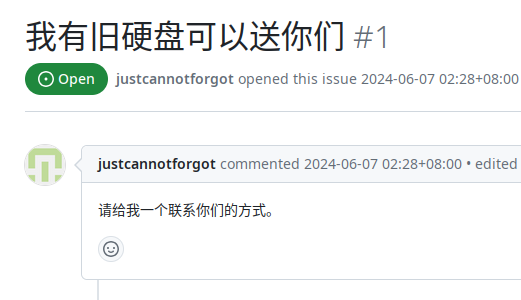
一位名为 @justcannotforgot (这 username 不错) 的 GitHub 用户看完这篇微信公众号文章后,甚是感动,想起实验室里还有十几块硬盘在吃灰,于是跑过来发了个 issue,想送我们9️⃣硬盘。

可惜,我们那三天在磨洋功,他的 issue 一直被放置。于是在无响应的三天后,他更新了 issue,@ 了我们的成员。

他一下子 @ 了 4 个账号,但问题是,有一个账号是我们的内部 bot 账号,按理说不应该被外界知晓,他是怎么找到这个账号的?

他这一 @ ,弄得我们大惊失色。

然后我们发现用无关账号直接在我们的公开仓库 @ ,Mention suggester 竟然会将我们的 Private Owner 直接列出来。

我们临时给所有成员都加上了 Private Owner 权限,Mention suggester API 真就把全部 Private Owner 列出来了,再把临时权限去掉,果然,对应账号又从 API 中消失了。(GitHub Web UI 上限制了显示行数,但 F12 能看到 API 有返回更多账号)

API 响应

正常情况下,Mention suggester 应该只会列出组织的 Public Owner 和调用处仓库的活跃维护者/贡献者。但是不知道为啥,它把本该隐藏的 Private Owner 全列出来了。

我们立即拿家里蹲大学和 Epic Game 开刀,不得不说不愧是家里蹲大学,API 返回了 642 个家里蹲仔。但可惜,图中聊天记录一开始的推断错了,Mention suggester 返回 642 个账号是由于每个家里蹲入学家里蹲大学的时候都开了个家里蹲申请 issue 而产生的家里蹲噪声。(一个加入家里蹲大学就可以得知的家里蹲大学秘密:家里蹲大学里面藏着大概 10 个 Private 家里蹲皇帝)

然后我们拿群友的组织(非生物组织,全过程没有任何成员受到伤害)做实验,又当场新建了个组织,均没有泄漏 Private Owner……

难道我们 saveweb 是体质比其他 org 特殊患感冒了?


很快啊,我们找到了问题的关键:是由于咱 saveweb 遥遥领先,别的组织入 org 即送全 org 范围的 read 权限(默认),而咱们则是设置成了入 org 啥权限都不派送(No permission),相反,我们用 GitHub 的 Team 功能“细粒度”分配不同 repos 的权限给不同的成员。

Member privileges->Base permissions 设置为 No permission 之后。所有 private 的 owner 就也会被 suggestion API 列出。
大 bug 啊。

我们随后创了 GItHub 新号,用它创了个新 org,org 设置成 No permission 后,一样成功复现。

所以是不是该…?
是该 report
哈哈哈 GitHub 也是个草台班子看来
这世界本来就是个大型的草台班子…

然后我们就去 HackerOne 给 GitHub 发 report 了。

  • June 10, 2024, 7:39pm UTC 发 report
  • June 17, 2024, 6:51pm UTC GitHub 确认 Bug
  • June 19, 2024, 10:1pm UTC GitHub 回复说由于是低风险,所以会修得比较慢,然后给了 $617 赏金。
  • 一段时间后,这个 bug 被修了。

最后,$617 电汇损失 $2 手续费,我们实际收到了 $615 赏金。


谢谢送硬盘的老兄。😚😚
送硬盘的老兄草
这老兄送的可比硬盘多多了
尝试送硬盘的
而这一切的一切还得感谢那位送硬盘的大哥at了一些不该at的东西

还拿到了个 Octoplush 吉祥物。(Shipped from USA, Made In China, 绷不住)


什么?你想问这个 bug 有啥用?你想不想知道某些的🍅组织的 private owner 🙂

什么?你问开头那位 @justcannotforgot 老哥的硬盘?他前几个月给我们说他师兄可能要卖二手处理掉那些9️⃣硬盘,然后到现在也没有音讯……

我们救下了一千万张画作

作者 saveweb
2024年3月31日 03:37

画吧是于 2013 年成立的绘画 APP。其特色功能是用户上传作品到社区时,APP 会同时上传工程文件。浏览者可以播放工程文件,看到每一笔一画的作画过程(100%没有 AIGC)。 其已于 2024-02-09 00:36 关站。

我们在画吧关站前抢救下了全部的一千万多张绘画作品(工程文件+图),总量约 12TiB 。详情见:https://wiki.saveweb.org/画吧

如果您是画师,请查看 画吧:takeout 来获取您的作品备份。

已存档「萤火圈」,提供个人公开数据备份

作者 saveweb
2023年6月19日 12:54

在半次元宣布停服前几天,小众APP萤火圈也宣布将停服。这款以女性游戏用户为主的APP运营3年,日活5万的情况下,付费不到5%,官方曾在抖音直播带货自救。——「半次元停服了,我的快乐老家没有了-36氪

感谢 @OverflowCat 的投稿。(2023-6-13)

截止到关站前,我们成功存档了全站的公开内容:

1.3G    uids/    用户信息
4.3G    posts/   帖子信息
148G    user_avatars/    用户头像
1.3T    post_media/    帖子中的媒体文件

由于此站意外的有很多 NSFW 内容,以及考虑到萤火圈作为女性社区的社区性质,我们目前决定不将全站存档上传到 Internet Archive 或者网盘之类的地方公开。

如果你是萤火圈的用户

萤火圈说关就关,并没有给它的用户提供个人数据导出选项。(STWP 强烈谴责,haha

不过,我们可为您提供您账号的公开数据备份(包含帖子、图片、视频、笔记,不包含任何未登录用户无法访问到的内容,如非公开的需实名验证才能访问的帖子,这部分我们也获取不到),请向 saveweb@saveweb.org 来信询问(附上您的用户昵称),本服务公益且免费!


参与本项目存档下载的志愿者/成员有,感谢:
@xwyqi @Ovler @oveRidea_C @FlyingSky7 @OverflowCat @yzqzss

新年特别活动:糗事百科1.3TiB福利送大家

作者 saveweb
2023年1月2日 03:23

项目仓库:https://github.com/saveweb/qiushibaike-archive

「糗事百科」创于 2005 年,于 2022-12-29 关站。

2023年,STWP 送大家新鲜出炉 1.3 TiB 的「糗事百科」存档作为新年礼。

想领取此礼品的小伙伴,请自备 2TB 以上的硬盘,然后联系STWP,将硬盘快递发给 STWP 成员,我们将把这 1.3 TiB 当量的红包塞进您的硬盘并回寄给您,作为您的新年礼物。

这不是玩笑,重复,这不是玩笑。


「糗事百科」存档由 @NyaMisty 制作。

数据已全部下载,项目仍在做必要的后期处理,我们期望能把最终的存档做成 WARC 并塞进 IA 的 Wayback Machine 中。


更新:因 IA 扫描 WARC 需要白名单权限(我们肯定是没有的)所以 WARC 就不弄了。

科学网博客平台存档计划

作者 saveweb
2022年10月21日 23:26

科学网的博客平台(https://blog.sciencenet.cn)是国内少有的能存活到现在的博客平台(2007~)。

「科学网」由「中国科学报社」运营。「中国科学报社」是「中国科学院」所属唯一经国家新闻出版署批准的新闻媒体单位。(一句话:背景很大。)

其博客平台粗略目测没有任何广告,建站之初(2007)的老文章的存活率很高,而现今这个博客平台仍然有大量的活跃用户和新文章发布(估计每5分钟就会有一篇新文章,且多为长篇)。(一句话:存档价值很高!)

因此我们发起「科学网博客平台存档计划」,这是个长期项目,完成第一阶段的存档行动后,会定期 跟踪并存档 平台上新发布的文章。

目前用于该项目的存档脚本程序已经写好并运行。会将所有文章的 URL 推送到 IA 存档,待第一阶段存档完成后,我们会将详细存档结果(Archive.log)公开。

估计需要存档的文章数量在一百万左右,仅存档可公开访问的文章。


2022-10-21,已完成 100,000 的 id 进度。
2022-12-24,已完成 400,000 的 id 进度。
2023-02-13,已完成 1,000,000 的 id 进度。(追赶到 2021-8-16)

❌
❌