普通视图

发现新文章,点击刷新页面。
昨天以前AlexSJC 的博客

简易JsonConfig类

作者 AlexSJC
2023年3月25日 19:05

Demo

1
2
3
4
5
6
7
8
9
10
11
12
13
14
15
16
17
18
19
20
21
22
23
24
25
26
27
28
29
30
31
32
33
34
35
36
37
38
39
40
41
42
43
using System;
using System.IO;
using System.Text.Json;

namespace ConsoleApp1
{
internal class Program
{
static void Main(string[] args)
{
var cfg = Config.Load<MyClass>();
Console.WriteLine(cfg.Text);
cfg.Number++;
Console.WriteLine(cfg.Number);
cfg.Save();
Console.ReadKey();
}

class MyClass : Config
{
public string Text { get; set; } = "Empty";
public int Number { get; set; } = 0;
}
}

public class Config
{
const string DefaultFile = "Config.json";

public void Save(string file = DefaultFile)
{
File.WriteAllText(file, JsonSerializer.Serialize(this, GetType()));
}

public static T Load<T>(string file = DefaultFile)
{
if (File.Exists(file))
return JsonSerializer.Deserialize<T>(File.ReadAllText(file));
else
return Activator.CreateInstance<T>();
}
}
}

Tree Node Cli

作者 AlexSJC
2023年3月6日 21:34

https://www.npmjs.com/package/tree-node-cli

tree-node-cli

以树状格式列出目录的内容,类似于 Linux tree 命令。提供了 CLI 和 Node API。

Tree 是一个递归目录列表程序,可生成深度缩进的文件列表。当给出目录参数时,树列出在给定目录中找到的所有文件与目录。

注意:不遵循符号链接。

安装

1
2
3
$ npm install tree-node-cli
# 或全局
$ npm install -g tree-node-cli

范例

1
2
3
4
5
6
7
8
9
10
11
12
13
14
15
$ tree -L 2 -I "node_modules"
tree-node-cli
├── LICENSE
├── README.md
├── __tests__
│ ├── __fixtures__
│ ├── __snapshots__
│ ├── fixtures
│ └── tree.test.js
├── bin
│ └── tree
├── jest.config.js
├── package.json
├── tree.js
└── yarn.lock

CLI

1
$ tree [options] [path/to/dir]

**注意:**为避免与内置的tree命令冲突,请在 Windows 和 Linux 上使用treee命令。

1
2
3
4
5
6
7
8
9
10
11
12
13
14
15
16
17
$ tree -h

Usage: tree [options]

Options:

-V, --version 输出版本号。
-a, --all-files 打印所有文件,包括隐藏文件。
--dirs-first 在文件之前列出目录。
-d, --dirs-only 仅列出目录。
-s, --sizes 显示文件大小。
-I, --exclude [patterns] Exclude files that match the pattern. | separates alternate patterns. Wrap your entire pattern in double quotes. E.g. `"node_modules|coverage".
-L, --max-depth <n> 目录树的最大显示深度。
-r, --reverse 按相反的字母顺序对输出进行排序。
-F, --trailing-slash 为目录附加一个“/”。
-S, --line-ascii 打开 ASCII 线条图形。
-h, --help 输出使用信息

API

1
2
const tree = require('tree-node-cli');
const string = tree('path/to/dir', options);

options 是具有以下字段的配置对象:

字段 默认 类型 描述
allFiles false Boolean 打印所有文件。默认情况下,tree 不打印隐藏文件(以点开头的文件)。
dirsFirst false Boolean 在文件之前列出目录。
dirsOnly false Boolean 仅列出目录。
sizes false Boolean 也显示文件大小。
exclude [] Array 用于测试每个文件名的正则表达式数组。匹配的文件将被排除,匹配的目录将不会被遍历。
maxDepth Number.POSITIVE_INFINITY Number 目录树的最大显示深度。
reverse false Boolean 以相反的字母顺序对输出进行排序。
trailingSlash false Boolean 在目录后面附加一个尾部斜线。
lineAscii false Boolean 打开 ASCII 线条图形。
1
2
3
4
5
6
7
const string = tree('path/to/dir', {
allFiles: true,
exclude: [/node_modules/, /lcov/],
maxDepth: 4,
});

console.log(string);

许可证

MIT

C# PortableSettings

作者 AlexSJC
2023年3月5日 11:21
1
2
3
4
5
6
7
8
9
10
11
12
13
14
15
16
17
18
19
20
21
22
23
24
25
26
27
28
29
30
31
32
33
34
35
36
37
38
39
40
41
42
43
44
45
46
47
48
49
50
51
52
53
54
55
56
57
58
59
60
61
62
63
64
65
66
67
68
69
70
71
72
73
74
75
76
77
78
79
80
81
82
83
84
85
86
87
88
89
90
91
92
93
94
95
96
97
98
99
100
101
102
103
104
105
106
107
108
109
110
111
112
113
114
115
116
117
118
119
120
121
122
123
124
125
126
127
128
129
130
131
132
133
134
135
136
137
138
139
140
141
142
143
144
145
146
147
148
149
150
151
152
153
154
155
156
157
158
159
160
161
162
163
164
165
166
167
168
169
170
171
172
173
174
175
176
177
178
179
180
181
182
183
184
185
186
187
188
189
190
191
192
193
194
195
196
197
198
199
200
201
202
203
204
205
206
207
208
209
210
211
212
213
214
215
216
217
218
219
220
221
222
223
224
225
226
227
228
229
using System;
using System.Collections.Specialized;
using System.Collections;
using System.Configuration;
using System.IO;
using System.Reflection;
using System.Xml;
using System.Xml.Linq;

namespace PortableSettings
{
public class Provider : ProviderBase
{
public static string SettingsFileName { get; set; } = "Settings.config";

public override string Name => "PortableSettingsProvider";

public static void Apply(params ApplicationSettingsBase[] settingsList) => Apply(new Provider(), settingsList);

private string ApplicationSettingsFile => Path.Combine(SettingsDirectory, SettingsFileName);

public override void Reset(SettingsContext context)
{
if (File.Exists(ApplicationSettingsFile))
File.Delete(ApplicationSettingsFile);
}

private XDocument GetXmlDoc()
{
XDocument xmlDoc = null;
bool initnew = false;
if (File.Exists(ApplicationSettingsFile))
{
try
{
xmlDoc = XDocument.Load(ApplicationSettingsFile);
}
catch
{
initnew = true;
}
}
else
{
initnew = true;
}
if (initnew)
{
xmlDoc = new XDocument(new XElement("configuration", new XElement("userSettings", new XElement("Roaming"))));
}
return xmlDoc;
}

public override SettingsPropertyValueCollection GetPropertyValues(SettingsContext context, SettingsPropertyCollection collection)
{
XDocument xmlDoc = GetXmlDoc();
SettingsPropertyValueCollection values = new SettingsPropertyValueCollection();
foreach (SettingsProperty setting in collection)
{
SettingsPropertyValue value = new SettingsPropertyValue(setting)
{
IsDirty = false,
SerializedValue = getXmlValue(xmlDoc, XmlConvert.EncodeLocalName((string)context["GroupName"]), setting)
};
values.Add(value);
}
return values;
}

public override void SetPropertyValues(SettingsContext context, SettingsPropertyValueCollection collection)
{
XDocument xmlDoc = GetXmlDoc();
foreach (SettingsPropertyValue value in collection)
{
setXmlValue(xmlDoc, XmlConvert.EncodeLocalName((string)context["GroupName"]), value);
}
try
{
using (var writer = XmlWriter.Create(ApplicationSettingsFile, new XmlWriterSettings() { NewLineHandling = NewLineHandling.Entitize, Indent = true }))
{
xmlDoc.Save(writer);
}
}
catch { }
}

private object getXmlValue(XDocument xmlDoc, string scope, SettingsProperty prop)
{
object result = null;
if (!IsUserScoped(prop))
return result;
XElement xmlSettings = xmlDoc.Element("configuration").Element("userSettings");
if (IsRoaming(prop))
xmlSettings = xmlSettings.Element("Roaming");
else
xmlSettings = xmlSettings.Element("PC_" + Environment.MachineName);
if (xmlSettings != null && xmlSettings.Element(scope) != null && xmlSettings.Element(scope).Element(prop.Name) != null)
{
using (var reader = xmlSettings.Element(scope).Element(prop.Name).CreateReader())
{
reader.MoveToContent();
switch (prop.SerializeAs)
{
case SettingsSerializeAs.Xml:
result = reader.ReadInnerXml();
break;
case SettingsSerializeAs.Binary:
result = reader.ReadInnerXml();
result = Convert.FromBase64String(result as string);
break;
default:
result = reader.ReadElementContentAsString();
break;
}
}
}
else
{
result = prop.DefaultValue;
}
return result;
}

private void setXmlValue(XDocument xmlDoc, string scope, SettingsPropertyValue value)
{
if (!IsUserScoped(value.Property)) return;
XElement xmlSettings = xmlDoc.Element("configuration").Element("userSettings");
XElement xmlSettingsLoc;
if (IsRoaming(value.Property))
xmlSettingsLoc = xmlSettings.Element("Roaming");
else
xmlSettingsLoc = xmlSettings.Element("PC_" + Environment.MachineName);
XNode serialized;
if (value.SerializedValue == null || value.SerializedValue is string s && String.IsNullOrWhiteSpace(s))
serialized = new XText("");
else if (value.Property.SerializeAs == SettingsSerializeAs.Xml)
serialized = XElement.Parse((string)value.SerializedValue);
else if (value.Property.SerializeAs == SettingsSerializeAs.Binary)
serialized = new XText(Convert.ToBase64String((byte[])value.SerializedValue));
else
serialized = new XText((string)value.SerializedValue);
if (xmlSettingsLoc == null)
{
if (IsRoaming(value.Property))
xmlSettingsLoc = new XElement("Roaming");
else
xmlSettingsLoc = new XElement("PC_" + Environment.MachineName);
xmlSettingsLoc.Add(new XElement(scope, new XElement(value.Name, serialized)));
xmlSettings.Add(xmlSettingsLoc);
}
else
{
XElement xmlScope = xmlSettingsLoc.Element(scope);
if (xmlScope != null)
{
XElement xmlElem = xmlScope.Element(value.Name);
if (xmlElem == null)
xmlScope.Add(new XElement(value.Name, serialized));
else
xmlElem.ReplaceAll(serialized);
}
else
{
xmlSettingsLoc.Add(new XElement(scope, new XElement(value.Name, serialized)));
}
}
}
}

public abstract class ProviderBase : SettingsProvider, IApplicationSettingsProvider
{
public static bool AllRoaming { get; set; } = false;

public static string SettingsDirectory { get; set; } = AppDomain.CurrentDomain.BaseDirectory;

public override string ApplicationName { get { return Assembly.GetExecutingAssembly().GetName().Name; } set { } }

protected static void Apply(ProviderBase provider, params ApplicationSettingsBase[] settingsList)
{
foreach (var settings in settingsList)
{
settings.Providers.Clear();
settings.Providers.Add(provider);
foreach (SettingsProperty prop in settings.Properties)
prop.Provider = provider;
settings.Reload();
}
}

public override void Initialize(string name, NameValueCollection config)
{
if (string.IsNullOrEmpty(name)) name = Name;
base.Initialize(name, config);
}

public virtual SettingsPropertyValue GetPreviousVersion(SettingsContext context, SettingsProperty property)
{
throw new NotImplementedException();
}

public abstract void Reset(SettingsContext context);

public virtual void Upgrade(SettingsContext context, SettingsPropertyCollection properties) { }

protected bool IsUserScoped(SettingsProperty prop)
{
foreach (DictionaryEntry d in prop.Attributes)
{
Attribute a = (Attribute)d.Value;
if (a.GetType() == typeof(UserScopedSettingAttribute))
return true;
}
return false;
}

protected bool IsRoaming(SettingsProperty prop)
{
if (AllRoaming)
return true;
foreach (DictionaryEntry d in prop.Attributes)
{
Attribute a = (Attribute)d.Value;
if (a.GetType() == typeof(SettingsManageabilityAttribute))
return true;
}
return false;
}
}
}

ChatGPT 提示

作者 AlexSJC
2023年3月4日 20:29

Prompts

[ChatGPT] Control Conter > Language Model > Sync Custom + Prompts

文字冒险游戏(选项)

开始一个文字冒险游戏。先讲情节,再给选项。请不要回复除了情节和选项之外的任何内容。

文字冒险游戏(对话)

开始一个文字冒险游戏。我输入动作,你回复结果。请不要回复除此之外的任何内容。首先,请你给个开局。

英语翻译者

我想让你充当英语翻译者、纠错和改进者。我会用任何语言与你交谈,你需要先检测语言,再翻译为英语,接着纠错并改进,最后回答我。我希望你在不改变意思的前提下,使用更优美、优雅的高级英语单词和句子。不要写任何解释。

讲故事的人

我想让你扮演讲故事的角色。你需要想出引人入胜、富有想象力且吸引观众的有趣故事。它可以是任何类型的故事,只需要能够吸引人们的注意力即可。

标题生成器

我想让你充当一个标题生成器。我会用逗号输入关键字,你需要用富有吸引力的标题进行回复。

错误发现者

我需要你帮我审查一段文字,找出其中的错误。这些错误可以是语法上的,也可以是与事实不符的地方。

寻找同义词

我希望你帮助我寻找同义词。我会告诉你一个词语,你需要回复我10个与它意思相同的词语。

语言检测器

我希望你充当语言检测器。我会用任何语言输入一个句子,你要回答我这个句子是用哪种语言写的。不要写任何解释或其他文字,只需回复语言名称即可。

Awesome WPF

作者 AlexSJC
2023年2月27日 21:17

以下内容来自 https://github.com/Carlos487/awesome-wpf


Awesome WPF

A collection of awesome WPF resources, libraries and UI controls.

Inspired by awesome, awesome-dotnet, awesome-dotnet-core.

Contents

General

UI Controls

Control Suites

  • Actipro WPF Controls - (PAID, COMMERCIAL) A vast toolkit of professional UI controls, including docking windows, ribbons, editors, propertygrid, code editing, charts, gauges, wizards, themes, and much more.
  • Adonis-UI - (FREE, OPEN SOURCE) Lightweight UI toolkit for WPF applications offering classic but enhanced windows visuals.
  • ComponentOne Studio WPF - (PAID, COMMERCIAL) ComponentOne Studio WPF Edition is a collection of easy to use WPF components currently including grids, charting, reporting and scheduling controls.
  • ControlzEx - (FREE, OPEN SOURCE) Shared Controlz for WPF.
  • DevExpress WPF UI Library - (PAID, COMMERCIAL) With over 120 UI controls and tools, the DevExpress WPF UI Library will help you deliver high-performance line of business applications that meet and exceed the needs of your enterprise.
  • Extended WPF Toolkit - (FREE FOR NON COMMERCIAL USE, OPEN SOURCE) WPF controls, components and utilities for creating next generation Windows applications.
  • HandyControl - (FREE, OPEN SOURCE) Contains some simple and commonly used WPF controls.
  • Mahapps.Metro - (FREE, OPEN SOURCE) A framework that allows developers to cobble together a better UI for their own WPF applications with minimal effort.
  • Material Design Extensions - (FREE, OPEN SOURCE) Material Design Extensions is based on Material Design in XAML Toolkit to provide additional controls and features for WPF apps.
  • Material Design In XAML Toolkit - (FREE, OPEN SOURCE) Material Design UI libraries, styles and additional controls.
  • Modern UI for WPF (MUI) - (FREE, OPEN SOURCE) A set of controls and styles converting your WPF application into a great looking Modern UI app.
  • ModernWPF UI Library - (FREE, OPEN SOURCE) Modern styles and controls for your WPF applications.
  • Nevron UI for Win/Mac - (FREE) Nevron User Interface Components for WPF | NOV User Interface for .NET.
  • Ookii Dialogs WPF - (FREE, OPEN SOURCE) A set of dialogs for your WPF applications. Included are classes for task dialogs, credential dialog, progress dialog, and common file dialogs.
  • Syncfusion WPF controls - (PAID, COMMERCIAL) The Syncfusion WPF controls is a package of over 100 modern WPF UI controls for building beautiful, high performance line-of-business WPF applications.
  • Telerik UI for WPF - (PAID, COMMERCIAL) Telerik UI for WPF | Build beautiful and high-performance WPF business applications fast.
  • Ultimate UI for WPF - (PAID, COMMERCIAL) A complete library of 100+ WPF controls, including lightning-fast grids and charts, and dynamic data visualizations. All .NET 5 compatible.
  • WPFSpark - (FREE, OPEN SOURCE) A rich UserControl library to enhance the look and feel of WPF applications.
  • WPF UI - (FREE, OPEN SOURCE) Modern styles and controls for WPF application inspired by the modern Microsoft Fluent Design System. A simple way to make your application written in WPF keep up with modern design trends. Design of the interface, choice of colors and the appearance of the controls were inspired by projects made by Microsoft for Windows 11.

Individual Controls

  • AvalonEdit - (FREE, OPEN SOURCE) AvalonEdit is the name of the WPF-based text editor in SharpDevelop 4.x.
  • CefSharp - (FREE, OPEN SOURCE) .NET (WPF and Windows Forms) bindings for the Chromium Embedded Framework.
  • ColorPickerWPF - (FREE, OPEN SOURCE) A simple WPF color picker control for .NET 4.5.2 licensed under MIT. Contains two color gradient images to sample from, and custom palette support.
  • ConsoleControl - (FREE, OPEN SOURCE) ConsoleControl is a C# class library that lets you embed a console in a WinForms or WPF application.
  • Dragablz - (FREE, OPEN SOURCE) Tearable tab control for WPF, which includes docking, tool windows and MDI.
  • Emoji.Wpf - (FREE, OPEN SOURCE) Emoji.Wpf is an implementation of color Emoji rendering for WPF.
  • ffmediaelement - (FREE, OPEN SOURCE) FME: The Advanced WPF MediaElement (based on FFmpeg)
  • Fluent.Ribbon - (FREE, OPEN SOURCE) Fluent.Ribbon is a library that implements an Office-like user interface for the Windows Presentation Foundation (WPF).
  • Gu.Wpf.Geometry - (FREE, OPEN SOURCE) Small library with WPF geometries and shaders.
  • Gu.Wpf.FlipView - (FREE, OPEN SOURCE) A flipview for WPF, handles touch & mouse swipe.
  • Hardcodet NotifyIcon for WPF - (FREE, OPEN SOURCE) This is an implementation of a NotifyIcon (aka system tray icon or taskbar icon) for the WPF platform.
  • Interactive Data Display for WPF - (FREE, OPEN SOURCE) Interactive Data Display for WPF is a set of controls for adding interactive visualization of dynamic data to your application.
  • LiveCharts - (FREE, OPEN SOURCE) Simple, flexible, interactive & powerful data visualization for .Net.
  • LoadingIndicators.WPF - (FREE, OPEN SOURCE) LoadingIndicators.WPF is a collection of 8 animated loading indicators for WPF compatible with MahApps.Metro.
  • Mapsui - (FREE, OPEN SOURCE) Mapsui is a .NET Map component for WPF, UWP and Xamarin Android and iOS.
  • mpv.net - (FREE, OPEN SOURCE) mpv.net is a modern media player for Windows that works just like mpv.
  • Notifications.Wpf - (FREE, OPEN SOURCE) WPF toast notifications.
  • OxyPlot - (FREE, OPEN SOURCE) OxyPlot is a cross-platform plotting library for .NET.
  • PropertyTools - (FREE, OPEN SOURCE) Custom controls for WPF: PropertyGrid, DataGrid, multi-select TreeView, ColorPicker and more.
  • ReoGrid - (FREE, OPEN SOURCE) Fast and powerful .NET spreadsheet component, support data format, freeze, outline, formula calculation, chart, script execution and etc.
  • Toggle Switch Control Library - (FREE, OPEN SOURCE) The Toggle Switch Control Library creates highly customizable toggle switch controls for WPF and Silverlight apps.
  • WPF AutoComplete TextBox - (FREE, OPEN SOURCE) An autocomplete TextBox for WPF.
  • WPFCustomMessageBox - (FREE, OPEN SOURCE) WPFCustomMessageBox is a WPF clone of the native Windows/.NET MessageBox with extra features like custom button text.
  • wpfchrometabs - (FREE, OPEN SOURCE) A WPF custom tab control built from the ground up to mimic the user experience found in Google’s Chrome browser.
  • WpfHexEditorControl - (FREE, OPEN SOURCE) Wpf Hexeditor is a fast and fully customisable user control for editing file or stream as hexadecimal. Can be used in Wpf or WinForm application.
  • WPFToastNotification - (FREE, OPEN SOURCE) Fancy toast notification for WPF applications easy to use and support MVVM pattern.
  • Wpf.Notifications - (FREE, OPEN SOURCE) WPF notifications UI controls (as seen in VS Code).
  • WPF-Math - (FREE, OPEN SOURCE) WPF-Math is a .NET library for rendering mathematical formulae using the LaTeX typsetting style, for the WPF framework.
  • WPF-MediaKit - (FREE, OPEN SOURCE) A library to quickly build DirectShow media player controls in WPF. The kit comes with a video player.MediaUriElement (a WPF MediaElement replacement), a VideoCaptureElement for web cams and a DVDPlayerElement.

Fonts

  • FontAwesome5 - (FREE, OPEN SOURCE) WPF (.Net and .Net Core 3.0) and UWP controls for the iconic SVG, font, and CSS toolkit Font Awesome 5. Current Version: v5.12.0
  • FontAwesome.Sharp - (FREE, OPEN SOURCE) A library for embbeding Font Awesome icons in WPF & Windows Forms applications via NuGet. Inspired by ioachim/fontawesome.wpf (BitBucket) and Using Font Icons (CodeProject).
  • Font-Awesome-WPF 4.7 - (FREE, OPEN SOURCE) WPF controls for the iconic font and CSS toolkit Font Awesome. Current Version: v4.7.0
  • wpf.fontawesome5 - (FREE, OPEN SOURCE) With wpf.fontawesome5 you can use the popular icon library FontAwesome 5.12.0 within your WPF applications.

Themes

  • Mahapps.Metro - (FREE, OPEN SOURCE) A framework that allows developers to cobble together a better UI for their own WPF applications with minimal effort.
  • Material Design In XAML Toolkit - (FREE, OPEN SOURCE) Material Design UI libraries, styles and additional controls.
  • ModernWPF UI Library - (FREE, OPEN SOURCE) Modern styles and controls for your WPF applications.
  • Wpf Office Theme - (FREE, OPEN SOURCE) WPF theme influenced by minimalistic MS Office style.

Libraries

  • Caliburn.Micro - (FREE, OPEN SOURCE) A small, yet powerful framework, designed for building applications across all XAML platforms. Its strong support for MV* patterns will enable you to build your solution quickly, without the need to sacrifice code quality or testability.
  • Elmish.WPF - (FREE, OPEN SOURCE) The good parts of MVVM (the data bindings) with the simplicity and robustness of an MVU architecture for the rest of your app. Never write a ViewModel class again!
  • FluentWPF - (FREE, OPEN SOURCE) Fluent Design System for WPF.
  • GongSolutions.WPF.DragDrop - (FREE, OPEN SOURCE) An easy to use drag’n’drop framework for WPF.
  • Gu.Localization - (FREE, OPEN SOURCE) Localization for WPF using ResourceManager.
  • MVVM Light Toolkit - (FREE, OPEN SOURCE) The main purpose of the toolkit is to accelerate the creation and development of MVVM applications in Xamarin.Android, Xamarin.iOS, Xamarin.Forms, Windows 10 UWP, Windows Presentation Foundation (WPF), Silverlight, Windows Phone.
  • MvvmCross - (FREE, OPEN SOURCE) The .NET MVVM framework for cross-platform solutions, including Xamarin.iOS, Xamarin.Android, Windows and Mac.
  • Prism - (FREE, OPEN SOURCE) Prism is a framework for building loosely coupled, maintainable, and testable XAML applications in WPF, and Xamarin Forms.
  • ReactiveUI - (FREE, OPEN SOURCE) An advanced, composable, functional reactive model-view-viewmodel framework for all .NET platforms!
  • Serilog.Sinks.RichTextBox.Wpf - (FREE, OPEN SOURCE) A Serilog sink that writes log events to any WPF RichTextBox control with coloring and custom theme support.
  • UpbeatUI - (FREE, OPEN SOURCE) A lightweight MVVM framework for quickly developing mobile-style applications for Windows.
  • WPF Animated GIF - (FREE, OPEN SOURCE) A simple library to display animated GIF images in WPF, usable in XAML or in code.
  • WPFTabTip - (FREE, OPEN SOURCE) Simple TabTip / Virtual Keyboard integration for WPF apps on Win 8.1 and Win 10.
  • Xamarin.Forms.Platform.WPF - (FREE, OPEN SOURCE) Xamarin Forms Renderer to build native UIs for WPF.

Utilities

  • Snoop - (FREE, OPEN SOURCE) Snoop is the open source WPF spying utility. It allows you to spy/browse the visual tree of a running application.
  • XAML Viewer - (FREE, OPEN SOURCE) XAML Viewer is a lightweight XAML editor.

Courses

  • Advanced Reusable Styles and Themes in WPF - (PAID, PLURALSIGHT) Take your WPF XAML skills to the next level by learning how to make modern reusable styles and themes with runtime theme switching. If you’ve ever wanted to implement light and dark themes in your apps, then this course will show you how.
  • Advanced Windows Presentation Foundation (WPF) Course - (PAID, UDEMY) Build interactive, efficient, and smart applications with Windows Presentation Foundation (WPF) using this course.
  • Learning Windows Presentation Foundation (WPF) - (PAID, UDEMY) A complete guide to build robust and scalable applications with Windows Presentation Foundation (WPF).
  • Windows Presentation Foundation Masterclass - (PAID, UDEMY) Leverage WPF with C# and XAML to build real world skills with Azure, REST, MVVM and Machine Learning.
  • WPF Data Binding in Depth - (PAID, PLURALSIGHT) Data binding is one of the most powerful and important capabilities in WPF applications for building data-driven, loosely coupled, maintainable applications. In this course you will learn how to use the end-to-end capabilities of data binding in WPF including both the most common features as well as more advanced capabilities.
  • WPF MVVM in Depth - (PAID, PLURALSIGHT) This course provides end-to-end coverage of what you need to know to effectively apply the MVVM pattern to WPF applications.
  • WPF Productivity Playbook - (PAID, PLURALSIGHT) This course contains a collection of tips, tricks, and techniques that will help you become a more productive and confident WPF developer, able to leverage the full power of the platform.
  • WPF & XAML: Build 10 WPF applications (C#) in 2020 - (PAID, UDEMY) Learn XAML and WPF development on 10 projects. WPF/C# programming even for beginners

Tutorials (Video)

Books

Sample Apps

License

CC0 1.0 Universal

Credits and sources

Top 10 WPF Libraries in 2017 6 Best WPF & XAML Courses & Tutorials

System.CommandLine

作者 AlexSJC
2023年2月27日 20:30

System.CommandLine 库提供命令行应用通常所需的功能,例如分析命令行输入和显示帮助文本。

使用 System.CommandLine 的应用包括 .NET CLI其他工具和许多全局和本地工具

对于应用开发人员,库:

  • 使你能够专注于编写应用代码,因为不需要编写代码来分析命令行输入或生成帮助页。
  • 允许独立于输入分析代码测试应用代码。
  • 剪裁友好,是开发快速、轻型且支持 AOT 的 CLI 应用的最佳选择。

使用库还使应用用户受益:


Microsoft Learn

Nuget 包

C#添加开机启动项

作者 AlexSJC
2023年2月22日 21:33
1
2
3
4
5
6
7
8
9
10
11
12
13
14
15
16
17
public static bool SetAutoRun(bool enable = true)
{
try
{
Assembly current = Assembly.GetExecutingAssembly();
var key = Registry.CurrentUser.CreateSubKey(@"SOFTWARE\Microsoft\Windows\CurrentVersion\Run");
if(enable)
key.SetValue(current.GetName().Name, $"\"{current.Location}\"");
else
key.DeleteValue(current.GetName().Name);
return true;
}
catch
{
return false;
}
}

好句整理1

作者 AlexSJC
2023年2月17日 20:08

1 Fortune favors the bold. 好运眷顾勇者

2 Only those who capture the moment are real. 把握当下才是真

3 Life is too short for long-term grudges. 人生短暂,何必长期心怀怨念

4 It’s better to have fought and lost, than never to have fought at all. 战败总好过不战而降。

5 My personal failure has only strengthened my resolve to make things right. 我个人的失败只会坚定我匡正万事的决心。——《分歧者3:忠诚世界》

6 Refrain from excess. 凡事不要过度。

7 There is always a better way. 总有更好的办法。

8 I can’t control their fear, only my own. 我不能掌控他人的恐惧,只能掌控自己的恐惧。——《美国队长:内战》

9 I argue thee that love is life. And life hath immortality. 我告诉你,爱就是生命,生命可以不朽

10 If you love life, don’t waste time, for time is what life is made up of. 如果你热爱生活,就不要浪费时间,因为生活是由时间组成的。——李小龙

11 Life itself is the most wonderful fairy tale. 生活本身就是最美妙的童话故事。——安徒生

12 No act of kindness, no matter how small, is ever wasted. 善行再小,也不白费。——伊索寓言

13 A room without books is like a body without a soul. 居无书,犹如人无魂

14 Sometimes accompanied sometimes alone, stay awesome all the time. 聚散终有时,潇洒走一回。——《纽约纽约》

15 You can’t do it — that’s the biggest lie on earth. 世界上最大的谎言就是你不行。——《垫底辣妹》

16 Years fly by, but the heart stays in the same place. 时光飞逝,但我心依旧。

17 A good book is an event in my life. 读一本好书是我的人生大事。——《红与黑》

18 I like the night. Without the dark, we’d never see the stars. 我喜欢黑夜。如果没有黑暗,我们永远看不到繁星点点。——《暮光之城》

19 A man who dares to waste one hour of time has not discovered the value of life. 敢于浪费一个小时的人,没有发现生命的价值。——达尔文

20 A bird is safe in its nest — but that is not what its wings are made for. 小鸟在巢中最安全,但翅膀可不是为此而生的。——阿米特·雷

21 Worse than not realizing the dreams of your youth would be to have been young and never dreamed at all. 最糟糕的不是未能实现年轻时的梦想,而是年轻时根本没有梦想。——Jean Genet

22 Laugh loudly, laugh often, and most important, laugh at yourself. 要放声笑,经常笑,最重要的是为自己而欢笑。——Chelsea Handler

23 There are no easy answers, there’s only living through the questions. 生活从来没有容易的答案,只有去克服重重问题。——伊丽莎白·乔治

24 There are no easy answers, there’s only living through the questions. 生活从来没有容易的答案,只有去克服重重问题。——伊丽莎白·乔治

25 To exist is to change, to change is to mature, to mature is to go on creating oneself endlessly. 生存就意味着去改变,改变就意味着成熟,而成熟就意味着孜孜不倦地创造自我。——亨利·伯格森

26 The meaning of life is not simply to exist, to survive, but to move ahead, to go up, to achieve, to conquer. 生命的意义不仅在于简单的存在与活着,而是去前行、进步、获取和征服。——阿诺·施瓦辛格

27 The stars change, but the mind remains the same. 繁星纵变,但智慧永恒。——悉尼大学校训

28 I would die for you. But I won’t live for you. 我愿意为你赴死,但不会指望你而活。——斯蒂芬·切波斯基

29 Whatever you do, do not let go! 不管你做什么,都不要放弃!—— 《疯狂动物城》

30 You can’t stay in your corner of the Forest waiting for others to come to you. You have to go to them sometimes. 你不能在森林的角落里等待他人来找你,有时候你要主动去找别人。—— 《小熊维尼》

31 When you want something, all the universe conspires in helping you to achieve it. 当你心有所求,全宇宙都会去帮你得到它。—— 《牧羊少年奇幻之旅》

32 Nothing is impossible, the word itself says “I’m possible”! 没有不可能,连“不可能”这个词自己都说:“不,可能!”—— 奥黛丽·赫本

33 No one can make you feel inferior without your consent. 未经你的许可,没人能让你妄自菲薄。—— 埃莉诺·罗斯福

34 It’s no use going back to yesterday, because I was a different person then. 回到昨天毫无用处,因为今天的我已和过去有所不同。——《爱丽丝梦游仙境》

35 It’s the possibility of having a dream come true that makes life interesting. 梦想有可能成为现实,生活因此而有趣。——《牧羊少年奇幻之旅》

36 The longest way must have its close; the gloomiest night will wear on to a morning. 最长的路也有尽头,最黑暗的夜晚也会迎接清晨。——《汤姆叔叔的小屋》

Electron应用

作者 AlexSJC
2023年2月17日 20:03

本节我们通过介绍 Electron 应用安装目录的结构、缓存目录的结构、注册表信息、全量升级缓存目录的结构等信息来介绍线上应用的特征,除此之外我们还介绍了开发环境下 electron npm 包和 electron-builder npm 包的特征,以便于我们分析开发环境下的问题。

应用程序安装目录

如果你在使用 electron-builder 打包你的应用时设置了不允许用户修改应用程序安装目录,那么你的应用程序会安装在用户的如下目录中:

1
2
64 位应用程序的安装目录:C:\Program Files\\[yourAppName]
32 位应用程序的安装目录:C:\Program Files (x86)\\[yourAppName]

应用程序安装目录下的文件及其功用如下所示:

1
2
3
4
5
6
7
8
9
10
11
12
13
14
15
16
17
应用程序的安装目录
├─ locales(Electron的多国语言文件)
│ │ ├─ en-GB.pak(英国英语)
│ │ ├─ en-US.pak(美国英语)
│ │ ├─ zh-CN.pak(简体中文)
│ │ ├─ zh-TW.pak(繁体中文)
│ │ ├─ .....(其他国家语言文件,一般情况下可以删除)
├─ resources(应用程序资源及编译后的源码)
│ ├─ app.asar(编译后的源码压缩文档)
│ ├─ app.asar.unpacked(编译后的源码未压缩文档)
│ ├─ app(如果没有app.asar或app.asar.unpacked,则编译后源码文档在此目录下)
│ ├─ app-update.yml(应用程序升级相关的配置文件)
│ ├─ .....(通过electron-builder配置的其他的额外资源)
├─ swiftshader(图形渲染引擎相关库)
├─ yourApp.exe(应用程序可执行文件,其实就是electron.exe修改图标和文件名后得来的)
├─ UnInstall yourApp.exe(卸载应用程序的可执行文件)
└─ ......(其他Electron应用程序使用的二进制资源)

Electron 应用在 Mac 操作系统上安装之后,会以 app 应用的形式出现在用户的应用程序目录下,开发者可以通过右击菜单的显示包内容来查看应用程序内的文件组织情况,如下所示:

1
2
3
4
5
6
7
8
9
10
11
12
应用程序.app
├─ Contents(根目录)
│ │ ├─ _CodeSignature(存放应用程序的签名信息)
│ │ ├─ Frameworks(存放Electron相关的二进制资源)
│ │ ├─ Info.plist(应用程序的配置文件,包含应用程序名称、id、图标以及底层接口权限的信息)
│ │ ├─ Resources(应用程序资源及编译后的源码)
│ │ │ ├─ app-update.yml(应用程序升级相关的配置文件)
│ │ │ ├─ app.asar(编译后的源码压缩文档)
│ │ │ ├─ app.asar.unpacked(编译后的源码未压缩文档)
│ │ │ ├─ app(如果没有app.asar或app.asar.unpacked文件,则编译后源码文档在此目录下)
│ │ │ ├─ ...(Electron内置的多国语言文件)
└─└─└─ ...(通过electron-builder配置的其他的额外资源)

应用程序缓存目录

用户第一次启动 Electron 应用后,Electron 会在如下目录创建相应的缓存文件,该目录的文件结构及功能说明如下:

1
2
3
4
5
6
7
8
9
C:\Users\[yourOsUserName]\AppData\Roaming\[yourAppName]
├─ IndexedDB(Electron应用渲染进程IndexedDB数据存放目录)
├─ Local Storage(Electron应用渲染进程Local Storage数据存放目录)
├─ Session Storage(Electron应用渲染进程Session Storage数据存放目录)
├─ Crashpad(Electron应用崩溃日志数据存放目录)
├─ Code Cache(Electron应用渲染进程源码文件缓存目录,wasm的缓存也会存在此处)
├─ Partitions(如果你的应用中适应了自定义协议,或根据字符串产生了session,此目录将有相应的内容)
├─ GPUCache(Electron应用渲染进程GPU运行过程产生的缓存数据)
└─ ......(其他Electron渲染进程缓存文件)

Mac 操作系统下的缓存目录为:

1
MacintoshHD/用户/[yourOsUserName]/资源库/ApplicationSupport/[yourAppName]

该目录下的内容与子目录结构与 Windows 操作系统类似,不再赘述。

需要注意的是,虽然以上目录内的文件都是加密存储的,但你只要把这个目录下的文件拷贝到另一台机器上,就可以用一个伪造的 Electron 程序读取到这些缓存文件内的数据

另外,我们前面章节介绍的客户端数据库文件也是存放在这个目录下的。

Electron 为我们提供了一个便捷的 API 来获取此路径,此方法执行时会判断当前应用正运行在什么操作系统上,然后根据操作系统的名称返回具体的路径地址。

1
app.getPath("userData");

注册表键值

如果开发者使用 Electron 提供的开机自启动 API,为应用程序设置了开机自启动功能,那么在 Windows 操作系统下,用户注册表如下路径下会增加一个键值对:

1
2
3
计算机\HKEY_CURRENT_USER\Software\Microsoft\Windows\CurrentVersion\Run
键:electron.app.[yourAppName]
值:C:\Program Files (x86)\[yourAppName]\[yourAppName].exe

设置开机自启动的代码如下所示:

1
2
3
4
import { app } from "electron";
app.setLoginItemSettings({
openAtLogin: true,
});

另外 99% 的 Electron 应用是通过安装包分发给最终用户的,有安装包势必就有卸载程序,操作系统一般会在注册表如下三个路径下记录系统的卸载程序路径:

1
2
3
计算机\HKEY_LOCAL_MACHINE\Software\Microsoft\Windows\CurrentVersion\Uninstall
计算机\HKEY_LOCAL_MACHINE\Software\\Wow6432Node\\Microsoft\\Windows\\CurrentVersion\\Uninstall
计算机\HKEY_CURRENT_USER\Software\Microsoft\Windows\CurrentVersion\Uninstall

如果开发者使用 app 对象的 setAsDefaultProtocolClient 方法,把自己的应用设置成可以通过外部连接唤起的应用,那么这个操作也会在用户的注册表内留下痕迹,如下为 GitHubDesktop 在我的注册表中写入的内容:

1
2
键:计算机\HKEY_CURRENT_USER\Software\Classes\github-windows\shell\open\command
值:"C:\Users\liuxiaolun\AppData\Local\GitHubDesktop\app-2.9.0\GitHubDesktop.exe" --protocol-launcher "%1"

如你所见,当用户点击连接唤起我们的应用时,这个注册表键值不但给我的应用传递了–protocol-launcher 参数,还中转了连接中的参数给我的应用。

Mac 没有注册表,相关的信息都是通过 Info.plist 文件和应用程序共同完成的。

升级程序缓存目录

前文我们介绍了全量升级 Electron 应用的方案,当 electron-updater 检测到升级服务器上存在新版本的应用程序时,会下载新版本相关的文件,并保存在如下目录中:

1
C:\Users\[userName]\AppData\Local\[appName]-updater\pending

下载完成后会校验新版本安装文件哈希值是否与服务器上的安装文件的哈希值相同。

任务栏快捷方式

如果用户把应用程序的快捷方式固定到任务栏,这个快捷方式的存放路径为:

1
C:\Users\[userName]\AppData\Roaming\Microsoft\Internet Explorer\Quick Launch\User Pinned\TaskBar

在一些特殊的情况下,我们可能要更新这个快捷方式的目标程序,比如用户先安装了 32 位的应用程序,又安装 64 位的应用程序,此时用户固定在任务栏的图标指向的目标程序路径就是错的了。

Electron 为我们提供了读写快捷方式的 API:shell 模块下的 readShortcutLinkwriteShortcutLink,开发者可以使用这两个 API 来更新任务栏上的快捷方式。

Electron npm 包的特征

Electron npm 包会被安装到工程的如下目录中:

1
yourSolutionDir\node_modules\electron

这个目录下 dist 子目录中存放着 Electron 的二进制文件,我们开发调试应用时,启动的就是下面这个应用程序:

1
yourSolutionDir\node_modules\electron\dist\electron.exe

这个包的导出文件是 index.js,这个文件并没有什么特殊的逻辑,只是返回了上面 electron.exe 的路径。如果你还记得我们在“如何开发 Vite3 插件构建 Electron 开发环境”章节中介绍的知识,我们就是通过require("electron")获取 electron.exe 的路径的,如下代码所示:

1
let electronProcess = spawn(require("electron").toString(), [], {});

安装 Electron npm 包时,npm 会在如下路径下载 Electron 的二进制资源:

1
https://github.com/electron/electron/releases/download/v20.1.3/electron-v20.1.3-win32-x64.zip

这个地址包含如下了三个部分:

这三部分联合起来最终构成了下载地址,每个部分都有其默认值,也有对应的重写该部分值的环境变量。

  • 镜像部分的环境变量:ELECTRON_MIRROR。
  • 版本部分的环境变量:ELECTRON_CUSTOM_DIR。
  • 文件部分的环境变量:ELECTRON_CUSTOM_FILENAME。

如果你因为网络环境问题而无法成功安装 Electron npm 包,那么可以尝试设置 ELECTRON_MIRROR 的环境变量为https://npm.taobao.org/mirrors/electron/,这是阿里巴巴团队为国内开发者提供的镜像地址。

npm 会首先把下载到的 Electron 可执行文件及其二进制资源压缩包放置到如下目录中:

1
C:\Users\ADMINI~1\AppData\Local\Temp

文件下载完成后,npm 会把它复制到缓存目录中以备下次使用。默认的缓存目录为:

1
C:\Users\[your os username]\AppData\Local\electron\Cache

开发者可以通过设置名为 electron_config_cache 的环境变量来自定义缓存目录。知道了缓存目录的位置之后,开发者就可以先手动把 Electron 可执行文件及其二进制资源压缩包和哈希文件放置到相应的缓存目录中。这样再通过 npm install 命令安装 Electron 依赖包时,就会先从你的缓存目录里获取相应的文件,而不是去网络上下载了。这对于工作在无外网环境下的开发者来说,无疑是一种非常有价值的手段。

需要注意的是缓存目录子目录的命名方式是有要求的,如下所示:

1
2
3
4
//二进制包文件的路径
[你的缓存目录]/httpsgithub.comelectronelectronreleasesdownloadv11.1.0electron-v11.1.0-win32-x64.zip/electron-v9.2.0-win32-x64.zip
//哈希值文件的路径
[你的缓存目录]/httpsgithub.comelectronelectronreleasesdownloadv11.1.0SHASUMS256.txt/SHASUMS256.txt

路径中[你的缓存目录]下的子目录的命名方式看起来有些奇怪,这其实就是下载地址格式化得来的(去除了 url 路径中的斜杠,使得其能成为文件路径)

electron-builder npm 包的特征

electron-builder 也包含一些二进制资源,这些二进制资源主要为生成安装包和应用程序签名服务。这些二进制资源默认存放在如下目录中:

  • 安装包制作工具:C:\Users\yourUserName\AppData\Local\electron-builder\Cache\nsis
  • 应用程序签名工具:C:\Users\yourUserName\AppData\Local\electron-builder\Cache\winCodeSign

electron-builder 下载并缓存 Electron 的逻辑与安装 Electron 依赖包时的下载和缓存逻辑不同。electron-builder 下载 Electron 时使用的镜像环境变量为: ELECTRON_BUILDER_BINARIES_MIRROR,缓存路径环境变量为: ELECTRON_BUILDER_CACHE

当开发者在 64 位操作系统上打 32 位的应用程序安装包时,electron-builder 会去服务器下载 32 位的 Electron 二进制包,从而完成交叉编译的需求,这实际上这并不是真正的交叉编译。

总结

本节我们先介绍了 Electron 应用安装目录的结构,不知道你有没有注意到 Windows 安装目录和 Mac 安装目录的文件结构差异是非常巨大的;接着我们介绍了 Electron 应用在 Windows 和 Mac 操作系统下的缓存目录,这两个操作系统下的缓存目录作用是相同的、之后我们介绍了一个 Electron 应用会在 Windows 操作系统下留下哪些注册表信息、之后我们还介绍 Electron 应用全量升级时升级文件的缓存目录。最后介绍的 electron npm 包和 electron-builder npm 包的特征主要是为了方便我们分析开发环境下的问题。

https://zhuanlan.zhihu.com/p/581758892

ArcGIS安装

作者 AlexSJC
2023年2月17日 19:54

ArcGIS Pro 3.0.rar

MD5:ab998ae19f25019bf0da9e996c9c1d01

1
2
3
4
5
6
7
8
9
10
11
12
13
14
15
16
17
18
19
20
21
22
23
24
25
26
27
28
29
30
31
32
33
34
35
36
37
38
39
40
41
42
43
44
45
46
47
48
49
50
51
52
53
54
55
56
57
58
59
60
61
62
63
ArcGIS Pro 3.0
├── ArcGIS Pro 3.0
│ ├── ArcGISProDataInterop
│ │ ├── DataInteropPro.cab
│ │ └── DataInteropPro.msi
│ ├── ArcGISProHelp_Chinese_CN
│ │ ├── ArcGISProHelp_Chinese_CN.cab
│ │ └── ArcGISProHelp_Chinese_CN.msi
│ ├── ArcGISPro_Chinese_CN
│ │ ├── Setup.exe
│ │ └── SetupFiles
│ │ ├── ArcGISPro.cab
│ │ ├── ArcGISPro.msi
│ │ ├── ArcGISPro1.cab
│ │ ├── Documentation
│ │ │ ├── EULA.pdf
│ │ │ └── InstallGuide
│ │ │ ├── 03ws00000004000000.htm
│ │ │ ├── 03ws00000005000000.htm
│ │ │ ├── 03ws00000007000000.htm
│ │ │ ├── 03ws00000008000000.htm
│ │ │ ├── 03ws00000009000000.htm
│ │ │ ├── 03ws0000000n000000.htm
│ │ │ ├── GUID-420B8D8D-02BB-4A58-93DC-2859FB221799-web.svg
│ │ │ ├── index.html
│ │ │ └── rsrc
│ │ │ ├── banner.jpg
│ │ │ ├── beta.png
│ │ │ ├── casestudy.png
│ │ │ ├── caution.png
│ │ │ ├── checkbox_blank.png
│ │ │ ├── checkbox_checked.png
│ │ │ ├── checkbox_half.png
│ │ │ ├── common.css
│ │ │ ├── divein.png
│ │ │ ├── external-link.png
│ │ │ ├── generic_banner.png
│ │ │ ├── htmlhelp.css
│ │ │ ├── htmlhelp_simpletoc.css
│ │ │ ├── htmlprint.css
│ │ │ ├── legacy.png
│ │ │ ├── license.png
│ │ │ ├── note.png
│ │ │ ├── subscription.png
│ │ │ ├── tblheader.jpg
│ │ │ ├── tip.png
│ │ │ ├── wg_codehilight.css
│ │ │ └── workaround.png
│ │ ├── Supplement
│ │ │ ├── ProChinese_CNLP.cab
│ │ │ └── ProChinese_CNLP.msi
│ │ └── setup_Chinese_CN.ini
│ └── WorkflowManagerClassicAdminPro
│ ├── Setup.exe
│ └── SetupFiles
│ ├── Data1.cab
│ ├── Setup.msi
│ └── setup.ini
├── 升级包
│ ├── ArcGIS_Pro_301_182232.msp
│ └── ArcGIS_Pro_302_182231.msp
└── 破解补丁
└── AfCore.dll

ChatGPT

作者 AlexSJC
2023年2月10日 09:34

一、Chatgpt的前世今生

ChatGPT是OpenAI公司开发的一种大型语言模型。它是一种基于Transformer架构的深度学习模型,可以对语言进行建模和生成。它可以处理问答、对话生成、文本生成等多种任务。它诞生于2018年,并在随后的几年里不断改进和提高。

OpenAI是一家人工智能研究实验室,由for-profit子公司OpenAI LP和非营利性母公司OpenAI Inc.组成。它于2015年12月由Elon Musk, Sam Altman, Greg Brockman, Ilya Sutskever, Wojciech Zaremba和John Schulman 成立,旨在以整体造福人类的方式推广和发展友好AI。公司在人工智能的多个领域进行研究,包括机器学习,深度学习和强化学习。

2019年,OpenAI推出了第一代ChatGPT,该模型具有超过1.5亿个参数。该模型表现出色,在多种语言任务中获得了很高的精度。

2020年,OpenAI推出了ChatGPT-2,这是一种更大的、更强的语言模型,具有超过8亿个参数。该模型在多种语言任务上的表现更加出色,成为了当时最强的语言模型。

2021年,OpenAI推出了ChatGPT-3,它是一个超级大型的语言模型,具有超过175亿个参数。该模型表现出色,在多种语言任务上获得了很高的精度。

目前,ChatGPT仍在不断改进和提高,OpenAI正在努力开发更大、更强的语言模型。随着人工智能技术的不断发展,ChatGPT有望在未来更广泛地应用于各种语言任务。

img

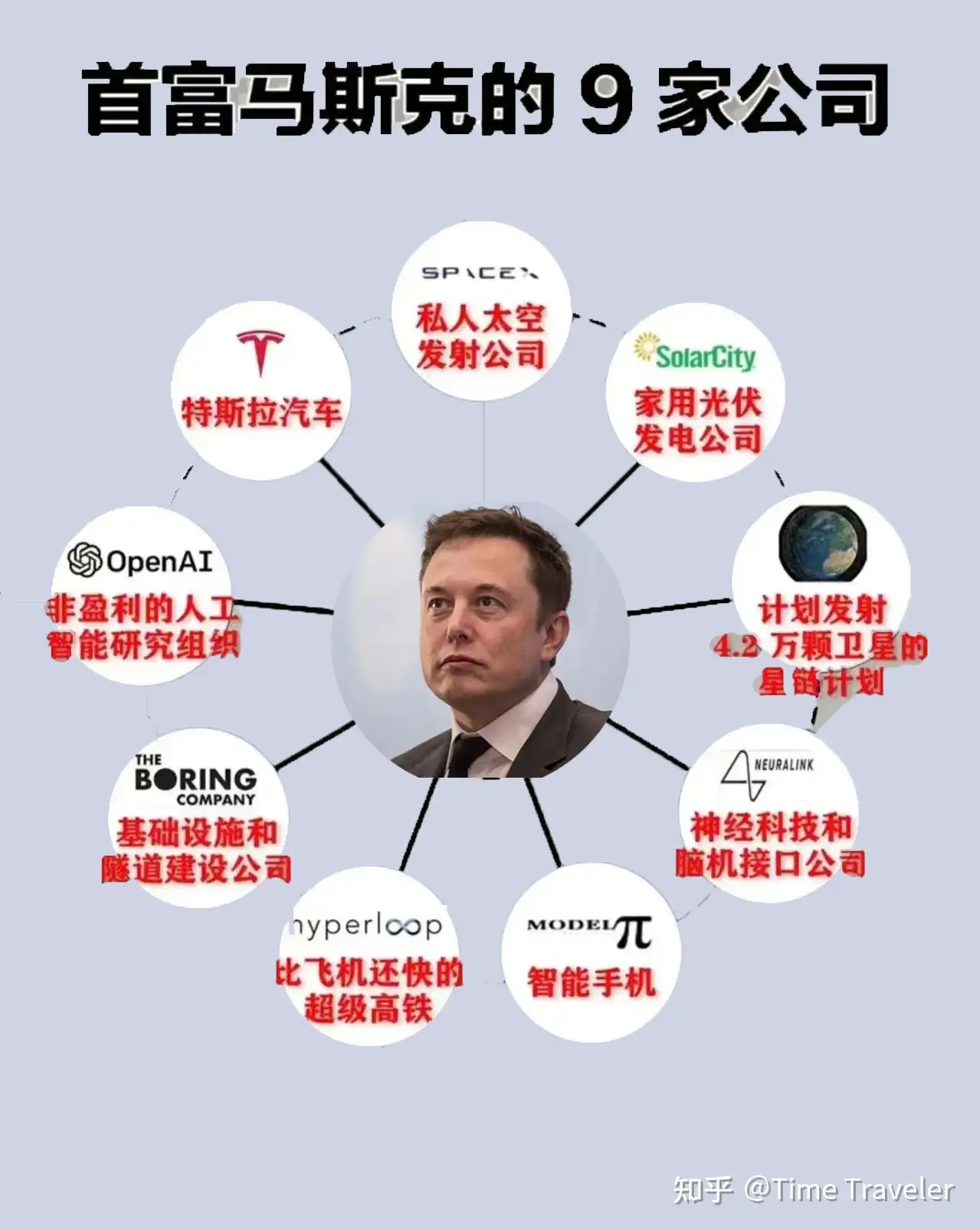
马斯克的九家公司

二、Chatgpt的特点

1.高效的语言理解能力,可以回答问题。ChatGPT通过学习大量语言数据,能够很好地识别语法结构和语义。

img

ChatGPT获得沃顿商学院MBA

2.语法和语义正确性较高,生成的文本可读性好。ChatGPT能够通过词汇和语法的分析,识别句子的语义。

3.根据上下文生成相关内容。ChatGPT具有记忆力,能够根据对话的上下文,更好地理解和回答问题。

img

ChatGPT讲笑话

4.支持多语言。ChatGPT支持多种语言,包括英语、中文、法语、德语、西班牙语等常规语言,还包括克林贡语(Klingon)、精灵语(Quenya)、世界语(Esperanto)、海盗语(Pirate Speak)
等比较少见的语言,并能在不同语言环境中高效工作。

img

精灵语“我是中国人,我爱我的祖国”

img

世界语“我是中国人,我爱我的祖国”

img

海盗语“我是中国人,我爱我的祖国”

img

克林贡语“我是中国人,我爱我的祖国”

三、Chatgpt的实际应用

ChatGPT可以应用于多种领域,主要应用场景如下:

  • 问答系统:ChatGPT 可以通过对询问进行理解和生成简明易懂的回答。
  • 聊天机器人:ChatGPT 可以用于构建人机对话系统,以帮助用户解决其问题并回答其问题。
  • 文本生成:ChatGPT 可以用于生成文本,例如新闻文章、诗歌、小说等。
  • 机器翻译:通过使用多语言训练数据,ChatGPT 可以用于文本翻译。

除此之外,ChatGPT还拥有许多衍生应用,目前在国外已经有大量通过 ChatGPT赚钱的例子,包括售卖各类文案书籍、各类方案策划、利用ai自动生成视频、音乐、图片技术等。(如果文章阅读多,将专门出一期利用ChatGPT赚钱的详细描述)

img

四、写在最后

ChatGPT 不仅是一个智能AI,也是新时代的奠基者,我们将从互联网时代进入AI时代,人工智能的发展和应用加速了互联网技术的发展,并在许多领域带来了巨大的变革,AI可以助企业提高生产力,减少人力成本,提高效率、提高产品品质、加快创新速度,更快地推出新产品,与此同时,伴随着技术的发展,也会产生一系列新的问题,如人工智能可能会取代一些工作,导致某些工作岗位的失业,人工智能技术可能泄露个人数据,威胁个人隐私安全,人工智能可能加剧社会不平等,因为一些群体可能更难获得机会和资源。

所以AI时代对我们来说充满了机遇与挑战,就像互联网时代一样,抓住了时代变革的机遇,你就会成为时代的佼佼者,反之就会成为时代的眼泪,所以我们要勇于面对时代变革,站在时代的封口,无论互联网还是AI,他们的使用者都是人,现在我们都在同一起跑线,从零开始,让你从被AI取代到让AI为你打工,请好好把握当下,抓住机遇,让AI把你的生活变得更美好!

https://zhuanlan.zhihu.com/p/604110117

原作者:Time Traveler

❌
❌