阅读视图

发现新文章,点击刷新页面。
☑️ ☆

learn lua (WIP)

resources:


§ KEYWORDS


DECLARACTION
    local   function

LOGIC
    and     or  not

CONTROL
    for	    in  repeat  until   while   break
    do      if  else    elseif  then    return
    end

VALUE
    true    false   nil
    

§ tyles and values

basic types

nil
type of a single value, non-exist, anything undeclared, or effectively “deleted”
boolean
2 values true and false. conditionals consider false and nil to be false and anything else to be true. nil is false, 0 is true.
number
real numbers, double-precision floating point. There is no integer type in lua. lua can represent any long integer without rounding issues. Lua can be compiled to use other types for numbers.
    4     0.4     4.57e-3     0.3e12     5e+20
  • string
  • userdata
  • function
  • thread
  • table
☑️ ☆

hugo license helpers

Some license helpers if

  1. you may use different licenses for different page
  2. you don’t want to micromanage license URLs.

(simple way): specify license in page frontmatter:

And simply call {{.Params.license}} in your page footer partial. This is simple and versatile (you can type anything you want in this field). But there is no link to the license text.

---
title: "hugo license helpers"
license: Public Domain or CC0
---

with spdx data

  1. download the license data from spdx to e.g. /site/data/spdx.json

  2. have a template or shortcode that queries the data and parse a link shortcodes/spdx.html example

    {{- $id := .Get 0}}
    {{- $target:= dict}}
    {{- $spdxall := site.Data.spdx.licenses}}
    {{- range $spdxall}}
    {{- if (eq $id .licenseId)}}
    {{- $target = .}}
    {{- end}}
    {{- end}}
    
    {{- with $target.name}}
    <a href="{{$target.reference}}">{{$target.licenseId}}</a>
    {{- else}}
    {{- warnf "%s is not valid spdx license id, using default." $id}}
    <a href="/license">[license]</a>
    {{- end}}
    
  3. (e.g.) call from a post (remove the spaces..)

    {{ < spdx EUPL-1.2 > }}
    
☑️ ⭐

vim thoughts and rants

§§§ priviously on shrik3’s 无能狂怒

text editor edits text!!!

repeat after me: T-E-X-T editor! What’s the fucking point of pulling out a CNC machine and call it “a better knife”? vi is a text editor, neovim is a text editor, lunar/astro/nvchad/* is not a fucking text editor. Just be honest with yourself. When you want a debugger, a languague server, a treesitter, a VCS integration, a rocket launcher … in your workflow, say it out loud that you want an IDE (just because you control the “I” of the “IDE” doesn’t change what it is.).

There is no elitism in this rant: I use whatever gets things done. The point is, arguing about the “the best text editor for programming” is just pointless.

§§§ when a text editor is less than a text editor

Now I’m thinking, what should be integrated into a text editor and what shouldn’t?

§§§ emojis

If you neovim you probably already know the name of Folke, developer of many beloved plugins.

While I do appreciate their works…. That consistent passion in abusing emojis in the docs… Well who am I to rant?

I mean, here https://github.com/folke/lazy.nvim
Every single line in the readme is led by an emoji. For me this is absolutely painful to read.

☑️ ⭐

[DEPRECATED] archlinux使用贴士

date: 2017-03-28 23:04:15

this page is deprecated, please see /post/arch_setup_new

阿昊诈尸了,数月之后含着泪更下了这篇文章,因为他手残把系统滚挂了,重装了一遍,顺便复习一下安装过程。

一些小东西,日常更新,只为更好的用户体验

§ 安装

§§ PREPARATION

  • download arch iso here
  • 写引导镜像 。 讲道理没必要用 UltraIso 那么麻烦的工具 , 我推荐 USB writer
  • 安装过程需要网络连接,尽量使用网线,wifi需要另外配置,参见官网wiki。
  • BIOS 这种东西我们就不用了吧, UEFI大法好。

§§ 开始干活儿!

§§§ 关于分区

理论上讲需要三个分区,她们分别是

SDA1 : linux swap SDA2 : EFI system SDA3 : linux file system

其中 swap 分区,并不是一个必需的东西,不过建议搞一个,他的容量一般设置为机器内存的一半。

EFI 分区, 如果已经有了,也可以不搞。她的容量是512 Mb。

由引导盘启动后即可开始分区,使用cdisk工具,按照指示弄就好了,没什么可说的。

分完区之后注意记一下各个分区对应的编号,这个例子中, sda1 sda2 sda3 分别对应 swap , efi , linux file system .

接下来执行这四条指令格式化分区。

mkfs.vfat -F32 /dev/sda2
mkfs.ext4 /dev/sda3
mkswap /dev/sda1
swapon /dev/sda1

他们的作用分别是 1. 把设置sda2为vfat(作efi分区用),2.把sda3格式化为ext4 作为 Linux 分区使用 . 3和4 建立并激活swap 分区。

挂载分区

mount /dev/sda3 /mnt
mkdir -p /mnt/home /mnt/boot
mount /dev/sda2 /mnt/boot

§§§ 正式开始安装

由于某些众所周知的原因,我们的联网安装可能会遇到障碍,所以在获取联机内容前先编辑一下源 /etc/pacman.d/mirrorlist , 把想用的源放在最前面.保存后执行 pacman -Syy

安装系统:

pacstrap /mnt base base-devel

fstab 在这里, fstab 用于硬盘的自动挂载 (之前的各种mount操作)。这里有一个坑,如果用 sda1 sda2 这样的编号作为设备的索引,一旦将来设备编号发生变化,就会出现问题,举个栗子(亲身经历),我的arch和windows装在同一块ssd上,win占用的分区编号靠前,又一次win更新过后,很抽筋地给我增加了一个分区在前面,导致其后所有分区编号顺延了1,这样fstab就未能成功挂载boot,arch系统引导失败。 解决这种情况就要用UUID 作为设备索引了,当然这都是后话。

genfstab -U -p /mnt >> /mnt/etc/fstab

以上命令生成一个fstab配置,最好再人工确认一下,另外以后就不要再用genfstab了 , 人工编辑吧。

进入新系统 说了那么多,刚才所有的操作其实是在你的U盘中的一个live arch系统中进行的,现在你要换到自己刚装上的系统去。

arch-chroot /mnt /bin/bash

启用dhcpcd (网络连接):

systemctl enable dhcpcd.service

现在要设置一些语言地区时间字体了,不过为了减少安装步骤,这里只是设置一下语言地区,其他来日方长。

edit /etc/locale.gen 选择需要的编码,去掉注释。我们用到的是这些:

en_US.UTF-8 UTF-8
zh_CN.GB18030 GB18030
zh_CN.GBK GBK
zh_CN.UTF-8 UTF-8
zh_CN GB2312

tip : vi 中 在normal模式下,按 / 可进行搜索。 按n跳转到下一个结果。

edit /etc/locale.conf

LANG=en_US.UTF-8

现在新建一个日常用户,root用户要少用,而且不要用root 搞startx,容易出事儿。

useradd -G wheel username
passwd username
mkdir -m 700 /home/username
chown username:username /home/user

这个时候虽然新用户在管理员组,但仍然不能使用sudo权限,这时候你就要作为root,编辑一个 /etc/sudoers 添加一行

username ALL=(ALL) ALL

对了root 用户最好也用passwd命令设个密码。。

bootloader(for UEFI)

mount -t efivarfs efivarfs /sys/firmware/efi/efivars

pacman -S grub os-prober efibootmgr

grub-install --target=x86_64-efi --efi-directory=/boot --bootloader-id=arch_grub --recheck

grub-mkconfig -o /boot/grub/grub.cfg

卸载分区,重启一发

exit
umount -R /mnt
reboot

§§§ 图形界面

pacman -S xorg-server xorg-xinit xorg-utils xorg-server-utils xorg xorg-xeyes xorg-xclock

显卡驱动

pacman -S xf86-video-vesa

GNOME

pacman -S gnome pacman -S gnome-tweak-tool gnome-packagekit
systemctl enable gdm.service

到这里,就可以开始用ARCH LINUX 了

§§§ 其他设备

pacman -S alsa-utils
pacman -S xf86-input-synaptics

§§§ 输入法

pacman -S ibus-libpinyin

§§§ 关于网络

sudo pacman -S networkmanager network-manager-applet
sudo systemctl enable NetworkManager.service
sudo systemctl disable dhcpcd

§ 日常设置

§§§ 节省笔记本电池

刚装完的arch,吃电池还是很厉害的,需要进行一些微小的优化:

sudo pacman -S tlp powertop
sudo systemctl enable tlp
sudo systemctl start tlp

§§§ 交换 ESC 和 CAPS LOCK

作为一个vim党,不换CAPS LOCK 和 ESC 根本忍不了

simply use dconf-editor

找到 org » gnome » desktop » input-source 然后 找到 xkb-options , 添加 ‘caps:swapescape’ (注意不要改变中括号)

§§§ ntfs 分区的挂载

正常情况下arch是不支持ntfs文件系统的读写的,这时候需要

sudo pacman -S ntfs-3g

这样就可以mount一个windows分区,但是手动mount太麻烦了,对于一些常用分区,我们希望让系统自动挂载,这时候就要用到fstab了。 edit /etc/fstab 比如我们需要挂载的分区是 /dev/sda4 ,只需要加一行

/etc/sda4  [mount-point]  ntfs-3g  defaults  0 0

(其中[mount point]是挂载点,我用的是 /mnt/windev). 还记得之前说过的使用sda4这类设备编号的坑嘛?如果分区表发生了变化,这个挂载就会失败,所以我们更该一下,使用UUID作为设备索引。

sudo blkid /dev/sda4 

这时候你会得到一串字符串。找到 UUID= 后面的内容,更改刚才那一条fstab记录(其中XXXXXX是刚刚查到的UUID):

UUID=XXXXXX  <mount point>  ntfs-3g  defaults  0 0

改完后保存,重启,就可以自动把sda4挂载到/mnt/windev下了 =w= 当然,fstab记录可以进行更详尽的权限等设置,具体参见官方wiki。

§§§ 关于win ,arch 双启动

假设我们用的是grub,在之前的安装步骤,我们进行 grub-mkconfig 的时候并没有识别原来windows的EFI,引导界面是看不到windows的,所以这里作出一个微小的补救,我们装完上面的 ntfs-3g 之后, 再进行一个

sudo grub-mkconfig -o /boot/grub/grub.cfg

就可以把新监测到的windows EFI写入grub配置文件 , 现在重启,就可以在启动界面看到windows辣。

§§§ 给我一个酷炫的终端

跟ubuntu那种耀眼贱货不一样,我们的arch小萝莉默认终端是不能变透明的,所以我们要装一个

pacman -S xfce4-terminal

然后就可以设置背景透明啦。 再给他一个drop down 式的全局热键触发,在系统设置-keyboard-custom shortcut 中添加一条 xfce4-terminal --drop-down ,我用的 alt+t

§§§ hifi ,懂吗 , hifi!

笔记本声卡什么的,才不用呢。 装一套 alsa-utils 即可使用 alsamixer 工具切换声卡。

§§§ 持续更新中

☑️ ⭐

如何用区块链合约做一个赌博应用?

writting date: 2018-09-21 13:46:49

去中心化,匿名,可信。除了做电子货币之外,区块链仿佛是为赌博量身定制的一般。 那么问题来了,如何实现一个赌博应用呢。。

我在参考了一些代码后做了个测试,有兴趣的可以传到主链上试试(一切后果自负。这里只做技术探讨。 我参考了国外大佬写的一些代码,但出处已经找不到了。

Any possibly related consequence is  your own.

§ oraclize

所有的赌博都依赖一个【公开透明高可信的随机因素】。比如赌球赌马,比赛结果就放在那里,谁也不可能伪造;同时又没有人能够真正预知比赛结果(假如没有黑幕)。 你甚至可以赌下周五伦敦的气温。

那么问题来了,如何生成一个可信的随机数呢。 你说,在给定范围内random一个integer不就行了嘛? 可是程序内部生成的数字,赌徒可不买账,谁知道你是不是操纵了这个结果呢。 的确有人利用random.org之类的随机数生成服务来赌博,但是他们是不是一家谁又能证明呢。

所以就有了oraclize这个东西,它给智能合约提供了一个现实世界的api,通过它你可以在合约里动态获取货币汇率,天气情况,等等乱七八糟的数据,十分强大。但这里只说一下它的随机数服务。

oraclize的随机数生成原理可以看这里,它保证了随机数不会被操纵(除非天下矿工都是你)

使用方法概述一下是这个样子的:

0.你需要在一开始导入oraclize的库,并声明你的合约using oraclize:

1
2
import "github.com/oraclize/ethereum-api/oraclizeAPI.sol";
contract Betting is usingOraclize

btw,关于solidity版本,我在测试代码的时候4.20是稳定运行的,可最新版会出现一些不可名状的错误,我不知道为什么。

1.这个服务不是免费的,你必须支付一定的佣金。需要把这部分eth放在msg的value里面,而不是通过支付gas的方式。所以获取随机数的函数应该写成payable的

1
2
3
    function setRandomNumber()public payable{
        oraclize_query("WolframALpha","RandomInteger[{0,1}]");
    }

这里生成的是随机的0或1

2.服务提供方响应请求后,如果成功获取了随机数,就会通过回调的方式来告诉你结果,因此对应地,也需要一个处理callback的函数,用于接收,验证和处理结果。而且这一步产生的gas费用也是需要你支付的(wtf)

1
2
3
4
    function __callback(bytes32 myid, string result){
        if(msg.sender != oraclize_cbAddress()) throw;
        RandomNumber = result;
    }

这里首先要确认消息的发送方是否就是可信的的随机数提供方(防止其他人伪造结果) 代码里的RandomNumber是合约类中的成员变量。

§ Gambling is the demon , stay away:

基于上面的随机数,可以设计一个类似猜硬币正反的合约,两个人参与,各付一块钱押金,猜正反,赢家通吃。 下面的代码,为了方便调试,许多变量我写成public了,真正使用的话应该private。

 1
 2
 3
 4
 5
 6
 7
 8
 9
10
11
12
contract Betting is usingOraclize{
    string public description;
    address[] private addresses;
    uint public amount;           // 这里限定了下注的金额 
    uint public pot;              // 这是所有人的下注总金额
    string[] private numbers;     // 这是每个人下注的数字
    string public RandomNumber;   // 最后生成的随机数保存在这里
    mapping (address => uint) participating; // 同一个人不能投两次注
    
    event betAccepted(address gambler, uint amount);
    event Winner(address winner , uint _pot);
    event rollAccepted(address better , string _number);

这是合约的各种成员变量和事件。

接下来是构造函数:

1
2
3
4
 function Betting (string _description, uint amount_In_Ether)public payable{
        description = _description;
        amount = amount_In_Ether * 1 ether;
    }

需要注意的是,因为后面需要把奖池里的eth付给赢家,所以构造函数必须是payable的。

下面的代码用来接受投注:在调用这个方法时,应该把金额放在value里面(因此这个方法必须是payable的),前面规定投注必须是1个ETH。

 1
 2
 3
 4
 5
 6
 7
 8
 9
10
11
12
13
14
15
  function sendNumberAndAmount (string _numberInRangeOf0To1) public payable {
        if(msg.value == amount && participating[msg.sender]==0){ 
        
        // 投注的前置条件:投注金额必须符合规定而且你之前没有下过注
            pot += msg.value;
            addresses.push(msg.sender);
            numbers.push(_numberInRangeOf0To1);
            participating[msg.sender] += 1;
            betAccepted (msg.sender,msg.value);
            rollAccepted (msg.sender, _numberInRangeOf0To1);
        }
        else {
            throw;
        }
    }

接下来把前面提到的请求随机数和回调函数抄一遍,这儿不重复了

获取随机数之后就可以检测赢家是谁并付款了

 1
 2
 3
 4
 5
 6
 7
 8
 9
10
11
12
13
function checkingWinner()public {
    bool win = false;
    uint x = 0;
    while(win == false){
    stringsEqual(numbers[x]);
    if(equal == true){
        addresses[x].transfer(pot);
        Winner(addresses[x],pot);
        win = true ;
    }else {
        x++;
    }
}

再下面就是个坑了,虽然说我们请求的是“随机数”,但是oraclize还给我们的随机数是字符串形式,为了省一步转换,在下注的环节中也使用字符串来接受玩家的猜测数字。

那么问题来了,在solidity里面字符串怎么比较呢。。 最普遍的方法是这个样子的:

 1
 2
 3
 4
 5
 6
 7
 8
 9
10
11
12
13
14
15
16
17
18
19
20
   function compareStrings(string fuck, string shit){
        bytes storage a = bytes(fuck);
        bytes memory b = bytes(shit);
        uint c = 2;

        if(a.length != b.length){
            return false;
            c--;
        }

        for(uint i = 0; i<a.length;i++){
            if(a[i]!=b[i]){
                return false;
                c--;
            }
        }
        if(c==2){
            return true;
        }
    }

肥肠无语。。不过还有种比较heck的方法可以更简单地比较字符串中的数字

1
2
3
   function compareStrings (string a, string b) view returns (bool){
       return keccak256(a) == keccak256(b);
    }

用的是hash函数来比较两个字符串,‘1’和‘0’的hash显然是不一样的,但是如果字符串没这么简单,那就不好说了。

checkingWinner()中的stringsEqual封装了一下使用compareStrings对比RandomNumber变量和输入字符串的逻辑。两行代码,这里就不写了。

反正至此你就可以跟朋友赌博去了。

§ THIS IS A TEST

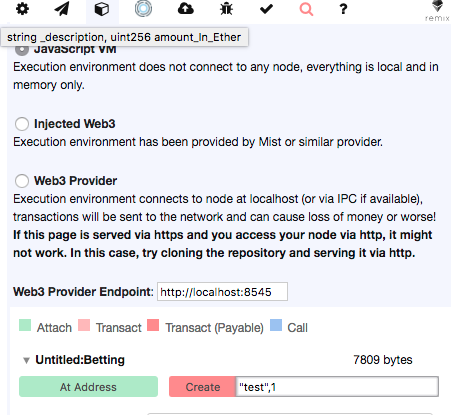
下面是一个测试。 之前说了,oraclize是收费的,为了无限制地测试,可以使用oralize官方给出的在线ide,注意要把测试环境设置成Javascript VM. 如果她说 compiler not yet loaded , 试试关掉adBlock,并且把你的校园网关了,自己拿手机开个热点。别问我怎么知道的。

Screen Shot 2018-09-21 at 3.01.17 P

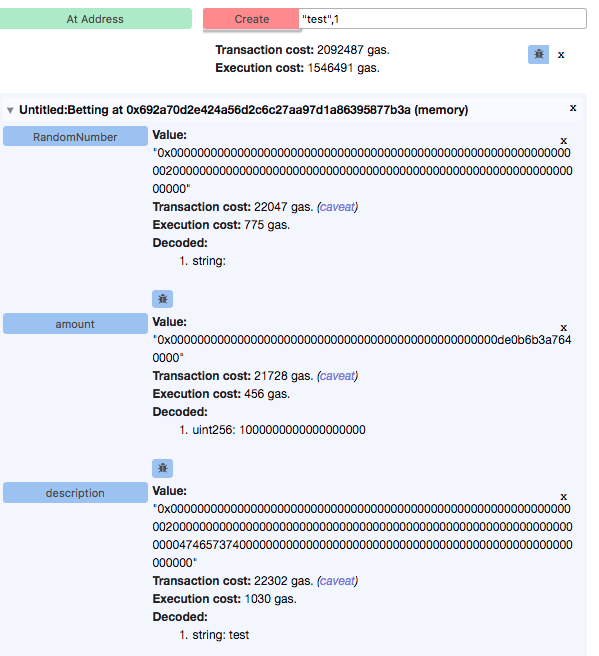
部署看上去是这样子的Screen Shot 2018-09-21 at 3.02.34 P

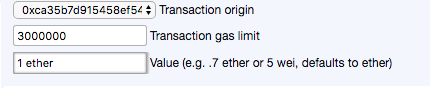
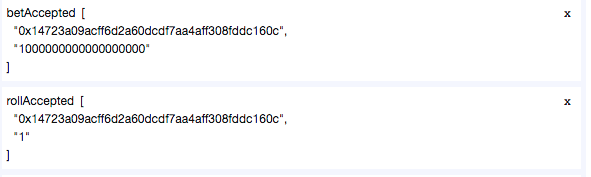
接下来投个注试试: 不要忘记把value写成1 ether Screen Shot 2018-09-21 at 3.03.24 P

Screen Shot 2018-09-21 at 3.04.15 P

Screen Shot 2018-09-21 at 3.08.36 P

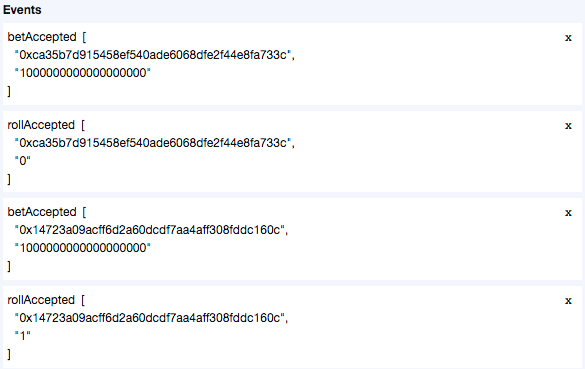
接下来换一个账户,投“1” Screen Shot 2018-09-21 at 3.09.00 P

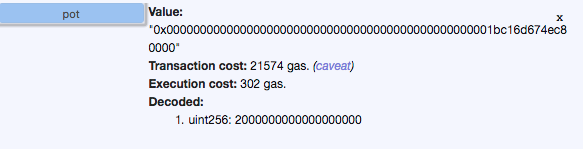
之后看一下合约的状态:奖池里已经有两块钱了 Screen Shot 2018-09-21 at 3.05.21 P

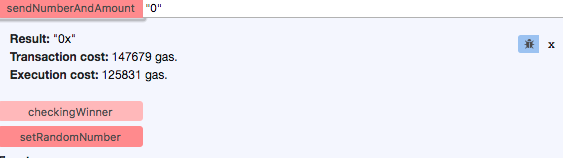
再调用一下设置随机数函数,这个点完了得等会儿再看结果,结果不是立刻返回给你的 注意下,这一步,你第一次用的时候是免费的,这是oraclize的政策,后面再用就得付费,费用通过value支付。具体付多少可以看官网的价格。

随机数设置好以后,就可以揭晓赢家啦。 调用checkingWinner函数: Screen Shot 2018-09-21 at 3.09.45 P 恭喜这位60c玩家获得两块钱。

§ improve

这个合约为了简单,省略了各种操作,还可以完善一下,比如

  • 设置一个initialize函数,把所有变量恢复初始状态,使合约可以重用
  • 可以设置更复杂的规则,更多的参加人数和可变的投注额。让投注较多的赢家赚更多
  • 你可以当庄家,不过需要根据概率设置好赔率,否则就亏了。。
  • 除了随机数,还有各种玩法,毕竟oraclize那么强大呢,在线赌球也不是不行
  • 你可以从奖池里抽取(大笔的)佣金,同时调用随机数api产生的费用也应该这么付。

§§§ 只做技术探讨,一切使用后果自负

§§§ 富强、民主、文明、和谐、自由、平等、公正、法治、爱国、敬业、诚信、友善

☑️ ☆

how fast are things in Linux (WIP)

let’s benchmark the speed / latency of various things under linux.

Disclaimer: this is only some fun experiments to give an rough idea of magnitude of things. I don’t claim to provide any accurate or representative numbers.

§ testing environment

processor:  Intel(R) Core(TM) i5-6440HQ CPU @ 2.60GHz
kernel:     Linux 6.6.63-1-lts #1 SMP PREEMPT_DYNAMIC x86_64 GNU/Linux
system:     archlinux
glibc:      2.40

mitigations:
I have a rather old CPU from 2016, which has many HW vulnerability like spectre and meltdown. The mitigation slows down the system (especially syscalls) quite significantly (see appendix for the mitigations). Keep this in mind when reading the numbers.

clock source:
For measurement I’m using CPU’s invariant TSC. My CPU tsc ticks @ 2592 MHz, this is like cpu cycles but not nesessarily the same counting.

§ what’s before main()

This is actually pretty complicated: when running a program, the parent process calls exec, and the newly forked process doesn’t directly start from main(), the libc needs to prepare various things for it. But for a quick measurement, let’s see how long does it take to exec()

In the below example we are doing a fork() in the main process, in the forked process we when do a execve. The tsc difference is roughly the time spent on calling fork(), execve(), then run until the main() function of spawned program. In dozens of runs, this number range from 1574520 to 5118116, which translates into 607 to 1974 microseconds (µs). Note that in this case you must have the constant_tsc cpu feature, because the parent and child process won’t necessarily spawn on the same core.

// main.c
int main() {
    long long tsc_0;
    pid_t my, pid;
    my = getpid();
    tsc_0 = RDTSC();
    pid = fork();
    if (pid == -1){
        printf("fork error\n");
        exit(-1);
    } else if (pid > 0) {
        printf("host counter before fork: %lld\n", tsc_0);
        int status;
        waitpid(pid, &status, 0);
    } else {
        execve("test", NULL, NULL);
    }
    return 0;
}


// test.c
int main() {
    long long tsc_1;
    tsc_1 = RDTSC();
    printf("child_process in main: %lld\n", tsc_1);
    return 0;
}

The difference between tsc 0 and tsc 1 is roughly the exec overhead.

§ print hello world

The speed of printing depends on many things but what about the trivial

printf("hello world\n");

result 100 runs:

loop total time total ticks avg. ticks per iter avg. each iter
printf() 0.000265 s 687078 6870 2690 ns

btw, compiler optimization doesn’t change anything here.

§ syscall

For a rough idea, we could have 1k ~ 100k syscalls per second. on a normal 4 cores system.

$ sudo perf stat -e raw_syscalls:sys_enter -a -I 1000 sleep 10

on my (pertty busy) 4C/8G production server:

#           time             counts      unit events
     1.000774756             26,478      raw_syscalls:sys_enter                                                
     2.002340928             29,731      raw_syscalls:sys_enter                                                
     3.006551494             28,774      raw_syscalls:sys_enter                                                
     4.007948189             73,816      raw_syscalls:sys_enter                                                
     5.009343398             31,859      raw_syscalls:sys_enter                                                
     6.010853823             52,696      raw_syscalls:sys_enter                                                
     7.012298835             55,095      raw_syscalls:sys_enter                                                
     8.013842981             21,614      raw_syscalls:sys_enter                                                
     9.015450515             26,814      raw_syscalls:sys_enter                                                
    10.006519753             52,751      raw_syscalls:sys_enter 

on my laptop (I’m randomly clicking in the browser):

#           time             counts unit events
     1.001079680             18,676      raw_syscalls:sys_enter                                                
     2.007895894             28,518      raw_syscalls:sys_enter                                                
     3.014606980             19,019      raw_syscalls:sys_enter                                                
     4.021105434             37,456      raw_syscalls:sys_enter                                                
     5.026087966             53,223      raw_syscalls:sys_enter                                                
     6.054707533             43,798      raw_syscalls:sys_enter                                                
     7.056551079             20,397      raw_syscalls:sys_enter                                                
     8.058208397             19,185      raw_syscalls:sys_enter                                                
     9.060285037             47,732      raw_syscalls:sys_enter                                                
    10.005679016             21,985      raw_syscalls:sys_enter 

syscall latency: runtime of getpid() and the same loop without syscall as reference:

 1
 2
 3
 4
 5
 6
 7
 8
 9
10
11
12
13
14
int main() {   
    // SNIP
    volatile pid_t pid;
    for (int i = 0; i < RUNS; i++) {
        pid = syscall(SYS_getpid);
    }

    // SNIP
    volatile long long test = 0;
    for (int i = 0; i < RUNS; i++) {
        test += 1;
    }
    return 0;
}

results (each loop for 1000000 times)

loop total time total ticks avg. ticks per iter avg. each iter
getpid() 0.909797 s 2358194840 2358 910 ns
empty loop 0.002529 s 6556390 6 2.31 ns

§ signal delivery

TODO latency measurement between signal() call and signal handler code (in another process)

§ pthread context switch

TODO latency measurement of pthread’s cooperate context switching with yield()

§ linux process scheduling

TODO this is a bit complicated because linux scheduler is a blockbox: we have no idea what scheduler decides to switch to next.

§ coroutine / fiber context switch

glibc swapcontext invokes the rt_sigprocmask syscall, therefore you have at least 1 microsecond of latency.

There are also implicit latency: constantly swapping processor context would break locality (spoken: cache utility).

§ setjmp / longjmp

§ boost::context

§ further readings:

§ Appendix: testing environment

[+] click to expand full cpuinfo
$ lscpu:
Architecture:             x86_64
  CPU op-mode(s):         32-bit, 64-bit
  Address sizes:          39 bits physical, 48 bits virtual
  Byte Order:             Little Endian
CPU(s):                   4
  On-line CPU(s) list:    0-3
Vendor ID:                GenuineIntel
  Model name:             Intel(R) Core(TM) i5-6440HQ CPU @ 2.60GHz
    CPU family:           6
    Model:                94
    Thread(s) per core:   1
    Core(s) per socket:   4
    Socket(s):            1
    Stepping:             3
    CPU(s) scaling MHz:   26%
    CPU max MHz:          3500.0000
    CPU min MHz:          800.0000
    BogoMIPS:             5202.65
    Flags:                fpu vme de pse tsc msr pae mce cx8 apic sep mtrr pge
                          mca cmov pat pse36 clflush dts acpi mmx fxsr sse sse2
                          ss ht tm pbe syscall nx pdpe1gb rdtscp lm constant_tsc
                          art arch_perfmon pebs bts rep_good nopl xtopology
                          nonstop_tsc cpuid ap erfmperf pni pclmulqdq dtes64
                          monitor ds_cpl vmx smx est tm2 ssse3 sdbg fma cx16
                          xtpr pdcm pcid sse4_1 sse4_2 x2apic movbe popcnt
                          tsc_deadline_timer aes xsave avx f16c rdrand lahf_lm
                          abm 3dnowprefetch cpuid_fault epb pti ssbd ibrs i bpb
                          stibp tpr_shadow flexpriority ept vpid ept_ad fsgsbase
                          tsc_adjust sgx bmi1 avx2 smep bmi2 erms invpcid mpx
                          rdsee d adx smap clflushopt intel_pt xsaveopt xsavec
                          xgetbv1 xsaves dtherm ida arat pln pts hwp hwp_notify
                          hwp_act_window hwp_epp vnmi md_clear flush_l1d
                          arch_capabilities
Virtualization features:  
  Virtualization:         VT-x
Caches (sum of all):      
  L1d:                    128 KiB (4 instances)
  L1i:                    128 KiB (4 instances)
  L2:                     1 MiB (4 instances)
  L3:                     6 MiB (1 instance)
NUMA:                     
  NUMA node(s):           1
  NUMA node0 CPU(s):      0-3
Vulnerabilities:          
  Gather data sampling:   Vulnerable: No microcode
  Itlb multihit:          KVM: Mitigation: VMX disabled
  L1tf:                   Mitigation; PTE Inversion; VMX conditional cache
                          flushes, SMT disabled
  Mds:                    Mitigation; Clear CPU buffers; SMT disabled
  Meltdown:               Mitigation; PTI
  Mmio stale data:        Mitigation; Clear CPU buffers; SMT disabled
  Reg file data sampling: Not affected
  Retbleed:               Mitigation; IBRS
  Spec rstack overflow:   Not affected
  Spec store bypass:      Mitigation; Speculative Store Bypass disabled via prctl
  Spectre v1:             Mitigation; usercopy/swapgs barriers and __user
                          pointer sanitization
  Spectre v2:             Mitigation; IBRS; IBPB conditional; STIBP disabled;
                          RSB filling; PBRSB-eIBRS Not affected; BHI Not
                          affected
  Srbds:                  Mitigation; Microcode
  Tsx async abort:        Mitigation; TSX disabled
☑️ ☆

No bullshit hugo blog

Javascript free, tracking free, ultra-lightweight.

Everything about this site.

§§§ Code is here

https://git.sr.ht/~shrik3/blog_public

Be aware that the code is duct-taped to my specific needs. It won’t suit you out-of-the-box. Nevertheless the code itself is a more straightforward documentation.

This page would be updated if I learn something new for blogging. The above code however is just a snapshot and will not be actively updated. Contact me if you have questions.

§§§ Related posts

Layouts
How to have a “all-posts” list: https://shrik3.com/all-posts/_1/

email based comment system
https://shrik3.com/post/static_comment/
https://shrik3.com/comment/

why/how no js
https://shrik3.com/post/js_or_no_js/

modules
Math rendering (katex) integration (client side JS required): https://shrik3.com/post/hugo_katex_support/
openring/webring integration: https://shrik3.com/post/open_webring/
fediverse timeline integration: https://git.sr.ht/~shrik3/timeline-bot

CMS
Building a art gallery with meta data management: https://shrik3.com/post/static_gallery/

Commentaries
Why default to “light mode” theme. https://shrik3.com/bits/0x45#default-to-light-mode
Why the public repo for blog doesn’t include the post content: https://shrik3.com/bits/0x39#blog-code-in-a-public-repo

☑️ ☆

my blog deploy script

  1
  2
  3
  4
  5
  6
  7
  8
  9
 10
 11
 12
 13
 14
 15
 16
 17
 18
 19
 20
 21
 22
 23
 24
 25
 26
 27
 28
 29
 30
 31
 32
 33
 34
 35
 36
 37
 38
 39
 40
 41
 42
 43
 44
 45
 46
 47
 48
 49
 50
 51
 52
 53
 54
 55
 56
 57
 58
 59
 60
 61
 62
 63
 64
 65
 66
 67
 68
 69
 70
 71
 72
 73
 74
 75
 76
 77
 78
 79
 80
 81
 82
 83
 84
 85
 86
 87
 88
 89
 90
 91
 92
 93
 94
 95
 96
 97
 98
 99
100
101
102
103
104
105
106
107
108
109
110
111
112
113
114
115
116
117
118
#!/usr/bin/sh

bold=$(tput bold)
normal=$(tput sgr0)

blog_root=/home/shrik3/docs/blog
site_local=$blog_root/site
# trailing slash is necessary for rsync
webroot_remote=shrik3@shrik3.com:/srv/www/blog/

# for performance, limit the max number of URLs to pass to openring
limit=6
openring_in=~/docs/blog/webring_in.html
openring_out=~/docs/blog/site/layouts/partials/webring.html
webring_src="https://raw.githubusercontent.com/XXIIVV/webring/main/index.html"

# adhoc pages on wth.moe
vnoid_root=$blog_root/vnoid_home
vnoid_remote=shrik3@vnoid:~/www

sync_vnoid() {
    pushd $vnoid_root
    ./gen.sh
    rsync -avh -og --chown=shrik3:http --info=progress2 \
        --info=name0 --update --delete-after \
        $vnoid_root/ $vnoid_remote/
    popd
}

print_help(){
    echo "usage":
    echo "without parameters: render the blog as normal"
    echo "[optional]"
    echo "      --fedi      include fedi timeline"
    echo "      --webring   include webring"
    echo "      --misc      include static files"
    echo "      --all       include all options"
}

pull_timeline(){
    echo "${bold} Fetching Timeline from fedi... ${normal}"
    cd $blog_root/timelinebot
    ./timelinebot.py
}

# parse webring index.html into openring parameters
# | grep -Po        # extract pattern from html
# | shuf | head -n  # randomize and select n of them
# | sed             # prefix each html with '-s'
pull_webring(){
    echo "${bold} Pulling webring... ${normal}"
    rss_list=$(curl $webring_src | grep -Po '.*href="\K.*(?=" class="rss")' | shuf | head -$limit | sed -e 's/^/-s /')
    # rss_list=$(curl $webring_src | grep -Po '.*href="\K.*(?=" class="rss")' | shuf | sed -e 's/^/-s /')
    openring $rss_list < $openring_in > $openring_out
}


sync_files(){
    echo "${bold} Sync static files ... ${normal}"
    cd $blog_root
    ./syncmisc
}


while [[ $# -gt 0 ]]; do
    case $1 in
        --vnoid)
            sync_vnoid
            exit 0
            ;;
        --fedi)
            pull_timeline
            shift 1;
            ;;
        --webring)
            pull_webring
            shift 1;
            ;;
        --misc)
            gpg --export --armor --export-options export-minimal $GPGKEY > $blog_root/misc/gpg.asc
            sync_files
            shift 1;
            ;;
        -*|--*)
            print_help
            exit 1
            ;;
        *)
            print_help
            exit 1
            ;;
    esac
done


# render blog
cd $site_local
echo "${bold} Rendering blog... ${normal}"

# update gpg pubkey
echo "${bold} Appending key $GPGKEY... ${normal}"
gpg --export --armor --export-options export-minimal $GPGKEY > $site_local/layouts/partials/pubkey.asc

# dump a git log
git log --format=reference | head > $site_local/layouts/partials/gitlog.asc

# the render
hugo --ignoreCache
# copy key into public dir
cp $site_local/layouts/partials/pubkey.asc $site_local/public/gpg.asc

# sync files
echo "${bold} Sync blog to remote server... ${normal}"
rsync -avh -og --chown=http:http --info=progress2 --info=name0 --update --delete-after $site_local/public/ $webroot_remote

# Reminder
echo
echo "${bold} Remember to commit the changes and push to remote repo ${normal}"
☑️ ☆

Text to speech in (neo)vim...

Some dirty hacks to read the vim buffer with espeak.

 1
 2
 3
 4
 5
 6
 7
 8
 9
10
-- In Visual mode, read the selected text
vim.keymap.set('v', '<F1>', ':w !setsid -f espeak -s 150 -D<cr><cr>')
-- In Normal mode play the current line
vim.keymap.set('n', '<F1>', ':.w !setsid -f espeak -s 150 -D<cr><cr>')
-- Play from the current line to the end of file.
vim.keymap.set('n', '<F11>', ':.,$w !setsid -f espeak -s 150 -D<cr><cr>')
-- In insert mode, use ctrl-enter to read the newly inserted line.
vim.keymap.set('i', '<C-CR>', '<Esc>:.w !setsid -f espeak<CR>o')
-- Stop playing
vim.keymap.set('n', '<F12>', ':!pkill espeak<cr><cr>')

What does the command mean

A simplified version is:

:.,$w !espeak
  • : go to command mode
  • .,$ is a range filter, . means the current line, $ means end of file.
  • w means write, but unlike your normal :wq, it doesn’t write to a file. Instead the text is written to the stdio of a command started by a bang !
  • espeak this is the final (external) command.
  • setsid -f see below.

What is setsid -f

  • It’s simple, you don’t want to block your editor while playing the sound! So you want espeak to run “in the background”.
  • I’m being lazy here, setsid -f is to tell the shell to always create new process (fork)
  • Another option is to use nohup and redirect output to /dev/null
  • There are better ways to do it, see below

Actung dirty Hack!

  • Perhaps I should use async instead of setsid -f, and keep espeak as a daemon.
  • Perhaps I should make the parameters configurable, but since I’m not publishing a plugin, this should be fine… daemon.

Conclusion: it works.

☑️ ⭐

Tomato clock!

Just a simple script that reminds you to take some rest every n minutes

optional assets:

  • some nice soundfx
  • a potato logo (here ~/utils/tomato.png)

tomato

 1
 2
 3
 4
 5
 6
 7
 8
 9
10
11
12
13
14
15
16
17
18
19
20
21
22
23
24
25
26
27
28
29
30
31
32
33
34
35
36
37
38
39
40
41
42
43
44
45
46
47
48
49
50
51
52
53
54
55
#!/usr/bin/bash

# default; time in minutes
INTERVAL=40
BREAK=5
function print_help {
    echo "USAGE $0 [opts]"
    echo "options"
    echo "-i/--interval [num] duration of each work cycle, default 40"
    echo "-b/--break [num] duration of a break, default 5"
}

re='^[0-9]+$'
while [[ $# -gt 0 ]]; do
  case $1 in
    -i|--interval)
      if ! [[ $2 =~ $re ]] ; then
        echo "invalid input" >&2; print_help; exit 1
      fi
      INTERVAL="$2"
      shift # past argument
      shift # past value
      ;;
    -b|--break)
      if ! [[ $2 =~ $re ]] ; then
        echo "invalid input" >&2; print_help; exit 1
      fi
      BREAK="$2"
      shift # past argument
      shift # past value
      ;;
    -*|--*)
      print_help
      exit 1
      ;;
    *)
      POSITIONAL_ARGS+=("$1") # save positional arg
      shift # past argument
      ;;
  esac
done

let "SLEEP = $INTERVAL * 60"
let "SLEEPW = $BREAK * 60"
notify-send "timer set! next break in $INTERVAL minutes, break time $BREAK minutes  " --app-name="Tomato Timer" -i ~/utils/tomato.png

sleep $SLEEP

while true
do
    notify-send -u critical "$INTERVAL minutes elapsed, relax!  " --app-name="Tomato Timer" -i ~/utils/tomato.png
    sleep $SLEEPW
    notify-send "timer set! \n next break in $INTERVAL minutes  " --app-name="Tomato Timer" -i ~/utils/tomato.png
    sleep $SLEEP
done
☑️ ☆

C _o_ r e^

DYING A LITTLE MORE DYING A LITTLE MORE DYING A LITTLE MORE DYING A LITTLE MORE

The first stage is a faithful image/copy, where people believe, and may even be correct to believe, that a sign is a "reflection of a profound reality" (pg 6), this is a good appearance, in what Baudrillard called "the sacramental order". The second stage is perversion of reality, where people come to believe that the sign is an unfaithful copy, which "masks and denatures" reality as an "evil appearance—it is of the order of maleficence". Here, signs and images do not faithfully reveal reality to us, but can hint at the existence of an obscure reality which the sign itself is incapable of encapsulating. The third stage masks the absence of a profound reality, where the sign pretends to be a faithful copy, but it is a copy with no original. Signs and images claim to represent something real, but no representation is taking place and arbitrary images are merely suggested as things which they have no relationship to. Baudrillard calls this the "order of sorcery", a regime of semantic algebra where all human meaning is conjured artificially to appear as a reference to the (increasingly) hermetic truth. The fourth stage is pure simulacrum, in which the simulacrum has no relationship to any reality whatsoever. Here, signs merely reflect other signs and any claim to reality on the part of images or signs is only of the order of other such claims. This is a regime of total equivalency, where cultural products need no longer even pretend to be real in a naïve sense, because the experiences of consumers' lives are so predominantly artificial that even claims to reality are expected to be phrased in artificial, "hyperreal" terms. Any naïve pretension to reality as such is perceived as bereft of critical self-awareness, and thus as oversentimental.

WHAT ARE YOU MADE OF? WHAT ARE YOU MADE OF? WHAT ARE YOU MADE OF?


男子离奇死亡,竟是被妻子投了重水导致渴死。

THRASH METAL 生于西海岸则为敲击,生于东海岸则为鞭挞,倘若是生于南部农村,那就是激流!

我们是来自山东滨州的一支重型乐队..是由迷笛屌丝学生和高中屌丝学生组成的一支特屌丝的乐队

在一个黄金时间 巨大而且精密的机器 喷射出他的信念 他的碎片

Hold your head up high-for there is no greater love, Think of the faces of the people you defend.

′★../丄偙 請 吥 喓 奪赱___莪恴 緈鍢 恏嗎?_▂_▂_▂。 °

受力分析,变速圆周运动,粒子加速器和三角函数。

老张开车去东北 🎵, drifting further everyday 🎵 🎵

We cut the trees to build bird houses.

We build the cities and the cities destroy us.

☑️ ⭐

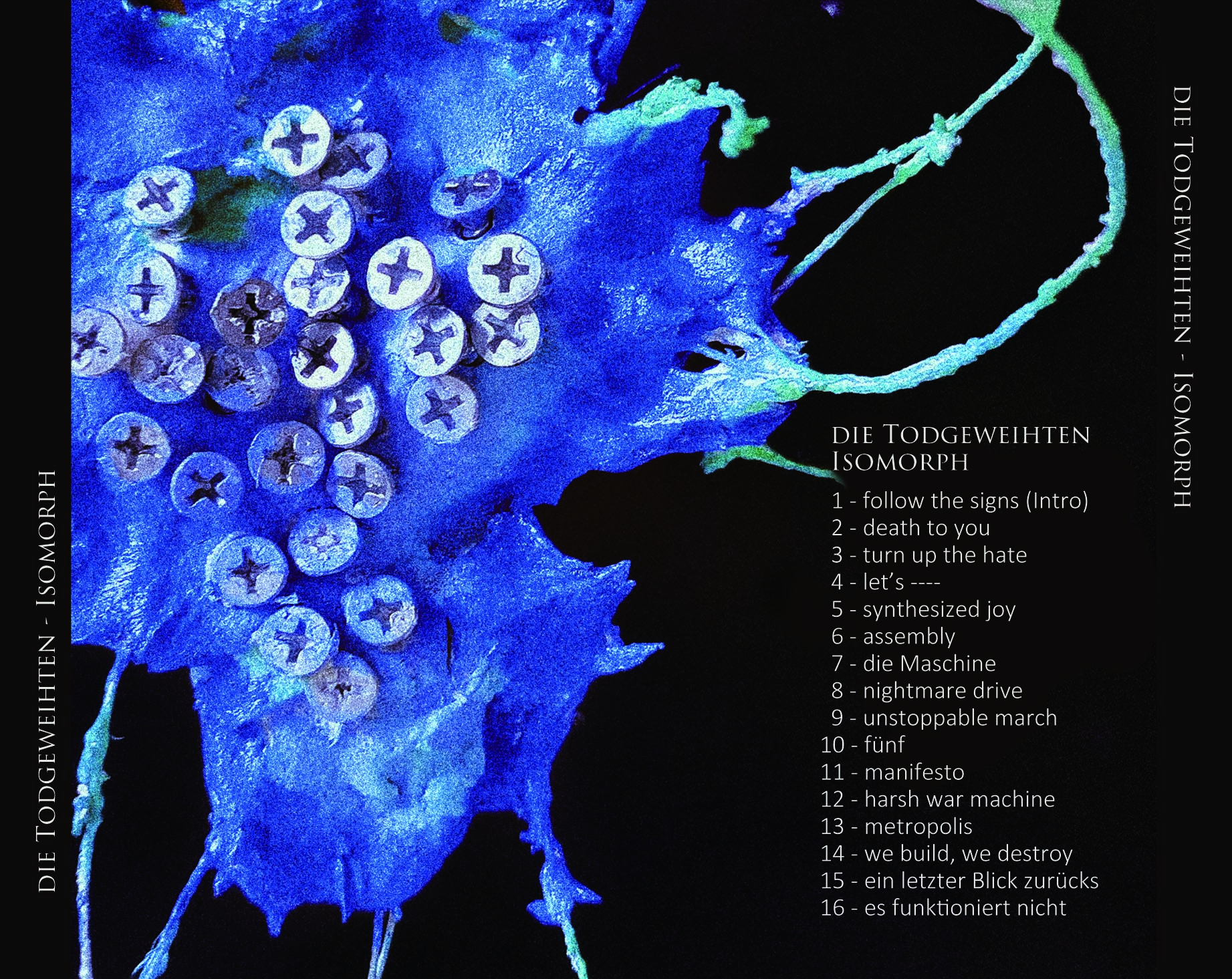
Isomorph

My thoughts on creating the album “Isomorph”

The word isomorphism is derived from the Ancient Greek: ἴσος isos “equal”, and μορφή morphe “form” or “shape”.

This album is all about machine. Not because I adore it. In the contrary, I fear it, and I hate it.

The greatest machine we ever built, is what we call the society, in which we have no identities, that’s why we create the labels:
the rich, the kind, the wicked, the libre, the patriot, the Abeitklasse, the capitalist, the elite, the political-correct, the minor group, the whatever you name it. These are not what we are born with, they are social constructs, created in order to keep the machine running.
However we, the nature-chosen social animals, are programmed in the very genes to maintain the construct. While you are a part of the machine, the machine is a part of you.

we live in a world, in which everything doesn’t fuckin’ work.
we built it and we destroyed it.
we obey the power that will not protect us
we pray for tomorrow that will never come
we gave birth to the machine that enslave us
the incarnation of the unholy god
(es funktioniert nicht)

However, whatever I do, is to some extent, hypocrite


❌