阅读视图

发现新文章,点击刷新页面。
🔲 ☆

procrastinated单词终极指南:发音/中文解释/英文解释/词源/例句全解 | myxtea学英语

procrastinated 单词详解

20250430175925EFDBA3780682AF7D5B92-0~tplv-vuqhorh59i-image.jpg

发音 (IPA)

  • US: /prəˈkræstɪneɪtɪd/
  • UK: /prəˈkræstɪneɪtɪd/
    (Note: IPA verified from authoritative sources, reflecting the past tense of "procrastinate")

语源 (Etymology)

  • Origin:
    From Latin procrastinātus (past participle of procrastinārī, "to put off until tomorrow"), derived from pro ("forward") + crās ("tomorrow").
    中文翻译: 词源来自拉丁语 procrastinātusprocrastinārī 的过去分词,意为“推迟到明天”),由 pro(“向前”)和 crās(“明天”)组成。
  • Historical Shift:
    First recorded in English in the early 17th century, retaining the core meaning of "delaying action intentionally." No significant semantic shifts; consistent usage across centuries.
    中文翻译: 17世纪初首次在英语中出现,核心含义“有意推迟行动”保持不变,数个世纪用法一致,无重大语义演变。

解释 (Definition)

  1. 中文解释: (动词过去式/过去分词)拖延;耽搁
  2. English (Oxford):
    • (v., past tense/past participle) Delayed doing something, especially out of habitual carelessness or reluctance.

例句 (Example Sentences)

  1. 例句 1:
    "She procrastinated on her thesis deadline and stayed up all night to finish it."
    (她拖延了论文截止日期,熬夜通宵完成。)
    Context: Describing academic delay due to hesitation.

  2. 例句 2:
    "They procrastinated repairing the leaky roof until the rain caused significant damage."
    (他们拖延修补漏水的屋顶,直到雨水造成严重损坏。)
    Context: Illustrating the consequences of postponing maintenance.

Image Suggestions

  • Literal: A desk cluttered with unfinished work and a calendar marked with a late deadline (emphasizing task delay).
  • Abstract: An hourglass with sand almost empty, paired with a person scrolling on a phone instead of working (symbolizing time waste).
  • Emotional: A stressed individual staring at a pile of overdue tasks, highlighting the anxiety of procrastination.
🔲 ☆

procrastinated 单词详解

"procrastinated" 单词详解

202504301214048B688E0C7C162C5A819B-0~tplv-vuqhorh59i-image.image

发音 (IPA)

  • US: /prəˈkræstɪneɪtɪd/
  • UK: /prəˈkræstɪneɪtɪd/
    (Note: IPA verified from authoritative sources)

语源 (Etymology)

  • Origin:
    From Latin procrastinatus, past participle of procrastinare ("to defer until tomorrow"), composed of pro ("forward, for") + crastinus ("of tomorrow") → ultimately from Greek krástos ("next day").
    中文翻译: 词源来自拉丁语 procrastinatus,为动词 procrastinare(推迟到明天)的过去分词,由 pro(向前、为了)和 crastinus(明天的)组成,最终源自希腊语 krástos(次日)。
  • Historical Shift:
    17th century: Adopted into English as "to procrastinate" (to delay action) with direct Latin meaning retention; no significant semantic shift.
    中文翻译: 17世纪传入英语,作为 "to procrastinate"(拖延行动)使用,直接保留拉丁语含义,无重大语义变化。
  • If no record: N/A (well-documented etymology)

解释 (Definition)

  1. 中文解释: 拖延(过去式/过去分词形式),指推迟或延迟做某事,尤其是出于习惯性或非理性的犹豫。
  2. English (Oxford):
    • (v., past tense/past participle of "procrastinate") To delay or postpone action; to put off doing something, especially out of habitual carelessness or irrational resistance.

例句 (Example Sentences)

  1. 例句 1:
    "She procrastinated on writing the report until the night before the deadline."
    (她一直拖延写报告,直到截止日期前一晚才动手。)
    Context: Describing habitual delay in completing a task.

  2. 例句 2:
    "He procrastinated over choosing a university, missing several application deadlines."
    (他在选择大学的问题上犹豫不决、一拖再拖,错过了多个申请截止日期。)
    Context: Illustrating decision-making delay with negative consequences.

Image Suggestions

  • Literal: A desk with an unfinished project, a clock showing late hours, and a person staring at a to-do list with a procrastinating posture (e.g., leaning back, avoiding work).
  • Abstract: A hourglass with sand trickling slowly, overlaid with a calendar marked with missed deadlines, symbolizing wasted time through delay.
  • Emotional: A person sighing while looking at a pile of overdue tasks, with a thought bubble showing distractions (e.g., social media, games) that caused procrastination.
🔲 ☆

test 3

啊飒飒飒飒飒飒说
啊飒飒飒飒飒飒说
啊飒飒飒飒飒飒说
啊飒飒飒飒飒飒说
啊飒飒飒飒飒飒说

🔲 ☆

地图找出口算法python实现

算法描述

代码实现

import copy

m = [
    [0, 0, 0, 0, 0, 1, 0, 1, 1, 1, 1, 1, 1, 0, 1, 0, 1, 1, 1, 1, 0, 0, 1, ],
    [1, 1, 1, 1, 0, 1, 0, 1, 0, 0, 0, 0, 1, 0, 1, 0, 0, 0, 0, 0, 0, 0, 1, ],
    [0, 0, 0, 0, 0, 1, 0, 1, 1, 1, 1, 0, 1, 0, 1, 1, 1, 1, 0, 0, 1, 0, 0, ],
    [0, 1, 1, 1, 0, 1, 0, 0, 0, 0, 1, 0, 1, 0, 1, 0, 1, 0, 0, 1, 1, 1, 1, ],
    [0, 1, 0, 1, 0, 1, 1, 1, 1, 0, 1, 0, 1, 0, 0, 0, 1, 0, 0, 1, 0, 0, 0, ],
    [0, 1, 0, 0, 0, 0, 0, 0, 1, 0, 1, 0, 1, 0, 1, 1, 1, 0, 0, 1, 0, 1, 1, ],
    [0, 1, 1, 1, 1, 1, 1, 1, 1, 0, 1, 0, 0, 0, 0, 0, 0, 0, 0, 1, 0, 0, 1, ],
    [0, 0, 0, 0, 0, 0, 0, 0, 0, 0, 1, 0, 1, 1, 1, 1, 1, 1, 1, 1, 0, 0, 0, ],
    [1, 1, 1, 1, 1, 1, 0, 1, 1, 1, 1, 0, 1, 0, 0, 0, 0, 0, 0, 0, 0, 1, 0, ],
    [0, 0, 0, 0, 0, 0, 0, 1, 0, 0, 0, 0, 1, 0, 0, 1, 1, 1, 1, 1, 0, 1, 0, ],
    [1, 1, 0, 1, 1, 1, 1, 1, 0, 1, 1, 1, 1, 0, 0, 1, 0, 0, 0, 1, 0, 1, 0, ],
    [0, 0, 0, 1, 0, 0, 0, 0, 0, 1, 0, 0, 0, 0, 0, 1, 0, 1, 0, 1, 0, 1, 0, ],
    [0, 1, 1, 1, 0, 0, 0, 0, 0, 0, 0, 0, 0, 1, 1, 1, 0, 1, 0, 1, 0, 1, 0, ],
    [0, 0, 0, 0, 0, 1, 1, 1, 0, 1, 1, 1, 0, 0, 0, 1, 0, 1, 1, 1, 0, 1, 0, ],
    [0, 1, 1, 1, 1, 1, 0, 1, 0, 1, 0, 1, 1, 1, 0, 1, 0, 0, 0, 0, 0, 1, 0, ],
    [0, 0, 0, 0, 0, 0, 0, 1, 0, 1, 0, 0, 0, 0, 0, 1, 0, 1, 1, 1, 1, 1, 0, ],
]

LEFT = "Left"
RIGHT = "Right"
UP = "Up"
DOWN = "Down"

class Map:
    def __init__(self, m):
        self.m = m
        self.result = copy.deepcopy(m)
        self.current = [0, 0]
        self.direction = RIGHT
        self.height = len(m)
        self.width = len(m[0])
        self.left_translations = dict(Right=UP, Up=LEFT, Left=DOWN, Down=RIGHT)
        self.right_translations = dict(Right=DOWN, Up=RIGHT, Left=UP, Down=LEFT)

    def get_next_position(self, direction):
        if direction == UP:
            return [self.current[0], self.current[1]-1]
        elif direction == RIGHT:
            return [self.current[0]+1, self.current[1]]
        elif direction == DOWN:
            return [self.current[0], self.current[1]+1]
        elif direction == LEFT:
            return [self.current[0]-1, self.current[1]]
        else:
            raise "invalid direction"

    def is_available(self, position) -> bool:
        if position[0] < 0 or position[0] >= self.width or position[1] < 0 or position[1] >= self.height:
            return False
        return self.m[position[1]][position[0]] == 0

    def execute(self):
        step = 1
        self.show(step)
        while True:
            new_direction = self.right_translations[self.direction]
            next_position = self.get_next_position(new_direction)
            if self.is_available(next_position):
                self.direction = new_direction
                if self.has_change(next_position):
                    self.current = next_position
                    step += 1
                    self.show(step)
                    print("-----------------")
            else:
                self.direction = self.left_translations[self.direction]

            if self.finished():
                break
        print("final result")
        self.print_matrix(self.result)

    def finished(self):
        if self.current[0] == len(self.m[1])-1 and self.current[1] == len(self.m)-1:
            return True
        return False

    def has_change(self, new_position):
        return self.current[0] != new_position[0] or self.current[1] != new_position[1]

    def show(self, step):
        print("\n------------------ step : ", step)
        #self.print_matrix(self.m)
        for i in range(len(self.m)):
            for j in range(len(self.m[i])):
                if i == self.current[1] and j == self.current[0]:
                    print("X", end="   ")
                else:
                    print(m[i][j], end="   ")
            print()
        self.result[self.current[1]][self.current[0]] = "X"

    def print_matrix(self, matrix):
        for i in range(len(matrix)):
            for j in range(len(matrix[0])):
                if i == self.current[1] and j == self.current[0]:
                    print("X", end="   ")
                else:
                    print(matrix[i][j], end="   ")
            print()
inst = Map(m)
inst.execute()

执行结果和经过路径
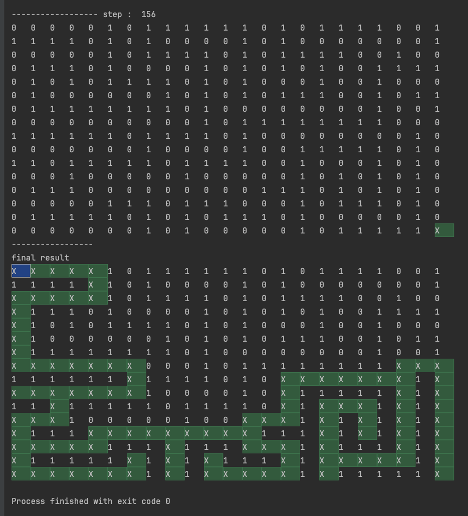
Picture1.png

🔲 ☆

使用Vault管理服务器各种密码

vault简介

安装

在centos上安装

$ sudo yum install -y yum-utils
$ sudo yum-config-manager --add-repo https://rpm.releases.hashicorp.com/RHEL/hashicorp.repo
$ sudo yum -y install vault

在ubuntu上安装

$ sudo apt update && sudo apt install gpg
$ wget -O- https://apt.releases.hashicorp.com/gpg | gpg --dearmor | sudo tee /usr/share/keyrings/hashicorp-archive-keyring.gpg >/dev/null
$ gpg --no-default-keyring --keyring /usr/share/keyrings/hashicorp-archive-keyring.gpg --fingerprint
$ echo "deb [signed-by=/usr/share/keyrings/hashicorp-archive-keyring.gpg] https://apt.releases.hashicorp.com $(lsb_release -cs) main" | sudo tee /etc/apt/sources.list.d/hashicorp.list
sudo apt update && sudo apt install vault

mac上安装

$ brew tap hashicorp/tap
$ brew install hashicorp/tap/vault
$ brew upgrade hashicorp/tap/vault # 升级

windows上安装

choco install vault

测试环境启动vault服务

这种用法仅限于测试环境,生产环境后面我们在说

开发模式启动

$ vault server -dev 
WARNING! dev mode is enabled! In this mode, Vault runs entirely in-memory
and starts unsealed with a single unseal key. The root token is already
authenticated to the CLI, so you can immediately begin using Vault.

You may need to set the following environment variables:

    $ export VAULT_ADDR='http://127.0.0.1:8200'

The unseal key and root token are displayed below in case you want to
seal/unseal the Vault or re-authenticate.

Unseal Key: 910jSSp6agJyY0RNm2QnamUtv3IZNcdJp0DejDE3OvI= 
Root Token: hvs.Wlq6tyxrx2kS5IQSJI1F7b1l                       !!!!!重要重要重要!!!!!

Development mode should NOT be used in production installations!

$ export VAULT_ADDR='http://127.0.0.1:8200'          # 把vault服务地址写入环境变量
$ export VAULT_TOKEN='hvs.Wlq6tyxrx2kS5IQSJI1F7b1l'  # 把root token写入环境变量

可以开始测试vault了

这里我们先使用简单的kv引擎,kv存储引擎会以明文方式把信息放在内存里。vault还支持其他的secrets engine,后面再说。

写入信息

$ vault kv put -mount=secret hello foo=world # 向hello写入一个kv foo=world
== Secret Path ==
secret/data/hello

======= Metadata =======
Key                Value
---                -----
created_time       2023-01-04T05:39:57.252132156Z
custom_metadata    <nil>
deletion_time      n/a
destroyed          false
version            1

$ vault kv put -mount=secret hello foo=world excited=yes # 一次写入多个
== Secret Path ==
secret/data/hello

======= Metadata =======
Key                Value
---                -----
created_time       2023-01-04T05:47:08.162563361Z
custom_metadata    <nil>
deletion_time      n/a
destroyed          false
version            2

读取信息

$ vault kv get -mount=secret hello # 读取
== Secret Path ==
secret/data/hello

======= Metadata =======
Key                Value
---                -----
created_time       2023-01-04T05:47:08.162563361Z
custom_metadata    <nil>
deletion_time      n/a
destroyed          false
version            2

===== Data =====
Key        Value
---        -----
excited    yes
foo        world

$ vault kv get -mount=secret -field=excited hello # 读取excited
yes

$ vault kv get -mount=secret -field=foo hello # 读取foo
world

删除信息

$ vault kv delete -mount=secret hello # 删除
Success! Data deleted (if it existed) at: secret/data/hello

恢复删除的信息

$ vault kv undelete -mount=secret -versions=2 hello # 恢复删除的数据
Success! Data written to: secret/undelete/hello

$ vault kv get -mount=secret hello #读取
== Secret Path ==
secret/data/hello

======= Metadata =======
Key                Value
---                -----
created_time       2023-01-04T05:47:08.162563361Z
custom_metadata    <nil>
deletion_time      n/a
destroyed          false
version            2

===== Data =====
Key        Value
---        -----
excited    yes
foo        world

secrets存储引擎

启用secrets engine

$ vault secrets enable -path=kv kv
Success! Enabled the kv secrets engine at: kv/

查看secrets engine

$ vault secrets list
Path          Type         Accessor              Description
----          ----         --------              -----------
cubbyhole/    cubbyhole    cubbyhole_4a6f3187    per-token private secret storage
identity/     identity     identity_b7f7c47e     identity store
kv/           kv           kv_886c0760           n/a
secret/       kv           kv_90394201           key/value secret storage
sys/          system       system_1b527783       system endpoints used for control, policy and debugging

写入信息

$ vault kv put kv/hello target=world
Success! Data written to: kv/hello

$ vault kv put kv/my-secret value="s3c(eT"
Success! Data written to: kv/hello

读取

$ vault kv get kv/my-secret
==== Data ====
Key      Value
---      -----
value    s3c(eT

删除

$ vault kv delete kv/my-secret
Success! Data deleted (if it existed) at: kv/my-secret

关闭secret engine

$ vault secrets disable kv/
Success! Disabled the secrets engine (if it existed) at: kv/

dynamic secrets

可以使用aws存储密码信息,vault远程读取。需要了解请参考官方文档。https://developer.hashicorp.com/vault/tutorials/getting-started/getting-started-dynamic-secrets

安全认证

这里主要有两种认证方式

  • token认证
  • github credentials认证

本文只关注token认证方式,需要了解github credential方式的,参考官方文档。https://developer.hashicorp.com/vault/tutorials/getting-started/getting-started-authentication

token认证方式默认出狱开启状态,dev模式启动vault时候,他会显示root token信息。vault命令行会从环境变量$VAULT_TOKEN中读取root token完成授权。因此,需要设置环境变量

$ export VAULT_TOKEN='hvs.Wlq6tyxrx2kS5IQSJI1F7b1l'  # 把root token写入环境变量

创建新的token

$ vault token create
Key                  Value
---                  -----
token                hvs.AH1OvBNx2EG76sp3OiIJq43Z
token_accessor       Rf4yUJ16Q8nEUuTJsS7Z4zXQ
token_duration       ∞
token_renewable      false
token_policies       ["root"]
identity_policies    []
policies             ["root"]

使用新token登录

$ unset VAULT_TOKEN # 注销掉之前的root token

$ vault login
Token (will be hidden): #此处输入上面的tokenhvs.AH1OvBNx2EG76sp3OiIJq43Z
Success! You are now authenticated. The token information displayed below
is already stored in the token helper. You do NOT need to run "vault login"
again. Future Vault requests will automatically use this token.

Key                  Value
---                  -----
token                hvs.AH1OvBNx2EG76sp3OiIJq43Z
token_accessor       Rf4yUJ16Q8nEUuTJsS7Z4zXQ
token_duration       ∞
token_renewable      false
token_policies       ["root"]
identity_policies    []
policies             ["root"]

注销token

$ vault token revoke hvs.AH1OvBNx2EG76sp3OiIJq43Z
Success! Revoked token (if it existed)

生产环境部署vault

先取消VAULT_TOKEN

$ unset VAULT_TOKEN

vault配置文件config.hcl,内容

storage "raft" {
  path    = "./vault/data"
  node_id = "node1"
}

listener "tcp" {
  address     = "127.0.0.1:8200"
  tls_disable = "true"
}

api_addr = "http://127.0.0.1:8200"
cluster_addr = "https://127.0.0.1:8201"
ui = true

配置文件解释

  • storage:指定vault存储的物理后端。dev模式服务使用inmem后端,这里我们使用raft后端,更佳适用于生产环境
  • listener:监听地址,用于处理api请求。这里使用http://127.0.0.1:8200,我们只要设置环境变量VAULT_ADDR=http://127.0.0.1:8200,vault客户端就可以连接了
  • api_addr:指定处理客户请求的地址
  • cluster_addr:指定vault node之间通信的地址和端口

启动服务

$ mkdir -p ./vault/data # 创建数据目录
$ vault server -config=config.hcl
🔲 ☆

windows环境pip无法安装dlib库的终极解决

问题

机器学习需要安装dlib库,网上搜索

解决方案在最底部

网上搜索的解决方案

pip install cmake
pip install boost
pip install dlib

然而,在安装dlib的时候,错误原因不仅限于没有安装cmake。

报错如下

Collecting dlib
  Using cached dlib-19.24.0.tar.gz (3.2 MB)
  Preparing metadata (setup.py) ... done
Building wheels for collected packages: dlib
  Building wheel for dlib (setup.py) ... error
  error: subprocess-exited-with-error

  × python setup.py bdist_wheel did not run successfully.
  │ exit code: 1
  ╰─> [320 lines of output]
      running bdist_wheel
      running build
      running build_py
      package init file 'tools\python\dlib\__init__.py' not found (or not a regular file)
      running build_ext
      Building extension for Python 3.8.8 (default, Apr 13 2021, 15:08:03) [MSC v.1916 64 bit (AMD64)]
      Invoking CMake setup: 'cmake C:\Users\shyan\AppData\Local\Temp\pip-install-g2xfkj5d\dlib_6582d86d1c13456bb92e2e45ecaaae84\tools\python -DCMAKE_LIBRARY_OUTPUT_DIRECTORY=C:\Users\shyan\AppData\Local\Temp\pip-install-g2xfkj5d\dlib_6582d86d1c13456bb92e2e45ecaaae84\build\lib.win-amd64-3.8 -DPYTHON_EXECUTABLE=C:\ProgramData\Anaconda3\python.exe -DCMAKE_LIBRARY_OUTPUT_DIRECTORY_RELEASE=C:\Users\shyan\AppData\Local\Temp\pip-install-g2xfkj5d\dlib_6582d86d1c13456bb92e2e45ecaaae84\build\lib.win-amd64-3.8 -A x64'
      -- Building for: Visual Studio 17 2022
      -- Selecting Windows SDK version 10.0.19041.0 to target Windows 10.0.19044.
      -- The C compiler identification is MSVC 19.32.31329.0
      -- The CXX compiler identification is MSVC 19.32.31329.0
      -- Detecting C compiler ABI info
      -- Detecting C compiler ABI info - done
      -- Check for working C compiler: C:/Program Files/Microsoft Visual Studio/2022/Community/VC/Tools/MSVC/14.32.31326/bin/Hostx64/x64/cl.exe - skipped
      -- Detecting C compile features
      -- Detecting C compile features - done
      -- Detecting CXX compiler ABI info
      -- Detecting CXX compiler ABI info - done
      -- Check for working CXX compiler: C:/Program Files/Microsoft Visual Studio/2022/Community/VC/Tools/MSVC/14.32.31326/bin/Hostx64/x64/cl.exe - skipped
      -- Detecting CXX compile features
      -- Detecting CXX compile features - done
      -- Found PythonInterp: C:/ProgramData/Anaconda3/python.exe (found version "3.8.8")
      -- Found PythonLibs: C:/ProgramData/Anaconda3/libs/Python38.lib
      -- pybind11 v2.2.4
      -- Using CMake version: 3.22.5
      -- Compiling dlib version: 19.24.0
      -- Looking for sys/types.h
      -- Looking for sys/types.h - found
      -- Looking for stdint.h
      -- Looking for stdint.h - found
      -- Looking for stddef.h
      -- Looking for stddef.h - found
      -- Check size of void*
      -- Check size of void* - done
      -- Enabling SSE2 instructions
      -- Searching for BLAS and LAPACK
      -- Searching for BLAS and LAPACK
      -- Looking for pthread.h
      -- Looking for pthread.h - not found
      -- Found Threads: TRUE
      -- Found CUDA: C:/Program Files/NVIDIA GPU Computing Toolkit/CUDA/v11.2 (found suitable version "11.2", minimum required is "7.5")
      -- Looking for cuDNN install...
      -- Found cuDNN: C:/tools/cudnn-11.2-windows-x64-v8.1.1.33/cuda/lib/x64/cudnn.lib
      -- Building a CUDA test project to see if your compiler is compatible with CUDA...
      -- *****************************************************************************************************************
      -- *** CUDA was found but your compiler failed to compile a simple CUDA program so dlib isn't going to use CUDA.
      -- *** The output of the failed CUDA test compile is shown below:
      -- ***
      -- ***   Change Dir: C:/Users/shyan/AppData/Local/Temp/pip-install-g2xfkj5d/dlib_6582d86d1c13456bb92e2e45ecaaae84/build/temp.win-amd64-3.8/Release/dlib_build/cuda_test_build
         ***
         ***   Run Build Command(s):C:/Program Files/Microsoft Visual Studio/2022/Community/MSBuild/Current/Bin/amd64/MSBuild.exe ALL_BUILD.vcxproj /p:Configuration=Debug /p:Platform=x64 /p:VisualStudioVersion=17.0 /v:m && Microsoft (R) Build Engine version 17.2.1+52cd2da31 for .NET Framework
         ***   Copyright (C) Microsoft Corporation. All rights reserved.
         ***
         ***   C:\Program Files\Microsoft Visual Studio\2022\Community\MSBuild\Microsoft\VC\v170\Microsoft.CppBuild.targets(524,5): warning MSB8029: The Intermediate directory or Output directory cannot reside under the Temporary directory as it could lead to issues with incremental build. [C:\Users\shyan\AppData\Local\Temp\pip-install-g2xfkj5d\dlib_6582d86d1c13456bb92e2e45ecaaae84\build\temp.win-amd64-3.8\Release\dlib_build\cuda_test_build\ZERO_CHECK.vcxproj]
         ***     Checking Build System
         ***   C:\Program Files\Microsoft Visual Studio\2022\Community\MSBuild\Microsoft\VC\v170\Microsoft.CppBuild.targets(524,5): warning MSB8029: The Intermediate directory or Output directory cannot reside under the Temporary directory as it could lead to issues with incremental build. [C:\Users\shyan\AppData\Local\Temp\pip-install-g2xfkj5d\dlib_6582d86d1c13456bb92e2e45ecaaae84\build\temp.win-amd64-3.8\Release\dlib_build\cuda_test_build\cuda_test.vcxproj]
         ***     Building NVCC (Device) object CMakeFiles/cuda_test.dir/Debug/cuda_test_generated_cuda_test.cu.obj
         ***     cuda_test.cu
         ***   C:\Program Files\NVIDIA GPU Computing Toolkit\CUDA\v11.2\include\crt/host_config.h(160): fatal error C1189: #error:  -- unsupported Microsoft Visual Studio version! Only the versions between 2017 and 2019 (inclusive) are supported! The nvcc flag '-allow-unsupported-compiler' can be used to override this version check; however, using an unsupported host compiler may cause compilation failure or incorrect run time execution. Use at your own risk. [C:\Users\shyan\AppData\Local\Temp\pip-install-g2xfkj5d\dlib_6582d86d1c13456bb92e2e45ecaaae84\build\temp.win-amd64-3.8\Release\dlib_build\cuda_test_build\cuda_test.vcxproj]
         ***   CUSTOMBUILD : nvcc warning : The 'compute_35', 'compute_37', 'compute_50', 'sm_35', 'sm_37' and 'sm_50' architectures are deprecated, and may be removed in a future release (Use -Wno-deprecated-gpu-targets to suppress warning). [C:\Users\shyan\AppData\Local\Temp\pip-install-g2xfkj5d\dlib_6582d86d1c13456bb92e2e45ecaaae84\build\temp.win-amd64-3.8\Release\dlib_build\cuda_test_build\cuda_test.vcxproj]
         ***   CUSTOMBUILD : nvcc warning : The -std=c++11 flag is not supported with the configured host compiler. Flag will be ignored. [C:\Users\shyan\AppData\Local\Temp\pip-install-g2xfkj5d\dlib_6582d86d1c13456bb92e2e45ecaaae84\build\temp.win-amd64-3.8\Release\dlib_build\cuda_test_build\cuda_test.vcxproj]
         ***     CMake Error at cuda_test_generated_cuda_test.cu.obj.Debug.cmake:216 (message):
         ***       Error generating
         ***       C:/Users/shyan/AppData/Local/Temp/pip-install-g2xfkj5d/dlib_6582d86d1c13456bb92e2e45ecaaae84/build/temp.win-amd64-3.8/Release/dlib_build/cuda_test_build/CMakeFiles/cuda_test.dir//Debug/cuda_test_generated_cuda_test.cu.obj
         ***
         ***
         ***   C:\Program Files\Microsoft Visual Studio\2022\Community\MSBuild\Microsoft\VC\v170\Microsoft.CppCommon.targets(245,5): error MSB8066: Custom build for 'C:\Users\shyan\AppData\Local\Temp\pip-install-g2xfkj5d\dlib_6582d86d1c13456bb92e2e45ecaaae84\dlib\cmake_utils\test_for_cuda\cuda_test.cu;C:\Users\shyan\AppData\Local\Temp\pip-install-g2xfkj5d\dlib_6582d86d1c13456bb92e2e45ecaaae84\dlib\cmake_utils\test_for_cuda\CMakeLists.txt' exited with code 1. [C:\Users\shyan\AppData\Local\Temp\pip-install-g2xfkj5d\dlib_6582d86d1c13456bb92e2e45ecaaae84\build\temp.win-amd64-3.8\Release\dlib_build\cuda_test_build\cuda_test.vcxproj]
         ***
         ***
      -- *****************************************************************************************************************
      -- Disabling CUDA support for dlib.  DLIB WILL NOT USE CUDA
      -- C++11 activated.
      -- Configuring done
      -- Generating done
      -- Build files have been written to: C:/Users/shyan/AppData/Local/Temp/pip-install-g2xfkj5d/dlib_6582d86d1c13456bb92e2e45ecaaae84/build/temp.win-amd64-3.8/Release
      Invoking CMake build: 'cmake --build . --config Release -- /m'
      Microsoft (R) Build Engine version 17.2.1+52cd2da31 for .NET Framework
      Copyright (C) Microsoft Corporation. All rights reserved.

      C:\Program Files\Microsoft Visual Studio\2022\Community\MSBuild\Microsoft\VC\v170\Microsoft.CppBuild.targets(524,5): warning MSB8029: The Intermediate directory or Output directory cannot reside under the Temporary directory as it could lead to issues with incremental build. [C:\Users\shyan\AppData\Local\Temp\pip-install-g2xfkj5d\dlib_6582d86d1c13456bb92e2e45ecaaae84\build\temp.win-amd64-3.8\Release\ZERO_CHECK.vcxproj]
        Checking Build System
      C:\Program Files\Microsoft Visual Studio\2022\Community\MSBuild\Microsoft\VC\v170\Microsoft.CppBuild.targets(524,5): warning MSB8029: The Intermediate directory or Output directory cannot reside under the Temporary directory as it could lead to issues with incremental build. [C:\Users\shyan\AppData\Local\Temp\pip-install-g2xfkj5d\dlib_6582d86d1c13456bb92e2e45ecaaae84\build\temp.win-amd64-3.8\Release\dlib_build\dlib.vcxproj]
        Building Custom Rule C:/Users/shyan/AppData/Local/Temp/pip-install-g2xfkj5d/dlib_6582d86d1c13456bb92e2e45ecaaae84/dlib/CMakeLists.txt
        base64_kernel_1.cpp
        bigint_kernel_1.cpp
        bigint_kernel_2.cpp
        bit_stream_kernel_1.cpp
        entropy_decoder_kernel_1.cpp
        entropy_decoder_kernel_2.cpp
        entropy_encoder_kernel_1.cpp
        entropy_encoder_kernel_2.cpp
        md5_kernel_1.cpp
        tokenizer_kernel_1.cpp
        unicode.cpp
        test_for_odr_violations.cpp
        sockets_kernel_1.cpp
        bsp.cpp
        dir_nav_kernel_1.cpp
        dir_nav_kernel_2.cpp
        dir_nav_extensions.cpp
        fonts.cpp
        linker_kernel_1.cpp
        extra_logger_headers.cpp
        logger_kernel_1.cpp
        logger_config_file.cpp
        misc_api_kernel_1.cpp
        misc_api_kernel_2.cpp
        sockets_extensions.cpp
        sockets_kernel_2.cpp
        sockstreambuf.cpp
        sockstreambuf_unbuffered.cpp
        server_kernel.cpp
        server_iostream.cpp
        server_http.cpp
        multithreaded_object_extension.cpp
        threaded_object_extension.cpp
        threads_kernel_1.cpp
        threads_kernel_2.cpp
        threads_kernel_shared.cpp
        thread_pool_extension.cpp
        async.cpp
        timer.cpp
        stack_trace.cpp
        cpu_dlib.cpp
        tensor_tools.cpp
        image_dataset_metadata.cpp
        mnist.cpp
        cifar.cpp
        global_function_search.cpp
        kalman_filter.cpp
        auto.cpp
        widgets.cpp
        drawable.cpp
        canvas_drawing.cpp
        style.cpp
        base_widgets.cpp
        gui_core_kernel_1.cpp
        gui_core_kernel_2.cpp
        png_loader.cpp
        save_png.cpp
        jpeg_loader.cpp
        save_jpeg.cpp
        arm_init.c
        filter_neon_intrinsics.c
        png.c
        pngerror.c
        pngget.c
        pngmem.c
        pngpread.c
        pngread.c
        pngrio.c
        pngrtran.c
        pngrutil.c
        pngset.c
        pngtrans.c
        pngwio.c
        pngwrite.c
        pngwtran.c
        pngwutil.c
        adler32.c
        compress.c
        crc32.c
        deflate.c
        gzclose.c
        gzlib.c
        gzread.c
        gzwrite.c
        infback.c
      C:\Users\shyan\AppData\Local\Temp\pip-install-g2xfkj5d\dlib_6582d86d1c13456bb92e2e45ecaaae84\dlib\external\zlib\gzread.c(319,17): warning C4267: “=”: 从“size_t”转换到“unsigned int”,可能丢失数据 [C:\Users\shyan\AppData\Local\Temp\pip-install-g2xfkj5d\dlib_6582d86d1c13456bb92e2e45ecaaae84\build\temp.win-amd64-3.8\Release\dlib_build\dlib.vcxproj]
        inffast.c
        inflate.c
        inftrees.c
        trees.c
        uncompr.c
      C:\Users\shyan\AppData\Local\Temp\pip-install-g2xfkj5d\dlib_6582d86d1c13456bb92e2e45ecaaae84\dlib\external\zlib\gzread.c(400,11): warning C4267: “=”: 从“size_t”转换到“unsigned int”,可能丢失数据 [C:\Users\shyan\AppData\Local\Temp\pip-install-g2xfkj5d\dlib_6582d86d1c13456bb92e2e45ecaaae84\build\temp.win-amd64-3.8\Release\dlib_build\dlib.vcxproj]
      C:\Users\shyan\AppData\Local\Temp\pip-install-g2xfkj5d\dlib_6582d86d1c13456bb92e2e45ecaaae84\dlib\external\zlib\gzwrite.c(212,24): warning C4267: “=”: 从“size_t”转换到“unsigned int”,可能丢失数据 [C:\Users\shyan\AppData\Local\Temp\pip-install-g2xfkj5d\dlib_6582d86d1c13456bb92e2e45ecaaae84\build\temp.win-amd64-3.8\Release\dlib_build\dlib.vcxproj]
        zutil.c
        jaricom.c
      C:\Users\shyan\AppData\Local\Temp\pip-install-g2xfkj5d\dlib_6582d86d1c13456bb92e2e45ecaaae84\dlib\external\zlib\gzread.c(472,11): warning C4267: “=”: 从“size_t”转换到“int”,可能丢失数据 [C:\Users\shyan\AppData\Local\Temp\pip-install-g2xfkj5d\dlib_6582d86d1c13456bb92e2e45ecaaae84\build\temp.win-amd64-3.8\Release\dlib_build\dlib.vcxproj]
      C:\Users\shyan\AppData\Local\Temp\pip-install-g2xfkj5d\dlib_6582d86d1c13456bb92e2e45ecaaae84\dlib\external\zlib\gzwrite.c(232,21): warning C4267: “=”: 从“size_t”转换到“unsigned int”,可能丢失数据 [C:\Users\shyan\AppData\Local\Temp\pip-install-g2xfkj5d\dlib_6582d86d1c13456bb92e2e45ecaaae84\build\temp.win-amd64-3.8\Release\dlib_build\dlib.vcxproj]
      C:\Users\shyan\AppData\Local\Temp\pip-install-g2xfkj5d\dlib_6582d86d1c13456bb92e2e45ecaaae84\dlib\external\zlib\gzwrite.c(371,11): warning C4267: “=”: 从“size_t”转换到“int”,可能丢失数据 [C:\Users\shyan\AppData\Local\Temp\pip-install-g2xfkj5d\dlib_6582d86d1c13456bb92e2e45ecaaae84\build\temp.win-amd64-3.8\Release\dlib_build\dlib.vcxproj]
        jcapimin.c
        jcapistd.c
        jcarith.c
        jccoefct.c
        jccolor.c
        jcdctmgr.c
        jchuff.c
        jcinit.c
        jcmainct.c
        jcmarker.c
        jcmaster.c
        jcomapi.c
        jcparam.c
        jcprepct.c
        jcsample.c
        jdapimin.c
        jdapistd.c
        jdarith.c
        jdatadst.c
        jdatasrc.c
        jdcoefct.c
      C:\Users\shyan\AppData\Local\Temp\pip-install-g2xfkj5d\dlib_6582d86d1c13456bb92e2e45ecaaae84\dlib\external\libjpeg\jdatadst.c(185,34): warning C4267: “=”: 从“size_t”转换到“unsigned long”,可能丢失数据 [C:\Users\shyan\AppData\Local\Temp\pip-install-g2xfkj5d\dlib_6582d86d1c13456bb92e2e45ecaaae84\build\temp.win-amd64-3.8\Release\dlib_build\dlib.vcxproj]
        jdcolor.c
        jddctmgr.c
        jdhuff.c
        jdinput.c
        jdmainct.c
        jdmarker.c
        jdmaster.c
        jdmerge.c
        jdpostct.c
        jdsample.c
        jerror.c
        jfdctflt.c
        jfdctfst.c
        jfdctint.c
        jidctflt.c
        jidctfst.c
        jidctint.c
        jmemmgr.c
        jmemnobs.c
        jquant1.c
        jquant2.c
        jutils.c
      C:\Users\shyan\AppData\Local\Temp\pip-install-g2xfkj5d\dlib_6582d86d1c13456bb92e2e45ecaaae84\dlib\external\libjpeg\jmemmgr.c(307,47): warning C4267: “+=”: 从“size_t”转换到“long”,可能丢失数据 [C:\Users\shyan\AppData\Local\Temp\pip-install-g2xfkj5d\dlib_6582d86d1c13456bb92e2e45ecaaae84\build\temp.win-amd64-3.8\Release\dlib_build\dlib.vcxproj]
      C:\Users\shyan\AppData\Local\Temp\pip-install-g2xfkj5d\dlib_6582d86d1c13456bb92e2e45ecaaae84\dlib\external\libjpeg\jerror.c(193,5): warning C4996: 'sprintf': This function or variable may be unsafe. Consider using sprintf_s instead. To disable deprecation, use _CRT_SECURE_NO_WARNINGS. See online help for details. [C:\Users\shyan\AppData\Local\Temp\pip-install-g2xfkj5d\dlib_6582d86d1c13456bb92e2e45ecaaae84\build\temp.win-amd64-3.8\Release\dlib_build\dlib.vcxproj]
      C:\Users\shyan\AppData\Local\Temp\pip-install-g2xfkj5d\dlib_6582d86d1c13456bb92e2e45ecaaae84\dlib\external\libjpeg\jmemmgr.c(367,46): warning C4267: “+=”: 从“size_t”转换到“long”,可能丢失数据 [C:\Users\shyan\AppData\Local\Temp\pip-install-g2xfkj5d\dlib_6582d86d1c13456bb92e2e45ecaaae84\build\temp.win-amd64-3.8\Release\dlib_build\dlib.vcxproj]
      C:\Users\shyan\AppData\Local\Temp\pip-install-g2xfkj5d\dlib_6582d86d1c13456bb92e2e45ecaaae84\dlib\external\libjpeg\jerror.c(195,5): warning C4996: 'sprintf': This function or variable may be unsafe. Consider using sprintf_s instead. To disable deprecation, use _CRT_SECURE_NO_WARNINGS. See online help for details. [C:\Users\shyan\AppData\Local\Temp\pip-install-g2xfkj5d\dlib_6582d86d1c13456bb92e2e45ecaaae84\build\temp.win-amd64-3.8\Release\dlib_build\dlib.vcxproj]
      C:\Users\shyan\AppData\Local\Temp\pip-install-g2xfkj5d\dlib_6582d86d1c13456bb92e2e45ecaaae84\dlib\external\libjpeg\jmemmgr.c(977,35): warning C4267: “-=”: 从“size_t”转换到“long”,可能丢失数据 [C:\Users\shyan\AppData\Local\Temp\pip-install-g2xfkj5d\dlib_6582d86d1c13456bb92e2e45ecaaae84\build\temp.win-amd64-3.8\Release\dlib_build\dlib.vcxproj]
      C:\Users\shyan\AppData\Local\Temp\pip-install-g2xfkj5d\dlib_6582d86d1c13456bb92e2e45ecaaae84\dlib\external\libjpeg\jmemmgr.c(991,35): warning C4267: “-=”: 从“size_t”转换到“long”,可能丢失数据 [C:\Users\shyan\AppData\Local\Temp\pip-install-g2xfkj5d\dlib_6582d86d1c13456bb92e2e45ecaaae84\build\temp.win-amd64-3.8\Release\dlib_build\dlib.vcxproj]
      C:\Users\shyan\AppData\Local\Temp\pip-install-g2xfkj5d\dlib_6582d86d1c13456bb92e2e45ecaaae84\dlib\external\libjpeg\jmemmgr.c(1107,19): warning C4996: 'getenv': This function or variable may be unsafe. Consider using _dupenv_s instead. To disable deprecation, use _CRT_SECURE_NO_WARNINGS. See online help for details. [C:\Users\shyan\AppData\Local\Temp\pip-install-g2xfkj5d\dlib_6582d86d1c13456bb92e2e45ecaaae84\build\temp.win-amd64-3.8\Release\dlib_build\dlib.vcxproj]
      C:\Users\shyan\AppData\Local\Temp\pip-install-g2xfkj5d\dlib_6582d86d1c13456bb92e2e45ecaaae84\dlib\external\libjpeg\jmemmgr.c(1110,11): warning C4996: 'sscanf': This function or variable may be unsafe. Consider using sscanf_s instead. To disable deprecation, use _CRT_SECURE_NO_WARNINGS. See online help for details. [C:\Users\shyan\AppData\Local\Temp\pip-install-g2xfkj5d\dlib_6582d86d1c13456bb92e2e45ecaaae84\build\temp.win-amd64-3.8\Release\dlib_build\dlib.vcxproj]
        dlib.vcxproj -> C:\Users\shyan\AppData\Local\Temp\pip-install-g2xfkj5d\dlib_6582d86d1c13456bb92e2e45ecaaae84\build\temp.win-amd64-3.8\Release\dlib_build\Release\dlib19.24.0_release_64bit_msvc1932.lib
      C:\Program Files\Microsoft Visual Studio\2022\Community\MSBuild\Microsoft\VC\v170\Microsoft.CppBuild.targets(524,5): warning MSB8029: The Intermediate directory or Output directory cannot reside under the Temporary directory as it could lead to issues with incremental build. [C:\Users\shyan\AppData\Local\Temp\pip-install-g2xfkj5d\dlib_6582d86d1c13456bb92e2e45ecaaae84\build\temp.win-amd64-3.8\Release\_dlib_pybind11.vcxproj]
        Building Custom Rule C:/Users/shyan/AppData/Local/Temp/pip-install-g2xfkj5d/dlib_6582d86d1c13456bb92e2e45ecaaae84/tools/python/CMakeLists.txt
        dlib.cpp
        matrix.cpp
        vector.cpp
        svm_c_trainer.cpp
        svm_rank_trainer.cpp
        decision_functions.cpp
        other.cpp
        basic.cpp
        cca.cpp
        sequence_segmenter.cpp
        svm_struct.cpp
        image.cpp
        image2.cpp
        image3.cpp
        image4.cpp
        rectangles.cpp
      C:\ProgramData\Anaconda3\Library\include\gif_lib.h(286,61): error C2734: “GifAsciiTable8x8”: 如果不是外部的,则 必须初始化常量对象 (编译源文件 C:\Users\shyan\AppData\Local\Temp\pip-install-g2xfkj5d\dlib_6582d86d1c13456bb92e2e45ecaaae84\tools\python\src\dlib.cpp) [C:\Users\shyan\AppData\Local\Temp\pip-install-g2xfkj5d\dlib_6582d86d1c13456bb92e2e45ecaaae84\build\temp.win-amd64-3.8\Release\_dlib_pybind11.vcxproj]
      C:\ProgramData\Anaconda3\Library\include\gif_lib.h(286,61): error C2734: “GifAsciiTable8x8”: 如果不是外部的,则 必须初始化常量对象 (编译源文件 C:\Users\shyan\AppData\Local\Temp\pip-install-g2xfkj5d\dlib_6582d86d1c13456bb92e2e45ecaaae84\tools\python\src\matrix.cpp) [C:\Users\shyan\AppData\Local\Temp\pip-install-g2xfkj5d\dlib_6582d86d1c13456bb92e2e45ecaaae84\build\temp.win-amd64-3.8\Release\_dlib_pybind11.vcxproj]
      C:\ProgramData\Anaconda3\Library\include\gif_lib.h(286,61): error C2734: “GifAsciiTable8x8”: 如果不是外部的,则 必须初始化常量对象 (编译源文件 C:\Users\shyan\AppData\Local\Temp\pip-install-g2xfkj5d\dlib_6582d86d1c13456bb92e2e45ecaaae84\tools\python\src\cca.cpp) [C:\Users\shyan\AppData\Local\Temp\pip-install-g2xfkj5d\dlib_6582d86d1c13456bb92e2e45ecaaae84\build\temp.win-amd64-3.8\Release\_dlib_pybind11.vcxproj]
      C:\ProgramData\Anaconda3\Library\include\gif_lib.h(286,61): error C2734: “GifAsciiTable8x8”: 如果不是外部的,则 必须初始化常量对象 (编译源文件 C:\Users\shyan\AppData\Local\Temp\pip-install-g2xfkj5d\dlib_6582d86d1c13456bb92e2e45ecaaae84\tools\python\src\decision_functions.cpp) [C:\Users\shyan\AppData\Local\Temp\pip-install-g2xfkj5d\dlib_6582d86d1c13456bb92e2e45ecaaae84\build\temp.win-amd64-3.8\Release\_dlib_pybind11.vcxproj]
      C:\ProgramData\Anaconda3\Library\include\gif_lib.h(286,61): error C2734: “GifAsciiTable8x8”: 如果不是外部的,则 必须初始化常量对象 (编译源文件 C:\Users\shyan\AppData\Local\Temp\pip-install-g2xfkj5d\dlib_6582d86d1c13456bb92e2e45ecaaae84\tools\python\src\other.cpp) [C:\Users\shyan\AppData\Local\Temp\pip-install-g2xfkj5d\dlib_6582d86d1c13456bb92e2e45ecaaae84\build\temp.win-amd64-3.8\Release\_dlib_pybind11.vcxproj]
      C:\ProgramData\Anaconda3\Library\include\gif_lib.h(286,61): error C2734: “GifAsciiTable8x8”: 如果不是外部的,则 必须初始化常量对象 (编译源文件 C:\Users\shyan\AppData\Local\Temp\pip-install-g2xfkj5d\dlib_6582d86d1c13456bb92e2e45ecaaae84\tools\python\src\svm_rank_trainer.cpp) [C:\Users\shyan\AppData\Local\Temp\pip-install-g2xfkj5d\dlib_6582d86d1c13456bb92e2e45ecaaae84\build\temp.win-amd64-3.8\Release\_dlib_pybind11.vcxproj]
      C:\ProgramData\Anaconda3\Library\include\gif_lib.h(286,61): error C2734: “GifAsciiTable8x8”: 如果不是外部的,则 必须初始化常量对象 (编译源文件 C:\Users\shyan\AppData\Local\Temp\pip-install-g2xfkj5d\dlib_6582d86d1c13456bb92e2e45ecaaae84\tools\python\src\vector.cpp) [C:\Users\shyan\AppData\Local\Temp\pip-install-g2xfkj5d\dlib_6582d86d1c13456bb92e2e45ecaaae84\build\temp.win-amd64-3.8\Release\_dlib_pybind11.vcxproj]
      C:\ProgramData\Anaconda3\Library\include\gif_lib.h(286,61): error C2734: “GifAsciiTable8x8”: 如果不是外部的,则 必须初始化常量对象 (编译源文件 C:\Users\shyan\AppData\Local\Temp\pip-install-g2xfkj5d\dlib_6582d86d1c13456bb92e2e45ecaaae84\tools\python\src\image2.cpp) [C:\Users\shyan\AppData\Local\Temp\pip-install-g2xfkj5d\dlib_6582d86d1c13456bb92e2e45ecaaae84\build\temp.win-amd64-3.8\Release\_dlib_pybind11.vcxproj]
        object_detection.cpp
      C:\ProgramData\Anaconda3\Library\include\gif_lib.h(286,61): error C2734: “GifAsciiTable8x8”: 如果不是外部的,则 必须初始化常量对象 (编译源文件 C:\Users\shyan\AppData\Local\Temp\pip-install-g2xfkj5d\dlib_6582d86d1c13456bb92e2e45ecaaae84\tools\python\src\image.cpp) [C:\Users\shyan\AppData\Local\Temp\pip-install-g2xfkj5d\dlib_6582d86d1c13456bb92e2e45ecaaae84\build\temp.win-amd64-3.8\Release\_dlib_pybind11.vcxproj]
      C:\ProgramData\Anaconda3\Library\include\gif_lib.h(286,61): error C2734: “GifAsciiTable8x8”: 如果不是外部的,则 必须初始化常量对象 (编译源文件 C:\Users\shyan\AppData\Local\Temp\pip-install-g2xfkj5d\dlib_6582d86d1c13456bb92e2e45ecaaae84\tools\python\src\basic.cpp) [C:\Users\shyan\AppData\Local\Temp\pip-install-g2xfkj5d\dlib_6582d86d1c13456bb92e2e45ecaaae84\build\temp.win-amd64-3.8\Release\_dlib_pybind11.vcxproj]
        shape_predictor.cpp
      C:\ProgramData\Anaconda3\Library\include\gif_lib.h(286,61): error C2734: “GifAsciiTable8x8”: 如果不是外部的,则 必须初始化常量对象 (编译源文件 C:\Users\shyan\AppData\Local\Temp\pip-install-g2xfkj5d\dlib_6582d86d1c13456bb92e2e45ecaaae84\tools\python\src\rectangles.cpp) [C:\Users\shyan\AppData\Local\Temp\pip-install-g2xfkj5d\dlib_6582d86d1c13456bb92e2e45ecaaae84\build\temp.win-amd64-3.8\Release\_dlib_pybind11.vcxproj]
      C:\ProgramData\Anaconda3\Library\include\gif_lib.h(286,61): error C2734: “GifAsciiTable8x8”: 如果不是外部的,则 必须初始化常量对象 (编译源文件 C:\Users\shyan\AppData\Local\Temp\pip-install-g2xfkj5d\dlib_6582d86d1c13456bb92e2e45ecaaae84\tools\python\src\image4.cpp) [C:\Users\shyan\AppData\Local\Temp\pip-install-g2xfkj5d\dlib_6582d86d1c13456bb92e2e45ecaaae84\build\temp.win-amd64-3.8\Release\_dlib_pybind11.vcxproj]
        correlation_tracker.cpp
      C:\ProgramData\Anaconda3\Library\include\gif_lib.h(286,61): error C2734: “GifAsciiTable8x8”: 如果不是外部的,则 必须初始化常量对象 (编译源文件 C:\Users\shyan\AppData\Local\Temp\pip-install-g2xfkj5d\dlib_6582d86d1c13456bb92e2e45ecaaae84\tools\python\src\svm_c_trainer.cpp) [C:\Users\shyan\AppData\Local\Temp\pip-install-g2xfkj5d\dlib_6582d86d1c13456bb92e2e45ecaaae84\build\temp.win-amd64-3.8\Release\_dlib_pybind11.vcxproj]
      C:\ProgramData\Anaconda3\Library\include\gif_lib.h(286,61): error C2734: “GifAsciiTable8x8”: 如果不是外部的,则 必须初始化常量对象 (编译源文件 C:\Users\shyan\AppData\Local\Temp\pip-install-g2xfkj5d\dlib_6582d86d1c13456bb92e2e45ecaaae84\tools\python\src\sequence_segmenter.cpp) [C:\Users\shyan\AppData\Local\Temp\pip-install-g2xfkj5d\dlib_6582d86d1c13456bb92e2e45ecaaae84\build\temp.win-amd64-3.8\Release\_dlib_pybind11.vcxproj]
      C:\ProgramData\Anaconda3\Library\include\gif_lib.h(286,61): error C2734: “GifAsciiTable8x8”: 如果不是外部的,则 必须初始化常量对象 (编译源文件 C:\Users\shyan\AppData\Local\Temp\pip-install-g2xfkj5d\dlib_6582d86d1c13456bb92e2e45ecaaae84\tools\python\src\image3.cpp) [C:\Users\shyan\AppData\Local\Temp\pip-install-g2xfkj5d\dlib_6582d86d1c13456bb92e2e45ecaaae84\build\temp.win-amd64-3.8\Release\_dlib_pybind11.vcxproj]
      C:\ProgramData\Anaconda3\Library\include\gif_lib.h(286,61): error C2734: “GifAsciiTable8x8”: 如果不是外部的,则 必须初始化常量对象 (编译源文件 C:\Users\shyan\AppData\Local\Temp\pip-install-g2xfkj5d\dlib_6582d86d1c13456bb92e2e45ecaaae84\tools\python\src\svm_struct.cpp) [C:\Users\shyan\AppData\Local\Temp\pip-install-g2xfkj5d\dlib_6582d86d1c13456bb92e2e45ecaaae84\build\temp.win-amd64-3.8\Release\_dlib_pybind11.vcxproj]
        face_recognition.cpp
        cnn_face_detector.cpp
        global_optimization.cpp
        image_dataset_metadata.cpp
        numpy_returns.cpp
        line.cpp
        gui.cpp
      C:\ProgramData\Anaconda3\Library\include\gif_lib.h(286,61): error C2734: “GifAsciiTable8x8”: 如果不是外部的,则 必须初始化常量对象 (编译源文件 C:\Users\shyan\AppData\Local\Temp\pip-install-g2xfkj5d\dlib_6582d86d1c13456bb92e2e45ecaaae84\tools\python\src\object_detection.cpp) [C:\Users\shyan\AppData\Local\Temp\pip-install-g2xfkj5d\dlib_6582d86d1c13456bb92e2e45ecaaae84\build\temp.win-amd64-3.8\Release\_dlib_pybind11.vcxproj]
      C:\ProgramData\Anaconda3\Library\include\gif_lib.h(286,61): error C2734: “GifAsciiTable8x8”: 如果不是外部的,则 必须初始化常量对象 (编译源文件 C:\Users\shyan\AppData\Local\Temp\pip-install-g2xfkj5d\dlib_6582d86d1c13456bb92e2e45ecaaae84\tools\python\src\shape_predictor.cpp) [C:\Users\shyan\AppData\Local\Temp\pip-install-g2xfkj5d\dlib_6582d86d1c13456bb92e2e45ecaaae84\build\temp.win-amd64-3.8\Release\_dlib_pybind11.vcxproj]
      C:\ProgramData\Anaconda3\Library\include\gif_lib.h(286,61): error C2734: “GifAsciiTable8x8”: 如果不是外部的,则 必须初始化常量对象 (编译源文件 C:\Users\shyan\AppData\Local\Temp\pip-install-g2xfkj5d\dlib_6582d86d1c13456bb92e2e45ecaaae84\tools\python\src\correlation_tracker.cpp) [C:\Users\shyan\AppData\Local\Temp\pip-install-g2xfkj5d\dlib_6582d86d1c13456bb92e2e45ecaaae84\build\temp.win-amd64-3.8\Release\_dlib_pybind11.vcxproj]
      C:\ProgramData\Anaconda3\Library\include\gif_lib.h(286,61): error C2734: “GifAsciiTable8x8”: 如果不是外部的,则 必须初始化常量对象 (编译源文件 C:\Users\shyan\AppData\Local\Temp\pip-install-g2xfkj5d\dlib_6582d86d1c13456bb92e2e45ecaaae84\tools\python\src\face_recognition.cpp) [C:\Users\shyan\AppData\Local\Temp\pip-install-g2xfkj5d\dlib_6582d86d1c13456bb92e2e45ecaaae84\build\temp.win-amd64-3.8\Release\_dlib_pybind11.vcxproj]
      C:\ProgramData\Anaconda3\Library\include\gif_lib.h(286,61): error C2734: “GifAsciiTable8x8”: 如果不是外部的,则 必须初始化常量对象 (编译源文件 C:\Users\shyan\AppData\Local\Temp\pip-install-g2xfkj5d\dlib_6582d86d1c13456bb92e2e45ecaaae84\tools\python\src\global_optimization.cpp) [C:\Users\shyan\AppData\Local\Temp\pip-install-g2xfkj5d\dlib_6582d86d1c13456bb92e2e45ecaaae84\build\temp.win-amd64-3.8\Release\_dlib_pybind11.vcxproj]
      C:\ProgramData\Anaconda3\Library\include\gif_lib.h(286,61): error C2734: “GifAsciiTable8x8”: 如果不是外部的,则 必须初始化常量对象 (编译源文件 C:\Users\shyan\AppData\Local\Temp\pip-install-g2xfkj5d\dlib_6582d86d1c13456bb92e2e45ecaaae84\tools\python\src\cnn_face_detector.cpp) [C:\Users\shyan\AppData\Local\Temp\pip-install-g2xfkj5d\dlib_6582d86d1c13456bb92e2e45ecaaae84\build\temp.win-amd64-3.8\Release\_dlib_pybind11.vcxproj]
      C:\ProgramData\Anaconda3\Library\include\gif_lib.h(286,61): error C2734: “GifAsciiTable8x8”: 如果不是外部的,则 必须初始化常量对象 (编译源文件 C:\Users\shyan\AppData\Local\Temp\pip-install-g2xfkj5d\dlib_6582d86d1c13456bb92e2e45ecaaae84\tools\python\src\image_dataset_metadata.cpp) [C:\Users\shyan\AppData\Local\Temp\pip-install-g2xfkj5d\dlib_6582d86d1c13456bb92e2e45ecaaae84\build\temp.win-amd64-3.8\Release\_dlib_pybind11.vcxproj]
      C:\ProgramData\Anaconda3\Library\include\gif_lib.h(286,61): error C2734: “GifAsciiTable8x8”: 如果不是外部的,则 必须初始化常量对象 (编译源文件 C:\Users\shyan\AppData\Local\Temp\pip-install-g2xfkj5d\dlib_6582d86d1c13456bb92e2e45ecaaae84\tools\python\src\numpy_returns.cpp) [C:\Users\shyan\AppData\Local\Temp\pip-install-g2xfkj5d\dlib_6582d86d1c13456bb92e2e45ecaaae84\build\temp.win-amd64-3.8\Release\_dlib_pybind11.vcxproj]
      C:\ProgramData\Anaconda3\Library\include\gif_lib.h(286,61): error C2734: “GifAsciiTable8x8”: 如果不是外部的,则 必须初始化常量对象 (编译源文件 C:\Users\shyan\AppData\Local\Temp\pip-install-g2xfkj5d\dlib_6582d86d1c13456bb92e2e45ecaaae84\tools\python\src\line.cpp) [C:\Users\shyan\AppData\Local\Temp\pip-install-g2xfkj5d\dlib_6582d86d1c13456bb92e2e45ecaaae84\build\temp.win-amd64-3.8\Release\_dlib_pybind11.vcxproj]
      C:\ProgramData\Anaconda3\Library\include\gif_lib.h(286,61): error C2734: “GifAsciiTable8x8”: 如果不是外部的,则 必须初始化常量对象 (编译源文件 C:\Users\shyan\AppData\Local\Temp\pip-install-g2xfkj5d\dlib_6582d86d1c13456bb92e2e45ecaaae84\tools\python\src\gui.cpp) [C:\Users\shyan\AppData\Local\Temp\pip-install-g2xfkj5d\dlib_6582d86d1c13456bb92e2e45ecaaae84\build\temp.win-amd64-3.8\Release\_dlib_pybind11.vcxproj]
      Traceback (most recent call last):
        File "<string>", line 2, in <module>
        File "<pip-setuptools-caller>", line 34, in <module>
        File "C:\Users\shyan\AppData\Local\Temp\pip-install-g2xfkj5d\dlib_6582d86d1c13456bb92e2e45ecaaae84\setup.py", line 222, in <module>
          setup(
        File "C:\ProgramData\Anaconda3\lib\site-packages\setuptools\__init__.py", line 165, in setup
          return distutils.core.setup(**attrs)
        File "C:\ProgramData\Anaconda3\lib\distutils\core.py", line 148, in setup
          dist.run_commands()
        File "C:\ProgramData\Anaconda3\lib\distutils\dist.py", line 966, in run_commands
          self.run_command(cmd)
        File "C:\ProgramData\Anaconda3\lib\distutils\dist.py", line 985, in run_command
          cmd_obj.run()
        File "C:\ProgramData\Anaconda3\lib\site-packages\wheel\bdist_wheel.py", line 299, in run
          self.run_command('build')
        File "C:\ProgramData\Anaconda3\lib\distutils\cmd.py", line 313, in run_command
          self.distribution.run_command(command)
        File "C:\ProgramData\Anaconda3\lib\distutils\dist.py", line 985, in run_command
          cmd_obj.run()
        File "C:\ProgramData\Anaconda3\lib\distutils\command\build.py", line 135, in run
          self.run_command(cmd_name)
        File "C:\ProgramData\Anaconda3\lib\distutils\cmd.py", line 313, in run_command
          self.distribution.run_command(command)
        File "C:\ProgramData\Anaconda3\lib\distutils\dist.py", line 985, in run_command
          cmd_obj.run()
        File "C:\Users\shyan\AppData\Local\Temp\pip-install-g2xfkj5d\dlib_6582d86d1c13456bb92e2e45ecaaae84\setup.py", line 134, in run
          self.build_extension(ext)
        File "C:\Users\shyan\AppData\Local\Temp\pip-install-g2xfkj5d\dlib_6582d86d1c13456bb92e2e45ecaaae84\setup.py", line 174, in build_extension
          subprocess.check_call(cmake_build, cwd=build_folder)
        File "C:\ProgramData\Anaconda3\lib\subprocess.py", line 364, in check_call
          raise CalledProcessError(retcode, cmd)
      subprocess.CalledProcessError: Command '['cmake', '--build', '.', '--config', 'Release', '--', '/m']' returned non-zero exit status 1.
      [end of output]

  note: This error originates from a subprocess, and is likely not a problem with pip.
  ERROR: Failed building wheel for dlib
  Running setup.py clean for dlib
Failed to build dlib
Installing collected packages: dlib
  Running setup.py install for dlib ... /

关键错误

#error:  -- unsupported Microsoft Visual Studio version! Only the versions between 2017 and 2019 (inclusive) are supported! The nvcc flag '-allow-unsupported-compiler' can be used to override this version check; however, using an unsupported host compiler may cause compilation failure or incorrect run time execution. Use at your own risk. [C:\Users\shyan\AppData\Local\Temp\pip-install-g2xfkj5d\dlib_6582d86d1c13456bb92e2e45ecaaae84\build\temp.win-amd64-

我推测关键错误原因还是visual studio版本的问题。我本机有vs2019和vs2022,python应该是使用了vs2022。然而这个版本不被支持

解决方法

下载dlib包,手动执行setup.py,加上参数

下载地址: https://github.com/davisking/dlib/tags

解压缩执行命令,cmd打开目录

C:\Users\machineA\Desktop\dlib-19.24>> python setup.py install --no DLIB_GIF_SUPPORT
。。。。。
creating dist
creating 'dist\dlib-19.24.0-py3.8-win-amd64.egg' and adding 'build\bdist.win-amd64\egg' to it
removing 'build\bdist.win-amd64\egg' (and everything under it)
Processing dlib-19.24.0-py3.8-win-amd64.egg
creating c:\programdata\anaconda3\lib\site-packages\dlib-19.24.0-py3.8-win-amd64.egg
Extracting dlib-19.24.0-py3.8-win-amd64.egg to c:\programdata\anaconda3\lib\site-packages
Adding dlib 19.24.0 to easy-install.pth file

Installed c:\programdata\anaconda3\lib\site-packages\dlib-19.24.0-py3.8-win-amd64.egg
Processing dependencies for dlib==19.24.0
Finished processing dependencies for dlib==19.24.0
🔲 ☆

一切事物都需要方法论

一切事物都需要方法论

软件开发也做了好些年了,无数次项目或者组件的重构,已经让我在系统设计上有了一定的经验。在一个领域内,反复的犯错,反复的总结,有一天回头看看自己,或许就能看到提升吧。

我还记得18年在Aurora最后一次开会的场景。我说我打算回国了,吴总忽然就眼睛一酸说了句“留下不好么?”,接着又说“也好,人各有志。系统设计上好好练练,大有可为”。

2020年于我是峰回路转的一年,有些事我以为应该成了的,反倒散了;有些事,我以为无法达成的,倒是成了。散了的,直到此刻,想起来我都是久久不能平静,然而我清楚的知道情绪不能带入工作,情绪不能影响我前进。如果情绪可以换回已经逝去的东西,请加倍来,多么难我都可以忍。

越是失败的领域,我越是需要总结方法论。好在这次积攒了不少"资料"可以复查。

  1. 阴阳结合
    凡事不能走极端,需要同时具备两种情绪混合的能力。脑袋不要长肌肉,种花的态度去过一生

  2. 方法论
    以自己的方法去应对,不能一味跟着场景走。需要总结。持续从错误的case中整理

🔲 ☆

java初学者笔记

学习新技术栈新框架,花最大力气的部分往往不是写代码,而是搭建开发和运行环境

安装java环境

安装maven

wget https://apache.website-solution.net/maven/maven-3/3.6.3/binaries/apache-maven-3.6.3-bin.tar.gz
tar xf apache-maven-3.6.3-bin.tar.gz -C /opt
ln -s /opt/apache-maven-3.6.3 /opt/maven

# 加入环境变量
vim /etc/profile.d/maven.sh
export M2_HOME=/opt/maven
export MAVEN_HOME=/opt/maven
export PATH=${M2_HOME}/bin:${PATH}

安装java 11

mkdir /home/source
cd /home/source

# 下载地址需要去java官网获取,简直无力吐槽,下载个java还需要登录,你妹的
wget https://download.oracle.com/otn/java/jdk/11.0.9+7/eec35ebefb3f4133bd045b891f05db94/jdk-11.0.9_linux-x64_bin.tar.gz?AuthParam=1609837853_6407df9acf594b0b4a01f3e5183db889
mv jdk-11.0.9_linux-x64_bin.tar.gz?AuthParam=1609837853_6407df9acf594b0b4a01f3e5183db889 jdk-11.0.9_linux-x64_bin.tar.gz

# 解压缩
tar xzvf jdk-11.0.9_linux-x64_bin.tar.gz

# 配置环境变量
vim /etc/profile.d/jdk11.sh
加入
export JAVA_HOME=/usr/local/jdk-11.0.9
export PATH=$PATH:$JAVA_HOME/bin

# 备份默认java 1.8,更换java 11为默认java
mv /usr/bin/java  /usr/bin/java1.8
ln -s $JAVA_HOME/bin/java /usr/bin/java

# 检查
java -version
java version "11.0.9" 2020-10-20 LTS
Java(TM) SE Runtime Environment 18.9 (build 11.0.9+7-LTS)
Java HotSpot(TM) 64-Bit Server VM 18.9 (build 11.0.9+7-LTS, mixed mode)

well done

编译运行springboot项目

maven编辑命令

mvn clean install -Dmaven.test.skip=true
🔲 ☆

windows环境pip无法安装dlib库的终极解决

问题

机器学习需要安装dlib库,网上搜索

解决方案在最底部

网上搜索的解决方案

pip install cmake
pip install boost
pip install dlib

然而,在安装dlib的时候,错误原因不仅限于没有安装cmake。

报错如下

Collecting dlib
  Using cached dlib-19.24.0.tar.gz (3.2 MB)
  Preparing metadata (setup.py) ... done
Building wheels for collected packages: dlib
  Building wheel for dlib (setup.py) ... error
  error: subprocess-exited-with-error

  × python setup.py bdist_wheel did not run successfully.
  │ exit code: 1
  ╰─> [320 lines of output]
      running bdist_wheel
      running build
      running build_py
      package init file 'tools\python\dlib\__init__.py' not found (or not a regular file)
      running build_ext
      Building extension for Python 3.8.8 (default, Apr 13 2021, 15:08:03) [MSC v.1916 64 bit (AMD64)]
      Invoking CMake setup: 'cmake C:\Users\shyan\AppData\Local\Temp\pip-install-g2xfkj5d\dlib_6582d86d1c13456bb92e2e45ecaaae84\tools\python -DCMAKE_LIBRARY_OUTPUT_DIRECTORY=C:\Users\shyan\AppData\Local\Temp\pip-install-g2xfkj5d\dlib_6582d86d1c13456bb92e2e45ecaaae84\build\lib.win-amd64-3.8 -DPYTHON_EXECUTABLE=C:\ProgramData\Anaconda3\python.exe -DCMAKE_LIBRARY_OUTPUT_DIRECTORY_RELEASE=C:\Users\shyan\AppData\Local\Temp\pip-install-g2xfkj5d\dlib_6582d86d1c13456bb92e2e45ecaaae84\build\lib.win-amd64-3.8 -A x64'
      -- Building for: Visual Studio 17 2022
      -- Selecting Windows SDK version 10.0.19041.0 to target Windows 10.0.19044.
      -- The C compiler identification is MSVC 19.32.31329.0
      -- The CXX compiler identification is MSVC 19.32.31329.0
      -- Detecting C compiler ABI info
      -- Detecting C compiler ABI info - done
      -- Check for working C compiler: C:/Program Files/Microsoft Visual Studio/2022/Community/VC/Tools/MSVC/14.32.31326/bin/Hostx64/x64/cl.exe - skipped
      -- Detecting C compile features
      -- Detecting C compile features - done
      -- Detecting CXX compiler ABI info
      -- Detecting CXX compiler ABI info - done
      -- Check for working CXX compiler: C:/Program Files/Microsoft Visual Studio/2022/Community/VC/Tools/MSVC/14.32.31326/bin/Hostx64/x64/cl.exe - skipped
      -- Detecting CXX compile features
      -- Detecting CXX compile features - done
      -- Found PythonInterp: C:/ProgramData/Anaconda3/python.exe (found version "3.8.8")
      -- Found PythonLibs: C:/ProgramData/Anaconda3/libs/Python38.lib
      -- pybind11 v2.2.4
      -- Using CMake version: 3.22.5
      -- Compiling dlib version: 19.24.0
      -- Looking for sys/types.h
      -- Looking for sys/types.h - found
      -- Looking for stdint.h
      -- Looking for stdint.h - found
      -- Looking for stddef.h
      -- Looking for stddef.h - found
      -- Check size of void*
      -- Check size of void* - done
      -- Enabling SSE2 instructions
      -- Searching for BLAS and LAPACK
      -- Searching for BLAS and LAPACK
      -- Looking for pthread.h
      -- Looking for pthread.h - not found
      -- Found Threads: TRUE
      -- Found CUDA: C:/Program Files/NVIDIA GPU Computing Toolkit/CUDA/v11.2 (found suitable version "11.2", minimum required is "7.5")
      -- Looking for cuDNN install...
      -- Found cuDNN: C:/tools/cudnn-11.2-windows-x64-v8.1.1.33/cuda/lib/x64/cudnn.lib
      -- Building a CUDA test project to see if your compiler is compatible with CUDA...
      -- *****************************************************************************************************************
      -- *** CUDA was found but your compiler failed to compile a simple CUDA program so dlib isn't going to use CUDA.
      -- *** The output of the failed CUDA test compile is shown below:
      -- ***
      -- ***   Change Dir: C:/Users/shyan/AppData/Local/Temp/pip-install-g2xfkj5d/dlib_6582d86d1c13456bb92e2e45ecaaae84/build/temp.win-amd64-3.8/Release/dlib_build/cuda_test_build
         ***
         ***   Run Build Command(s):C:/Program Files/Microsoft Visual Studio/2022/Community/MSBuild/Current/Bin/amd64/MSBuild.exe ALL_BUILD.vcxproj /p:Configuration=Debug /p:Platform=x64 /p:VisualStudioVersion=17.0 /v:m && Microsoft (R) Build Engine version 17.2.1+52cd2da31 for .NET Framework
         ***   Copyright (C) Microsoft Corporation. All rights reserved.
         ***
         ***   C:\Program Files\Microsoft Visual Studio\2022\Community\MSBuild\Microsoft\VC\v170\Microsoft.CppBuild.targets(524,5): warning MSB8029: The Intermediate directory or Output directory cannot reside under the Temporary directory as it could lead to issues with incremental build. [C:\Users\shyan\AppData\Local\Temp\pip-install-g2xfkj5d\dlib_6582d86d1c13456bb92e2e45ecaaae84\build\temp.win-amd64-3.8\Release\dlib_build\cuda_test_build\ZERO_CHECK.vcxproj]
         ***     Checking Build System
         ***   C:\Program Files\Microsoft Visual Studio\2022\Community\MSBuild\Microsoft\VC\v170\Microsoft.CppBuild.targets(524,5): warning MSB8029: The Intermediate directory or Output directory cannot reside under the Temporary directory as it could lead to issues with incremental build. [C:\Users\shyan\AppData\Local\Temp\pip-install-g2xfkj5d\dlib_6582d86d1c13456bb92e2e45ecaaae84\build\temp.win-amd64-3.8\Release\dlib_build\cuda_test_build\cuda_test.vcxproj]
         ***     Building NVCC (Device) object CMakeFiles/cuda_test.dir/Debug/cuda_test_generated_cuda_test.cu.obj
         ***     cuda_test.cu
         ***   C:\Program Files\NVIDIA GPU Computing Toolkit\CUDA\v11.2\include\crt/host_config.h(160): fatal error C1189: #error:  -- unsupported Microsoft Visual Studio version! Only the versions between 2017 and 2019 (inclusive) are supported! The nvcc flag '-allow-unsupported-compiler' can be used to override this version check; however, using an unsupported host compiler may cause compilation failure or incorrect run time execution. Use at your own risk. [C:\Users\shyan\AppData\Local\Temp\pip-install-g2xfkj5d\dlib_6582d86d1c13456bb92e2e45ecaaae84\build\temp.win-amd64-3.8\Release\dlib_build\cuda_test_build\cuda_test.vcxproj]
         ***   CUSTOMBUILD : nvcc warning : The 'compute_35', 'compute_37', 'compute_50', 'sm_35', 'sm_37' and 'sm_50' architectures are deprecated, and may be removed in a future release (Use -Wno-deprecated-gpu-targets to suppress warning). [C:\Users\shyan\AppData\Local\Temp\pip-install-g2xfkj5d\dlib_6582d86d1c13456bb92e2e45ecaaae84\build\temp.win-amd64-3.8\Release\dlib_build\cuda_test_build\cuda_test.vcxproj]
         ***   CUSTOMBUILD : nvcc warning : The -std=c++11 flag is not supported with the configured host compiler. Flag will be ignored. [C:\Users\shyan\AppData\Local\Temp\pip-install-g2xfkj5d\dlib_6582d86d1c13456bb92e2e45ecaaae84\build\temp.win-amd64-3.8\Release\dlib_build\cuda_test_build\cuda_test.vcxproj]
         ***     CMake Error at cuda_test_generated_cuda_test.cu.obj.Debug.cmake:216 (message):
         ***       Error generating
         ***       C:/Users/shyan/AppData/Local/Temp/pip-install-g2xfkj5d/dlib_6582d86d1c13456bb92e2e45ecaaae84/build/temp.win-amd64-3.8/Release/dlib_build/cuda_test_build/CMakeFiles/cuda_test.dir//Debug/cuda_test_generated_cuda_test.cu.obj
         ***
         ***
         ***   C:\Program Files\Microsoft Visual Studio\2022\Community\MSBuild\Microsoft\VC\v170\Microsoft.CppCommon.targets(245,5): error MSB8066: Custom build for 'C:\Users\shyan\AppData\Local\Temp\pip-install-g2xfkj5d\dlib_6582d86d1c13456bb92e2e45ecaaae84\dlib\cmake_utils\test_for_cuda\cuda_test.cu;C:\Users\shyan\AppData\Local\Temp\pip-install-g2xfkj5d\dlib_6582d86d1c13456bb92e2e45ecaaae84\dlib\cmake_utils\test_for_cuda\CMakeLists.txt' exited with code 1. [C:\Users\shyan\AppData\Local\Temp\pip-install-g2xfkj5d\dlib_6582d86d1c13456bb92e2e45ecaaae84\build\temp.win-amd64-3.8\Release\dlib_build\cuda_test_build\cuda_test.vcxproj]
         ***
         ***
      -- *****************************************************************************************************************
      -- Disabling CUDA support for dlib.  DLIB WILL NOT USE CUDA
      -- C++11 activated.
      -- Configuring done
      -- Generating done
      -- Build files have been written to: C:/Users/shyan/AppData/Local/Temp/pip-install-g2xfkj5d/dlib_6582d86d1c13456bb92e2e45ecaaae84/build/temp.win-amd64-3.8/Release
      Invoking CMake build: 'cmake --build . --config Release -- /m'
      Microsoft (R) Build Engine version 17.2.1+52cd2da31 for .NET Framework
      Copyright (C) Microsoft Corporation. All rights reserved.

      C:\Program Files\Microsoft Visual Studio\2022\Community\MSBuild\Microsoft\VC\v170\Microsoft.CppBuild.targets(524,5): warning MSB8029: The Intermediate directory or Output directory cannot reside under the Temporary directory as it could lead to issues with incremental build. [C:\Users\shyan\AppData\Local\Temp\pip-install-g2xfkj5d\dlib_6582d86d1c13456bb92e2e45ecaaae84\build\temp.win-amd64-3.8\Release\ZERO_CHECK.vcxproj]
        Checking Build System
      C:\Program Files\Microsoft Visual Studio\2022\Community\MSBuild\Microsoft\VC\v170\Microsoft.CppBuild.targets(524,5): warning MSB8029: The Intermediate directory or Output directory cannot reside under the Temporary directory as it could lead to issues with incremental build. [C:\Users\shyan\AppData\Local\Temp\pip-install-g2xfkj5d\dlib_6582d86d1c13456bb92e2e45ecaaae84\build\temp.win-amd64-3.8\Release\dlib_build\dlib.vcxproj]
        Building Custom Rule C:/Users/shyan/AppData/Local/Temp/pip-install-g2xfkj5d/dlib_6582d86d1c13456bb92e2e45ecaaae84/dlib/CMakeLists.txt
        base64_kernel_1.cpp
        bigint_kernel_1.cpp
        bigint_kernel_2.cpp
        bit_stream_kernel_1.cpp
        entropy_decoder_kernel_1.cpp
        entropy_decoder_kernel_2.cpp
        entropy_encoder_kernel_1.cpp
        entropy_encoder_kernel_2.cpp
        md5_kernel_1.cpp
        tokenizer_kernel_1.cpp
        unicode.cpp
        test_for_odr_violations.cpp
        sockets_kernel_1.cpp
        bsp.cpp
        dir_nav_kernel_1.cpp
        dir_nav_kernel_2.cpp
        dir_nav_extensions.cpp
        fonts.cpp
        linker_kernel_1.cpp
        extra_logger_headers.cpp
        logger_kernel_1.cpp
        logger_config_file.cpp
        misc_api_kernel_1.cpp
        misc_api_kernel_2.cpp
        sockets_extensions.cpp
        sockets_kernel_2.cpp
        sockstreambuf.cpp
        sockstreambuf_unbuffered.cpp
        server_kernel.cpp
        server_iostream.cpp
        server_http.cpp
        multithreaded_object_extension.cpp
        threaded_object_extension.cpp
        threads_kernel_1.cpp
        threads_kernel_2.cpp
        threads_kernel_shared.cpp
        thread_pool_extension.cpp
        async.cpp
        timer.cpp
        stack_trace.cpp
        cpu_dlib.cpp
        tensor_tools.cpp
        image_dataset_metadata.cpp
        mnist.cpp
        cifar.cpp
        global_function_search.cpp
        kalman_filter.cpp
        auto.cpp
        widgets.cpp
        drawable.cpp
        canvas_drawing.cpp
        style.cpp
        base_widgets.cpp
        gui_core_kernel_1.cpp
        gui_core_kernel_2.cpp
        png_loader.cpp
        save_png.cpp
        jpeg_loader.cpp
        save_jpeg.cpp
        arm_init.c
        filter_neon_intrinsics.c
        png.c
        pngerror.c
        pngget.c
        pngmem.c
        pngpread.c
        pngread.c
        pngrio.c
        pngrtran.c
        pngrutil.c
        pngset.c
        pngtrans.c
        pngwio.c
        pngwrite.c
        pngwtran.c
        pngwutil.c
        adler32.c
        compress.c
        crc32.c
        deflate.c
        gzclose.c
        gzlib.c
        gzread.c
        gzwrite.c
        infback.c
      C:\Users\shyan\AppData\Local\Temp\pip-install-g2xfkj5d\dlib_6582d86d1c13456bb92e2e45ecaaae84\dlib\external\zlib\gzread.c(319,17): warning C4267: “=”: 从“size_t”转换到“unsigned int”,可能丢失数据 [C:\Users\shyan\AppData\Local\Temp\pip-install-g2xfkj5d\dlib_6582d86d1c13456bb92e2e45ecaaae84\build\temp.win-amd64-3.8\Release\dlib_build\dlib.vcxproj]
        inffast.c
        inflate.c
        inftrees.c
        trees.c
        uncompr.c
      C:\Users\shyan\AppData\Local\Temp\pip-install-g2xfkj5d\dlib_6582d86d1c13456bb92e2e45ecaaae84\dlib\external\zlib\gzread.c(400,11): warning C4267: “=”: 从“size_t”转换到“unsigned int”,可能丢失数据 [C:\Users\shyan\AppData\Local\Temp\pip-install-g2xfkj5d\dlib_6582d86d1c13456bb92e2e45ecaaae84\build\temp.win-amd64-3.8\Release\dlib_build\dlib.vcxproj]
      C:\Users\shyan\AppData\Local\Temp\pip-install-g2xfkj5d\dlib_6582d86d1c13456bb92e2e45ecaaae84\dlib\external\zlib\gzwrite.c(212,24): warning C4267: “=”: 从“size_t”转换到“unsigned int”,可能丢失数据 [C:\Users\shyan\AppData\Local\Temp\pip-install-g2xfkj5d\dlib_6582d86d1c13456bb92e2e45ecaaae84\build\temp.win-amd64-3.8\Release\dlib_build\dlib.vcxproj]
        zutil.c
        jaricom.c
      C:\Users\shyan\AppData\Local\Temp\pip-install-g2xfkj5d\dlib_6582d86d1c13456bb92e2e45ecaaae84\dlib\external\zlib\gzread.c(472,11): warning C4267: “=”: 从“size_t”转换到“int”,可能丢失数据 [C:\Users\shyan\AppData\Local\Temp\pip-install-g2xfkj5d\dlib_6582d86d1c13456bb92e2e45ecaaae84\build\temp.win-amd64-3.8\Release\dlib_build\dlib.vcxproj]
      C:\Users\shyan\AppData\Local\Temp\pip-install-g2xfkj5d\dlib_6582d86d1c13456bb92e2e45ecaaae84\dlib\external\zlib\gzwrite.c(232,21): warning C4267: “=”: 从“size_t”转换到“unsigned int”,可能丢失数据 [C:\Users\shyan\AppData\Local\Temp\pip-install-g2xfkj5d\dlib_6582d86d1c13456bb92e2e45ecaaae84\build\temp.win-amd64-3.8\Release\dlib_build\dlib.vcxproj]
      C:\Users\shyan\AppData\Local\Temp\pip-install-g2xfkj5d\dlib_6582d86d1c13456bb92e2e45ecaaae84\dlib\external\zlib\gzwrite.c(371,11): warning C4267: “=”: 从“size_t”转换到“int”,可能丢失数据 [C:\Users\shyan\AppData\Local\Temp\pip-install-g2xfkj5d\dlib_6582d86d1c13456bb92e2e45ecaaae84\build\temp.win-amd64-3.8\Release\dlib_build\dlib.vcxproj]
        jcapimin.c
        jcapistd.c
        jcarith.c
        jccoefct.c
        jccolor.c
        jcdctmgr.c
        jchuff.c
        jcinit.c
        jcmainct.c
        jcmarker.c
        jcmaster.c
        jcomapi.c
        jcparam.c
        jcprepct.c
        jcsample.c
        jdapimin.c
        jdapistd.c
        jdarith.c
        jdatadst.c
        jdatasrc.c
        jdcoefct.c
      C:\Users\shyan\AppData\Local\Temp\pip-install-g2xfkj5d\dlib_6582d86d1c13456bb92e2e45ecaaae84\dlib\external\libjpeg\jdatadst.c(185,34): warning C4267: “=”: 从“size_t”转换到“unsigned long”,可能丢失数据 [C:\Users\shyan\AppData\Local\Temp\pip-install-g2xfkj5d\dlib_6582d86d1c13456bb92e2e45ecaaae84\build\temp.win-amd64-3.8\Release\dlib_build\dlib.vcxproj]
        jdcolor.c
        jddctmgr.c
        jdhuff.c
        jdinput.c
        jdmainct.c
        jdmarker.c
        jdmaster.c
        jdmerge.c
        jdpostct.c
        jdsample.c
        jerror.c
        jfdctflt.c
        jfdctfst.c
        jfdctint.c
        jidctflt.c
        jidctfst.c
        jidctint.c
        jmemmgr.c
        jmemnobs.c
        jquant1.c
        jquant2.c
        jutils.c
      C:\Users\shyan\AppData\Local\Temp\pip-install-g2xfkj5d\dlib_6582d86d1c13456bb92e2e45ecaaae84\dlib\external\libjpeg\jmemmgr.c(307,47): warning C4267: “+=”: 从“size_t”转换到“long”,可能丢失数据 [C:\Users\shyan\AppData\Local\Temp\pip-install-g2xfkj5d\dlib_6582d86d1c13456bb92e2e45ecaaae84\build\temp.win-amd64-3.8\Release\dlib_build\dlib.vcxproj]
      C:\Users\shyan\AppData\Local\Temp\pip-install-g2xfkj5d\dlib_6582d86d1c13456bb92e2e45ecaaae84\dlib\external\libjpeg\jerror.c(193,5): warning C4996: 'sprintf': This function or variable may be unsafe. Consider using sprintf_s instead. To disable deprecation, use _CRT_SECURE_NO_WARNINGS. See online help for details. [C:\Users\shyan\AppData\Local\Temp\pip-install-g2xfkj5d\dlib_6582d86d1c13456bb92e2e45ecaaae84\build\temp.win-amd64-3.8\Release\dlib_build\dlib.vcxproj]
      C:\Users\shyan\AppData\Local\Temp\pip-install-g2xfkj5d\dlib_6582d86d1c13456bb92e2e45ecaaae84\dlib\external\libjpeg\jmemmgr.c(367,46): warning C4267: “+=”: 从“size_t”转换到“long”,可能丢失数据 [C:\Users\shyan\AppData\Local\Temp\pip-install-g2xfkj5d\dlib_6582d86d1c13456bb92e2e45ecaaae84\build\temp.win-amd64-3.8\Release\dlib_build\dlib.vcxproj]
      C:\Users\shyan\AppData\Local\Temp\pip-install-g2xfkj5d\dlib_6582d86d1c13456bb92e2e45ecaaae84\dlib\external\libjpeg\jerror.c(195,5): warning C4996: 'sprintf': This function or variable may be unsafe. Consider using sprintf_s instead. To disable deprecation, use _CRT_SECURE_NO_WARNINGS. See online help for details. [C:\Users\shyan\AppData\Local\Temp\pip-install-g2xfkj5d\dlib_6582d86d1c13456bb92e2e45ecaaae84\build\temp.win-amd64-3.8\Release\dlib_build\dlib.vcxproj]
      C:\Users\shyan\AppData\Local\Temp\pip-install-g2xfkj5d\dlib_6582d86d1c13456bb92e2e45ecaaae84\dlib\external\libjpeg\jmemmgr.c(977,35): warning C4267: “-=”: 从“size_t”转换到“long”,可能丢失数据 [C:\Users\shyan\AppData\Local\Temp\pip-install-g2xfkj5d\dlib_6582d86d1c13456bb92e2e45ecaaae84\build\temp.win-amd64-3.8\Release\dlib_build\dlib.vcxproj]
      C:\Users\shyan\AppData\Local\Temp\pip-install-g2xfkj5d\dlib_6582d86d1c13456bb92e2e45ecaaae84\dlib\external\libjpeg\jmemmgr.c(991,35): warning C4267: “-=”: 从“size_t”转换到“long”,可能丢失数据 [C:\Users\shyan\AppData\Local\Temp\pip-install-g2xfkj5d\dlib_6582d86d1c13456bb92e2e45ecaaae84\build\temp.win-amd64-3.8\Release\dlib_build\dlib.vcxproj]
      C:\Users\shyan\AppData\Local\Temp\pip-install-g2xfkj5d\dlib_6582d86d1c13456bb92e2e45ecaaae84\dlib\external\libjpeg\jmemmgr.c(1107,19): warning C4996: 'getenv': This function or variable may be unsafe. Consider using _dupenv_s instead. To disable deprecation, use _CRT_SECURE_NO_WARNINGS. See online help for details. [C:\Users\shyan\AppData\Local\Temp\pip-install-g2xfkj5d\dlib_6582d86d1c13456bb92e2e45ecaaae84\build\temp.win-amd64-3.8\Release\dlib_build\dlib.vcxproj]
      C:\Users\shyan\AppData\Local\Temp\pip-install-g2xfkj5d\dlib_6582d86d1c13456bb92e2e45ecaaae84\dlib\external\libjpeg\jmemmgr.c(1110,11): warning C4996: 'sscanf': This function or variable may be unsafe. Consider using sscanf_s instead. To disable deprecation, use _CRT_SECURE_NO_WARNINGS. See online help for details. [C:\Users\shyan\AppData\Local\Temp\pip-install-g2xfkj5d\dlib_6582d86d1c13456bb92e2e45ecaaae84\build\temp.win-amd64-3.8\Release\dlib_build\dlib.vcxproj]
        dlib.vcxproj -> C:\Users\shyan\AppData\Local\Temp\pip-install-g2xfkj5d\dlib_6582d86d1c13456bb92e2e45ecaaae84\build\temp.win-amd64-3.8\Release\dlib_build\Release\dlib19.24.0_release_64bit_msvc1932.lib
      C:\Program Files\Microsoft Visual Studio\2022\Community\MSBuild\Microsoft\VC\v170\Microsoft.CppBuild.targets(524,5): warning MSB8029: The Intermediate directory or Output directory cannot reside under the Temporary directory as it could lead to issues with incremental build. [C:\Users\shyan\AppData\Local\Temp\pip-install-g2xfkj5d\dlib_6582d86d1c13456bb92e2e45ecaaae84\build\temp.win-amd64-3.8\Release\_dlib_pybind11.vcxproj]
        Building Custom Rule C:/Users/shyan/AppData/Local/Temp/pip-install-g2xfkj5d/dlib_6582d86d1c13456bb92e2e45ecaaae84/tools/python/CMakeLists.txt
        dlib.cpp
        matrix.cpp
        vector.cpp
        svm_c_trainer.cpp
        svm_rank_trainer.cpp
        decision_functions.cpp
        other.cpp
        basic.cpp
        cca.cpp
        sequence_segmenter.cpp
        svm_struct.cpp
        image.cpp
        image2.cpp
        image3.cpp
        image4.cpp
        rectangles.cpp
      C:\ProgramData\Anaconda3\Library\include\gif_lib.h(286,61): error C2734: “GifAsciiTable8x8”: 如果不是外部的,则 必须初始化常量对象 (编译源文件 C:\Users\shyan\AppData\Local\Temp\pip-install-g2xfkj5d\dlib_6582d86d1c13456bb92e2e45ecaaae84\tools\python\src\dlib.cpp) [C:\Users\shyan\AppData\Local\Temp\pip-install-g2xfkj5d\dlib_6582d86d1c13456bb92e2e45ecaaae84\build\temp.win-amd64-3.8\Release\_dlib_pybind11.vcxproj]
      C:\ProgramData\Anaconda3\Library\include\gif_lib.h(286,61): error C2734: “GifAsciiTable8x8”: 如果不是外部的,则 必须初始化常量对象 (编译源文件 C:\Users\shyan\AppData\Local\Temp\pip-install-g2xfkj5d\dlib_6582d86d1c13456bb92e2e45ecaaae84\tools\python\src\matrix.cpp) [C:\Users\shyan\AppData\Local\Temp\pip-install-g2xfkj5d\dlib_6582d86d1c13456bb92e2e45ecaaae84\build\temp.win-amd64-3.8\Release\_dlib_pybind11.vcxproj]
      C:\ProgramData\Anaconda3\Library\include\gif_lib.h(286,61): error C2734: “GifAsciiTable8x8”: 如果不是外部的,则 必须初始化常量对象 (编译源文件 C:\Users\shyan\AppData\Local\Temp\pip-install-g2xfkj5d\dlib_6582d86d1c13456bb92e2e45ecaaae84\tools\python\src\cca.cpp) [C:\Users\shyan\AppData\Local\Temp\pip-install-g2xfkj5d\dlib_6582d86d1c13456bb92e2e45ecaaae84\build\temp.win-amd64-3.8\Release\_dlib_pybind11.vcxproj]
      C:\ProgramData\Anaconda3\Library\include\gif_lib.h(286,61): error C2734: “GifAsciiTable8x8”: 如果不是外部的,则 必须初始化常量对象 (编译源文件 C:\Users\shyan\AppData\Local\Temp\pip-install-g2xfkj5d\dlib_6582d86d1c13456bb92e2e45ecaaae84\tools\python\src\decision_functions.cpp) [C:\Users\shyan\AppData\Local\Temp\pip-install-g2xfkj5d\dlib_6582d86d1c13456bb92e2e45ecaaae84\build\temp.win-amd64-3.8\Release\_dlib_pybind11.vcxproj]
      C:\ProgramData\Anaconda3\Library\include\gif_lib.h(286,61): error C2734: “GifAsciiTable8x8”: 如果不是外部的,则 必须初始化常量对象 (编译源文件 C:\Users\shyan\AppData\Local\Temp\pip-install-g2xfkj5d\dlib_6582d86d1c13456bb92e2e45ecaaae84\tools\python\src\other.cpp) [C:\Users\shyan\AppData\Local\Temp\pip-install-g2xfkj5d\dlib_6582d86d1c13456bb92e2e45ecaaae84\build\temp.win-amd64-3.8\Release\_dlib_pybind11.vcxproj]
      C:\ProgramData\Anaconda3\Library\include\gif_lib.h(286,61): error C2734: “GifAsciiTable8x8”: 如果不是外部的,则 必须初始化常量对象 (编译源文件 C:\Users\shyan\AppData\Local\Temp\pip-install-g2xfkj5d\dlib_6582d86d1c13456bb92e2e45ecaaae84\tools\python\src\svm_rank_trainer.cpp) [C:\Users\shyan\AppData\Local\Temp\pip-install-g2xfkj5d\dlib_6582d86d1c13456bb92e2e45ecaaae84\build\temp.win-amd64-3.8\Release\_dlib_pybind11.vcxproj]
      C:\ProgramData\Anaconda3\Library\include\gif_lib.h(286,61): error C2734: “GifAsciiTable8x8”: 如果不是外部的,则 必须初始化常量对象 (编译源文件 C:\Users\shyan\AppData\Local\Temp\pip-install-g2xfkj5d\dlib_6582d86d1c13456bb92e2e45ecaaae84\tools\python\src\vector.cpp) [C:\Users\shyan\AppData\Local\Temp\pip-install-g2xfkj5d\dlib_6582d86d1c13456bb92e2e45ecaaae84\build\temp.win-amd64-3.8\Release\_dlib_pybind11.vcxproj]
      C:\ProgramData\Anaconda3\Library\include\gif_lib.h(286,61): error C2734: “GifAsciiTable8x8”: 如果不是外部的,则 必须初始化常量对象 (编译源文件 C:\Users\shyan\AppData\Local\Temp\pip-install-g2xfkj5d\dlib_6582d86d1c13456bb92e2e45ecaaae84\tools\python\src\image2.cpp) [C:\Users\shyan\AppData\Local\Temp\pip-install-g2xfkj5d\dlib_6582d86d1c13456bb92e2e45ecaaae84\build\temp.win-amd64-3.8\Release\_dlib_pybind11.vcxproj]
        object_detection.cpp
      C:\ProgramData\Anaconda3\Library\include\gif_lib.h(286,61): error C2734: “GifAsciiTable8x8”: 如果不是外部的,则 必须初始化常量对象 (编译源文件 C:\Users\shyan\AppData\Local\Temp\pip-install-g2xfkj5d\dlib_6582d86d1c13456bb92e2e45ecaaae84\tools\python\src\image.cpp) [C:\Users\shyan\AppData\Local\Temp\pip-install-g2xfkj5d\dlib_6582d86d1c13456bb92e2e45ecaaae84\build\temp.win-amd64-3.8\Release\_dlib_pybind11.vcxproj]
      C:\ProgramData\Anaconda3\Library\include\gif_lib.h(286,61): error C2734: “GifAsciiTable8x8”: 如果不是外部的,则 必须初始化常量对象 (编译源文件 C:\Users\shyan\AppData\Local\Temp\pip-install-g2xfkj5d\dlib_6582d86d1c13456bb92e2e45ecaaae84\tools\python\src\basic.cpp) [C:\Users\shyan\AppData\Local\Temp\pip-install-g2xfkj5d\dlib_6582d86d1c13456bb92e2e45ecaaae84\build\temp.win-amd64-3.8\Release\_dlib_pybind11.vcxproj]
        shape_predictor.cpp
      C:\ProgramData\Anaconda3\Library\include\gif_lib.h(286,61): error C2734: “GifAsciiTable8x8”: 如果不是外部的,则 必须初始化常量对象 (编译源文件 C:\Users\shyan\AppData\Local\Temp\pip-install-g2xfkj5d\dlib_6582d86d1c13456bb92e2e45ecaaae84\tools\python\src\rectangles.cpp) [C:\Users\shyan\AppData\Local\Temp\pip-install-g2xfkj5d\dlib_6582d86d1c13456bb92e2e45ecaaae84\build\temp.win-amd64-3.8\Release\_dlib_pybind11.vcxproj]
      C:\ProgramData\Anaconda3\Library\include\gif_lib.h(286,61): error C2734: “GifAsciiTable8x8”: 如果不是外部的,则 必须初始化常量对象 (编译源文件 C:\Users\shyan\AppData\Local\Temp\pip-install-g2xfkj5d\dlib_6582d86d1c13456bb92e2e45ecaaae84\tools\python\src\image4.cpp) [C:\Users\shyan\AppData\Local\Temp\pip-install-g2xfkj5d\dlib_6582d86d1c13456bb92e2e45ecaaae84\build\temp.win-amd64-3.8\Release\_dlib_pybind11.vcxproj]
        correlation_tracker.cpp
      C:\ProgramData\Anaconda3\Library\include\gif_lib.h(286,61): error C2734: “GifAsciiTable8x8”: 如果不是外部的,则 必须初始化常量对象 (编译源文件 C:\Users\shyan\AppData\Local\Temp\pip-install-g2xfkj5d\dlib_6582d86d1c13456bb92e2e45ecaaae84\tools\python\src\svm_c_trainer.cpp) [C:\Users\shyan\AppData\Local\Temp\pip-install-g2xfkj5d\dlib_6582d86d1c13456bb92e2e45ecaaae84\build\temp.win-amd64-3.8\Release\_dlib_pybind11.vcxproj]
      C:\ProgramData\Anaconda3\Library\include\gif_lib.h(286,61): error C2734: “GifAsciiTable8x8”: 如果不是外部的,则 必须初始化常量对象 (编译源文件 C:\Users\shyan\AppData\Local\Temp\pip-install-g2xfkj5d\dlib_6582d86d1c13456bb92e2e45ecaaae84\tools\python\src\sequence_segmenter.cpp) [C:\Users\shyan\AppData\Local\Temp\pip-install-g2xfkj5d\dlib_6582d86d1c13456bb92e2e45ecaaae84\build\temp.win-amd64-3.8\Release\_dlib_pybind11.vcxproj]
      C:\ProgramData\Anaconda3\Library\include\gif_lib.h(286,61): error C2734: “GifAsciiTable8x8”: 如果不是外部的,则 必须初始化常量对象 (编译源文件 C:\Users\shyan\AppData\Local\Temp\pip-install-g2xfkj5d\dlib_6582d86d1c13456bb92e2e45ecaaae84\tools\python\src\image3.cpp) [C:\Users\shyan\AppData\Local\Temp\pip-install-g2xfkj5d\dlib_6582d86d1c13456bb92e2e45ecaaae84\build\temp.win-amd64-3.8\Release\_dlib_pybind11.vcxproj]
      C:\ProgramData\Anaconda3\Library\include\gif_lib.h(286,61): error C2734: “GifAsciiTable8x8”: 如果不是外部的,则 必须初始化常量对象 (编译源文件 C:\Users\shyan\AppData\Local\Temp\pip-install-g2xfkj5d\dlib_6582d86d1c13456bb92e2e45ecaaae84\tools\python\src\svm_struct.cpp) [C:\Users\shyan\AppData\Local\Temp\pip-install-g2xfkj5d\dlib_6582d86d1c13456bb92e2e45ecaaae84\build\temp.win-amd64-3.8\Release\_dlib_pybind11.vcxproj]
        face_recognition.cpp
        cnn_face_detector.cpp
        global_optimization.cpp
        image_dataset_metadata.cpp
        numpy_returns.cpp
        line.cpp
        gui.cpp
      C:\ProgramData\Anaconda3\Library\include\gif_lib.h(286,61): error C2734: “GifAsciiTable8x8”: 如果不是外部的,则 必须初始化常量对象 (编译源文件 C:\Users\shyan\AppData\Local\Temp\pip-install-g2xfkj5d\dlib_6582d86d1c13456bb92e2e45ecaaae84\tools\python\src\object_detection.cpp) [C:\Users\shyan\AppData\Local\Temp\pip-install-g2xfkj5d\dlib_6582d86d1c13456bb92e2e45ecaaae84\build\temp.win-amd64-3.8\Release\_dlib_pybind11.vcxproj]
      C:\ProgramData\Anaconda3\Library\include\gif_lib.h(286,61): error C2734: “GifAsciiTable8x8”: 如果不是外部的,则 必须初始化常量对象 (编译源文件 C:\Users\shyan\AppData\Local\Temp\pip-install-g2xfkj5d\dlib_6582d86d1c13456bb92e2e45ecaaae84\tools\python\src\shape_predictor.cpp) [C:\Users\shyan\AppData\Local\Temp\pip-install-g2xfkj5d\dlib_6582d86d1c13456bb92e2e45ecaaae84\build\temp.win-amd64-3.8\Release\_dlib_pybind11.vcxproj]
      C:\ProgramData\Anaconda3\Library\include\gif_lib.h(286,61): error C2734: “GifAsciiTable8x8”: 如果不是外部的,则 必须初始化常量对象 (编译源文件 C:\Users\shyan\AppData\Local\Temp\pip-install-g2xfkj5d\dlib_6582d86d1c13456bb92e2e45ecaaae84\tools\python\src\correlation_tracker.cpp) [C:\Users\shyan\AppData\Local\Temp\pip-install-g2xfkj5d\dlib_6582d86d1c13456bb92e2e45ecaaae84\build\temp.win-amd64-3.8\Release\_dlib_pybind11.vcxproj]
      C:\ProgramData\Anaconda3\Library\include\gif_lib.h(286,61): error C2734: “GifAsciiTable8x8”: 如果不是外部的,则 必须初始化常量对象 (编译源文件 C:\Users\shyan\AppData\Local\Temp\pip-install-g2xfkj5d\dlib_6582d86d1c13456bb92e2e45ecaaae84\tools\python\src\face_recognition.cpp) [C:\Users\shyan\AppData\Local\Temp\pip-install-g2xfkj5d\dlib_6582d86d1c13456bb92e2e45ecaaae84\build\temp.win-amd64-3.8\Release\_dlib_pybind11.vcxproj]
      C:\ProgramData\Anaconda3\Library\include\gif_lib.h(286,61): error C2734: “GifAsciiTable8x8”: 如果不是外部的,则 必须初始化常量对象 (编译源文件 C:\Users\shyan\AppData\Local\Temp\pip-install-g2xfkj5d\dlib_6582d86d1c13456bb92e2e45ecaaae84\tools\python\src\global_optimization.cpp) [C:\Users\shyan\AppData\Local\Temp\pip-install-g2xfkj5d\dlib_6582d86d1c13456bb92e2e45ecaaae84\build\temp.win-amd64-3.8\Release\_dlib_pybind11.vcxproj]
      C:\ProgramData\Anaconda3\Library\include\gif_lib.h(286,61): error C2734: “GifAsciiTable8x8”: 如果不是外部的,则 必须初始化常量对象 (编译源文件 C:\Users\shyan\AppData\Local\Temp\pip-install-g2xfkj5d\dlib_6582d86d1c13456bb92e2e45ecaaae84\tools\python\src\cnn_face_detector.cpp) [C:\Users\shyan\AppData\Local\Temp\pip-install-g2xfkj5d\dlib_6582d86d1c13456bb92e2e45ecaaae84\build\temp.win-amd64-3.8\Release\_dlib_pybind11.vcxproj]
      C:\ProgramData\Anaconda3\Library\include\gif_lib.h(286,61): error C2734: “GifAsciiTable8x8”: 如果不是外部的,则 必须初始化常量对象 (编译源文件 C:\Users\shyan\AppData\Local\Temp\pip-install-g2xfkj5d\dlib_6582d86d1c13456bb92e2e45ecaaae84\tools\python\src\image_dataset_metadata.cpp) [C:\Users\shyan\AppData\Local\Temp\pip-install-g2xfkj5d\dlib_6582d86d1c13456bb92e2e45ecaaae84\build\temp.win-amd64-3.8\Release\_dlib_pybind11.vcxproj]
      C:\ProgramData\Anaconda3\Library\include\gif_lib.h(286,61): error C2734: “GifAsciiTable8x8”: 如果不是外部的,则 必须初始化常量对象 (编译源文件 C:\Users\shyan\AppData\Local\Temp\pip-install-g2xfkj5d\dlib_6582d86d1c13456bb92e2e45ecaaae84\tools\python\src\numpy_returns.cpp) [C:\Users\shyan\AppData\Local\Temp\pip-install-g2xfkj5d\dlib_6582d86d1c13456bb92e2e45ecaaae84\build\temp.win-amd64-3.8\Release\_dlib_pybind11.vcxproj]
      C:\ProgramData\Anaconda3\Library\include\gif_lib.h(286,61): error C2734: “GifAsciiTable8x8”: 如果不是外部的,则 必须初始化常量对象 (编译源文件 C:\Users\shyan\AppData\Local\Temp\pip-install-g2xfkj5d\dlib_6582d86d1c13456bb92e2e45ecaaae84\tools\python\src\line.cpp) [C:\Users\shyan\AppData\Local\Temp\pip-install-g2xfkj5d\dlib_6582d86d1c13456bb92e2e45ecaaae84\build\temp.win-amd64-3.8\Release\_dlib_pybind11.vcxproj]
      C:\ProgramData\Anaconda3\Library\include\gif_lib.h(286,61): error C2734: “GifAsciiTable8x8”: 如果不是外部的,则 必须初始化常量对象 (编译源文件 C:\Users\shyan\AppData\Local\Temp\pip-install-g2xfkj5d\dlib_6582d86d1c13456bb92e2e45ecaaae84\tools\python\src\gui.cpp) [C:\Users\shyan\AppData\Local\Temp\pip-install-g2xfkj5d\dlib_6582d86d1c13456bb92e2e45ecaaae84\build\temp.win-amd64-3.8\Release\_dlib_pybind11.vcxproj]
      Traceback (most recent call last):
        File "<string>", line 2, in <module>
        File "<pip-setuptools-caller>", line 34, in <module>
        File "C:\Users\shyan\AppData\Local\Temp\pip-install-g2xfkj5d\dlib_6582d86d1c13456bb92e2e45ecaaae84\setup.py", line 222, in <module>
          setup(
        File "C:\ProgramData\Anaconda3\lib\site-packages\setuptools\__init__.py", line 165, in setup
          return distutils.core.setup(**attrs)
        File "C:\ProgramData\Anaconda3\lib\distutils\core.py", line 148, in setup
          dist.run_commands()
        File "C:\ProgramData\Anaconda3\lib\distutils\dist.py", line 966, in run_commands
          self.run_command(cmd)
        File "C:\ProgramData\Anaconda3\lib\distutils\dist.py", line 985, in run_command
          cmd_obj.run()
        File "C:\ProgramData\Anaconda3\lib\site-packages\wheel\bdist_wheel.py", line 299, in run
          self.run_command('build')
        File "C:\ProgramData\Anaconda3\lib\distutils\cmd.py", line 313, in run_command
          self.distribution.run_command(command)
        File "C:\ProgramData\Anaconda3\lib\distutils\dist.py", line 985, in run_command
          cmd_obj.run()
        File "C:\ProgramData\Anaconda3\lib\distutils\command\build.py", line 135, in run
          self.run_command(cmd_name)
        File "C:\ProgramData\Anaconda3\lib\distutils\cmd.py", line 313, in run_command
          self.distribution.run_command(command)
        File "C:\ProgramData\Anaconda3\lib\distutils\dist.py", line 985, in run_command
          cmd_obj.run()
        File "C:\Users\shyan\AppData\Local\Temp\pip-install-g2xfkj5d\dlib_6582d86d1c13456bb92e2e45ecaaae84\setup.py", line 134, in run
          self.build_extension(ext)
        File "C:\Users\shyan\AppData\Local\Temp\pip-install-g2xfkj5d\dlib_6582d86d1c13456bb92e2e45ecaaae84\setup.py", line 174, in build_extension
          subprocess.check_call(cmake_build, cwd=build_folder)
        File "C:\ProgramData\Anaconda3\lib\subprocess.py", line 364, in check_call
          raise CalledProcessError(retcode, cmd)
      subprocess.CalledProcessError: Command '['cmake', '--build', '.', '--config', 'Release', '--', '/m']' returned non-zero exit status 1.
      [end of output]

  note: This error originates from a subprocess, and is likely not a problem with pip.
  ERROR: Failed building wheel for dlib
  Running setup.py clean for dlib
Failed to build dlib
Installing collected packages: dlib
  Running setup.py install for dlib ... /

关键错误

#error:  -- unsupported Microsoft Visual Studio version! Only the versions between 2017 and 2019 (inclusive) are supported! The nvcc flag '-allow-unsupported-compiler' can be used to override this version check; however, using an unsupported host compiler may cause compilation failure or incorrect run time execution. Use at your own risk. [C:\Users\shyan\AppData\Local\Temp\pip-install-g2xfkj5d\dlib_6582d86d1c13456bb92e2e45ecaaae84\build\temp.win-amd64-

我推测关键错误原因还是visual studio版本的问题。我本机有vs2019和vs2022,python应该是使用了vs2022。然而这个版本不被支持

解决方法

下载dlib包,手动执行setup.py,加上参数

下载地址: https://github.com/davisking/dlib/tags

解压缩执行命令,cmd打开目录

C:\Users\machineA\Desktop\dlib-19.24>> python setup.py install --no DLIB_GIF_SUPPORT
。。。。。
creating dist
creating 'dist\dlib-19.24.0-py3.8-win-amd64.egg' and adding 'build\bdist.win-amd64\egg' to it
removing 'build\bdist.win-amd64\egg' (and everything under it)
Processing dlib-19.24.0-py3.8-win-amd64.egg
creating c:\programdata\anaconda3\lib\site-packages\dlib-19.24.0-py3.8-win-amd64.egg
Extracting dlib-19.24.0-py3.8-win-amd64.egg to c:\programdata\anaconda3\lib\site-packages
Adding dlib 19.24.0 to easy-install.pth file

Installed c:\programdata\anaconda3\lib\site-packages\dlib-19.24.0-py3.8-win-amd64.egg
Processing dependencies for dlib==19.24.0
Finished processing dependencies for dlib==19.24.0
🔲 ☆

php中__METHOD__和_FUNCTION__的区别

话不多说,一段代码实验下

<?php
class A{
    public function a1(){
        echo __FUNCTION__;
        echo "\n";
        echo __METHOD__;
         echo "\n\n";
    }

    public static function a2(){
        echo __FUNCTION__;
        echo "\n";
        echo __METHOD__;
        echo "\n\n";
    }
}

function a3(){
    echo __FUNCTION__;
    echo "\n";
    echo __METHOD__;
    echo "\n\n";
}

$a = new A();
$a->a1();
A::a2();
a3();

输出如下

a1
A::a1

a2
A::a2

a3
a3

结论

  • 对于类成员函数,METHOD会带上类名,FUNCTION 没有类名
  • 对于非类成员函数,没差别
🔲 ⭐

cat命令提取json中的key

cat连用grep进行筛选,筛选出的json还可以提取key

距离提取满足grep筛选条件的记录,并提取MessageID字段内容

cat log-20210326-* | grep xxx | grep MessageID | grep -Po 'MessageID[" :]+\K[^"]+'
🔲 ⭐

人生路漫漫要修炼的还很多-学学说话吧

人生路漫漫要修炼的还很多。每走过一段弯路,每经历一段惨剧,都总反思并要学会点什么,才能变得更好。未来遇到同样或者类似的路,才可以走的不那么磕磕绊绊。

一直以来在处理各种问题时候,我都采用的是工作思维。工作思维,问题是什么,解决方案是什么,方案可靠不可靠,实施并迭代完善。然而,这种思维只能让我无限的理工直男,在遇到不确定性比较强的问题,就会显得很智障。创造副业收入,磕磕绊绊。。。追妹子,追一个沉一个。。。

让我痛定思痛决定做出改变的,有两部分。第一部分,我不想讲了,多说无益;第二部分,就是下面这段对吧。我给它起个标题叫做如何与女生好好说话

再把你刚才说话那种态度,那种语气说一遍来
不仅仅是人家走过去那两个人看着你
我也是这样一直盯着你
你知道为啥盯着你看么?大家都不敢相信,你知道吧

不敢想你这么美的一个仙子,嘴巴里说出了什么虎狼之词。那种态度那种语气,是你这么温柔的一个大家闺秀该有的话么?你对得起你的美么?你对得起它么?笑
你的美有多少人羡慕,你让我这种(对自己摇头),继续啊继续保持那种态度

道歉

影响我前面三十年思维最核心的东西有这么几样。

第一,音乐,每一段音乐都有他的基调,悲伤(g大调的悲伤的),欢快(卡门序曲),愤怒(life struggle),勇往直前(victory)。。。。。。这些东西感情色彩过于单一了。整乐章的歌剧或者交响乐,包罗万象,但过于繁杂了,并不能很集中的混合多重情绪

第二,过程拆分各个击破保证不出大问题。刷锅怎么刷的干净?锅包括锅盖和锅身,锅盖有正反两面加边沿一圈,锅身有内外两部分。只要保证刷锅过程覆盖了以上各个部分,就不会有大的问题。

第三,兼容并包思想自由。我未必认同你所说,但我会试着理解你,协商沟通达成一致

然而这些不够。为什么有人说话就讨喜,招人爱,我就做不到。

我们加上场景来解析下上面那段话。
女生生气发飙,我会怎么样处理呢?我貌似会经常一本正经的思考女生发表这件事对不对,对的地方表达支持,其他的我就要去驳斥。这简直就是惊天大bug。。。。

看人家这语言能力,是不是惊觉还有如此操作?大家都是9年义务教育出来的,为啥人家这么优秀?来来来分三部分解析下

  1. 再把你刚才说话那态度那语气拿出来再说一遍?不仅仅是人家过去那两个人看着你,我也是一直这样盯着你。你知道为啥我盯着你不?大家都不敢相信,你知道吧

多数时候吵吵都是为了些琐事,因此大概率为啥生气此刻不重要,此刻不重要,此刻不重要.......,陈述事实,描述别人的眼光,镜头聚焦

  1. 不敢想你这样一个仙子,嘴巴里说出了什么虎狼之词。那种态度,那种语气,是你这么温柔的一个大家闺秀该有的话么?你对得起你的美么,对得起它么

这是什么鬼怪级的语言天赋啊,我前面三十年是怎么长大的,为啥就没人教教我。仙子,温柔,大家闺秀,美。。。。你看这词用的,神来之笔。但凡是个正常人,瞬间这架都吵不下去了有没有。用最狠的话表达观点,同时还挂上n个有点加以辅助保命,这求生欲我也是给满分,生性作死的我只能说佩服佩服。女生听到这就笑了。

  1. 笑?你的美有多少人羡慕?你让我这种。。。(对自己摇摇头),继续啊,继续保持那种态度

继续夸,同时贬自己,然后表达不满“你继续啊”。女生也不好意思了不是。谦虚果然是种美德,我就是太喜欢刚正面了,经常脑袋里面长肌肉,我真不是蛋白粉喝成这样的。。。。自我救赎吧

  1. 道歉

完美

这段对白对我触动非常深,在未来的某一天,他一定会成为影响我核心思维的第四条。

人啊,痛定思痛,调整好自己重新上路才能更好的走完这短暂的一生。由此我产生了这么些改变自己的办法

每周学习这位po主的一段对白,要做到完美复述,滚瓜烂熟,透彻理解他其中的思维。李荣浩唱的,好好练练字再出门闯荡我是不打认同的,但好好学学说话再出门闯荡肯定没毛病

如果那天,该说的话好好说。。。。
再遇见你,我希望我能更好的讲话

❌