阅读视图

发现新文章,点击刷新页面。
☑️ ⭐

一文搞定函数参数默认值

本文已收录到《jsmini系列文章

划重点,这是一道面试必考题,我就问过很多面试者这个问题,✧(≖ ◡ ≖✿)嘿嘿

在JavaScript的世界里,函数参数的处理不仅是代码复用性和模块化设计的核心,也是提高开发效率和可维护性的关键。随着JavaScript语言的发展,我们见证了从基本技术到复杂处理的演变。本文将探讨JavaScript中处理函数参数和默认值的历史,包括早期的技术、ECMAScript 2015引入的现代语法,以及如何高级处理复杂对象。

在ECMAScript 2015之前的参数默认值

在 ECMAScript 2015 之前,语言层面并不支持函数默认值,一般都是函数内部自己处理,比较常见的做法是使用或逻辑运算符

function leftpad(str, len, char) {
  len = len || 2;
  char = char || '0';
}

或运算符是一个短路运算符,当前面的值是真值时,返回前面的值;当前面的值是徦值时,返回后面的值,在参数默认值这个场景下,对于假值或运算符是有问题的。

JavaScript 中的徦值包括:空字符串, 0, undefined, null,对于参数默认值来说,当值为undefined返回默认值是正确的行为,空字符串,0 和 null 都会被错误的返回默认值。

undefined || 1; // 1
null || 1; // 1
0 || 1; // 1
'' || 1; // 1

更好的做法是直接判断undefined,前面介绍过需要使用typeof判断undefined

function leftpad(str, len, char) {
  len = typeof len === 'undefined' ? len : 2;
  char = typeof char === 'undefined' ? char : '0';
}

ECMAScript 2015引入的默认参数值

ES2015引入了原生的参数默认值,极大地简化了语法:

function leftpad(str, len = 2, char = '0') {}

这种方式在函数定义时直接指定默认值,更加直观且避免了之前方法的缺陷。它确保只有在参数未传递或传递undefined时才使用默认值。

这一变化使得函数更易于阅读和维护,也使得代码更加干净和现代化。开发者可以更容易地理解函数的用途和行为,从而提高代码的可维护性。

对象参数的默认值处理

处理对象参数时,简单的默认参数方法不管用了,解决这个问题有多种办法下面分别介绍下。

第1种,可以使用 ECMAScript 2015 带来的Object.assign函数,其可以实现将多个对象合并,后面对象的属性可以覆盖前面的属性。

function leftpad(str, opt) {
  opt = Object.assign({ len: 2, char: '0' }, opt);
}

第2种,同样的思路还可以使用 ECMAScript 2018 带来的对象解构,类似数组解构方法,解构的语法看起来更简洁。

function leftpad(str, opt) {
  opt = { len: 2, char: '0', ...opt };
}

第3种,另一种解构语法,在展开对象时,允许设置默认值,将解构默认值和函数参数结合起来,对于对象属性默认值,推荐使用这种办法。

function leftpad(str, { len = 2, char = '0' }) {
  console.log(len, char);
}

下面思考下,假如对象的层级变深时,传入可选参数的默认值问题,下面看个例子,现在 len 变成了有最大值和最小值的对象。

function leftpad(str, { len = { min = 1, max = 10 }, char = '0' }) {
    console.log(len, char)
}

leftpad('a', {len:  {max: 5 }}) // min会被覆盖

对于有两层数据或者更多层数据的参数对象,前面的办法不能很好的保留默认值,下面让我们看看如何解决这个问题。

深层对象参数的默认值问题

处理多层嵌套对象时,使用简单的方法可能不足以确保所有层级的属性都能正确设置默认值。这需要更复杂的策略,如递归合并:

@jsmini/type库来自于我之前写的文章:如何回答面试中的JavaScript获取变量类型问题?

import { type } from '@jsmini/type';

export function extend(defaultOpt, customOpt) {
  for (let name in customOpt) {
    const src = defaultOpt[name];
    const copy = customOpt[name];

    // 非可枚举属性,例如原型链上的属性
    if (!hasOwnProp(customOpt, name)) {
      continue;
    }

    // 对于对象需要递归处理
    if (copy && type(copy) === 'object') {
      // 如果default上不存在值时,会自动创建空对象
      const clone = src && type(src) === 'object' ? src : {};
      // 递归合并
      defaultOpt[name] = extend(clone, copy);
    } else if (typeof copy !== 'undefined') {
      // 非对象且值不为undefined
      defaultOpt[name] = copy;
    }
  }

  return defaultOpt;
}

改进extend函数以防止原对象被修改

上面的代码基本实现了功能,但还有一个比较严重的问题,就是会改写defaultOpt,对于使用方来说可能存在问题,考虑下面的场景:

// 使用方法一
extend({ len: { min: 1, max: 10 } }, { len: { max: 5 } }); // 改写defaultOpt没问题

// 使用方法二
const defaultOpt = { len: { min: 1, max: 10 } };

extend(defaultOpt, { len: { max: 5 } }); // 改写了defaultOpt
extend(defaultOpt, { len: { min: 2 } }); // 再次调用时会返回错误结果,max返回5,期望返回10

解决这个问题其实并不难,只需要在最开始将defaultOpt复制一份,后面修改复制的数据即可,这样就不会影响传入的defaultOpt了。

@jsmini/clone库来自于我之前写的文章:深拷贝的终极探索

import { clone } from '@jsmini/clone';

export function extend(defaultOpt, customOpt) {
  defaultOpt = clone(defaultOpt); // 拷贝一份defaultOpt,隔离数据

  // 此处省略代码,见上面

  return defaultOpt;
}

相关工具介绍

Lodash的merge功能

在Lodash库中,merge函数是处理对象合并的强大工具,特别适用于需要合并多个源对象到一个目标对象的情况,这在处理配置对象或状态对象时尤为常见。merge函数不仅合并属性,还能递归合并嵌套结构的对象,确保深层属性也能得到正确处理。

const object = {
  'a': [{ 'b': 2 }, { 'd': 4 }]
};

const other = {
  'a': [{ 'c': 3 }, { 'e': 5 }]
};

_.merge(object, other);
// 结果: { 'a': [{ 'b': 2, 'c': 3 }, { 'd': 4, 'e': 5 }] }

在这个例子中,merge函数深度合并了两个对象中的数组和嵌套对象,而不是简单地替换掉相同路径的值,这显示了其在复杂数据结构中处理默认值和可选参数的能力。

Webpack中的webpack-merge功能

Webpack是现代前端开发中不可或缺的工具,其配置文件的管理可以变得相当复杂。webpack-merge是一个专门为Webpack设计的合并工具,用于合并多个配置对象。这在管理不同环境的Webpack配置时尤其有用,例如将通用配置与环境特定配置合并。

const { merge } = require('webpack-merge');
const commonConfig = {
  entry: './src/index.js',
  // 其他通用配置...
};
const productionConfig = {
  mode: 'production',
  // 生产环境专有配置...
};
const finalConfig = merge(commonConfig, productionConfig);

在此示例中,commonConfig 包含所有环境下都会用到的配置,而 productionConfig 包含生产环境下特有的配置。通过 merge,可以灵活地合并这些配置,生产环境的特定设置将覆盖通用配置中的相应设置。这种方法大大简化了配置的复杂性,提高了可维护性和扩展性。

结论

掌握现代JavaScript中的参数和默认值处理是每个开发者的必备技能。随着ES2015及后续标准的推广,我们拥有了更多工具和技术来编写更清晰、更健壮的代码。鼓励所有开发者探索这些技术,将它们应用到自己的项目中,以实现更好的软件工程实践。

这篇博文提供了JavaScript函数参数和默认值的全面讨论,从基本概念到高级实践,帮助开发者深入理解并应用这些重要的技术。

你可以在项目中直接使用extend库,源代码地址如下:https://github.com/jsmini/extend

原创不易,感谢阅读,如果有进一步的问题或需要详细讨论某个主题,欢迎评论区交流。
☑️ ⭐

TypeScript:从抵触到真香,一个开发者的心路历程

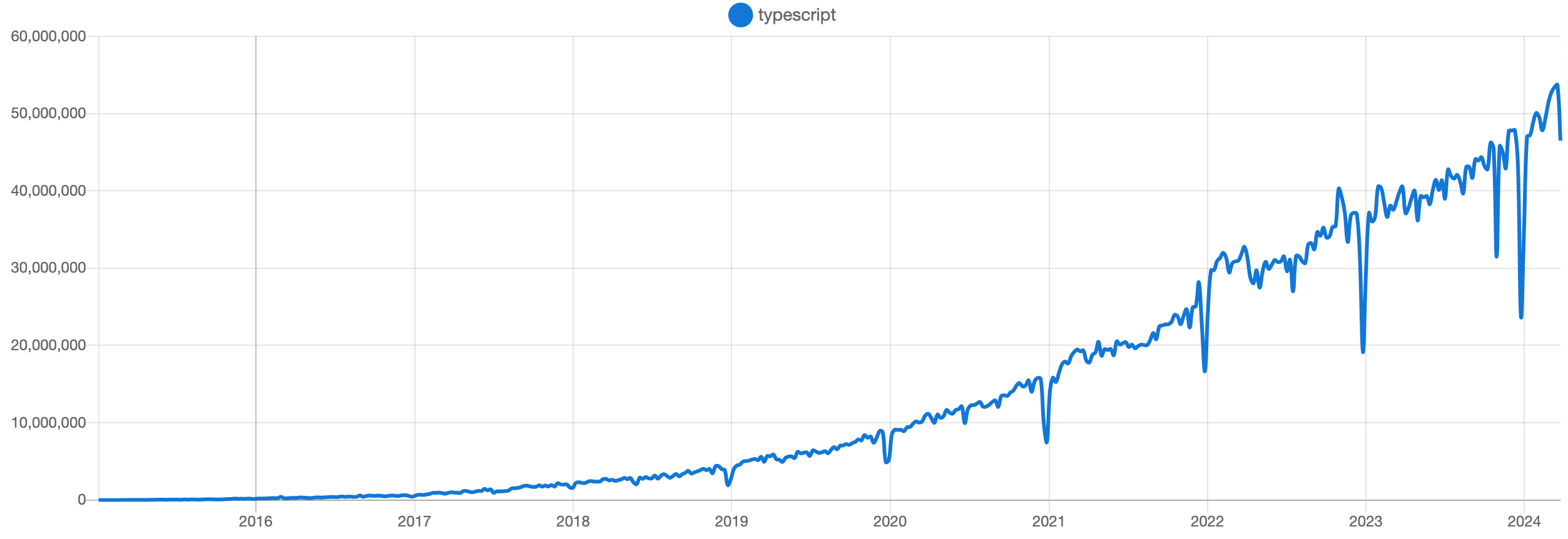
在技术领域,新技术的出现总是伴随着争议。TypeScript(简称 TS)作为一门静态类型的 JavaScript 超集,自从推出以来,就引发了广泛的讨论。作为一名长期从事 JavaScript 开发的程序员,我最初对 TS 持怀疑态度。但经过几年的实践,我对 TS 有了更深入的理解和认识。在这篇博文中,我将分享我对 TS 的理解,我的个人经历,以及我是如何从一个 TS 的抵抗者变成拥护者的。

TS 自 2012 年诞生以来,发展非常迅速,目前已经得到了社区的广泛认可。有图有真香,通过 npm 下载量可以证明这一点。

在 TS 刚刚流行起来的时候,不少开发者,包括我在内,都对它持保留态度。我们担心 TS 的类型系统会限制 JS 的灵活性,增加开发的复杂度。而且,那时候社区中也有一些声音,认为 TS 可能只是一时的热潮,不会长久。

然而,随着时间的推移,TS 逐渐展现出其强大的生态和优势,越来越多的项目和库开始采用 TS。但也有一些开源库作者选择抛弃 TS,他们认为 TS 增加了开发和维护的成本,对于一些小型或者简单的项目来说,可能没有必要引入 TS。

TS 解决了什么问题

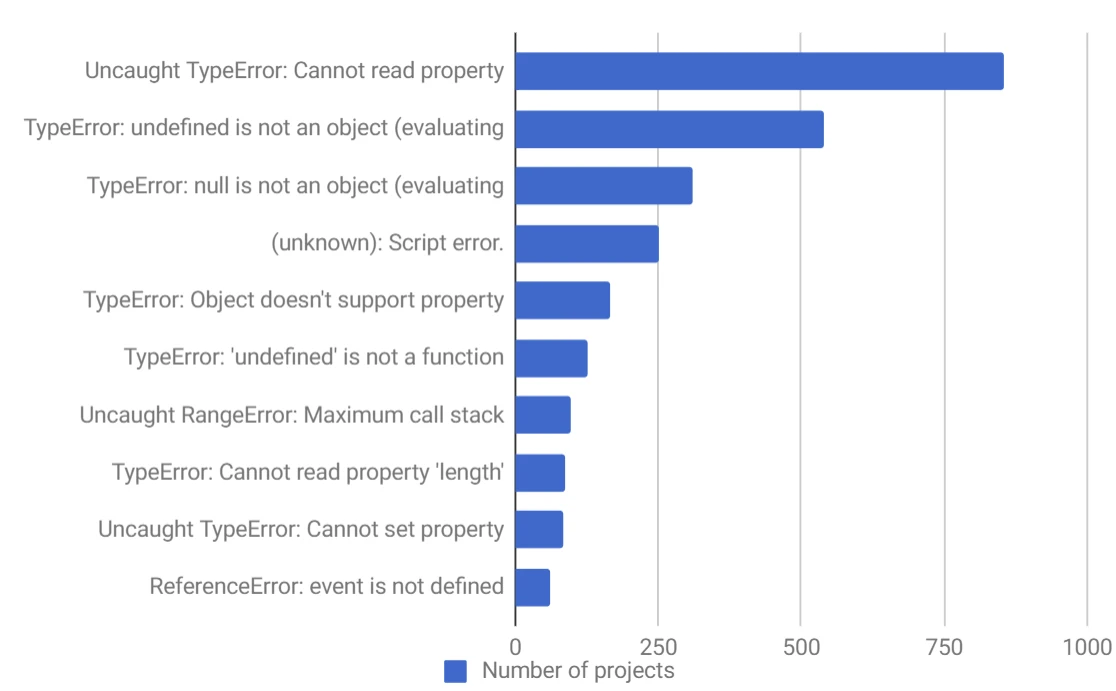
以下是排名靠前的 10 大 JavaScript 错误,其中 9 个错误都是因为类型错误导致的。

尽管存在一些负面声音,但 TS 的采用率仍在逐年增长,特别是在需要类型安全性和改善开发者体验的项目中。TS 引入了静态类型检查,可以在编译时捕获类型错误,减少运行时错误,提高代码的稳定性和可靠性。此外,TS 的类型系统使得重构更加安全和容易,有助于维护代码的清晰度和一致性,减少因变更引入的系统腐化。

我们的系统会面临腐化的问题,随着时间推移,系统会引入变更,而变更则会带来风险,随着时间和风险积累,系统会变得越来越脆弱。如何避免腐化问题呢?主要有两个思路,一个是保证系统中接口的类型安全,一个是保证系统中接口的逻辑正确性。而 TS 的静态类型检查,可以保证接口的类型安全。

TS 未解决的问题

然而,TS 也存在一些未解决的问题。这其实也是社区中很多人诟病 TS 的地方。比如知乎上的热门问题:”TypeScript 刚刚流行起来,为什么大牛们就开始抛弃了?“。又比如一些项目宣布放弃 TS:

  • Deno 将停止在其内部代码中使用 TypeScript,在未来,Deno 的内部代码将使用原生 JavaScript 进行开发。
  • Svelte 的创始人 Rich Harris 强调了他们决策的实用性。即将发布的 Svelte 5 将不再依赖于 TypeScript。
  • Ruby on Rails 作者 DHH 宣布 Turbo 8 将移除 TypeScript 代码

在我看来 TS 并不是一个银弹,它并不能解决所有问题。

  • 运行时安全性不保证:尽管 TS 在编译时进行类型检查,但生成的 JavaScript 代码在运行时不包含类型检查。这意味着即使完全使用 TS 编写的项目也可能在运行时遇到类型错误​。
  • 额外的复杂性:对于一些简单任务,引入 TS 可能会增加额外的复杂性。例如,监听文本输入事件的代码在 TS 中可能需要更多的类型断言和转换​。
  • 难以理解的错误信息:TS 有时会产生难以理解的错误信息,特别是对于初学者来说,这可能会让人望而却步​。
  • 构建性能受影响:TS 的类型检查会增加构建过程的时间,特别是在大型项目中,这可能会减慢开发速度​。

我的心路历程

下面,我将分享我的个人经历,以及我是如何从一个 TS 的抵抗者变成拥护者的。

初识 TypeScript:抵抗与质疑

回想起 5 年多前我第一次接触 TS 时的情景,内心充满了抵抗。那时,我已经有多年的 JavaScript(JS)开发经验,对 JS 的灵活性和自由度非常满意。TS 的类型系统让我感觉像是给自由奔跑的马加上了缰绳,限制了我的创造力。

使用 TypeScript:被迫接受

然而,当我从 JS + React 技术栈转向 Angular + TS + RxJS 技术栈时,我的观点开始慢慢转变。最初的不适应让我感觉自己像是被迫吞下了苦果,但随着时间的推移,我开始适应并理解 TS 的价值。

我发现,在日常开发中,我们其实只用到了 TS 的 20%功能。大部分同事的 TS 水平也仅仅停留在入门阶段。面对困难时,我们经常使用 as、any 或者@ts-ignore 来绕过类型检查,虽然这些做法有时看似方便,但实际上并没有发挥 TS 的真正价值。

拥抱 TypeScript:真香

随着对 TS 的深入了解,我开始拥抱它。我认识到,TS 并不是解决所有问题的银弹,优秀的代码还是需要优秀的开发者来编写。但 TS 的类型系统确实能够显著提高代码的可维护性,尤其是在多人合作的项目中,类型定义能够提供清晰的接口规范,减少沟通成本。

即使是在个人项目中,几个月后回头查看自己的代码时,有了类型定义,也能更快地理解当时的设计思路。而且,现在有了像 GPT 这样的工具,生成类型定义变得更加轻松。

TypeScript 在库开发中的应用

从开发库的角度来看,我认为 TS 和 JS 都是可行的选择。关键在于为库提供.d.ts 类型定义文件,这样无论是库的开发者还是使用者,都能享受到类型系统带来的好处。

作为一个实践者,我创建了jslib-base,这是一个可以快速创建现代 JavaScript 库的脚手架,兼容 TS 和 JS。使用它,你可以在短短 10 秒内创建出一个属于自己的库。

如何学习 TS

如果你还不了解 TS,或者刚刚入门,想深入学习 TS,可以看下我学习经验,我认为学习 TypeScript 的过程可以分为几个阶段:

  • 基础知识:首先,掌握 TypeScript 的基础知识,了解它的语法和特性,确保你能够在项目中使用它。
  • 实战经验:通过参与实际项目,遇到问题并解决问题,不断积累经验。在这个过程中,思考 TypeScript 如何帮助你更好地编写和维护代码。
  • 核心概念和知识体系:深入理解 TypeScript 的核心概念,构建起完整的知识体系,这对于理解更高级的特性和最佳实践至关重要。
  • 原理探索:探索 TypeScript 的工作原理,了解它是如何进行类型检查和编译的。这有助于你更深入地理解这门语言。
  • 动手实践:尝试自己造一个轮子,例如编写一个小型的库或工具,这样可以让你在实践中更好地应用所学知识,并且加深对 TypeScript 的理解。

通过这样的学习路径,你不仅能够熟练使用 TypeScript,还能够深入理解它的内部工作原理,从而更好地利用它来提高你的开发效率和代码质量。

结语:成为自己的大牛

通过对 TS 的理解和实践,我逐渐从一个抵抗者变成了一个拥护者。我相信,不管是 TS 还是其他任何技术,关键在于如何使用它们来提高我们的工作效率和代码质量。

如果你对 JS 库开发感兴趣,我推荐你阅读我的书《现代 JavaScript 库开发》。我希望通过这本书,能帮助你快速掌握并深入理解 JS 库的开发。

最后,我想说,不要羡慕别人成为大牛,我们都有成为大牛的潜力。只要不断学习、实践并拥抱新技术,我们就能成为自己领域的专家。让我们一起在技术的道路上不断前进,做自己的大牛吧!

☑️ ⭐

Jekyll Introduction

pThis Jekyll introduction will outline specifically what Jekyll is and why you would want to use it. Directly following the intro we’ll learn exactly emhow/em Jekyll does what it does./p h2 id=overviewOverview/h2 h3 id=what-is-jekyllWhat is Jekyll?/h3 pJekyll is a parsing engine bundled as a ruby gem used to build static websites from dynamic components such as templates, partials, liquid code, markdown, etc. Jekyll is known as “a simple, blog aware, static site generator”./p h3 id=examplesExamples/h3 pThis website is created with Jekyll. a href=https://github.com/mojombo/jekyll/wiki/SitesOther Jekyll websites/a./p h3 id=what-does-jekyll-doWhat does Jekyll Do?/h3 pJekyll is a ruby gem you install on your local system. Once there you can call code class=language-plaintext highlighter-rougejekyll --server/code on a directory and provided that directory is setup in a way jekyll expects, it will do magic stuff like parse markdown/textile files, compute categories, tags, permalinks, and construct your pages from layout templates and partials./p pOnce parsed, Jekyll stores the result in a self-contained static code class=language-plaintext highlighter-rouge_site/code folder. The intention here is that you can serve all contents in this folder statically from a plain static web-server./p pYou can think of Jekyll as a normalish dynamic blog but rather than parsing content, templates, and tags on each request, Jekyll does this once embeforehand/em and caches the ementire website/em in a folder for serving statically./p h3 id=jekyll-is-not-blogging-softwareJekyll is Not Blogging Software/h3 pstrongJekyll is a parsing engine./strong/p pJekyll does not come with any content nor does it have any templates or design elements. This is a common source of confusion when getting started. Jekyll does not come with anything you actually use or see on your website - you have to make it./p h3 id=why-should-i-careWhy Should I Care?/h3 pJekyll is very minimalistic and very efficient. The most important thing to realize about Jekyll is that it creates a static representation of your website requiring only a static web-server. Traditional dynamic blogs like Wordpress require a database and server-side code. Heavily trafficked dynamic blogs must employ a caching layer that ultimately performs the same job Jekyll sets out to do; serve static content./p pTherefore if you like to keep things simple and you prefer the command-line over an admin panel UI then give Jekyll a try./p pstrongDevelopers like Jekyll because we can write content like we write code:/strong/p ul liAbility to write content in markdown or textile in your favorite text-editor./li liAbility to write and preview your content via localhost./li liNo internet connection required./li liAbility to publish via git./li liAbility to host your blog on a static web-server./li liAbility to host freely on GitHub Pages./li liNo database required./li /ul h1 id=how-jekyll-worksHow Jekyll Works/h1 pThe following is a complete but concise outline of exactly how Jekyll works./p pBe aware that core concepts are introduced in rapid succession without code examples. This information is not intended to specifically teach you how to do anything, rather it is intended to give you the emfull picture/em relative to what is going on in Jekyll-world./p pLearning these core concepts should help you avoid common frustrations and ultimately help you better understand the code examples contained throughout Jekyll-Bootstrap./p h2 id=initial-setupInitial Setup/h2 pAfter a href=/index.html#start-nowinstalling jekyll/a you’ll need to format your website directory in a way jekyll expects. Jekyll-bootstrap conveniently provides the base directory format./p h3 id=the-jekyll-application-base-formatThe Jekyll Application Base Format/h3 pJekyll expects your website directory to be laid out like so:/p div class=language-plaintext highlighter-rougediv class=highlightpre class=highlightcode. |-- _config.yml |-- _includes |-- _layouts | |-- default.html | |-- post.html |-- _posts | |-- 2011-10-25-open-source-is-good.markdown | |-- 2011-04-26-hello-world.markdown |-- _site |-- index.html |-- assets |-- css |-- style.css |-- javascripts /code/pre/div/div ul li pstrong_config.yml/strong Stores configuration data./p /li li pstrong_includes/strong This folder is for partial views./p /li li pstrong_layouts/strong This folder is for the main templates your content will be inserted into. You can have different layouts for different pages or page sections./p /li li pstrong_posts/strong This folder contains your dynamic content/posts. the naming format is required to be code class=language-plaintext highlighter-rouge@YEAR-MONTH-DATE-title.MARKUP@/code./p /li li pstrong_site/strong This is where the generated site will be placed once Jekyll is done transforming it./p /li li pstrongassets/strong This folder is not part of the standard jekyll structure. The assets folder represents emany generic/em folder you happen to create in your root directory. Directories and files not properly formatted for jekyll will be left untouched for you to serve normally./p /li /ul p(read more: a href=https://github.com/mojombo/jekyll/wiki/Usagehttps://github.com/mojombo/jekyll/wiki/Usage/a)/p h3 id=jekyll-configurationJekyll Configuration/h3 pJekyll supports various configuration options that are fully outlined here: (a href=https://github.com/mojombo/jekyll/wiki/Configurationhttps://github.com/mojombo/jekyll/wiki/Configuration/a)/p h2 id=content-in-jekyllContent in Jekyll/h2 pContent in Jekyll is either a post or a page. These content “objects” get inserted into one or more templates to build the final output for its respective static-page./p h3 id=posts-and-pagesPosts and Pages/h3 pBoth posts and pages should be written in markdown, textile, or HTML and may also contain Liquid templating syntax. Both posts and pages can have meta-data assigned on a per-page basis such as title, url path, as well as arbitrary custom meta-data./p h3 id=working-with-postsWorking With Posts/h3 pstrongCreating a Post/strong Posts are created by properly formatting a file and placing it the code class=language-plaintext highlighter-rouge_posts/code folder./p pstrongFormatting/strong A post must have a valid filename in the form code class=language-plaintext highlighter-rougeYEAR-MONTH-DATE-title.MARKUP/code and be placed in the code class=language-plaintext highlighter-rouge_posts/code directory. If the data format is invalid Jekyll will not recognize the file as a post. The date and title are automatically parsed from the filename of the post file. Additionally, each file must have a href=https://github.com/mojombo/jekyll/wiki/YAML-Front-MatterYAML Front-Matter/a prepended to its content. YAML Front-Matter is a valid YAML syntax specifying meta-data for the given file./p pstrongOrder/strong Ordering is an important part of Jekyll but it is hard to specify a custom ordering strategy. Only reverse chronological and chronological ordering is supported in Jekyll./p pSince the date is hard-coded into the filename format, to change the order, you must change the dates in the filenames./p pstrongTags/strong Posts can have tags associated with them as part of their meta-data. Tags may be placed on posts by providing them in the post’s YAML front matter. You have access to the post-specific tags in the templates. These tags also get added to the sitewide collection./p pstrongCategories/strong Posts may be categorized by providing one or more categories in the YAML front matter. Categories offer more significance over tags in that they can be reflected in the URL path to the given post. Note categories in Jekyll work in a specific way. If you define more than one category you are defining a category hierarchy “set”. Example:/p div class=language-plaintext highlighter-rougediv class=highlightpre class=highlightcode--- title : Hello World categories : [lessons, beginner] --- /code/pre/div/div pThis defines the category hierarchy “lessons/beginner”. Note this is emone category/em node in Jekyll. You won’t find “lessons” and “beginner” as two separate categories unless you define them elsewhere as singular categories./p h3 id=working-with-pagesWorking With Pages/h3 pstrongCreating a Page/strong Pages are created by properly formatting a file and placing it anywhere in the root directory or subdirectories that do emnot/em start with an underscore./p pstrongFormatting/strong In order to register as a Jekyll page the file must contain a href=https://github.com/mojombo/jekyll/wiki/YAML-Front-MatterYAML Front-Matter/a. Registering a page means 1) that Jekyll will process the page and 2) that the page object will be available in the code class=language-plaintext highlighter-rougesite.pages/code array for inclusion into your templates./p pstrongCategories and Tags/strong Pages do not compute categories nor tags so defining them will have no effect./p pstrongSub-Directories/strong If pages are defined in sub-directories, the path to the page will be reflected in the url. Example:/p div class=language-plaintext highlighter-rougediv class=highlightpre class=highlightcode. |-- people |-- bob |-- essay.html /code/pre/div/div pThis page will be available at code class=language-plaintext highlighter-rougehttp://yourdomain.com/people/bob/essay.html/code/p pstrongRecommended Pages/strong/p ul listrongindex.html/strong You will always want to define the root index.html page as this will display on your root URL./li listrong404.html/strong Create a root 404.html page and GitHub Pages will serve it as your 404 response./li listrongsitemap.html/strong Generating a sitemap is good practice for SEO./li listrongabout.html/strong A nice about page is easy to do and gives the human perspective to your website./li /ul h2 id=templates-in-jekyllTemplates in Jekyll/h2 pTemplates are used to contain a page’s or post’s content. All templates have access to a global site object variable: code class=language-plaintext highlighter-rougesite/code as well as a page object variable: code class=language-plaintext highlighter-rougepage/code. The site variable holds all accessible content and metadata relative to the site. The page variable holds accessible data for the given page or post being rendered at that point./p pstrongCreate a Template/strong Templates are created by properly formatting a file and placing it in the code class=language-plaintext highlighter-rouge_layouts/code directory./p pstrongFormatting/strong Templates should be coded in HTML and contain YAML Front Matter. All templates can contain Liquid code to work with your site’s data./p pstrongRending Page/Post Content in a Template/strong There is a special variable in all templates named : code class=language-plaintext highlighter-rougecontent/code. The code class=language-plaintext highlighter-rougecontent/code variable holds the page/post content including any sub-template content previously defined. Render the content variable wherever you want your main content to be injected into your template:/p precode... lt;bodygt; lt;div id=sidebargt; ... lt;/divgt; lt;div id=maingt; #123;{content}#125; lt;/divgt; lt;/bodygt; .../code/pre h3 id=sub-templatesSub-Templates/h3 pSub-templates are exactly templates with the only difference being they define another “root” layout/template within their YAML Front Matter. This essentially means a template will render inside of another template./p h3 id=includesIncludes/h3 pIn Jekyll you can define include files by placing them in the code class=language-plaintext highlighter-rouge_includes/code folder. Includes are NOT templates, rather they are just code snippets that get included into templates. In this way, you can treat the code inside includes as if it was native to the parent template./p pAny valid template code may be used in includes./p h2 id=using-liquid-for-templatingUsing Liquid for Templating/h2 pTemplating is perhaps the most confusing and frustrating part of Jekyll. This is mainly due to the fact that Jekyll templates must use the Liquid Templating Language./p h3 id=what-is-liquidWhat is Liquid?/h3 pa href=https://github.com/Shopify/liquidLiquid/a is a secure templating language developed by a href=http://shopify.comShopify/a. Liquid is designed for end-users to be able to execute logic within template files without imposing any security risk on the hosting server./p pJekyll uses Liquid to generate the post content within the final page layout structure and as the primary interface for working with your site and post/page data./p h3 id=why-do-we-have-to-use-liquidWhy Do We Have to Use Liquid?/h3 pGitHub uses Jekyll to power a href=http://pages.github.com/GitHub Pages/a. GitHub cannot afford to run arbitrary code on their servers so they lock developers down via Liquid./p h3 id=liquid-is-not-programmer-friendlyLiquid is Not Programmer-Friendly./h3 pThe short story is liquid is not real code and its not intended to execute real code. The point being you can’t do jackshit in liquid that hasn’t been allowed explicitly by the implementation. What’s more you can only access data-structures that have been explicitly passed to the template./p pIn Jekyll’s case it is not possible to alter what is passed to Liquid without hacking the gem or running custom plugins. Both of which cannot be supported by GitHub Pages./p pAs a programmer - this is very frustrating./p pBut rather than look a gift horse in the mouth we are going to suck it up and view it as an opportunity to work around limitations and adopt client-side solutions when possible./p pstrongAside/strong My personal stance is to not invest time trying to hack liquid. It’s really unnecessary emfrom a programmer’s/em perspective. That is to say if you have the ability to run custom plugins (i.e. run arbitrary ruby code) you are better off sticking with ruby. Toward that end I’ve built a href=http://github.com/plusjade/mustache-with-jekyllMustache-with-Jekyll/a/p h2 id=static-assetsStatic Assets/h2 pStatic assets are any file in the root or non-underscored subfolders that are not pages. That is they have no valid YAML Front Matter and are thus not treated as Jekyll Pages./p pStatic assets should be used for images, css, and javascript files./p h2 id=how-jekyll-parses-filesHow Jekyll Parses Files/h2 pRemember Jekyll is a processing engine. There are two main types of parsing in Jekyll./p ul listrongContent parsing./strong This is done with textile or markdown./li listrongTemplate parsing./strong This is done with the liquid templating language./li /ul pAnd thus there are two main types of file formats needed for this parsing./p ul listrongPost and Page files./strong All content in Jekyll is either a post or a page so valid posts and pages are parsed with markdown or textile./li listrongTemplate files./strong These files go in code class=language-plaintext highlighter-rouge_layouts/code folder and contain your blogs strongtemplates/strong. They should be made in HTML with the help of Liquid syntax. Since include files are simply injected into templates they are essentially parsed as if they were native to the template./li /ul pstrongArbitrary files and folders./strong Files that emare not/em valid pages are treated as static content and pass through Jekyll untouched and reside on your blog in the exact structure and format they originally existed in./p h3 id=formatting-files-for-parsingFormatting Files for Parsing./h3 pWe’ve outlined the need for valid formatting using strongYAML Front Matter/strong. Templates, posts, and pages all need to provide valid YAML Front Matter even if the Matter is empty. This is the only way Jekyll knows you want the file processed./p pYAML Front Matter must be prepended to the top of template/post/page files:/p div class=language-plaintext highlighter-rougediv class=highlightpre class=highlightcode--- layout: post category : pages tags : [how-to, jekyll] --- ... contents ... /code/pre/div/div pThree hyphens on a new line start the Front-Matter block and three hyphens on a new line end the block. The data inside the block must be valid YAML./p pConfiguration parameters for YAML Front-Matter is outlined here: a href=https://github.com/mojombo/jekyll/wiki/YAML-Front-MatterA comprehensive explanation of YAML Front Matter/a/p h4 id=defining-layouts-for-posts-and-templates-parsingDefining Layouts for Posts and Templates Parsing./h4 pThe code class=language-plaintext highlighter-rougelayout/code parameter in the YAML Front Matter defines the template file for which the given post or template should be injected into. If a template file specifies its own layout, it is effectively being used as a code class=language-plaintext highlighter-rougesub-template./code That is to say loading a post file into a template file that refers to another template file with work in the way you’d expect; as a nested sub-template./p h2 id=how-jekyll-generates-the-final-static-filesHow Jekyll Generates the Final Static Files./h2 pUltimately, Jekyll’s job is to generate a static representation of your website. The following is an outline of how that’s done:/p ol li pstrongJekyll collects data./strong Jekyll scans the posts directory and collects all posts files as post objects. It then scans the layout assets and collects those and finally scans other directories in search of pages./p /li li pstrongJekyll computes data./strong Jekyll takes these objects, computes metadata (permalinks, tags, categories, titles, dates) from them and constructs one big code class=language-plaintext highlighter-rougesite/code object that holds all the posts, pages, layouts, and respective metadata. At this stage your site is one big computed ruby object./p /li li pstrongJekyll liquifies posts and templates./strong Next jekyll loops through each post file and converts (through markdown or textile) and strongliquifies/strong the post inside of its respective layout(s). Once the post is parsed and liquified inside the the proper layout structure, the layout itself is “liquified”. strongLiquification/strong is defined as follows: Jekyll initiates a Liquid template, and passes a simpler hash representation of the ruby site object as well as a simpler hash representation of the ruby post object. These simplified data structures are what you have access to in the templates./p /li li pstrongJekyll generates output./strong Finally the liquid templates are “rendered”, thereby processing any liquid syntax provided in the templates and saving the final, static representation of the file./p /li /ol pstrongNotes./strong Because Jekyll computes the entire site in one fell swoop, each template is given access to a global code class=language-plaintext highlighter-rougesite/code hash that contains useful data. It is this data that you’ll iterate through and format using the Liquid tags and filters in order to render it onto a given page./p pRemember, in Jekyll you are an end-user. Your API has only two components:/p ol liThe manner in which you setup your directory./li liThe liquid syntax and variables passed into the liquid templates./li /ol pAll the data objects available to you in the templates via Liquid are outlined in the strongAPI Section/strong of Jekyll-Bootstrap. You can also read the original documentation here: a href=https://github.com/mojombo/jekyll/wiki/Template-Datahttps://github.com/mojombo/jekyll/wiki/Template-Data/a/p h2 id=conclusionConclusion/h2 pI hope this paints a clearer picture of what Jekyll is doing and why it works the way it does. As noted, our main programming constraint is the fact that our API is limited to what is accessible via Liquid and Liquid only./p pJekyll-bootstrap is intended to provide helper methods and strategies aimed at making it more intuitive and easier to work with Jekyll =)/p pstrongThank you/strong for reading this far./p h2 id=next-stepsNext Steps/h2 pPlease take a look at a href=/a or jump right into a href=Usage/a if you’d like./p
☑️ ⭐

如何在JavaScript中判断两个值相等

本文已收录到《jsmini系列文章

划重点,这是一道面试必考题,我就问过很多面试者这个问题,✧(≖ ◡ ≖✿)嘿嘿

在 JavaScript 中如何判断两个值相等,这个问题看起来非常简单,但并非如此,在 JavaScript 中存在 4 种不同的相等逻辑,如果你不知道他们的区别,或者认为判断相等非常简单,那么本文非常适合你阅读。

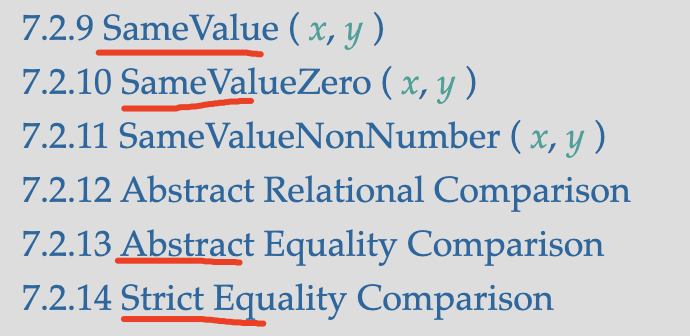
ECMAScript 是 JavaScript 的语言规范,在ECMAScript 规范中存在四种相等算法,如下图所示:

上图中四种算法对应的中文名字如下,大部分前端应该熟悉严格相等和非严格相等,但对于同值零和同值却不熟悉,下面我们分别介绍这四种算法。

  • 同值
  • 同值零
  • 非严格相等
  • 严格相等

非严格相等

非严格相等使用两个等号,也就是我们熟悉的双等,非严格相等表示语义相等,不要求类型一样,非严格相等在比较前会先将比较参数类型转换为一致,再进行比较,代码示例如下:

1 == 1; // true
1 == '1'; // true 类型不同,不影响比较结果

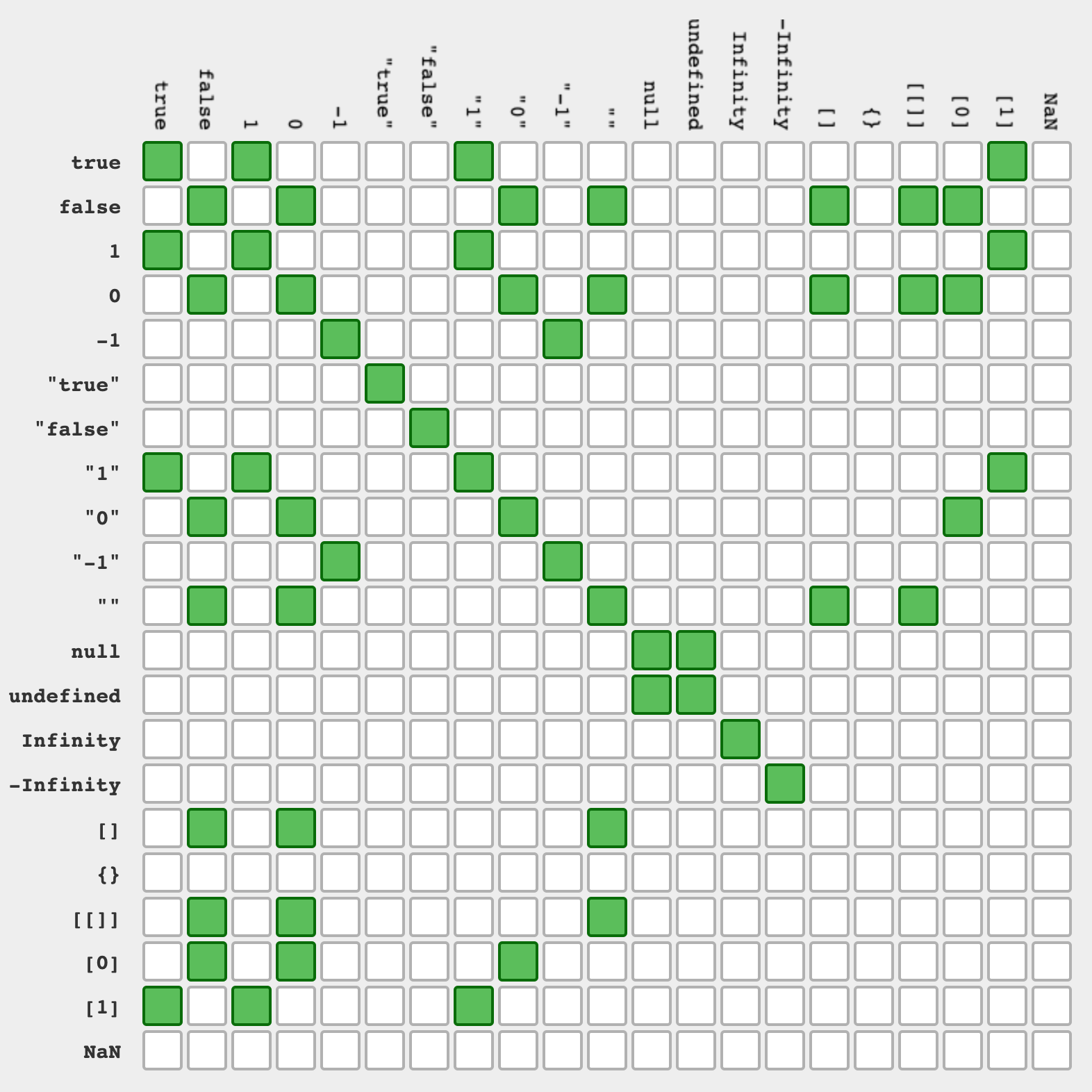
非严格相等有非常复杂的转换规则,非常难以记忆,社区中有人将上面的规则总结成了图片,一图胜千言,如下图所示:

为了方便记住非严格相等的的转换逻辑,作者将非对象值,可以总结为如下三条规则:

  • Undefined 只和 Null 相等
  • 和 Number 比较时,另一个值会自动转换为 Number
  • 和 Boolean 比较时,另一个值会转换为 Number

如果值为对象,会使用内部的 ToPrimitive 转换,可以通过自定义 Symbol.toPrimitive 改变返回值,需要注意的是在相等的判断中 Symbol.toPrimitive 接受的 hint 参数都是 default。

const obj = {
  [Symbol.toPrimitive](hint) {
    console.log(hint);
    if (hint == 'number') {
      return 1;
    }
    if (hint == 'string') {
      return 'yan';
    }
    return true;
  },
};

console.log(obj == 1); // obj 返回 true
console.log(obj == '1'); // obj 返回 true
console.log(obj == true); // obj 返回 true

非严格相等并非带来了很多便利,通过隐式的自动转换,简化了部分场景的工作,比如 Number 和 String 的自动转换,简化了前端从表单,url 参数中获取值的比较问题,但自动转换带来的问题比便利还多。

隐式转换的规则,大部分情况下难以驾驭,现在主流的观点已经不建议使用,作者建议只在判断 undefined 和 null 的场景下可以使用非严格相等。

严格相等

严格相等是另一种比较算法,其和非严格想等的区别是不会进行类型转换,类型不一致时直接返回 false,严格相等对应===操作符,因为使用三个等号,也被称作三等或者全等,严格相等示例如下:

1 === 1; // true
1 === '1'; // false 类型不同,影响比较结果

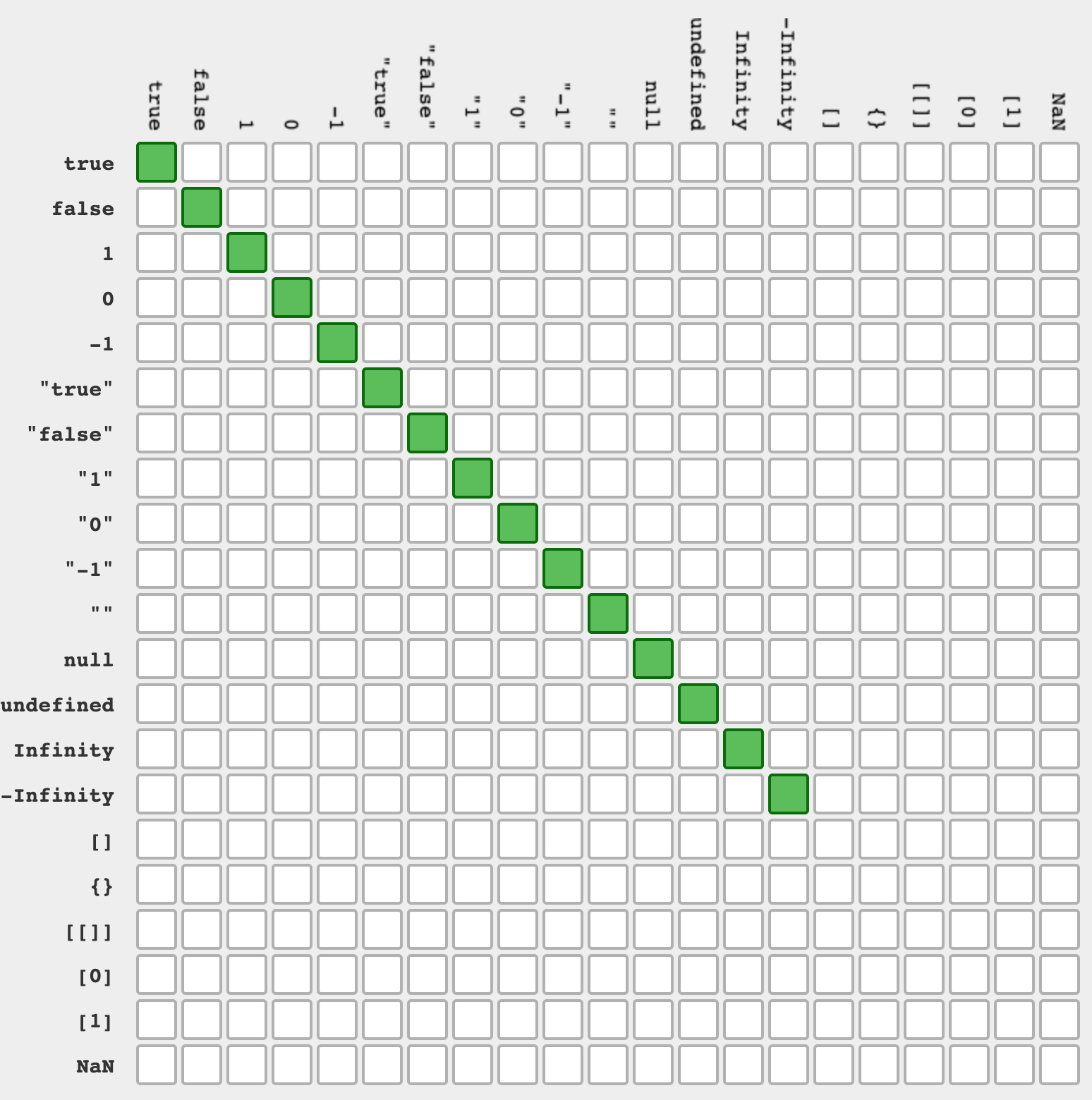
不同类型值判断规则如下,和前面的非严格相等对比,严格相等更符合直觉。

严格相等解决了非严格相等中隐式转换带来的问题,但也丢失了隐式转换带来的便利,对于类型可能不一致的情况下,比如从表单中获取的值都是字符串,保险的做法是,在比较前手动类型转换,代码示例如下:

1 === Number('1'); // true 手动类型转换,类型防御

严格相等几乎总是正确的,但也有例外情况,比如 NaN 和正负 0 的问题。

Number 类型有个特殊的值 NaN,用来表示计算错误的情概况,比较常见是非 Number 类型和 Number 类型计算时,会得到 NaN 值,代码示例如下所示,这是从表单和接口请求获取数据时很容易出现的问题。

const a = 0 / 0; // NaN
const b = 'a' / 1;
const c = undefined + 1; // NaN

在严格相等中,NaN 是不等于自己的,NaN 是(x !== x) 成立的唯一情况,在某些场景下其实是希望能够判断 NaN 的,可以使用 isNaN 进行判断,ECMAScript 2015 引入了新的 Number.isNaN,和 isNaN 的区别是不会对传入的参数做类型转换,建议使用语义更清晰的 Number.isNaN,但是要注意兼容性问题,判断 NaN 代码示例如下:

NaN === NaN; // false

isNaN(NaN); // true
Number.isNaN(NaN); // true

isNaN('aaa'); // true 自动转换类型 'aaa'转换为Number为NaN
Number.isNaN('aaa'); // false 不进行转换,类型不为Number,直接返回false

严格相等另一个例外情况是,无法区分+0 和-0,代码示例如下,在一些数学计算场景中是要区分语义的。

+0 === -0; // true

JavaScript 中很多系统函数都使用严格相等,比如数组的 indexOf,lastIndexOf 和 switch-case 等,需要注意,这些对于 NaN 无法返回正确结果,代码示例如下:

[NaN].indexOf(NaN); // -1 数组中其实存在NaN
[NaN].lastIndexOf(NaN); // -1

同值零

同值零是另一种相等算法,名字来源于规范的直译,规范中叫做 SameValueZero,同值零和严格相等功能一样,除了处理 NaN 的方式,同值零认为 NaN 和 NaN 相等,这在判断 NaN 是否在集合中的语义下是非常合理的。

ECMAScript 2016 引入的 includes 使用此算法,此外 Map 的键去重和 Set 的值去重,使用此算法,代码示例如下:

[NaN].incdudes(NaN); // true 注意和indexOf的区别,incdudes的语义更合理

new Set([NaN, NaN]); // [NaN] set中只会有个一个NaN,如果 NaN !== NaN的话,应该是[NaN, NaN]

new Map([
  [NaN, 1],
  [NaN, 2],
]); // {NaN => 2} 如果 NaN !== NaN的话,应该是 {NaN => 1, NaN => 2}

同值

同值是最后一种相等算法,其和同值零类似,但认为 +0 不等于 -0,ECMAScript 2015 带来的 Object.is 使用同值算法,代码示例如下:

Object.is(NaN, NaN); // true
Object.is(+0, -0); // false 📢 注意这里

同值算法的使用场景是,确定两个值是否在任何情况下功能上是相同的,比较不常用,defineProperty 使用此算法确认键是否存在,例如,将存在的只读属性值-0 修改为+0 时会报错,如果设置为同样的-0 将执行正常,代码示例如下:

function test() {
  'use strict'; // 需要开启严格模式
  var a = {};

  Object.defineProperty(a, 'a1', {
    value: -0,
    writable: false,
    configurable: false,
    enumerable: false,
  });

  Object.defineProperty(a, 'a1', {
    value: -0,
  }); // 正常执行

  Object.defineProperty(a, 'a1', {
    value: 0,
  }); // Uncaught TypeError: Cannot redefine property: a1
}
test();

对于数组判断是否存在的场景,如果想区分+0 和-0,可以使用 ECMAScript 2015 引入的 find 方法,自行控制判断逻辑,代码示例如下:

[0].includes(-0); // 不能区分-0
[0].find((val) => Object.is(val, -0)); // 能区分+0和-0

对比四种算法

下面对比下四种算法的区别,区别如下表所示:

  隐式转换 NaN 和 NaN +0 和 -0
非严格相等(==) false true
严格相等(===) false true
同值零(includes 等) true true
同值(Object.is) true false

Number 类型的坑

Number 类型真的有太多坑了,除了上面提到的 NaN 和正负零的问题,还存在其他语言都存在的小数问题,小数问题是前端比较容易踩坑的地方,如果想对比两个小数是否相同,可能会违反直觉,比如 0.1+0.2 并不和 0.3 全等,代码示例如下:

const a = 0.1 + 0.2; // 0.30000000000000004

a === 0.3; // false

如果要理解上面的原因,需要知道 JavaScript 是如何存储小数的,我之前曾经写个两篇文章,专门介绍这个问题:

简单来说 JavaScript 使用 IEEE-754 规范存储浮点数,这意味着每个浮点数占 64 位,具体含义如下图所示:

因此 JavaScript 中的最小数字 2-52,对应的十进制约等于 2.2204460492503130808472633361816E-16,这个数字比较难以记忆,ECMAScript 2015 引入了 Number.EPSILON 常量表示这个数字,使用方法如下

console.log(Number.EPSILON); // 2.220446049250313e-16

对于小数的比较,一般都是让两个数字做减法,如果其差值,小于 Number.EPSILON,就认为其相等,代码示例如下:

var a = 0.1 + 0.2; // 0.30000000000000004

a - 0.3 < Number.EPSILON; // true 可认为 a === 0.3

结构相等

前面介绍了各种判断相等的办法,都只能用于基本类型,如果有两个内容一样的对象,使用上面的方法都会返回 false,在 JavaScript 中缺少判断两个引用类型结构相等的功能,比如如下的 a1 和 a2,并不相等:

const a1 = { a: 1 };
const a2 = { a: 1 };

a1 == a2; // false
a1 === a2; // false
Object.is(a1, a2); // false

通过将对象序列化,可以将结构相等,转换为字符串相等,在 JavaScript 中序列化需要用到 JSON.stringify,使用 JSON.stringify 判断结构相等的示例代码如下:

const a1 = { a: 1 };
const a2 = { a: 1 };

JSON.stringify(a1) === JSON.stringify(a2); // true

大部分同学可能就是使用的,但其实这种方法是有缺陷的,比如某些值,在序列化后会丢失,从而导致判断逻辑错误,比如下面的值都会有问题:

  • NaN 序列化后和 null 无法区分;
  • +0 和-0 在序列化后也无法区分;
  • 溢出的数字和 null 无法区分;

比如如下两个对象,结构并不相等,但序列化后值是一样的:

const a1 = {
  a: NaN,
};

const a2 = {
  a: null,
};

JSON.stringify(a1); // '{"a":null}'
JSON.stringify(a2); // '{"a":null}'

此外,还有一些值不能被序列化,比如 undefined 和 symbol,序列化后就丢失了,代码示例如下:

const a = {
  a: undefined,
  b: Symbol(''),
};

JSON.stringify(a); // '{}' 值丢失了

由于 JSON.stringify 的方法走不通,另一种思路是自己写代码判断结构相等,其原理是依次遍历递归比较两个树是否相等,也可以使用社区中别人写好的库,比如isequal

鉴于篇幅,本文不在给出递归判断结构相等的代码,在下一篇文章中,给大家带来 isequal 的源码分析。

最后,欢迎大家阅读本文,如果对本文有任何疑问,欢迎在评论区交流。

❌