注意,本文方法主要用于 Butterfly 主题,其他主题需要有一定的前端知识 !!!
DIY 前请先备份!!!
本文基于 Butterfly 主题 3.0.0 之前的版本修改!
3.0.0 版本之后的部分内容可能需要调整!
对前端及自己使用的主题不太了解的话建议不要随意修改!
Pixiv 日榜
Butterfly 主题
在themes\Butterfly\layout\includes\widget文件夹新建card_pixiv.pug文件,文件内容如下:
.card-widget.card-pixiv .card-content .item-headline i.fa.fa-image(aria-hidden="true") span= _p('aside.card_pixiv') iframe(src="https://cloud.mokeyjay.com/pixiv" frameborder="0" style="width:99%;height:380px;margin:0;")
https://cloud.mokeyjay.com/pixiv使用的是超能小紫提供的服务,也可以自行搭建,搭建方式请看这里
编辑themes\Butterfly\layout\includes\widget\index.pug文件,在你想要显示的位置插入以下代码:
if theme.aside.card_pixiv include ./card_pixiv.pug
编辑butterfly.yml文件,在card_webinfo下面添加一行card_pixiv: true
编辑themes\Butterfly\languages\zh-CN.yml文件(请根据你的网站语言选择),找到card_announcement: 公告, 在下面添加一行card_pixiv: Pixiv日榜Top50(后面的文本可自定义)
如果不想显示,直接把butterfly.yml文件的card_pixiv: true改为card_pixiv: false即可
其他主题
将以下内容插入到需要显示的地方:
<iframe src="https://cloud.mokeyjay.com/pixiv" frameborder="0" style="width:100%;height:380px;margin:0;"></iframe>
访客地图
Butterfly 主题
前往clustrmaps网站注册一个帐号
找到Free Tools下面的Website Widget, 点击Get Map Widget
输入你的博客网址,点击Next
根据你自己的喜好选择样式Map widget或Globe Widget
找到如下代码,记住 src(******的部分):
<script type="text/javascript" id="clstr_globe" src="**********************">
在themes\Butterfly\layout\includes\widget文件夹新建card_map.pug文件,文件内容如下:
.card-widget.card-map .card-content .item-headline i.fas.fa-globe-asia(aria-hidden="true") span= _p('aside.card_map') //- 下面这行适用于3D地图(Globe Widget) script#clstr_globe(type="text/javascript" defer="defer" src="******************") //- 下面这行适用于平面地图(Map Widget) script#clustrmaps(type="text/javascript" defer="defer" src="******************")
******部分填写上面的 src, 3D 地图和平面地图任选一个,不用的把代码删掉
编辑themes\Butterfly\layout\includes\widget\index.pug文件,在你想要显示的位置插入以下代码:
if theme.aside.card_map include ./card_map.pug
编辑butterfly.yml文件,在card_webinfo下面添加一行card_map: true
编辑themes\Butterfly\languages\zh-CN.yml文件(请根据你的网站语言选择),找到card_announcement: 公告, 在下面添加一行card_map: 访客地图(后面的文本可自定义)
如果不想显示,直接把butterfly.yml文件的card_map: true改为card_map: false即可
其他主题
将上面第 5 步中的代码插入到需要显示的地方。
文章日历
安装hexo-generator-calendar插件
npm install --save git://github.com/howiefh/hexo-generator-calendar.git
下载calendar.js和languages.js文件,保存到themes\Butterfly\source\js目录
编辑calendar.js文件,在文件最后}(jQuery));之前添加:
$(document).ready(function () { $('#calendar').aCalendar('zh-CN');//'zh-CN'请根据自己博客的语言选择});
编辑butterfly.yml文件, 以下两个你butterfly.yml文件里有哪个就用那个,不要都用!
- /js/calendar.js- /js/languages.js
- <script src="/js/calendar.js"></script>- <script src="/js/languages.js"></script>
下载calendar.styl文件,保存到themes\Butterfly\source\css\_layout目录
在themes\Butterfly\layout\includes\widget文件夹新建card_calendar.pug文件,文件内容如下:
.card-widget.card-calendar .card-content .item-headline i.far.fa-calendar-alt(aria-hidden="true") span= _p('aside.card_calendar') div.widget-wrap div#calendar.widget
编辑themes\Butterfly\layout\includes\widget\index.pug文件,在你想要显示的位置插入以下代码:
if theme.aside.card_calendar include ./card_calendar.pug
编辑butterfly.yml文件,在card_webinfo下面添加一行card_calendar: true
编辑themes\Butterfly\languages\zh-CN.yml文件(请根据你的网站语言选择),找到card_announcement: 公告, 在下面添加一行card_calendar: 文章日历(后面的文本可自定义)
如果不想显示,直接把butterfly.yml文件的card_calendar: true改为card_calendar: false即可
投票系统
Butterfly 主题
前往widgetpack注册账号
登陆后在点击左侧侧边栏Rating->Install, 你会看到如下代码,记住id:
<div id="wpac-rating"></div><script type="text/javascript">wpac_init = window.wpac_init || [];wpac_init.push({widget: 'Rating', id: *****});(function() { if ('WIDGETPACK_LOADED' in window) return; WIDGETPACK_LOADED = true; var mc = document.createElement('script'); mc.type = 'text/javascript'; mc.async = true; mc.src = 'https://embed.widgetpack.com/widget.js'; var s = document.getElementsByTagName('script')[0]; s.parentNode.insertBefore(mc, s.nextSibling);})();</script><a href="https://widgetpack.com" class="wpac-cr">Star Rating WIDGET PACK</a>
在博客根目录/themes/Butterfly/layout/includes/post/目录内新建文件rate.pug, 内容如下:
#wpac-ratingscript. wpac_init = window.wpac_init || []; wpac_init.push({widget: 'Rating', id: #{theme.rate.id}}); (function() { if ('WIDGETPACK_LOADED' in window) return; WIDGETPACK_LOADED = true; var mc = document.createElement('script'); mc.type = 'text/javascript'; mc.async = true; mc.src = '//embed.widgetpack.com/widget.js'; var s = document.getElementsByTagName('script')[0]; s.parentNode.insertBefore(mc, s.nextSibling); })();style. #wpac-rating { margin-top: 20px; text-align: center; }
编辑博客根目录/themes/Butterfly/layout/post.pug文件,在!=partial('includes/post/reward', {}, {cache:theme.fragment_cache})下方添加:
if theme.rate.enable include includes/post/rate.pug
注意缩进if与上面的if对齐
在Butterfly.yml文件内添加:
rate: enable: true id: #上面记住的id
其他主题
将第 2 步生成的代码插入到需要显示的位置。
加载中动画
Butterfly 主题
更新到最新版即可。
其他主题
将以下内容添加到<head></head>标签内:
<link rel="stylesheet" href="https://cdn.jsdelivr.net/gh/HCLonely/images@master/others/loading.min.css">
将以下内容添加到<body>标签后面:
<div id="loading-box"> <div class="loading-left-bg"></div> <div class="loading-right-bg"></div> <div class="spinner-box"> <div class="configure-border-1"> <div class="configure-core"></div> </div> <div class="configure-border-2"> <div class="configure-core"></div> </div> <div class="loading-word">加载中...</div> </div></div>
将以下内容添加到</body>标签前面:
<script> var endLoading = function () { document.body.style.overflow = 'auto'; document.getElementById('loading-box').classList.add("loaded"); } window.addEventListener('load',endLoading);</script>
页脚跳动的♥
Butterfly 主题
编辑博客根目录/themes/Butterfly/layout/includes/footer.pug文件,将©${theme.since} - ${nowYear} By ${config.author}改为©${theme.since} - ${nowYear + ' '} <i id="heartbeat" class="fa fas fa-heartbeat"></i> ${config.author}, 将©${nowYear} By ${config.author}改为©${nowYear + ' '} <i id="heartbeat" class="fa fas fa-heartbeat"></i> ${config.author}
编辑butterfly.yml文件, 以下两个你butterfly.yml文件里有哪个就用那个,不要都用!
- https://cdn.jsdelivr.net/gh/HCLonely/images@master/others/heartbeat.min.css
- <link rel="stylesheet" href="https://cdn.jsdelivr.net/gh/HCLonely/images@master/others/heartbeat.min.css">
其他主题
将<i id="heartbeat" class="fa fas fa-heartbeat"></i>添加到需要显示的位置
将以下内容添加到<head></head>标签内:
<link rel="stylesheet" href="https://cdn.jsdelivr.net/gh/HCLonely/images@master/others/heartbeat.min.css">
页脚显示网站运行时间
Butterfly 主题
- 编辑
博客根目录/themes/Butterfly/layout/includes/footer.pug文件,在最后span=theme.ICP.text下一行添加以下内容:
#running-time script. setInterval(()=>{let create_time=Math.round(new Date('2020-01-03 00:00:00').getTime()/1000);let timestamp=Math.round((new Date().getTime()+8*60*60*1000)/1000);let second=timestamp-create_time;let time=new Array(0,0,0,0,0);if(second>=365*24*3600){time[0]=parseInt(second/(365*24*3600));second%=365*24*3600;}if(second>=24*3600){time[1]=parseInt(second/(24*3600));second%=24*3600;}if(second>=3600){time[2]=parseInt(second/3600);second%=3600;}if(second>=60){time[3]=parseInt(second/60);second%=60;}if(second>0){time[4]=second;}currentTimeHtml='本站已安全运行 '+time[0]+' 年 '+time[1]+' 天 '+time[2]+' 时 '+time[3]+' 分 '+time[4]+' 秒';document.getElementById("running-time").innerHTML=currentTimeHtml;},1000);
注意#running-time与上面的if theme.ICP.enable对齐!
要将2020-01-03 00:00:00改为你网站的起始时间!
其他主题
<div id="running-time"></div><script>setInterval(()=>{let create_time=Math.round(new Date('2020-01-03 00:00:00').getTime()/1000);let timestamp=Math.round((new Date().getTime()+8*60*60*1000)/1000);let second=timestamp-create_time;let time=new Array(0,0,0,0,0);if(second>=365*24*3600){time[0]=parseInt(second/(365*24*3600));second%=365*24*3600;}if(second>=24*3600){time[1]=parseInt(second/(24*3600));second%=24*3600;}if(second>=3600){time[2]=parseInt(second/3600);second%=3600;}if(second>=60){time[3]=parseInt(second/60);second%=60;}if(second>0){time[4]=second;}currentTimeHtml='本站已安全运行 '+time[0]+' 年 '+time[1]+' 天 '+time[2]+' 时 '+time[3]+' 分 '+time[4]+' 秒';document.getElementById("running-time").innerHTML=currentTimeHtml;},1000);</script>
要将2020-01-03 00:00:00改为你网站的起始时间!
双评论系统
这里以同时使用Valine和Gitalk, 默认使用Valine为例。
请确认Valine和Gitalk已开启并正确配置。
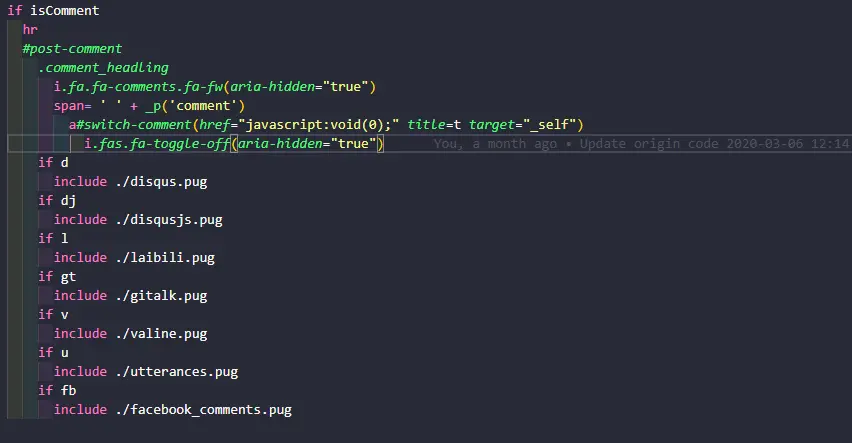
修改themes/Butterfly/layout/includes/comments/index.pug文件,将所有的else if改为if, 并在span= ' ' + _p('comment')下面添加:
a#switch-comment(href="javascript:void(0);" title="切换为Gitalk" target="_self") i.fa.fas.fa-toggle-off(aria-hidden="true")
隐藏一个评论,保留一个默认评论
- 隐藏
valine: 修改themes/Butterfly/layout/includes/comments/valine.pug文件,在#vcomment.vcomment后面添加(style=‘display:none;’) - 隐藏
gitalk: 修改themes/Butterfly/layout/includes/comments/gitalk.pug文件,在#gitalk-container后面添加(style=‘display:none;’) - 隐藏其他评论系统方法与上面类似
在themes/Butterfly/source/js/third-party/目录新建switch_comments.js文件,内容如下:
$('#switch-comment').click(function () { switchComment() return false})function switchComment () { const title = $('#switch-comment').attr('title') === '切换为Gitalk' ? '切换为Valine' : '切换为Gitalk' const i = $('#switch-comment>i') if ($('#gitalk-container').css('display') === 'none') { $('#vcomment').slideUp('normal', () => { $('#gitalk-container').slideDown('normal', () => { $('#switch-comment').attr('title', title) i.hasClass('fa-toggle-off') ? i.removeClass('fa-toggle-off').addClass('fa-toggle-on') : i.removeClass('fa-toggle-on').addClass('fa-toggle-off') }) }) } else { $('#gitalk-container').slideUp('normal', () => { $('#vcomment').slideDown('normal', () => { $('#switch-comment').attr('title', title) i.hasClass('fa-toggle-off') ? i.removeClass('fa-toggle-off').addClass('fa-toggle-on') : i.removeClass('fa-toggle-on').addClass('fa-toggle-off') }) }) }}
编辑butterfly.yml文件, 以下两个你butterfly.yml文件里有哪个就用那个,不要都用!
- /js/third-party/switch_comments.js
- <script src="/js/third-party/switch_comments.js"></script>
如果你使用的其他评论系统注意替换上面的切换为Gitalk, 切换为Valine, #gitalk-container, #vcomment
切换图标使用的fontawesome, 兼容V4和V5, 如果你是用的其他图标库,请替换fa-toggle-on和fa-toggle-off
随机文章跳转
在博客根目录/scripts(没有请自行创建)下新建random.js文件,内容如下:
hexo.extend.generator.register('random', function (locals) { const config = hexo.config.random || {} const posts = [] for (const post of locals.posts.data) { if (post.random !== false) posts.push(post.path) } return { path: config.path || 'random/index.html', data: `<html><head><script>var posts=${JSON.stringify(posts)};window.open('/'+posts[Math.floor(Math.random() * posts.length)],"_self")</script></head></html>` }})
打开/random/就会随机跳转一篇文章
可选配置
文章统计图表
从matery 主题上看到了文章发布统计图、标签统计图和文章分类统计图,觉得挺好看,就扒下来做了个插件。
因为使用 Tag 会导致文章获取不全,所以本插件直接使用 html 标签渲染,而不是使用 Tag。由于使用了 cheerio 模块,如果你使用了 html 压缩插件,可能会出现压缩报错,暂时无解。
安装
npm install hexo-charts -S
使用
注意!下面的标签可以放到post和不含type的page的md文件中,含有type的page请自行修改相应的模板文件,这个就不要来问我了,因为每个人用的主题可能都不一样,建议去问主题的作者。
文章发布统计图
<div id="posts-chart"></div>
标签统计图
<!-- "data-length"为显示标签个数(从多到少),默认为10 --><div id="tags-chart" data-length="10"></div>
文章分类统计图
<div id="categories-chart"></div>
示例
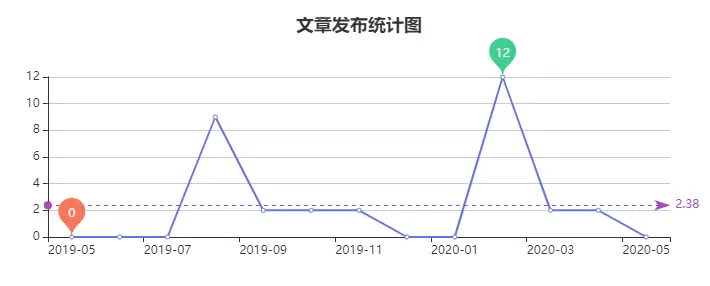
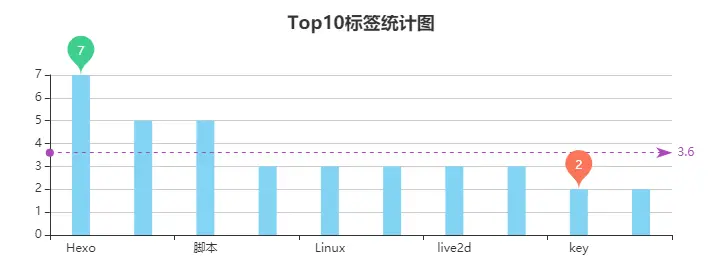
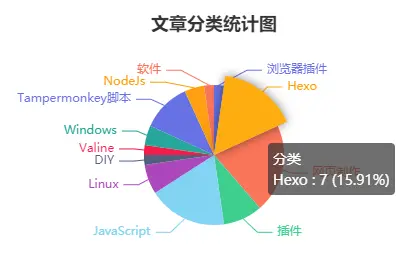
Butterfly 主题将图表添加到归档、分类、标签页面
将文章发布统计图添加到归档页面
在主题目录/Butterfly/layout/archive.pug文件的#archive下面添加一行#posts-chart, 新添加的比上一行多缩进两个空格。
block content include ./includes/mixins/article-sort.pug #archive #posts-chart
将标签统计图和分类统计图分别添加到标签和分类页面
- 编辑
主题目录/Butterfly/layout/page.pug文件,在.tag-cloud下面添加一行#tags-chart,在.category-content下面添加一行#categories-chart,新添加的比上一行多缩进两个空格。
block content if page.type === 'tags' .tag-cloud #tags-chart
else if page.type === 'categories' .category-content #categories-chart
文章二维码(仅 Butterfly 主题)
- 安装hexo-helper-qrcode插件:
npm install hexo-helper-qrcode -S
- 编辑
主题目录/Butterfly/layout/includes/header/post-info.pug, 在文件最后添加以下内容:
span.post-qrcode span.post-meta__separator | i.fa.fa-qrcode.post-meta__icon.fa-fw(aria-hidden="true") a(href="javasvript:;" onmouseover='document.getElementById("post-qrcode").style.display="block"' onmouseout='document.getElementById("post-qrcode").style.display="none"')='二维码' div#post-qrcode.post-qrcode-img img#post-img(src=qrcode(page.permalink))
注意span.post-qrcode要与上面的span.post-meta-commentcount对齐!
valine 评论添加博主等标签(仅 Butterfly 主题)
以下内容仅适用于 Butterfly 主题 <= V2.3.5,其他主题可以根据本教程和这篇文章自行修改!
Butterfly 主题 >= V4.0 请往下翻!
下载valine.pug文件,替换themes/Butterfly/layout/includes/comments/valine.pug
编辑butterfly.yml文件,找到valine配置,添加以下配置项:
master: # md5加密后的博主邮箱 - f8c7c3961aea2c203160e90cd3b3a26a friends: # md5加密后的小伙伴邮箱 - 5c2105bbfe6rfc02a6f6ae26dad3819c - a0adabb31677df92a2405fb18a02ee4d metaPlaceholder: # 输入框的背景文字 nick: 昵称/QQ号(必填) mail: 邮箱(必填) link: 网址(https://) tagMeta: '博主,小伙伴,访客' # 标签要显示的文字,默认'博主,小伙伴,访客' verify: false # 评论时是否需要验证,需jQuery支持
编辑butterfly.yml文件,将CDN中的valine链接改为https://cdn.jsdelivr.net/gh/HCLonely/Valine@latest/dist/Valine.min.js
改完之后hexo clean一下,不然不会生效
以下内容仅适用于 Butterfly 主题 >= V4.0!
- 编辑
butterfly.yml文件,找到valine配置,在option下添加以下配置项(注意缩进!):
option: master: # md5加密后的博主邮箱 - f8c7c3961aea2c203160e90cd3b3a26a friends: # md5加密后的小伙伴邮箱 - 5c2105bbfe6rfc02a6f6ae26dad3819c - a0adabb31677df92a2405fb18a02ee4d metaPlaceholder: # 输入框的背景文字 nick: 昵称/QQ号(必填) mail: 邮箱(必填) link: 网址(https://) tagMeta: # 标签要显示的文字,请注意顺序! - 博主 - 小伙伴 - 访客
编辑butterfly.yml文件,将CDN中的valine链接改为https://cdn.jsdelivr.net/gh/HCLonely/Valine@latest/dist/Valine.min.js
改完之后hexo clean一下,不然不会生效


