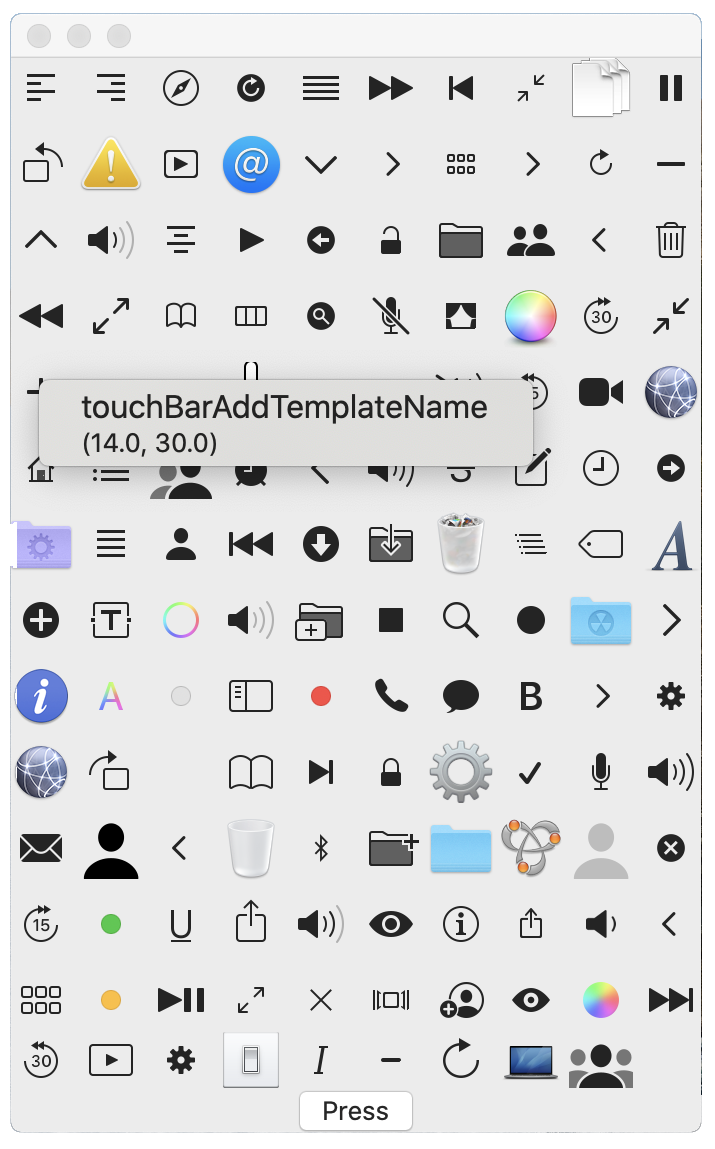
extensionImageNameDemoView{ funcgetNSImageName(_ s: String) -> String { var r = "NS\(s.prefix(1).capitalized)\(s.suffix(s.count - 1).prefix(s.count - 5))" if r == NSImage.applicationIconName { r = "" } return r } }
var columnNumber = 10 @Statevar images: [String] = []
var body: some View { VStack { ForEach(0 ..< images.count / columnNumber + 1, id: \.self) { y in HStack(spacing: 5) { ForEach(0 ..< self.columnNumber, id: \.self) { x in VStack(spacing: 5) { if x + y * self.columnNumber < self.images.count { // replace Text with Image Text("\(self.images[x + y * self.columnNumber])") } }.frame(width: 30, height: 30) } } } Button("Press") { self.getImages() { l in self.images = l } } } } }
下面把中间的文字换成有右键菜单的图片:
1 2 3 4 5 6
Image(nsImage: NSImage(named: self.getNSImageName(self.images[x + y * self.columnNumber])) ?? NSImage()) .contextMenu { Text("\(self.images[x + y * self.columnNumber])") .font(.system(size: 16)) Text("\(NSImage(named: self.getNSImageName(self.images[x + y * self.columnNumber]))?.size.debugDescription ?? "")") }
Initially, any containerized process that requests ownership metadata of an object is told that its uid and gid own the object. When any containerized process changes the ownership of a shared file system object, such as by using the chown command, the new ownership information is persisted in the com.docker.owner extended attribute of the object. Subsequent requests for ownership metadata return the previously set values. Ownership-based permissions are only enforced at the macOS file system level with all accessing processes behaving as the user running Docker. If the user does not have permission to read extended attributes on an object (such as when that object’s permissions are 0000), osxfs attempts to add an access control list (ACL) entry that allows the user to read and write extended attributes. If this attempt fails, the object appears to be owned by the process accessing it until the extended attribute is readable again.
所以内容被存储到了这里:
1 2 3 4 5 6 7 8
docker run -it --rm \ -v $PWD/data:/data \ bash:5.0 \ chown nobody /data/testfile ls -l@ data
DDEESSCCRRIIPPTTIIOONN ssccpppp simplifys file transformation between two machines by extending basic command scp. scpp is a one-line command that added to your bash profile. You need to specific username ,server address and options before using.
OOppttiioonnss ppuusshh Push files to remote machine.
.TH SCPP 1 "9 September 2019" .SH NAME scpp \- scp plus .SH SYNOPSIS \fBscpp\fP [ push | pull ] [ scp options ] source target .SH DESCRIPTION \fBscpp\fP simplifys file transformation between two machines by extending basic command scp. scpp is a one-line command that added to your bash profile. You need to specific username ,server address and options before using. .SS Options .TP \fBpush\fP Push files to remote machine. .TP \fBpull\fP Pull files from remote machine. .TP \fBsource\fP Specify the source file. .TP \fBtarget\fP Specify the target file. .SH "SEE ALSO" scp .SH BUGS Please report to minjie_gu@126.com.
# DESCRIPTION scpp simplifys file transformation between two machines by extending basic command scp. scpp is a one-line command that added to your bash profile. You need to specific username ,server address and options before using.
## Options
**push** Push files to remote machine.
**pull** Pull files from remote machine.
**source** Specify the source file.
**target** Specify the target file.
# SEE ALSO **scp**
# BUGS Please report to minjie_gu@126.com.
将这个文件存储为scpp.md,之后输入这个命令就可以看到显示效果:
1
pandoc --standalone -f markdown -t man -o scpp_md.roff scpp.md | groff -Tascii -man scpp_md.roff | more
<figureclass="highlight javascript"> <table><tbody><tr> <tdclass="gutter"> <pre> <spanclass="line">0</span><br> <spanclass="line">1</span><br> <spanclass="line">2</span><br> </pre> </td> <tdclass="code"> <pre> <spanclass="line">"a "<spanclass="keyword">very</span>" very long line"</span><br> <spanclass="line">a very very long line</span><br> <spanclass="line">a very very long line</span><br> </pre> </td> </tr></tbody></table> </figure>
不过不得不吐槽一下,查询过程当中裁判文书网大部分时间都处于“系统繁忙,请您稍后再试”的状态,搜索实在难以完成。当我看到有一个注册界面的时候,我朴素的以为由于我不是注册用户,搜索享受着爬虫待遇。结果不仅注册无法完成,“用户名查重失败:Index was outside the bounds of the array.”;而且找朋友借了一个账号后搜索速度完全没有好转。